Free Text Annotation in JavaScript (ES5) PDF Viewer
15 Aug 202617 minutes to read
Free Text is a text box annotation used to place formatted text anywhere on the page for notes, labels, or callouts.
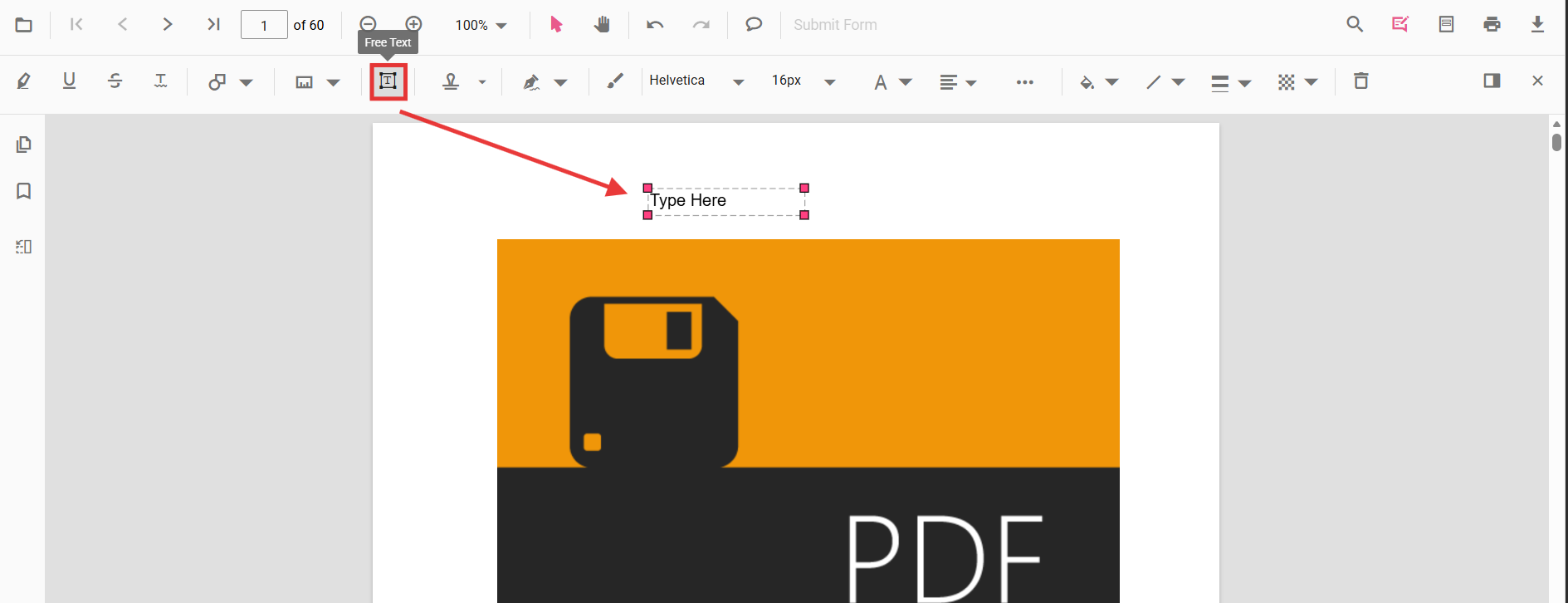
Add Free Text annotation
Add Free Text annotation via UI
Use the annotation toolbar to add a Free Text annotation:
- Click the Edit Annotation button in the PDF Viewer toolbar.
- Click the Free Text Annotation button to enable Free Text mode.
- Click on the page to add text.
When in pan mode, selecting Free Text switches the viewer to text select mode.
Switch to Free Text mode
The PDF Viewer component allows drawing free text annotations programmatically after enabling Free Text mode via button clicks.
<button id="addFreeTextAnnotation">FreeText</button>ej.pdfviewer.PdfViewer.Inject(
ej.pdfviewer.Toolbar,
ej.pdfviewer.Magnification,
ej.pdfviewer.Navigation,
ej.pdfviewer.Annotation,
ej.pdfviewer.LinkAnnotation,
ej.pdfviewer.ThumbnailView,
ej.pdfviewer.BookmarkView,
ej.pdfviewer.TextSelection,
ej.pdfviewer.TextSearch,
ej.pdfviewer.FormFields,
ej.pdfviewer.FormDesigner,
ej.pdfviewer.PageOrganizer
);
var pdfviewer = new ej.pdfviewer.PdfViewer();
pdfviewer.documentPath = 'https://cdn.syncfusion.com/content/pdf/pdf-succinctly.pdf';
pdfviewer.resourceUrl = 'https://cdn.syncfusion.com/ej2/31.1.23/dist/ej2-pdfviewer-lib';
pdfviewer.appendTo('#PdfViewer');
document.getElementById('addFreeTextAnnotation').addEventListener('click', function () {
pdfviewer.annotationModule.setAnnotationMode('FreeText');
});ej.pdfviewer.PdfViewer.Inject(
ej.pdfviewer.Toolbar,
ej.pdfviewer.Magnification,
ej.pdfviewer.Navigation,
ej.pdfviewer.Annotation,
ej.pdfviewer.LinkAnnotation,
ej.pdfviewer.ThumbnailView,
ej.pdfviewer.BookmarkView,
ej.pdfviewer.TextSelection,
ej.pdfviewer.TextSearch,
ej.pdfviewer.FormFields,
ej.pdfviewer.FormDesigner,
ej.pdfviewer.PageOrganizer
);
var pdfviewer = new ej.pdfviewer.PdfViewer();
pdfviewer.serviceUrl = 'https://document.syncfusion.com/web-services/pdf-viewer/api/pdfviewer/';
pdfviewer.documentPath = 'https://cdn.syncfusion.com/content/pdf/pdf-succinctly.pdf';
pdfviewer.appendTo('#PdfViewer');
document.getElementById('addFreeTextAnnotation').addEventListener('click', function () {
pdfviewer.annotationModule.setAnnotationMode('FreeText');
});Add Free Text annotation programmatically
Use addAnnotation() to programmatically create Free Text.
<button id="addFreeTextProgram">Add FreeText Programmatically</button>ej.pdfviewer.PdfViewer.Inject(
ej.pdfviewer.Toolbar,
ej.pdfviewer.Magnification,
ej.pdfviewer.Navigation,
ej.pdfviewer.Annotation,
ej.pdfviewer.LinkAnnotation,
ej.pdfviewer.ThumbnailView,
ej.pdfviewer.BookmarkView,
ej.pdfviewer.TextSelection,
ej.pdfviewer.TextSearch,
ej.pdfviewer.FormFields,
ej.pdfviewer.FormDesigner,
ej.pdfviewer.PageOrganizer
);
var pdfviewer = new ej.pdfviewer.PdfViewer();
pdfviewer.documentPath = 'https://cdn.syncfusion.com/content/pdf/pdf-succinctly.pdf';
pdfviewer.resourceUrl = 'https://cdn.syncfusion.com/ej2/31.1.23/dist/ej2-pdfviewer-lib';
pdfviewer.appendTo('#PdfViewer');
document.getElementById('addFreeTextProgram').addEventListener('click', function () {
pdfviewer.annotation.addAnnotation('FreeText', {
offset: { x: 120, y: 80 },
fontSize: 16,
fontFamily: 'Helvetica',
pageNumber: 1,
width: 200,
height: 40,
isLock: false,
defaultText: 'Syncfusion'
});
});ej.pdfviewer.PdfViewer.Inject(
ej.pdfviewer.Toolbar,
ej.pdfviewer.Magnification,
ej.pdfviewer.Navigation,
ej.pdfviewer.Annotation,
ej.pdfviewer.LinkAnnotation,
ej.pdfviewer.ThumbnailView,
ej.pdfviewer.BookmarkView,
ej.pdfviewer.TextSelection,
ej.pdfviewer.TextSearch,
ej.pdfviewer.FormFields,
ej.pdfviewer.FormDesigner,
ej.pdfviewer.PageOrganizer
);
var pdfviewer = new ej.pdfviewer.PdfViewer();
pdfviewer.serviceUrl = 'https://document.syncfusion.com/web-services/pdf-viewer/api/pdfviewer/';
pdfviewer.documentPath = 'https://cdn.syncfusion.com/content/pdf/pdf-succinctly.pdf';
pdfviewer.appendTo('#PdfViewer');
document.getElementById('addFreeTextProgram').addEventListener('click', function () {
pdfviewer.annotation.addAnnotation('FreeText', {
offset: { x: 120, y: 80 },
fontSize: 16,
fontFamily: 'Helvetica',
pageNumber: 1,
width: 200,
height: 40,
isLock: false,
defaultText: 'Syncfusion'
});
});Edit Free Text annotation
Edit Free Text Annotation in UI
You can select, move, and resize FreeText annotations directly in the viewer:
- Select a Free Text annotation to display its bounding box and resize handles.
- Move: drag the annotation box to reposition it on the page.
- Resize: drag any corner or edge handle to adjust its size.
- Delete: press the Delete key or use the context menu to remove the annotation.
Use the toolbar to change the appearance of the selected Free Text annotation:
- Font Family, Font Size, Font Style (Bold, Italic, Underline)
- Font Color and Text Alignment
- Fill Color (background) and Stroke Color (border)
- Border Thickness and Opacity
See the sections below for screenshots and details.
Edit the properties of free text annotations
Font family, font size, styles, font color, text alignment, fill color, stroke color, border thickness, and opacity can be edited using the Font Family, Font Size, Font Color, Text Align, Font Style, Edit Color, Edit Stroke Color, Edit Thickness, and Edit Opacity tools in the annotation toolbar.
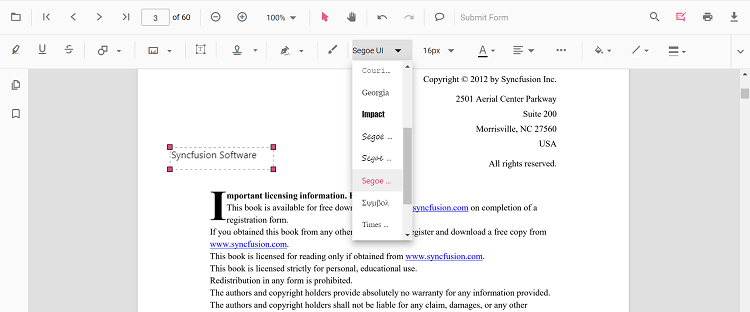
Edit font family
Edit the font family by selecting a font in the Font Family tool.
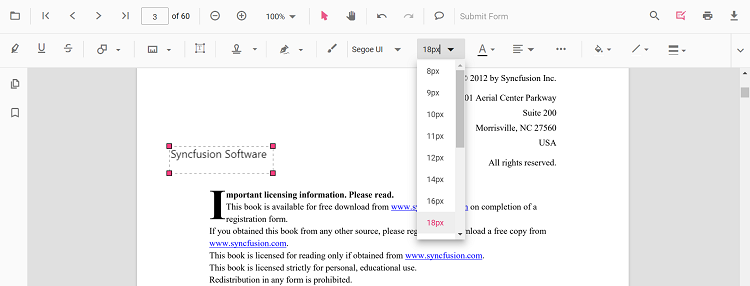
Edit font size
Edit the font size by selecting a size in the Font Size tool.
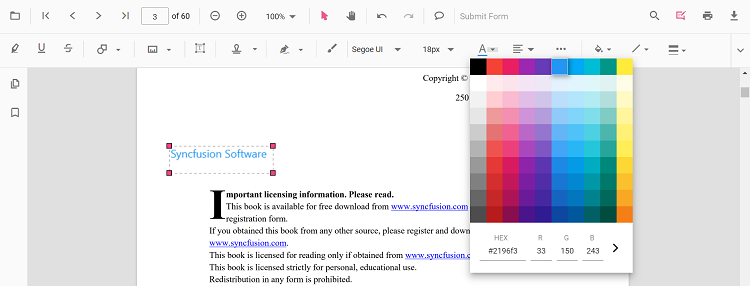
Edit font color
Edit the font color using the color palette in the Font Color tool.
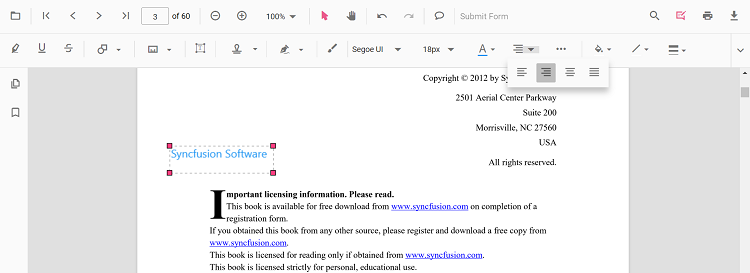
Edit text alignment
Align text by selecting an option from the Text Align tool.
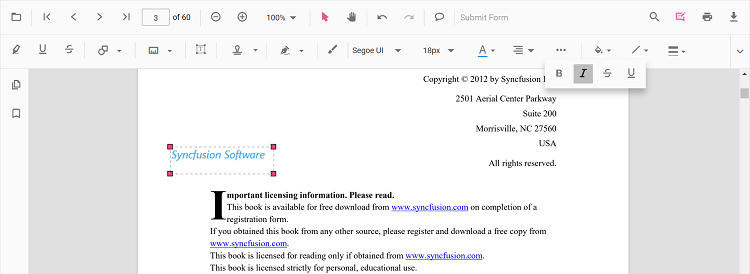
Edit text styles
Edit text styles by selecting options in the Font Style tool.
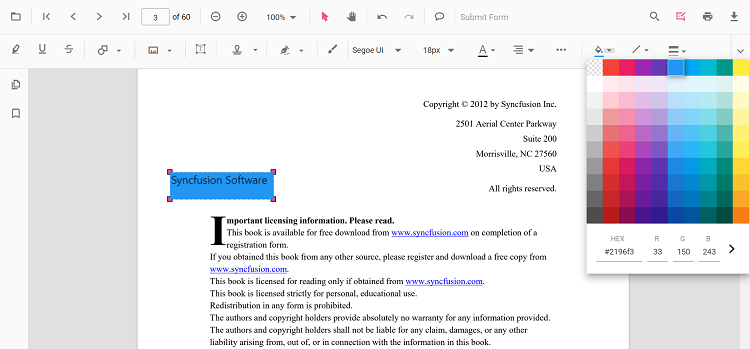
Edit fill color
Edit the fill color using the color palette in the Edit Color tool.
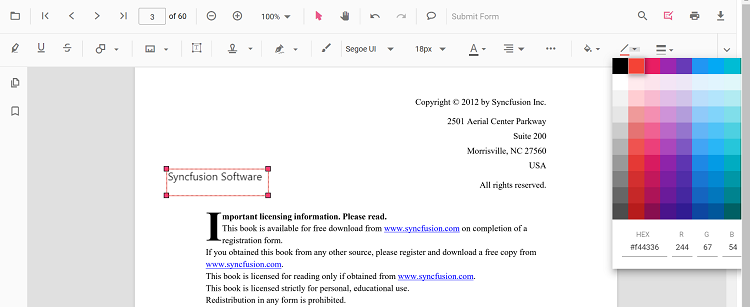
Edit stroke color
Edit the stroke color using the color palette in the Edit Stroke Color tool.
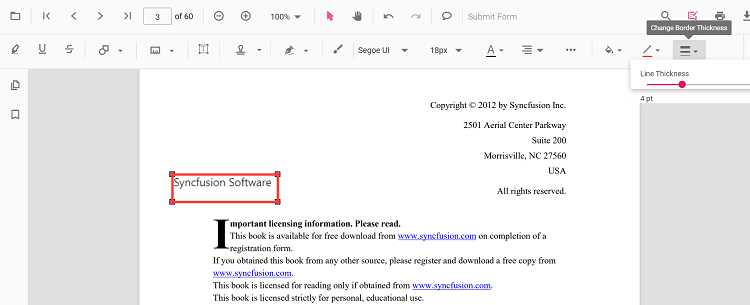
Edit thickness
Edit border thickness using the range slider in the Edit Thickness tool.
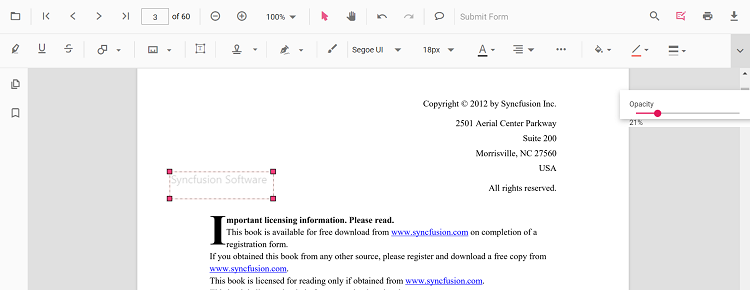
Edit opacity
Edit opacity using the range slider in the Edit Opacity tool.
Edit Free Text annotation programmatically
To modify an existing Free Text annotation programmatically, use the editAnnotation() method.
Here is an example of using editAnnotation():
<button id="changeContent">Change Content</button>ej.pdfviewer.PdfViewer.Inject(
ej.pdfviewer.Toolbar,
ej.pdfviewer.Magnification,
ej.pdfviewer.Navigation,
ej.pdfviewer.Annotation,
ej.pdfviewer.LinkAnnotation,
ej.pdfviewer.ThumbnailView,
ej.pdfviewer.BookmarkView,
ej.pdfviewer.TextSelection,
ej.pdfviewer.TextSearch,
ej.pdfviewer.FormFields,
ej.pdfviewer.FormDesigner,
ej.pdfviewer.PageOrganizer
);
var pdfviewer = new ej.pdfviewer.PdfViewer();
pdfviewer.documentPath = 'https://cdn.syncfusion.com/content/pdf/pdf-succinctly.pdf';
pdfviewer.resourceUrl = 'https://cdn.syncfusion.com/ej2/31.1.23/dist/ej2-pdfviewer-lib';
pdfviewer.appendTo('#PdfViewer');
document.getElementById('changeContent').addEventListener('click', function () {
for (var i = 0; i < pdfviewer.annotationCollection.length; i++) {
if (pdfviewer.annotationCollection[i].subject === 'Text Box') {
pdfviewer.annotationCollection[i].dynamicText = 'syncfusion';
pdfviewer.annotation.editAnnotation(pdfviewer.annotationCollection[i]);
}
}
});ej.pdfviewer.PdfViewer.Inject(
ej.pdfviewer.Toolbar,
ej.pdfviewer.Magnification,
ej.pdfviewer.Navigation,
ej.pdfviewer.Annotation,
ej.pdfviewer.LinkAnnotation,
ej.pdfviewer.ThumbnailView,
ej.pdfviewer.BookmarkView,
ej.pdfviewer.TextSelection,
ej.pdfviewer.TextSearch,
ej.pdfviewer.FormFields,
ej.pdfviewer.FormDesigner,
ej.pdfviewer.PageOrganizer
);
var pdfviewer = new ej.pdfviewer.PdfViewer();
pdfviewer.serviceUrl = 'https://document.syncfusion.com/web-services/pdf-viewer/api/pdfviewer/';
pdfviewer.documentPath = 'https://cdn.syncfusion.com/content/pdf/pdf-succinctly.pdf';
pdfviewer.appendTo('#PdfViewer');
document.getElementById('changeContent').addEventListener('click', function () {
for (var i = 0; i < pdfviewer.annotationCollection.length; i++) {
if (pdfviewer.annotationCollection[i].subject === 'Text Box') {
pdfviewer.annotationCollection[i].dynamicText = 'syncfusion';
pdfviewer.annotation.editAnnotation(pdfviewer.annotationCollection[i]);
}
}
});Default Free Text settings during initialization
Set default Free Text properties before creating the control using freeTextSettings.
ej.pdfviewer.PdfViewer.Inject(
    ej.pdfviewer.Toolbar,
    ej.pdfviewer.Magnification,
    ej.pdfviewer.Navigation,
    ej.pdfviewer.Annotation,
    ej.pdfviewer.LinkAnnotation,
    ej.pdfviewer.ThumbnailView,
    ej.pdfviewer.BookmarkView,
    ej.pdfviewer.TextSelection,
    ej.pdfviewer.TextSearch,
    ej.pdfviewer.FormFields,
    ej.pdfviewer.FormDesigner,
    ej.pdfviewer.PageOrganizer
);

var pdfviewer = new ej.pdfviewer.PdfViewer();
pdfviewer.documentPath = 'https://cdn.syncfusion.com/content/pdf/pdf-succinctly.pdf';
pdfviewer.resourceUrl = 'https://cdn.syncfusion.com/ej2/31.1.23/dist/ej2-pdfviewer-lib';
pdfviewer.freeTextSettings = { fillColor: 'green', borderColor: 'blue', fontColor: 'yellow' };
pdfviewer.appendTo('#PdfViewer');ej.pdfviewer.PdfViewer.Inject(
ej.pdfviewer.Toolbar,
ej.pdfviewer.Magnification,
ej.pdfviewer.Navigation,
ej.pdfviewer.Annotation,
ej.pdfviewer.LinkAnnotation,
ej.pdfviewer.ThumbnailView,
ej.pdfviewer.BookmarkView,
ej.pdfviewer.TextSelection,
ej.pdfviewer.TextSearch,
ej.pdfviewer.FormFields,
ej.pdfviewer.FormDesigner,
ej.pdfviewer.PageOrganizer
);
var pdfviewer = new ej.pdfviewer.PdfViewer();
pdfviewer.serviceUrl = 'https://document.syncfusion.com/web-services/pdf-viewer/api/pdfviewer/';
pdfviewer.documentPath = 'https://cdn.syncfusion.com/content/pdf/pdf-succinctly.pdf';
pdfviewer.freeTextSettings = { fillColor: 'green', borderColor: 'blue', fontColor: 'yellow' };
pdfviewer.appendTo('#PdfViewer');Set properties while adding Individual Annotation
Set properties for individual annotations while adding the annotation using addAnnotation().
After editing default color and opacity using the Edit Color and Edit Opacity tools, the values update to the selected settings.
Refer to the following code snippet to set the properties while adding a FreeText annotation.
<button id="FreeText">Add FreeText</button>ej.pdfviewer.PdfViewer.Inject(
ej.pdfviewer.Toolbar,
ej.pdfviewer.Magnification,
ej.pdfviewer.Navigation,
ej.pdfviewer.Annotation,
ej.pdfviewer.LinkAnnotation,
ej.pdfviewer.ThumbnailView,
ej.pdfviewer.BookmarkView,
ej.pdfviewer.TextSelection,
ej.pdfviewer.TextSearch,
ej.pdfviewer.FormFields,
ej.pdfviewer.FormDesigner,
ej.pdfviewer.PageOrganizer
);
var pdfviewer = new ej.pdfviewer.PdfViewer();
pdfviewer.documentPath = 'https://cdn.syncfusion.com/content/pdf/form-designer.pdf';
pdfviewer.resourceUrl = 'https://cdn.syncfusion.com/ej2/31.1.23/dist/ej2-pdfviewer-lib';
pdfviewer.appendTo('#PdfViewer');
//Apply FreeText Settings while adding individual Annotation
document.getElementById('FreeText')?.addEventListener('click', function () {
pdfviewer.annotation.addAnnotation('FreeText', {
offset: { x: 120, y: 80 },
fontSize: 16,
fontFamily: 'Helvetica',
pageNumber: 1,
width: 200,
height: 40,
isLock: false,
defaultText: 'Syncfusion',
fillColor: 'green',
borderColor: 'blue',
fontColor: 'yellow'
});
});ej.pdfviewer.PdfViewer.Inject(
ej.pdfviewer.Toolbar,
ej.pdfviewer.Magnification,
ej.pdfviewer.Navigation,
ej.pdfviewer.Annotation,
ej.pdfviewer.LinkAnnotation,
ej.pdfviewer.ThumbnailView,
ej.pdfviewer.BookmarkView,
ej.pdfviewer.TextSelection,
ej.pdfviewer.TextSearch,
ej.pdfviewer.FormFields,
ej.pdfviewer.FormDesigner,
ej.pdfviewer.PageOrganizer
);
var pdfviewer = new ej.pdfviewer.PdfViewer();
pdfviewer.documentPath = 'https://cdn.syncfusion.com/content/pdf/form-designer.pdf';
pdfviewer.serviceUrl = 'https://document.syncfusion.com/web-services/pdf-viewer/api/pdfviewer/';
pdfviewer.appendTo('#PdfViewer');
//Apply FreeText Settings while adding individual Annotation
document.getElementById('FreeText')?.addEventListener('click', function () {
pdfviewer.annotation.addAnnotation('FreeText', {
offset: { x: 120, y: 80 },
fontSize: 16,
fontFamily: 'Helvetica',
pageNumber: 1,
width: 200,
height: 40,
isLock: false,
defaultText: 'Syncfusion',
fillColor: 'green',
borderColor: 'blue',
fontColor: 'yellow'
});
});