Area Annotation in JavaScript (ES5) PDF Viewer
15 Aug 202621 minutes to read
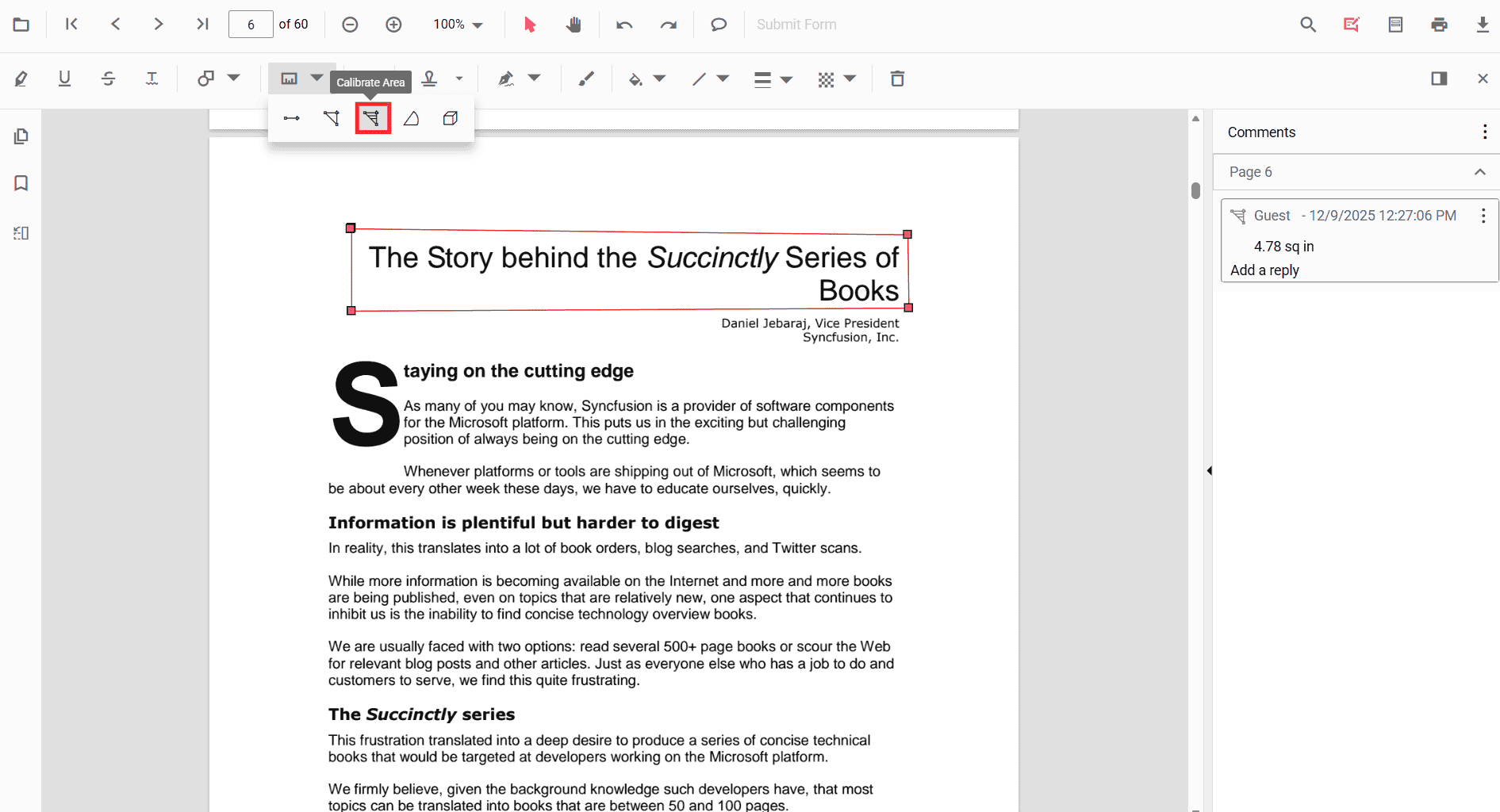
Area is a measurement annotation used to measure the surface of a closed region in the PDF.
Add Area Annotation
Add area annotation via UI
Use the annotation toolbar to add an area annotation:
- Click the Edit Annotation button in the PDF Viewer toolbar.
- Click the Measurement Annotation dropdown.
- Choose Area, then draw the region on the page.
When in pan mode, selecting a measurement annotation switches the viewer to text select mode.
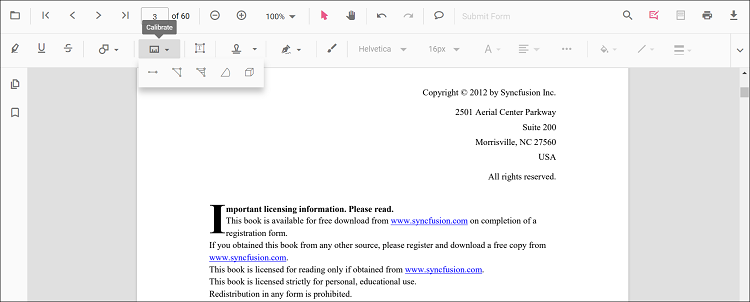
Enable area mode
The PDF Viewer library allows drawing measurement annotations programmatically after enabling area mode in button clicks.
<button id="areaMode">Area</button>ej.pdfviewer.PdfViewer.Inject(
ej.pdfviewer.Toolbar,
ej.pdfviewer.Magnification,
ej.pdfviewer.Navigation,
ej.pdfviewer.Annotation,
ej.pdfviewer.LinkAnnotation,
ej.pdfviewer.ThumbnailView,
ej.pdfviewer.BookmarkView,
ej.pdfviewer.TextSelection,
ej.pdfviewer.TextSearch,
ej.pdfviewer.FormFields,
ej.pdfviewer.FormDesigner,
ej.pdfviewer.PageOrganizer
);
var pdfviewer = new ej.pdfviewer.PdfViewer();
pdfviewer.documentPath = "https://cdn.syncfusion.com/content/pdf/pdf-succinctly.pdf";
pdfviewer.resourceUrl = "https://cdn.syncfusion.com/ej2/31.1.23/dist/ej2-pdfviewer-lib";
pdfviewer.appendTo('#PdfViewer');
document.getElementById('areaMode').addEventListener('click', function () {
pdfviewer.annotationModule.setAnnotationMode('Area');
});ej.pdfviewer.PdfViewer.Inject(
ej.pdfviewer.Toolbar,
ej.pdfviewer.Magnification,
ej.pdfviewer.Navigation,
ej.pdfviewer.Annotation,
ej.pdfviewer.LinkAnnotation,
ej.pdfviewer.ThumbnailView,
ej.pdfviewer.BookmarkView,
ej.pdfviewer.TextSelection,
ej.pdfviewer.TextSearch,
ej.pdfviewer.FormFields,
ej.pdfviewer.FormDesigner,
ej.pdfviewer.PageOrganizer
);
var pdfviewer = new ej.pdfviewer.PdfViewer();
pdfviewer.serviceUrl = 'https://document.syncfusion.com/web-services/pdf-viewer/api/pdfviewer/';
pdfviewer.documentPath = "https://cdn.syncfusion.com/content/pdf/pdf-succinctly.pdf";
pdfviewer.appendTo('#PdfViewer');
document.getElementById('areaMode').addEventListener('click', function () {
pdfviewer.annotationModule.setAnnotationMode('Area');
});Add an area annotation programmatically
The PDF Viewer library allows adding measurement annotations programmatically using the addAnnotation() method.
<button id="addAreaAnnotation">Add Area annotation Programmatically</button>ej.pdfviewer.PdfViewer.Inject(
ej.pdfviewer.Toolbar,
ej.pdfviewer.Magnification,
ej.pdfviewer.Navigation,
ej.pdfviewer.Annotation,
ej.pdfviewer.LinkAnnotation,
ej.pdfviewer.ThumbnailView,
ej.pdfviewer.BookmarkView,
ej.pdfviewer.TextSelection,
ej.pdfviewer.TextSearch,
ej.pdfviewer.FormFields,
ej.pdfviewer.FormDesigner,
ej.pdfviewer.PageOrganizer
);
var pdfviewer = new ej.pdfviewer.PdfViewer();
pdfviewer.documentPath = "https://cdn.syncfusion.com/content/pdf/pdf-succinctly.pdf";
pdfviewer.resourceUrl = "https://cdn.syncfusion.com/ej2/31.1.23/dist/ej2-pdfviewer-lib";
pdfviewer.appendTo('#PdfViewer');
document.getElementById('addAreaAnnotation').addEventListener('click', function () {
pdfviewer.annotation.addAnnotation('Area', {
offset: { x: 200, y: 500 },
pageNumber: 1,
vertexPoints: [
{ x: 200, y: 500 }, { x: 288, y: 499 }, { x: 289, y: 553 }, { x: 200, y: 500 }
]
});
});ej.pdfviewer.PdfViewer.Inject(
ej.pdfviewer.Toolbar,
ej.pdfviewer.Magnification,
ej.pdfviewer.Navigation,
ej.pdfviewer.Annotation,
ej.pdfviewer.LinkAnnotation,
ej.pdfviewer.ThumbnailView,
ej.pdfviewer.BookmarkView,
ej.pdfviewer.TextSelection,
ej.pdfviewer.TextSearch,
ej.pdfviewer.FormFields,
ej.pdfviewer.FormDesigner,
ej.pdfviewer.PageOrganizer
);
var pdfviewer = new ej.pdfviewer.PdfViewer();
pdfviewer.documentPath = "https://cdn.syncfusion.com/content/pdf/pdf-succinctly.pdf";
pdfviewer.serviceUrl = 'https://document.syncfusion.com/web-services/pdf-viewer/api/pdfviewer/';
pdfviewer.appendTo('#PdfViewer');
document.getElementById('addAreaAnnotation').addEventListener('click', function () {
pdfviewer.annotation.addAnnotation('Area', {
offset: { x: 200, y: 500 },
pageNumber: 1,
vertexPoints: [
{ x: 200, y: 500 }, { x: 288, y: 499 }, { x: 289, y: 553 }, { x: 200, y: 500 }
]
});
});Edit Area Annotation
Edit Area Annotation in UI
You can select, move, and resize Area annotations directly in the viewer:
- Select an Area to show its vertex handles.
- Move: drag inside the shape to reposition it on the page.
- Resize/reshape: drag any vertex handle to adjust the polygon points and size.
- Delete or access more options from the context menu.
Use the toolbar to change appearance:
- Edit Color, Edit Stroke Color, Edit Thickness, and Edit Opacity tools.
See the sections below for screenshots and details.
Edit the properties of area annotations
The fill color, stroke color, thickness, and opacity can be edited using the Edit Color, Edit Stroke Color, Edit Thickness, and Edit Opacity tools in the annotation toolbar.
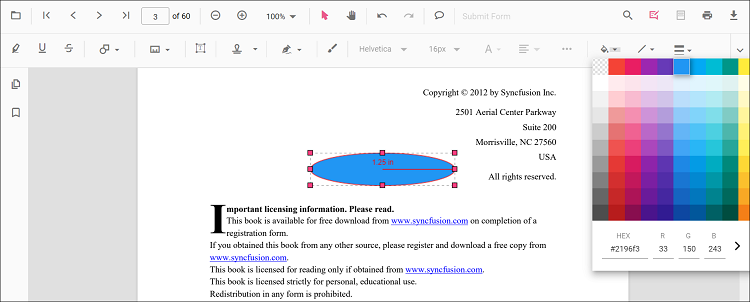
Edit fill color
The fill color of the annotation can be edited using the color palette provided in the Edit Color tool.
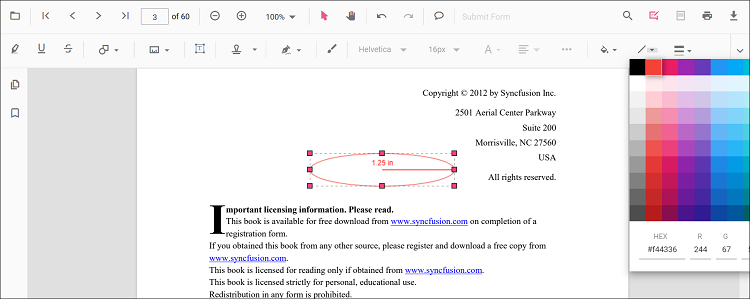
Edit stroke color
The stroke color of the annotation can be edited using the color palette provided in the Edit Stroke Color tool.
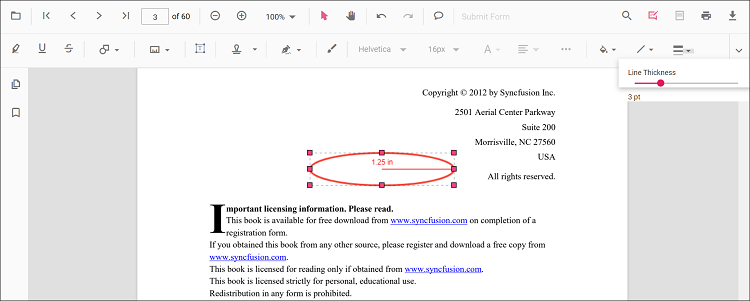
Edit thickness
Edit border thickness using the range slider provided in the Edit Thickness tool.
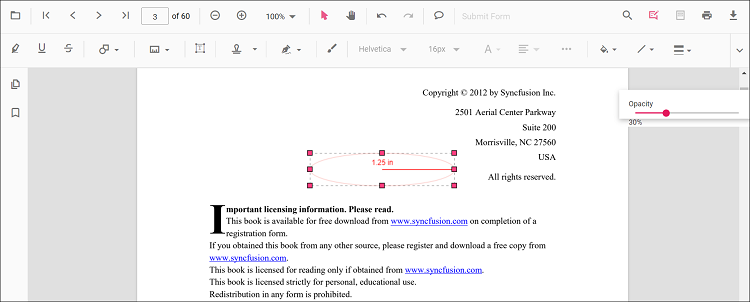
Edit opacity
The opacity of the annotation can be edited using the range slider provided in the Edit Opacity tool.
Edit an existing area annotation programmatically
To modify an existing area annotation programmatically, use the editAnnotation() method.
Here is an example of using editAnnotation():
<button id="editAreaAnnotation">Edit Area annotation Programmatically</button>ej.pdfviewer.PdfViewer.Inject(
ej.pdfviewer.Toolbar,
ej.pdfviewer.Magnification,
ej.pdfviewer.Navigation,
ej.pdfviewer.Annotation,
ej.pdfviewer.LinkAnnotation,
ej.pdfviewer.ThumbnailView,
ej.pdfviewer.BookmarkView,
ej.pdfviewer.TextSelection,
ej.pdfviewer.TextSearch,
ej.pdfviewer.FormFields,
ej.pdfviewer.FormDesigner,
ej.pdfviewer.PageOrganizer
);
var pdfviewer = new ej.pdfviewer.PdfViewer();
pdfviewer.documentPath = "https://cdn.syncfusion.com/content/pdf/pdf-succinctly.pdf";
pdfviewer.resourceUrl = "https://cdn.syncfusion.com/ej2/31.1.23/dist/ej2-pdfviewer-lib";
pdfviewer.appendTo('#PdfViewer');
var editAreaAnnotation = document.getElementById('editAreaAnnotation');
if (editAreaAnnotation) {
editAreaAnnotation.addEventListener('click', function () {
for (var i = 0; i < pdfviewer.annotationCollection.length; i++) {
if (pdfviewer.annotationCollection[i].subject === "Area calculation") {
pdfviewer.annotationCollection[i].annotationSelectorSettings.resizerShape = "Circle";
pdfviewer.annotationCollection[i].strokeColor = "#0000FF";
pdfviewer.annotationCollection[i].thickness = 2;
pdfviewer.annotationCollection[i].fillColor = "#FFFF00";
pdfviewer.annotation.editAnnotation(pdfviewer.annotationCollection[i]);
}
}
});
}ej.pdfviewer.PdfViewer.Inject(
ej.pdfviewer.Toolbar,
ej.pdfviewer.Magnification,
ej.pdfviewer.Navigation,
ej.pdfviewer.Annotation,
ej.pdfviewer.LinkAnnotation,
ej.pdfviewer.ThumbnailView,
ej.pdfviewer.BookmarkView,
ej.pdfviewer.TextSelection,
ej.pdfviewer.TextSearch,
ej.pdfviewer.FormFields,
ej.pdfviewer.FormDesigner,
ej.pdfviewer.PageOrganizer
);
var pdfviewer = new ej.pdfviewer.PdfViewer();
pdfviewer.serviceUrl = 'https://document.syncfusion.com/web-services/pdf-viewer/api/pdfviewer/';
pdfviewer.documentPath = "https://cdn.syncfusion.com/content/pdf/pdf-succinctly.pdf";
pdfviewer.appendTo('#PdfViewer');
var editAreaAnnotation = document.getElementById('editAreaAnnotation');
if (editAreaAnnotation) {
editAreaAnnotation.addEventListener('click', function () {
for (var i = 0; i < pdfviewer.annotationCollection.length; i++) {
if (pdfviewer.annotationCollection[i].subject === "Area calculation") {
pdfviewer.annotationCollection[i].annotationSelectorSettings.resizerShape = "Circle";
pdfviewer.annotationCollection[i].strokeColor = "#0000FF";
pdfviewer.annotationCollection[i].thickness = 2;
pdfviewer.annotationCollection[i].fillColor = "#FFFF00";
pdfviewer.annotation.editAnnotation(pdfviewer.annotationCollection[i]);
}
}
});
}Default area settings during initialization
Set default areaSettings before creating the control.
ej.pdfviewer.PdfViewer.Inject(
    ej.pdfviewer.Toolbar,
    ej.pdfviewer.Magnification,
    ej.pdfviewer.Navigation,
    ej.pdfviewer.Annotation,
    ej.pdfviewer.LinkAnnotation,
    ej.pdfviewer.ThumbnailView,
    ej.pdfviewer.BookmarkView,
    ej.pdfviewer.TextSelection,
    ej.pdfviewer.TextSearch,
    ej.pdfviewer.FormFields,
    ej.pdfviewer.FormDesigner,
    ej.pdfviewer.PageOrganizer
);

var pdfviewer = new ej.pdfviewer.PdfViewer();
pdfviewer.documentPath = "https://cdn.syncfusion.com/content/pdf/pdf-succinctly.pdf";
pdfviewer.resourceUrl = "https://cdn.syncfusion.com/ej2/31.1.23/dist/ej2-pdfviewer-lib";

pdfviewer.areaSettings = { fillColor: 'yellow', opacity: 0.6, strokeColor: 'orange' };
pdfviewer.appendTo('#PdfViewer');ej.pdfviewer.PdfViewer.Inject(
ej.pdfviewer.Toolbar,
ej.pdfviewer.Magnification,
ej.pdfviewer.Navigation,
ej.pdfviewer.Annotation,
ej.pdfviewer.LinkAnnotation,
ej.pdfviewer.ThumbnailView,
ej.pdfviewer.BookmarkView,
ej.pdfviewer.TextSelection,
ej.pdfviewer.TextSearch,
ej.pdfviewer.FormFields,
ej.pdfviewer.FormDesigner,
ej.pdfviewer.PageOrganizer
);
var pdfviewer = new ej.pdfviewer.PdfViewer();
pdfviewer.serviceUrl = 'https://document.syncfusion.com/web-services/pdf-viewer/api/pdfviewer/';
pdfviewer.documentPath = "https://cdn.syncfusion.com/content/pdf/pdf-succinctly.pdf";
pdfviewer.areaSettings = { fillColor: 'yellow', opacity: 0.6, strokeColor: 'orange' };
pdfviewer.appendTo('#PdfViewer');Set properties while adding Individual Annotation
Set properties for individual annotations while adding the annotation using addAnnotation().
After editing default color and opacity using the Edit Color and Edit Opacity tools, the values update to the selected settings.
Refer to the following code snippet to set the properties while adding an Area annotation.
<button id="Area">Add Area</button>ej.pdfviewer.PdfViewer.Inject(
ej.pdfviewer.Toolbar,
ej.pdfviewer.Magnification,
ej.pdfviewer.Navigation,
ej.pdfviewer.Annotation,
ej.pdfviewer.LinkAnnotation,
ej.pdfviewer.ThumbnailView,
ej.pdfviewer.BookmarkView,
ej.pdfviewer.TextSelection,
ej.pdfviewer.TextSearch,
ej.pdfviewer.FormFields,
ej.pdfviewer.FormDesigner,
ej.pdfviewer.PageOrganizer
);
var pdfviewer = new ej.pdfviewer.PdfViewer();
pdfviewer.documentPath = 'https://cdn.syncfusion.com/content/pdf/form-designer.pdf';
pdfviewer.resourceUrl = 'https://cdn.syncfusion.com/ej2/31.1.23/dist/ej2-pdfviewer-lib';
pdfviewer.appendTo('#PdfViewer');
// Apply Area settings while adding individual annotation
document.getElementById('Area')?.addEventListener('click', function () {
pdfviewer.annotation.addAnnotation('Area', {
offset: { x: 200, y: 500 },
pageNumber: 1,
vertexPoints: [
{ x: 200, y: 500 }, { x: 288, y: 499 }, { x: 289, y: 553 }, { x: 200, y: 500 }
],
fillColor: 'yellow',
opacity: 0.6,
strokeColor: 'orange'
});
});ej.pdfviewer.PdfViewer.Inject(
ej.pdfviewer.Toolbar,
ej.pdfviewer.Magnification,
ej.pdfviewer.Navigation,
ej.pdfviewer.Annotation,
ej.pdfviewer.LinkAnnotation,
ej.pdfviewer.ThumbnailView,
ej.pdfviewer.BookmarkView,
ej.pdfviewer.TextSelection,
ej.pdfviewer.TextSearch,
ej.pdfviewer.FormFields,
ej.pdfviewer.FormDesigner,
ej.pdfviewer.PageOrganizer
);
var pdfviewer = new ej.pdfviewer.PdfViewer();
pdfviewer.serviceUrl = 'https://document.syncfusion.com/web-services/pdf-viewer/api/pdfviewer/';
pdfviewer.documentPath = 'https://cdn.syncfusion.com/content/pdf/form-designer.pdf';
pdfviewer.appendTo('#PdfViewer');
// Apply Area settings while adding individual annotation
document.getElementById('Area')?.addEventListener('click', function () {
pdfviewer.annotation.addAnnotation('Area', {
offset: { x: 200, y: 500 },
pageNumber: 1,
vertexPoints: [
{ x: 200, y: 500 }, { x: 288, y: 499 }, { x: 289, y: 553 }, { x: 200, y: 500 }
],
fillColor: 'yellow',
opacity: 0.6,
strokeColor: 'orange'
});
});Editing scale ratio and unit of the area measurement annotation
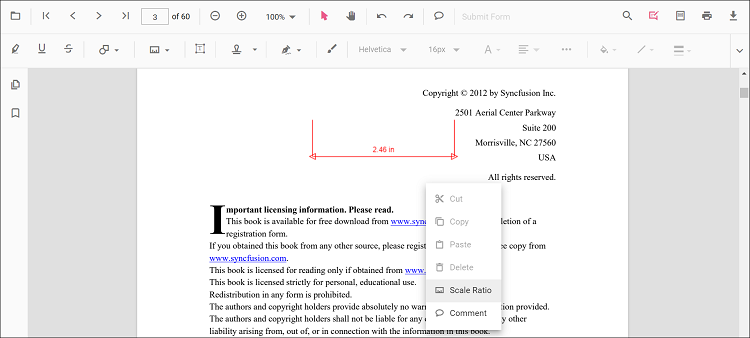
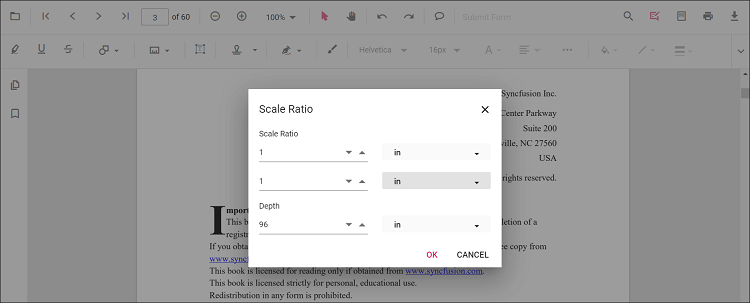
The scale ratio and unit of measurement can be modified using the scale ratio option provided in the context menu of the PDF Viewer control.
Supported units for measurement annotations are
- Inch
- Millimeter
- Centimeter
- Point
- Pica
- Feet
Setting default scale ratio settings during control initialization
The properties of scale ratio for measurement annotation can be set before creating the control using measurementSettings as shown in the following code snippet,
ej.pdfviewer.PdfViewer.Inject(
    ej.pdfviewer.Toolbar,
    ej.pdfviewer.Magnification,
    ej.pdfviewer.Navigation,
    ej.pdfviewer.Annotation,
    ej.pdfviewer.LinkAnnotation,
    ej.pdfviewer.ThumbnailView,
    ej.pdfviewer.BookmarkView,
    ej.pdfviewer.TextSelection,
    ej.pdfviewer.TextSearch,
    ej.pdfviewer.FormFields,
    ej.pdfviewer.FormDesigner,
    ej.pdfviewer.PageOrganizer
);

var pdfviewer = new ej.pdfviewer.PdfViewer();
pdfviewer.documentPath = "https://cdn.syncfusion.com/content/pdf/pdf-succinctly.pdf";
pdfviewer.resourceUrl = "https://cdn.syncfusion.com/ej2/31.1.23/dist/ej2-pdfviewer-lib";
pdfviewer.measurementSettings = { scaleRatio: 2, conversionUnit: 'cm', displayUnit: 'cm' };
pdfviewer.appendTo('#PdfViewer');ej.pdfviewer.PdfViewer.Inject(
ej.pdfviewer.Toolbar,
ej.pdfviewer.Magnification,
ej.pdfviewer.Navigation,
ej.pdfviewer.Annotation,
ej.pdfviewer.LinkAnnotation,
ej.pdfviewer.ThumbnailView,
ej.pdfviewer.BookmarkView,
ej.pdfviewer.TextSelection,
ej.pdfviewer.TextSearch,
ej.pdfviewer.FormFields,
ej.pdfviewer.FormDesigner,
ej.pdfviewer.PageOrganizer
);
var pdfviewer = new ej.pdfviewer.PdfViewer();
pdfviewer.serviceUrl = 'https://document.syncfusion.com/web-services/pdf-viewer/api/pdfviewer/';
pdfviewer.documentPath = "https://cdn.syncfusion.com/content/pdf/pdf-succinctly.pdf";
pdfviewer.measurementSettings = { scaleRatio: 2, conversionUnit: 'cm', displayUnit: 'cm' };
pdfviewer.appendTo('#PdfViewer');