Getting Started with Blazor .NET MAUI PDF Viewer
14 Aug 20264 minutes to read
This section explains how to create and run a .NET MAUI Blazor Hybrid application using the Blazor PDF Viewer component.
Prerequisites
- Visual Studio 2022 (17.8 or later) with the Mobile development with .NET workload installed.
- .NET 8.0 SDK or later.
- Windows 10/11 (version 1809 or later) to build and run the Windows target.
- To use the .NET MAUI project templates, install the Mobile development with .NET workload for Visual Studio. For installation details, see the Microsoft documentation: Install .NET MAUI.
Create a new Blazor .NET MAUI app in Visual Studio
- Open Visual Studio and choose File → New → Project.
- Search for Blazor MAUI App, select it, and click Next.
- Name the project PDFViewerGettingStarted and click Create using the Microsoft templates.
The PDF Viewer supports .NET 8.0 and later.
Install Blazor SfPdfViewer NuGet Packages
To add the Blazor SfPdfViewer (Next-Gen) component in the app, open the NuGet package manager in Visual Studio (Tools → NuGet Package Manager → Manage NuGet Packages for Solution), search and install:
Alternatively, you can use the following Package Manager command to install the same packages.
Install-Package Syncfusion.Blazor.SfPdfViewer -Version 35.1.37
Install-Package Syncfusion.Blazor.Themes -Version 35.1.37
Import namespaces
Open the ~/_Imports.razor file and import the Syncfusion.Blazor and Syncfusion.Blazor.SfPdfViewer namespaces.
@using Syncfusion.Blazor
@using Syncfusion.Blazor.SfPdfViewer
Add the Syncfusion.Blazor namespace to the MauiProgram.cs file.
using Syncfusion.Blazor;Register Syncfusion® Blazor Service
Register the Syncfusion® Blazor service in the ~/MauiProgram.cs file after the builder is created.
// Enable memory caching
builder.Services.AddMemoryCache();
// Register Syncfusion Blazor service
builder.Services.AddSyncfusionBlazor();
Add stylesheet and script resources
The theme stylesheet and script can be accessed from NuGet through Static Web Assets.
Add the stylesheet at the end of the <head> section in the ~/wwwroot/index.html file to apply proper layout and theme styling.
<!-- Blazor PDF Viewer control's theme stylesheet -->
<link href="_content/Syncfusion.Blazor.Themes/bootstrap5.css" rel="stylesheet" />
Add the required script at the end of the <body> section in the ~/wwwroot/index.html file to enable component functionality.
<!-- Blazor PDF Viewer control's script -->
<script src="_content/Syncfusion.Blazor.SfPdfViewer/scripts/syncfusion-blazor-sfpdfviewer.min.js" type="text/javascript"></script>
Check out the Blazor Themes topic to explore supported ways (such as static assets, CDN, and CRG) to apply themes in your Blazor application. Also, check out the Adding Script Reference topic to learn different approaches for adding script references in your Blazor application.
Add Blazor PDF Viewer component
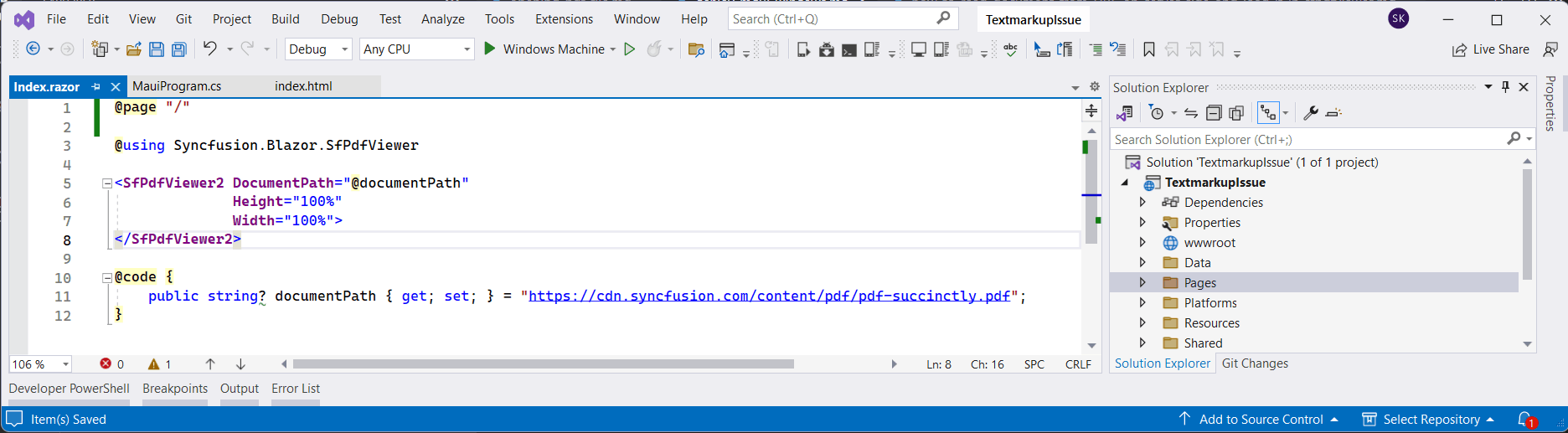
Add the Blazor PDF Viewer (Next-Gen) component to ~/Pages/Index.razor.
@using Syncfusion.Blazor.SfPdfViewer

<SfPdfViewer2 DocumentPath="https://cdn.syncfusion.com/content/pdf/pdf-succinctly.pdf"
              Height="100%"
              Width="100%">
</SfPdfViewer2>
- The sample
DocumentPathpoints to a remote URL. The device running the app must have internet access for the PDF to load. For offline scenarios, bundle the PDF in the project and load it withLoadAsyncfrom embedded resources, or use the Open toolbar option to pick a local file. For more information, see Render a PDF document from an embedded source in the .NET MAUI Android app.- If the DocumentPath property is not set, the PDF Viewer displays an empty viewer without a document. Use the Open toolbar option to browse and open a PDF.
Run on Windows
- In the Visual Studio toolbar, change the Solution Platforms dropdown to Windows Machine.
- Press F5 (with the debugger) or Ctrl+F5 (without the debugger) to build and run the app.
After the application launches, the PDF Viewer displays the specified PDF document.

Run on Android
- In Visual Studio, change the Solution Platforms dropdown to Android Emulators and select a running emulator. If no emulator is available, create one using the Android Device Manager.
- Press F5 to build and deploy the app to the emulator.
For setup and usage, see Android Emulator setup for .NET MAUI.

If any errors occur while using the Android Emulator, see Troubleshooting Android Emulator.
