How can I help you?
Layout Related Features in WPF Notify Icon
28 Jan 20255 minutes to read
This section illustrates the following Layout-related feature of NotifyIcon control.
Theme
NotifyIcon supports various built-in themes. Refer to the below links to apply themes for the NotifyIcon,

Customizing the Header of the NotifyIcon
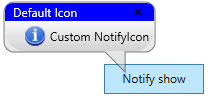
You can customize the background and foreground for the BalloonTipHeader by using the HeaderBackground and HeaderForeground properties.
<Button x:Name="button" Height="30" Width="100" Click="Button_Click" Content="Notify show">
</Button>

<syncfusion:NotifyIcon Name="notifyIcon" Header="NotifyIcon" BalloonTipTitle="Default NotifyIcon"
                       BalloonTipText="Custom NotifyIcon" BalloonTipIcon="Info"
                       ShowBalloonTipTime="1000" HideBalloonTipTime="1000"
                       HeaderBackground="Blue" HeaderForeground="White">
</syncfusion:NotifyIcon>
private void Button_Click(object sender, RoutedEventArgs e)
{
notifyIcon.HeaderBackground = Brushes.Blue;
notifyIcon.HeaderForeground = Brushes.White;
}
Events
The NotifyIcon includes several pre-defined events to perform any required action as follows:
- BalloonTipOpening
- BalloonTipOpened
- BalloonTipHiding
- BalloonTipHidden
- CloseButtonClick
- Click
BalloonTipOpening event
The BalloonTipOpening event occurs before opening the balloon tip and action can be handled in the respective event handler.
The CancelEventArgs object contains the following property.
- Cancel : Canceling the action of the balloon tip show.
<syncfusion:NotifyIcon Name="notifyIcon" Header="NotifyIcon" BalloonTipOpening="NotifyIcon_BalloonTipOpening">
</syncfusion:NotifyIcon>notifyIcon.BalloonTipOpening += NotifyIcon_BalloonTipOpening;
private void NotifyIcon_BalloonTipOpening(object sender, System.ComponentModel.CancelEventArgs e)
{
//Cancel the balloontip action.
e.Cancel = true;
}BalloonTipOpened event
The BalloonTipOpened event occurs after the balloon tip is opened and action can be handled in the respective event handler.
The DependencyPropertyChangedEventArgs object contains the following properties:
- NewValue : gets an new value.
- OldValue : gets an old value.
- Property : Identify the value.
<syncfusion:NotifyIcon Name="notifyIcon" Header="NotifyIcon" BalloonTipOpened="NotifyIcon_BalloonTipOpened">
</syncfusion:NotifyIcon>notifyIcon.BalloonTipOpened += NotifyIcon_BalloonTipOpened;
private void NotifyIcon_BalloonTipOpened(DependencyObject d, DependencyPropertyChangedEventArgs e)
{
if(e.Property.Name == "IsOpen")
{
//Change the balloontip text.
notifyIcon.BalloonTipText = "Welcome";
}
}BalloonTipHiding event
The BalloonTipHiding event occurs before hiding the balloon tip and action can be handled in the respective event handler.
The CancelEventArgs object contains the following property:
- Cancel : Canceling the hiding action of the balloon tip.
<syncfusion:NotifyIcon Name="notifyIcon" Header="NotifyIcon" BalloonTipHiding="NotifyIcon_BalloonTipHiding">
</syncfusion:NotifyIcon>notifyIcon.BalloonTipHiding += NotifyIcon_BalloonTipHiding;
private void NotifyIcon_BalloonTipHiding(object sender, System.ComponentModel.CancelEventArgs e)
{
//Cancel the hiding action.
e.Cancel = true;
}BalloonTipHidden event
The BalloonTipHidden event occurs after hiding the balloon tip and action can be handled in the respective event handler.
The DependencyPropertyChangedEventArgs object contains the following properties:
- NewValue : gets an new value.
- OldValue : gets an old value.
- Property : Identify the value.
<syncfusion:NotifyIcon Name="notifyIcon" Header="NotifyIcon" BalloonTipHidden="NotifyIcon_BalloonTipHidden">
</syncfusion:NotifyIcon>notifyIcon.BalloonTipHidden += NotifyIcon_BalloonTipHidden;
private void NotifyIcon_BalloonTipHidden(DependencyObject d, DependencyPropertyChangedEventArgs e)
{
}CloseButtonClick event
The CloseButtonClick event occurs while clicking the close button in the balloon tip.
<syncfusion:NotifyIcon Name="notifyIcon" Header="NotifyIcon" CloseButtonClick="NotifyIcon_CloseButtonClick">
</syncfusion:NotifyIcon>notifyIcon.CloseButtonClick += NotifyIcon_CloseButtonClick;
private void NotifyIcon_CloseButtonClick(object sender, EventArgs e)
{
}Click event
The Click event occurs while clicking the icon inside the balloon tip.
<syncfusion:NotifyIcon Name="notifyIcon" Header="NotifyIcon" Click="NotifyIcon_Click">
</syncfusion:NotifyIcon>notifyIcon.Click += NotifyIcon_Click;
private void NotifyIcon_Click(object sender, EventArgs e)
{
}