Appointment Drag and Drop in WPF Scheduler
The WPF Scheduler supports rescheduling an appointment by performing the drag and drop operation.
Disable drag and drop
The Scheduler supports disabling the appointment drag and drop by setting AppointmentEditFlag property except DragDrop. In this case, appointment drag & drop cannot be performed.
<Window
    . . .
    xmlns:syncfusion="http://schemas.syncfusion.com/wpf">
    <Grid>
        <syncfusion:SfScheduler x:Name="schedule"
                        AppointmentEditFlag="Add,Edit,Resize">
        </syncfusion:SfScheduler>
    </Grid>
</Window>
using Syncfusion.UI.Xaml.Scheduler;
this.Schedule.AppointmentEditFlag = AppointmentEditFlag.Add | AppointmentEditFlag.Edit | AppointmentEditFlag.Resize;Show/Hide the time indicator on appointment dragging
Show or hide the time indicator at a specific time when dragging the appointment by using the ShowTimeIndicator property of DragDropSettings is set to true.
using Syncfusion.UI.Xaml.Scheduler;

Schedule.ViewType = SchedulerViewType.Week;
Schedule.DragDropSettings.ShowTimeIndicator = true;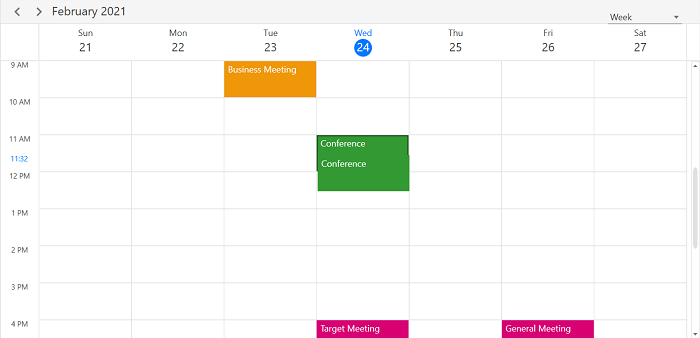
- Not applicable for Month and Timeline Month views.
- If the TimeRulerSize property value is zero to collapse the time ruler labels, then drag time indicator will not be shown.
Appointment dragging time indicator text formatting
Customize the format for the appointment dragging time indicator format by setting the TimeIndicatorFormat property of DragDropSettings in Scheduler.
using Syncfusion.UI.Xaml.Scheduler;

Schedule.ViewType = SchedulerViewType.Week;
Schedule.DragDropSettings.TimeIndicatorFormat = "HH mm tt";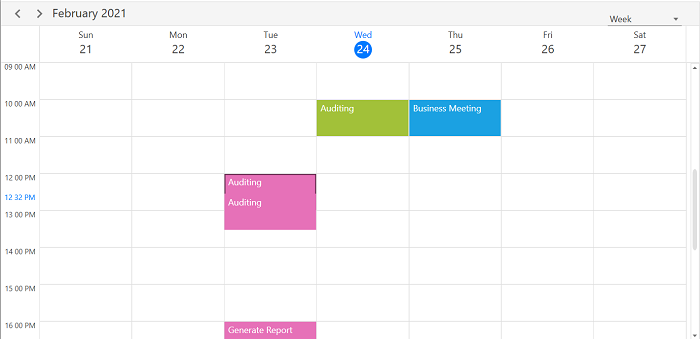
- When dragging the appointment, the time indicator overlaps with the time ruler label position in the day, week and workweek views.
AppointmentDragOver event
Scheduler notifies by AppointmentDragOver while dragging the appointment. AppointmentDragOverEventArgs has following members which provides information for AppointmentDragOver event.
Appointment - Gets the Appointment that is dragging.
DraggingPoint - Gets the dragging point of schedule appointment UI.
DraggingTime - Gets the dragging time of the dragging appointment object.
SourceResource - Gets the SchedulerResource where the appointment was located before starting the dragging.
TargetResource - Gets the SchedulerResource where the appointment is currently being dragged over.
using Syncfusion.UI.Xaml.Scheduler;

this.Schedule.AppointmentDragOver += Schedule_AppointmentDragOver;

private void Schedule_AppointmentDragOver(object sender, AppointmentDragEventArgs e)
{
   //To notify when dragging the appointment.
}
AppointmentDragStarting event
Scheduler notifies by AppointmentDragStarting when start to drag the appointment.
AppointmentDragStartingEventArgs has following members which provides information for AppointmentDragStarting event.
Appointment - Get the selected appointment.
Cancel - To avoid appointment dragging by enabling this property.
Resource - Gets the resource of an appointment under which the appointment is located.
using Syncfusion.UI.Xaml.Scheduler;

this.Schedule.AppointmentDragStarting += Schedule_AppointmentDragStarting;

private void Schedule_AppointmentDragStarting(object sender, AppointmentDragStartingEventArgs e)
{
   //To notify when start to drag the appointment.
}
AppointmentDropping event
Scheduler is notified by AppointmentDropping when the appointment is dropped.
AppointmentDroppingEventArgs has following members which provides information for AppointmentDropping event.
Appointment - Gets the selected appointment that is dragged and dropped.
DropTime - Gets the dropped time of the dragged appointment.
Cancel - To avoid appointment dropping by enabling this property.
SourceResource - Gets the SchedulerResource where the appointment was located before starting the dragging.
TargetResource - Gets the SchedulerResource where the appointment is currently being dragged over.
using Syncfusion.UI.Xaml.Scheduler;

this.Schedule.AppointmentDropping += Schedule_AppointmentDropping;

private void Schedule_AppointmentDropping(object sender, AppointmentDroppingEventArgs e)
{
  //To notify when the appointment is dropping.
}
You can also explore our WPF Scheduler example to know how to schedule and manage appointments through an intuitive user interface, similar to the Outlook calendar. For more information on appointment editing flags, see Appointment editing.