Formatting in UWP DatePicker
The SfDatePicker control allows the user to format the display text in various ways.
Using the FormatString
The FormatString property determines the format specifier by which the display text will be formatted.
The following code sample shows how to create a date picker with a month day pattern:
<Page
   ...
   xmlns:input="using:Syncfusion.UI.Xaml.Controls.Input">

    <Grid Background="{StaticResource ApplicationPageBackgroundThemeBrush}">

                <syncfusion:SfDatePicker VerticalAlignment="Center" x:Name="sfdatePicker"

                                       Width="200" Margin="15"

                                       FormatString="M"/>


    </Grid>

</Page>using Syncfusion.UI.Xaml.Controls.Input;
sfdatePicker.FormatString = "M";Imports Syncfusion.UI.Xaml.Controls.Input;
sfdatePicker.FormatString = "M"
Specifying format for the DateSelector
The SelectorFormatString property is used to specify the format for the DateSelector.
<Page
   ...
   xmlns:input="using:Syncfusion.UI.Xaml.Controls.Input">

    <Grid Background="{StaticResource ApplicationPageBackgroundThemeBrush}">

        <syncfusion:SfDatePicker SelectorFormatString="M"   x:Name="sfdatePicker" VerticalAlignment="Center"  Width="200" Margin="15" />

    </Grid>

</Page>using Syncfusion.UI.Xaml.Controls.Input;
sfdatePicker.SelectorFormatString = "M";Imports Syncfusion.UI.Xaml.Controls.Input;
sfdatePicker.SelectorFormatString = "M"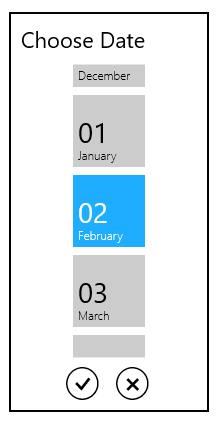
NOTE
A detailed explanation of standard date and time formatting is available here. The result strings produced by these format specifiers are influenced by the settings in the Regional Options control panel. Computers with different cultures or different date and time settings will generate different result strings.