Time restriction in .NET MAUI Time Picker
Minimum Time
The time picker provides an option to restrict the selection of time items using the MinimumTime property. This ensures that times beyond the specified minimum time range cannot be selected. The MinimumTime value must be less than the MaximumTime value. When setting the minimum time, only the hour and minute components are considered.
<ContentPage xmlns="http://schemas.microsoft.com/dotnet/2021/maui"
             xmlns:x="http://schemas.microsoft.com/winfx/2009/xaml"
             xmlns:picker="clr-namespace:Syncfusion.Maui.Picker;assembly=Syncfusion.Maui.Picker">
    <picker:SfTimePicker x:Name="picker"
                         MinimumTime="7:40:0">
    </picker:SfTimePicker>
</ContentPage>
using Syncfusion.Maui.Picker;
. . .
SfTimePicker timePicker = new SfTimePicker();
timePicker.MinimumTime = new TimeSpan(7, 40, 0);
this.Content = timePicker;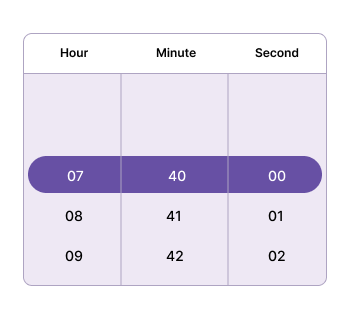
Maximum Time
The time picker provides an option to restrict the selection of time items using the MaximumTime property. This ensures that times beyond the specified maximum time range cannot be selected. The MaximumTime value must be higher than the MinimumTime value. When setting the maximum time, only the hour and minute components are considered.
<ContentPage xmlns="http://schemas.microsoft.com/dotnet/2021/maui"
             xmlns:x="http://schemas.microsoft.com/winfx/2009/xaml"
             xmlns:picker="clr-namespace:Syncfusion.Maui.Picker;assembly=Syncfusion.Maui.Picker">
    <picker:SfTimePicker x:Name="picker"
                         MaximumTime="20:15:0">
    </picker:SfTimePicker>
</ContentPage>
using Syncfusion.Maui.Picker;
. . .
SfTimePicker timePicker = new SfTimePicker();
timePicker.MaximumTime = new TimeSpan(20, 15, 0);
this.Content = timePicker;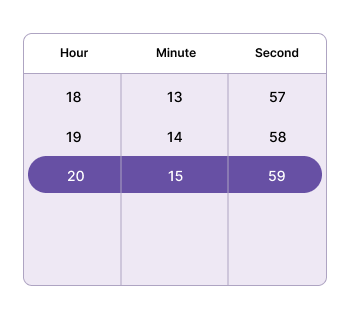
Blackout Times
The BlackoutTimes property in the SfTimePicker component enables you to limit the selection of certain times. You can specify a set of times to disable, preventing users from choosing those times. This feature is helpful for managing availability, such as excluding specific hours of the day.
<ContentPage xmlns="http://schemas.microsoft.com/dotnet/2021/maui"
             xmlns:x="http://schemas.microsoft.com/winfx/2009/xaml"
             xmlns:picker="clr-namespace:Syncfusion.Maui.Picker;assembly=Syncfusion.Maui.Picker">
    <picker:SfTimePicker x:Name="picker">
        <picker:SfTimePicker.BlackoutTimes>
            <x:TimeSpan>12:28:00</x:TimeSpan>
            <x:TimeSpan>12:26:00</x:TimeSpan>
            <x:TimeSpan>12:24:00</x:TimeSpan>
            <x:TimeSpan>12:22:00</x:TimeSpan>
            <x:TimeSpan>12:37:00</x:TimeSpan>
            <x:TimeSpan>12:35:00</x:TimeSpan>
            <x:TimeSpan>12:33:00</x:TimeSpan>
            <x:TimeSpan>12:32:00</x:TimeSpan>
        </picker:SfTimePicker.BlackoutTimes>
    </picker:SfTimePicker>
</ContentPage>
using Syncfusion.Maui.Picker;
. . .
SfTimePicker timePicker = new SfTimePicker();
timePicker.BlackoutTimes.Add(new TimeSpan(12, 28, 0));
timePicker.BlackoutTimes.Add(new TimeSpan(12, 26, 0));
timePicker.BlackoutTimes.Add(new TimeSpan(12, 24, 0));
timePicker.BlackoutTimes.Add(new TimeSpan(12, 22, 0));
timePicker.BlackoutTimes.Add(new TimeSpan(12, 37, 0));
timePicker.BlackoutTimes.Add(new TimeSpan(12, 35, 0));
timePicker.BlackoutTimes.Add(new TimeSpan(12, 33, 0));
timePicker.BlackoutTimes.Add(new TimeSpan(12, 32, 0));
this.Content = timePicker;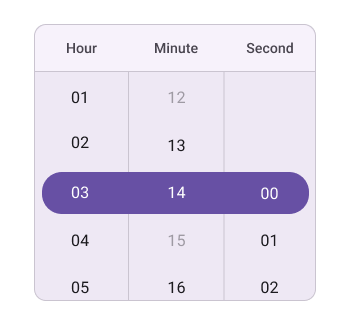
NOTE
The
Selection Viewwill not be applicable when settingBlackout times.