Context Menu in .NET MAUI Scheduler
The .NET MAUI Scheduler supports context menus for timeslot cells, month cells, all-day panels, and appointments. These context menus provide quick access to common actions such as creating, editing, or deleting appointments. The Scheduler provides built-in commands that can be assigned to context menu items.
The Scheduler displays context menus through the following interactions:
- Long press on touch devices (Android and iOS)
- Right-click on desktop platforms (Windows and macOS)
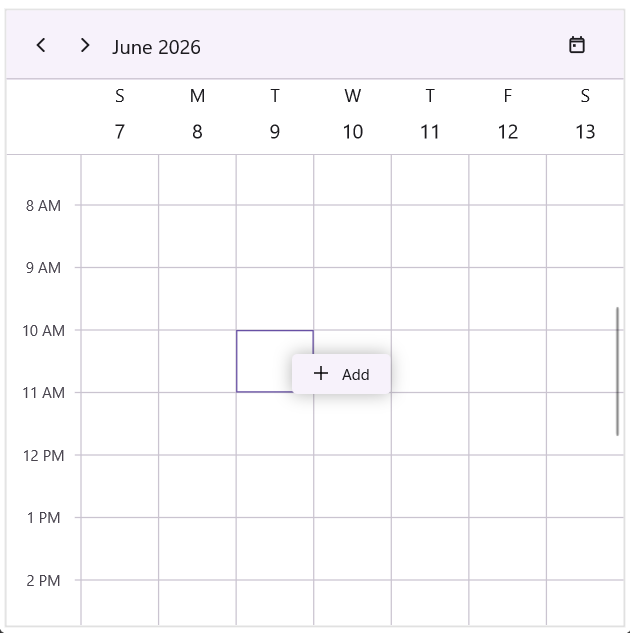
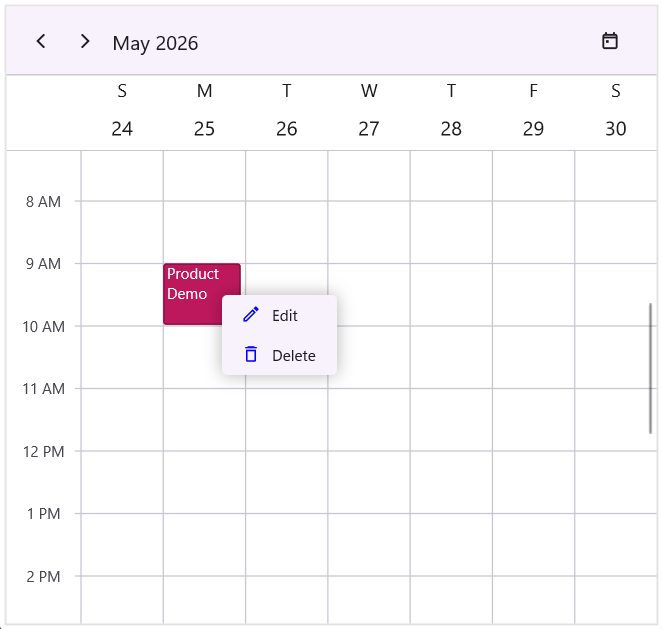
When a context menu is configured, the Scheduler automatically displays the menu at the interaction location.
Built-in Scheduler Commands to use in context menu
The Scheduler includes built-in commands that can be used directly in context menus.
- Add - Creates a new appointment for the selected cell.
- Edit - Opens the selected appointment for editing.
- Delete - Deletes the selected appointment.
NOTE
Built-in
AddandEditcommands work only when the AppointmentEditorMode property includes the correspondingAddorEditoption.
Context Menu for Timeslot Cells
The CellContextMenu property of the Scheduler allows users to define a set of context menu items that appear when the user performs a right tap or long press on a timeslot cell, month cell, or the all-day panel.
<ContentPage
. . .
xmlns:schedule="clr-namespace:Syncfusion.Maui.Scheduler;assembly=Syncfusion.Maui.Scheduler">
<schedule:SfScheduler x:Name="scheduler"
AppointmentEditorMode="Add,Edit"
View="Week">
<schedule:SfScheduler.CellContextMenu>
<schedule:MenuItemCollection>
<schedule:MenuItem Text="Add"
Command="{x:Static schedule:SchedulerCommands.Add}"
CommandParameter="{Binding}">
<schedule:MenuItem.Icon>
<FontImageSource Glyph=""
FontFamily="MauiMaterialAssets"/>
</schedule:MenuItem.Icon>
</schedule:MenuItem>
</schedule:MenuItemCollection>
</schedule:SfScheduler.CellContextMenu>
</schedule:SfScheduler>
</ContentPage>using Syncfusion.Maui.Scheduler;
. . .
public partial class MainPage : ContentPage
{
public MainPage()
{
InitializeComponent();
SfScheduler scheduler = new SfScheduler();
scheduler.View = SchedulerView.Week;
scheduler.AppointmentEditorMode = AppointmentEditorMode.Add | AppointmentEditorMode.Edit;
scheduler.CellContextMenu = new MenuItemCollection()
{
new Syncfusion.Maui.Scheduler.MenuItem
{
Text = "Add",
Command = SchedulerCommands.Add,
CommandParameter = new Binding("."),
Icon = new FontImageSource
{
FontFamily = "MauiMaterialAssets",
Glyph = "",
}
},
};
}
}
Context Menu for Appointments
The AppointmentContextMenu property of the Scheduler enables users to define a set of context menu items that appear when the user performs a right tap or long press on an appointment.
<ContentPage
. . .
xmlns:schedule="clr-namespace:Syncfusion.Maui.Scheduler;assembly=Syncfusion.Maui.Scheduler">
<schedule:SfScheduler x:Name="scheduler"
AppointmentEditorMode="Edit"
View="Week">
<schedule:SfScheduler.AppointmentContextMenu>
<schedule:MenuItemCollection>
<schedule:MenuItem Text="Edit"
Command="{x:Static schedule:SchedulerCommands.Edit}"
CommandParameter="{Binding}">
<schedule:MenuItem.Icon>
<FontImageSource Glyph=""
FontFamily="MauiMaterialAssets"
Color="Blue"
Size="16"/>
</schedule:MenuItem.Icon>
</schedule:MenuItem>
<schedule:MenuItem Text="Delete"
Command="{x:Static schedule:SchedulerCommands.Delete}"
CommandParameter="{Binding}">
<schedule:MenuItem.Icon>
<FontImageSource Glyph=""
FontFamily="MauiMaterialAssets"
Color="Blue"
Size="16"/>
</schedule:MenuItem.Icon>
</schedule:MenuItem>
</schedule:MenuItemCollection>
</schedule:SfScheduler.AppointmentContextMenu>
</schedule:SfScheduler>
</ContentPage>using Syncfusion.Maui.Scheduler;
. . .
public partial class MainPage : ContentPage
{
public MainPage()
{
InitializeComponent();
SfScheduler scheduler = new SfScheduler();
scheduler.View = SchedulerView.Week;
scheduler.AppointmentEditorMode = AppointmentEditorMode.Add | AppointmentEditorMode.Edit;
scheduler.AppointmentContextMenu = new MenuItemCollection()
{
new Syncfusion.Maui.Scheduler.MenuItem
{
Text = "Edit",
Command = SchedulerCommands.Edit,
CommandParameter = new Binding("."),
Icon = new FontImageSource
{
FontFamily = "MauiMaterialAssets",
Glyph = "",
Color = Colors.Blue,
Size = 16
}
},
new Syncfusion.Maui.Scheduler.MenuItem
{
Text = "Delete",
Command = SchedulerCommands.Delete,
CommandParameter = new Binding("."),
Icon = new FontImageSource
{
FontFamily = "MauiMaterialAssets",
Glyph = "",
Color = Colors.Blue,
Size = 16
}
},
};
}
}
NOTE
The BindingContext of each context menu item is set to a SchedulerContextMenuInfo object.
Customize context menu appearance
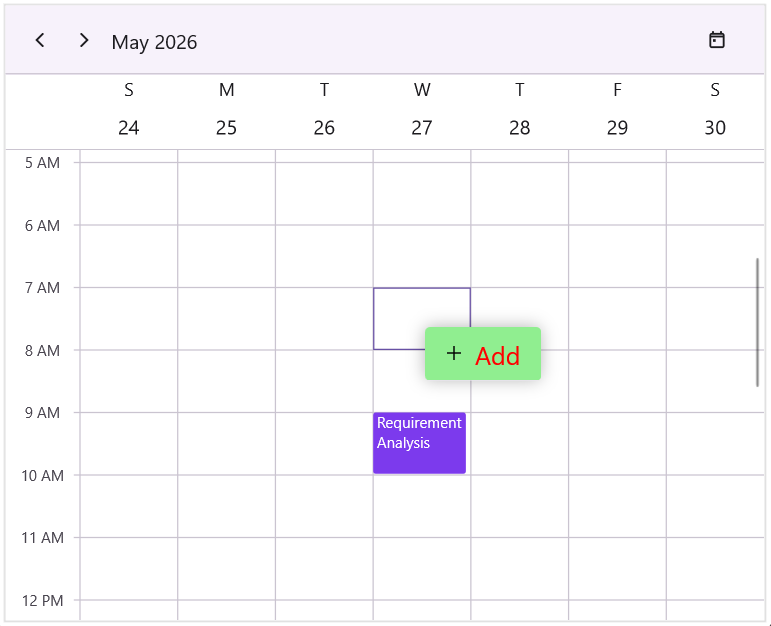
You can modify the background and text appearance of the context menu displayed for scheduler cells and appointment using the ContextMenuBackground and ContextMenuTextStyle properties.
<ContentPage
    . . .
    xmlns:schedule="clr-namespace:Syncfusion.Maui.Scheduler;assembly=Syncfusion.Maui.Scheduler">

    <schedule:SfScheduler x:Name="scheduler"
                          ContextMenuBackground="LightGreen"
                          View="Week">
        <schedule:SfScheduler.ContextMenuTextStyle>
            <schedule:SchedulerTextStyle TextColor="Red"
                                         FontSize="20"/>
        </schedule:SfScheduler.ContextMenuTextStyle>
    </schedule:SfScheduler>
</ContentPage>
using Syncfusion.Maui.Scheduler;
. . .
public partial class MainPage : ContentPage
{
public MainPage()
{
InitializeComponent();
SfScheduler scheduler = new SfScheduler();
scheduler.View = SchedulerView.Week;
scheduler.ContextMenuBackground = new SolidColorBrush(Colors.LightGreen);
scheduler.ContextMenuTextStyle = new SchedulerTextStyle()
{
TextColor = Colors.Black,
FontSize = 14,
};
}
}
Handle Context Menu Opening
The Scheduler raises the ContextMenuOpening event when a context menu is about to be displayed. This event provides access to the menu information and can be used to cancel the menu opening operation.
The SchedulerContextMenuOpeningEventArgs class provides information about the context menu being opened.
- ContextMenu – Gets the collection of menu items that will be displayed.
- MenuInfo – Gets information about the scheduler element that invoked the context menu. Provides the following details - selected appointment, cell date and time, associated resource and scheduler instance.
-
MenuType – Gets the type of scheduler element (
Appointment,SchedulerCell, orAllDay) for which the context menu is opened. -
MenuInfo.Appointment – The
SchedulerAppointmentassociated with the context menu (only forAppointmenttype). - MenuInfo.DateTime – The date/time of the cell where the context menu was opened.
-
MenuInfo.Resource – The associated
SchedulerResource(only in resource views). -
MenuInfo.Scheduler – The
SfSchedulerinstance that raised the event. -
Cancel– Specifies whether the context menu opening operation should be canceled.
<ContentPage
    . . .
    xmlns:schedule="clr-namespace:Syncfusion.Maui.Scheduler;assembly=Syncfusion.Maui.Scheduler">
    <schedule:SfScheduler x:Name="scheduler"
                          View="Week"
                          ContextMenuOpening="scheduler_ContextMenuOpening">
    </schedule:SfScheduler>
</ContentPage>
using Syncfusion.Maui.Scheduler;
. . .
public partial class MainPage : ContentPage
{
public MainPage()
{
InitializeComponent();
this.scheduler.ContextMenuOpening += scheduler_ContextMenuOpening;
}
private void scheduler_ContextMenuOpening(object sender, SchedulerContextMenuOpeningEventArgs e)
{
var contextMenu = e.ContextMenu;
var menuType = e.MenuType;
var menuInfo = e.MenuInfo;
var appointment = menuInfo?.Appointment;
var dateTime = menuInfo?.DateTime;
var resource = menuInfo?.Resource;
var scheduler = menuInfo?.Scheduler;
}
}Cancel context menu opening
The ContextMenuOpening event can be used to prevent a context menu from being displayed. To cancel the context menu opening operation, set the Cancel property of the SchedulerContextMenuOpeningEventArgs to true.
<ContentPage
    . . .
    xmlns:schedule="clr-namespace:Syncfusion.Maui.Scheduler;assembly=Syncfusion.Maui.Scheduler">

    <schedule:SfScheduler x:Name="scheduler"
                          View="Week"
                          ContextMenuOpening="scheduler_ContextMenuOpening">
    </schedule:SfScheduler>
</ContentPage>
using Syncfusion.Maui.Scheduler;
. . .
public partial class MainPage : ContentPage
{
public MainPage()
{
InitializeComponent();
this.scheduler.ContextMenuOpening += scheduler_ContextMenuOpening;
}
private void scheduler_ContextMenuOpening(object sender, SchedulerContextMenuOpeningEventArgs e)
{
e.Cancel = true; // Cancel the context menu from opening
}
}Implement clipboard operations using context menu
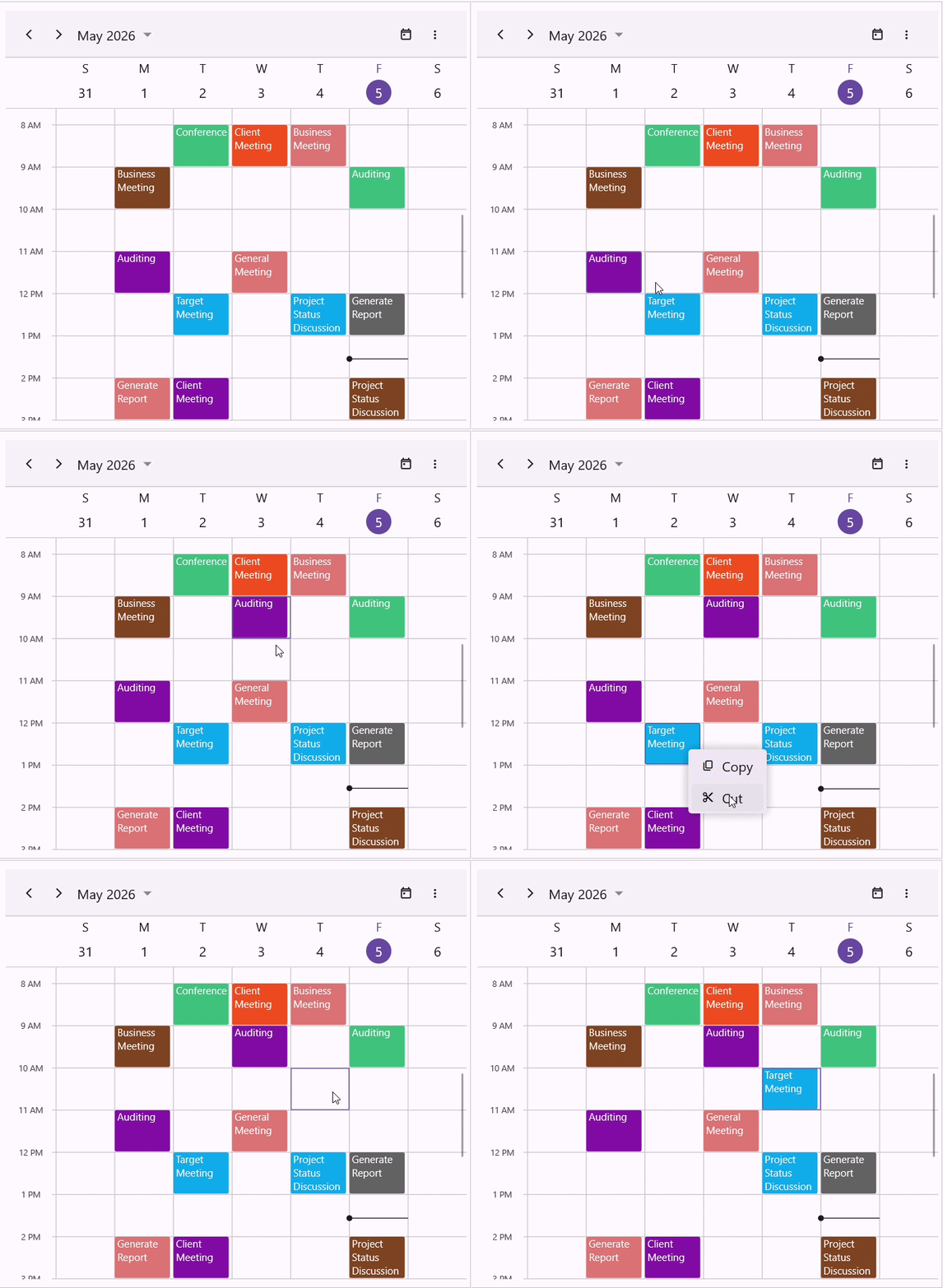
Clipboard-like functionality can be implemented using custom context menu commands for Copy, Cut, and Paste operations on appointments.
The clipboard functionality works as follows:
- Copy - The copy command creates a copy of the selected appointment and stores it temporarily.
- Cut - The cut command stores a copy of the selected appointment and marks the original appointment for removal.
- Paste - The paste command creates a new appointment at the selected scheduler cell while preserving the original appointment duration. When a cut operation is pasted the original appointment is removed and the appointment is moved to the new timeslot.
Adding Context Menu Items
The AppointmentContextMenu can be used to display Copy and Cut actions for appointments, while the CellContextMenu can be used to display the paste action for scheduler cells.
<ContentPage
. . .
xmlns:schedule="clr-namespace:Syncfusion.Maui.Scheduler;assembly=Syncfusion.Maui.Scheduler">
<schedule:SfScheduler x:Name="scheduler"
x:DataType="local:SchedulerClipboardViewModel"
AppointmentsSource="{Binding Events}"
AppointmentEditorMode="Add,Edit"
DisplayDate="{Binding DisplayDate}"
ShowDatePickerButton="True"
AllowAppointmentDrag="False"
AllowedViews="Day,Week,WorkWeek,Month"
View="Month">
<schedule:SfScheduler.AppointmentContextMenu>
<schedule:MenuItemCollection>
<schedule:MenuItem Text="Copy"
Command="{x:Static local:ClipboardCommands.Copy}"
CommandParameter="{Binding}">
<schedule:MenuItem.Icon>
<FontImageSource Glyph=""
FontFamily="MauiMaterialAssets"/>
</schedule:MenuItem.Icon>
</schedule:MenuItem>
<schedule:MenuItem Text="Cut"
Command="{x:Static local:ClipboardCommands.Cut}"
CommandParameter="{Binding}">
<schedule:MenuItem.Icon>
<FontImageSource Glyph=""
FontFamily="MauiMaterialAssets"/>
</schedule:MenuItem.Icon>
</schedule:MenuItem>
</schedule:MenuItemCollection>
</schedule:SfScheduler.AppointmentContextMenu>
<schedule:SfScheduler.CellContextMenu>
<schedule:MenuItemCollection>
<schedule:MenuItem Text="Paste"
Command="{x:Static local:ClipboardCommands.Paste}"
CommandParameter="{Binding}">
<schedule:MenuItem.Icon>
<FontImageSource Glyph=""
FontFamily="MauiMaterialAssets"/>
</schedule:MenuItem.Icon>
</schedule:MenuItem>
</schedule:MenuItemCollection>
</schedule:SfScheduler.CellContextMenu>
</schedule:SfScheduler>
</ContentPage>Custom Command Implementation
The clipboard operations are implemented using custom commands that implement the ICommand interface.
public static class ClipboardCommands
{
    private static SchedulerAppointment? copiedAppointment { get; set; }

    private static SchedulerAppointment? cutAppointment { get; set; }

    private static bool isCutOperation = false;

    public static ICommand Cut { get; } = new CutAppointmentCommand();

    public static ICommand Copy { get; } = new CopyAppointmentCommand();

    public static ICommand Paste { get; } = new PasteAppointmentCommand();

    private static SchedulerAppointment GetClonedAppointment(SchedulerAppointment appointment)
    {
        return new SchedulerAppointment
        {
            StartTime = appointment.StartTime,
            EndTime = appointment.EndTime,
            Subject = appointment.Subject,
            Notes = appointment.Notes,
            IsAllDay = appointment.IsAllDay,
            Location = appointment.Location,
            RecurrenceRule = appointment.RecurrenceRule,
            Background = appointment.Background,
            ResourceIds = appointment.ResourceIds,
        };
    }

    internal class CopyAppointmentCommand : ICommand
    {
        event EventHandler? ICommand.CanExecuteChanged
        {
            add { }
            remove { }
        }

        bool ICommand.CanExecute(object? parameter)
        {
            return parameter is SchedulerContextMenuInfo info && info.Scheduler != null && info.Appointment != null;
        }

        void ICommand.Execute(object? parameter)
        {
            if (parameter is SchedulerContextMenuInfo info && info.Appointment != null)
            {
                isCutOperation = false;
                cutAppointment = null;
                copiedAppointment = GetClonedAppointment(info.Appointment);
            }
        }
    }

    internal class CutAppointmentCommand : ICommand
    {
        event EventHandler? ICommand.CanExecuteChanged
        {
            add { }
            remove { }
        }

        bool ICommand.CanExecute(object? parameter)
        {
            return parameter is SchedulerContextMenuInfo info && info.Scheduler != null && info.Appointment != null;
        }

        void ICommand.Execute(object? parameter)
        {
            if (parameter is SchedulerContextMenuInfo info && info.Scheduler != null && info.Appointment != null)
            {
                isCutOperation = true;
                cutAppointment = info.Appointment;
                copiedAppointment = GetClonedAppointment(cutAppointment);
            }
        }
    }

    internal class PasteAppointmentCommand : ICommand
    {
        event EventHandler? ICommand.CanExecuteChanged
        {
            add { }
            remove { }
        }

        bool ICommand.CanExecute(object? parameter)
        {
            return parameter is SchedulerContextMenuInfo info && info.Scheduler != null && copiedAppointment != null;
        }

        void ICommand.Execute(object? parameter)
        {
            if (parameter is not SchedulerContextMenuInfo info || info.Scheduler == null || copiedAppointment == null || info.Scheduler.AppointmentsSource is not ObservableCollection<SchedulerAppointment> appointments)
            {
                return;
            }

            if (isCutOperation && cutAppointment != null)
            {
                appointments.Remove(cutAppointment);
                cutAppointment = null;
                isCutOperation = false;
            }

            var newAppointment = GetClonedAppointment(copiedAppointment);
            var duration = copiedAppointment.EndTime - copiedAppointment.StartTime;
            newAppointment.StartTime = info.DateTime;
            newAppointment.EndTime = info.DateTime.Add(duration);
            appointments.Add(newAppointment);
        }
    }
}