Appointment Tooltip in .NET MAUI Scheduler
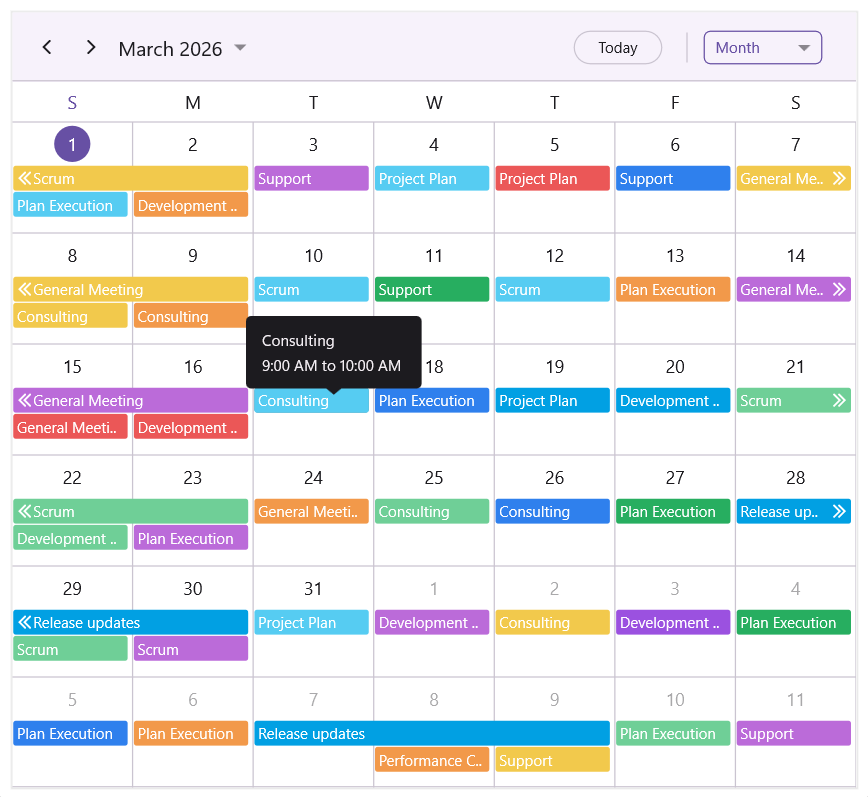
The appointment tooltip provides a quick, contextual preview of scheduled events. By default, the IsAppointmentToolTipEnabled property is set to false. To display appointment details such as the subject, start time, and end time when hovering over or tapping an appointment, set the IsAppointmentToolTipEnabled property to true.
<ContentPage
    . . .
    xmlns:scheduler="clr-namespace:Syncfusion.Maui.Scheduler;assembly=Syncfusion.Maui.Scheduler">
    <scheduler:SfScheduler x:Name="scheduler"
                           View="Day"
                           IsAppointmentToolTipEnabled="True">
    </scheduler:SfScheduler>
</ContentPage>
using Syncfusion.Maui.Scheduler;
. . .
public partial class MainPage : ContentPage
{
public MainPage()
{
InitializeComponent();
this.scheduler.IsAppointmentToolTipEnabled = true;
}
}
NOTE
- Desktop platforms: A tooltip is shown when you hover the mouse over an appointment.
- Mobile platforms: A tooltip is shown when you tap or long‑press an appointment. The tooltip appears on long‑press only when appointment dragging is disabled.
Appointment Tooltip Settings
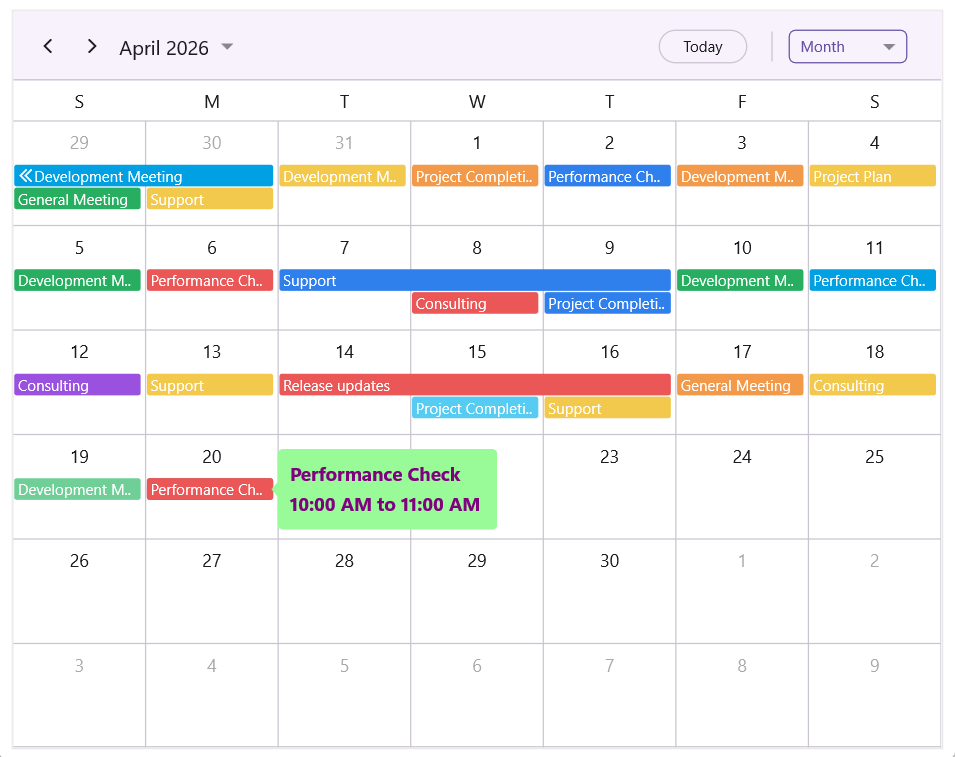
The AppointmentToolTipSettings property allows you to customize the appearance and behavior of appointment tooltips. The following settings can be configured:
-
Background – Defines the background color of the tooltip. Accepts a
Colorvalue (for example, a named color such as"PaleGreen",Colors.PaleGreen, or a hex string) or aBrushvalue (for example,SolidColorBrush,LinearGradientBrush). -
TextStyle – Specifies the text styling of the tooltip content. The
SchedulerTextStyleexposesTextColor,FontSize,FontAttributes,FontFamily,FontAutoScalingEnabled,LineBreakMode, and other text-related properties. -
Padding – Specifies the spacing inside the tooltip.
-
ToolTipPosition – Determines the placement of the tooltip relative to the appointment. Supported values are defined by the
SchedulerToolTipPositionenum and include Auto (default), Left, Right, Top, and Bottom.
<ContentPage
    . . .
    xmlns:scheduler="clr-namespace:Syncfusion.Maui.Scheduler;assembly=Syncfusion.Maui.Scheduler">
    <scheduler:SfScheduler x:Name="scheduler"
                           View="Day"
                           IsAppointmentToolTipEnabled="True">
        <scheduler:SfScheduler.AppointmentToolTipSettings>
            <scheduler:AppointmentToolTipSettings Background="PaleGreen" Padding="5" ToolTipPosition="Right">
                <scheduler:AppointmentToolTipSettings.TextStyle>
                    <scheduler:SchedulerTextStyle TextColor="Purple" FontSize="15" FontAttributes="Bold"/>
                </scheduler:AppointmentToolTipSettings.TextStyle>
            </scheduler:AppointmentToolTipSettings>
        </scheduler:SfScheduler.AppointmentToolTipSettings>
    </scheduler:SfScheduler>
</ContentPage>
using Syncfusion.Maui.Scheduler;
. . .
public partial class MainPage : ContentPage
{
public MainPage()
{
InitializeComponent();
this.scheduler.IsAppointmentToolTipEnabled = true;
this.scheduler.AppointmentToolTipSettings = new AppointmentToolTipSettings()
{
Background = Colors.PaleGreen,
Padding = new Thickness(5),
ToolTipPosition = SchedulerToolTipPosition.Right,
TextStyle = new SchedulerTextStyle
{
TextColor = Colors.Purple,
FontSize = 15,
FontAttributes = FontAttributes.Bold
}
};
}
}
Appointment ToolTip Template
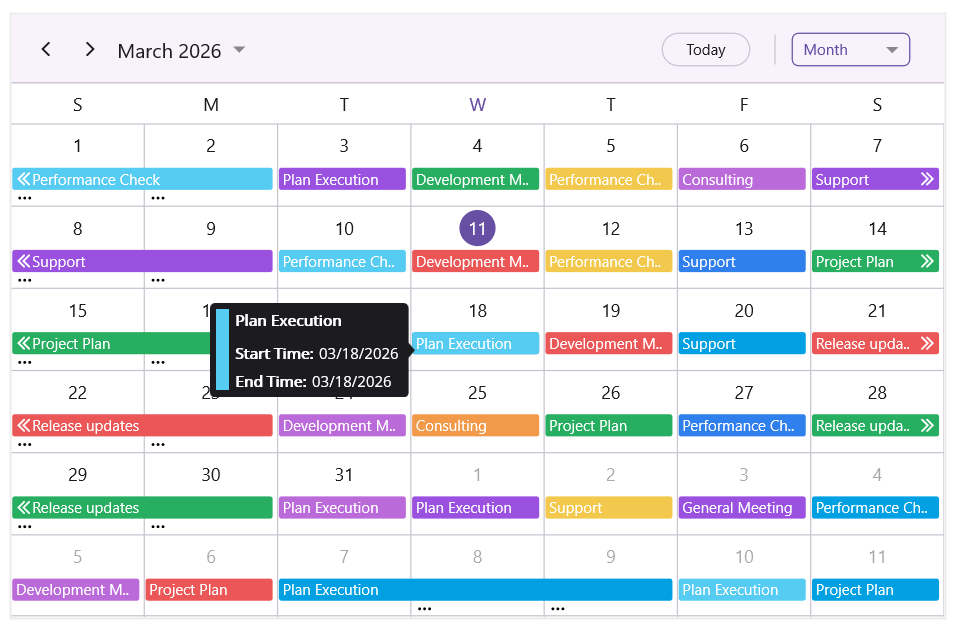
The AppointmentToolTipTemplate property lets you create a custom tooltip layout for appointments, allowing you to display additional information or change the tooltip’s appearance as needed.
<ContentPage
    . . .
    xmlns:scheduler="clr-namespace:Syncfusion.Maui.Scheduler;assembly=Syncfusion.Maui.Scheduler">
    <scheduler:SfScheduler x:Name="scheduler"
                           View="Day"
                           IsAppointmentToolTipEnabled="True">
        <scheduler:SfScheduler.AppointmentToolTipSettings>
            <scheduler:AppointmentToolTipSettings ToolTipPosition="Left"/>
        </scheduler:SfScheduler.AppointmentToolTipSettings>

        <scheduler:SfScheduler.AppointmentToolTipTemplate>
            <DataTemplate x:DataType="scheduler:SchedulerAppointment">
                <Grid ColumnDefinitions="Auto,*">
                    <BoxView Grid.Column="0"
                             Background="{Binding Background}"
                             WidthRequest="10"
                             HorizontalOptions="Start"
                             VerticalOptions="Fill"
                             Margin="0,0,5,0" />

                    <VerticalStackLayout Grid.Column="1" Spacing="5">
                        <Label Text="{Binding Subject}"
                               FontAttributes="Bold"
                               FontSize="12"
                               TextColor="White"
                               LineBreakMode="TailTruncation"
                               MaxLines="2"
                               Margin="0,0,0,5" />

                        <HorizontalStackLayout Spacing="4">
                            <Label Text="Start Time: "
                                   FontAttributes="Bold"
                                   FontSize="12"
                                   TextColor="White" />
                            <Label Text="{Binding StartTime, StringFormat='{0:MM/dd/yyyy}'}"
                                   FontSize="12"
                                   TextColor="White" />
                        </HorizontalStackLayout>

                        <HorizontalStackLayout Spacing="4">
                            <Label Text="End Time: "
                                   FontAttributes="Bold"
                                   FontSize="12"
                                   TextColor="White" />
                            <Label Text="{Binding EndTime, StringFormat='{0:MM/dd/yyyy}'}"
                                   FontSize="12"
                                   TextColor="White" />
                        </HorizontalStackLayout>
                    </VerticalStackLayout>
                </Grid>
            </DataTemplate>
        </scheduler:SfScheduler.AppointmentToolTipTemplate>
    </scheduler:SfScheduler>
</ContentPage>