Date Restriction in .NET MAUI Date Time Picker control
Restrict which dates and times a user can select using the following options: MinimumDate and MaximumDate define an allowed range, and BlackoutDateTimes disables specific dates or time slots within that range.
NOTE
The
MinimumDateandMaximumDateproperties are of typeDateTime. The default values areDateTime.MinValue(1/1/0001) andDateTime.MaxValue(12/31/9999) respectively. IfMinimumDateis set to a value greater thanMaximumDate, the picker throws anArgumentOutOfRangeExceptionwhen initialized.
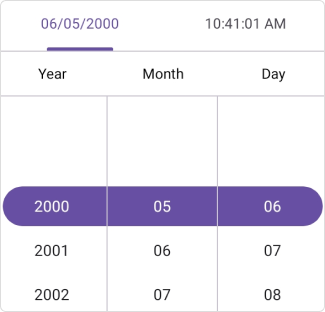
Minimum date
The Date Time Picker restricts selection to dates and times on or after the MinimumDate property. The MinimumDate value must be less than or equal to MaximumDate.
<ContentPage
    . . .
    xmlns:picker="clr-namespace:Syncfusion.Maui.Picker;assembly=Syncfusion.Maui.Picker">
    <picker:SfDateTimePicker x:Name="picker"
                             MinimumDate="2000/5/6 3:34:12 AM">
    </picker:SfDateTimePicker>
</ContentPage>
using Syncfusion.Maui.Picker;
. . .
public partial class MainPage : ContentPage
{
public MainPage()
{
InitializeComponent();
SfDateTimePicker dateTimePicker = new SfDateTimePicker();
dateTimePicker.MinimumDate = new DateTime(2000, 5, 6, 3, 34, 12);
this.Content = dateTimePicker;
}
}
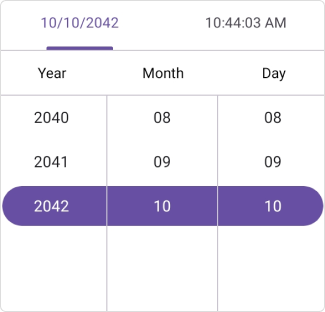
Maximum date
The Date Time Picker restricts selection to dates and times on or before the MaximumDate property.
<ContentPage
    . . .
    xmlns:picker="clr-namespace:Syncfusion.Maui.Picker;assembly=Syncfusion.Maui.Picker">
    <picker:SfDateTimePicker x:Name="picker"
                             MaximumDate="2042/10/10 12:15:03 PM">
    </picker:SfDateTimePicker>
</ContentPage>
using Syncfusion.Maui.Picker;
. . .
public partial class MainPage : ContentPage
{
public MainPage()
{
InitializeComponent();
SfDateTimePicker dateTimePicker = new SfDateTimePicker();
dateTimePicker.MaximumDate = new DateTime(2042, 10, 10, 12, 15, 03);
this.Content = dateTimePicker;
}
}
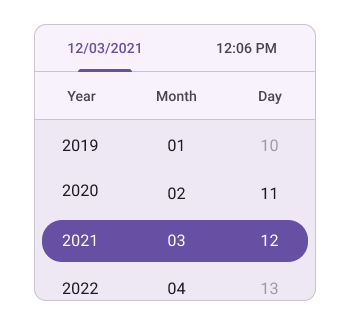
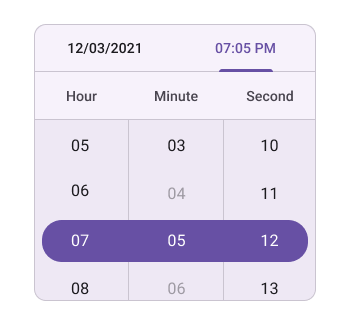
Blackout Date times
The Blackout Date times property in the SfDateTimePicker component allows you to block the selection of specific dates and times. The property accepts an ObservableCollection<DateTime?>; each entry can represent an entire day (time component is midnight) or a specific time slot within a day. This feature is useful for enforcing availability rules, such as restricting specific days or hours.
<ContentPage
    . . .
    xmlns:picker="clr-namespace:Syncfusion.Maui.Picker;assembly=Syncfusion.Maui.Picker"
    xmlns:date="clr-namespace:System;assembly=mscorlib">
    <picker:SfDateTimePicker x:Name="picker">
        <picker:SfDateTimePicker.BlackoutDateTimes>
            <date:DateTime>2001-08-10</date:DateTime>
            <date:DateTime>2001-08-12</date:DateTime>
            <date:DateTime>2001-08-14</date:DateTime>
            <date:DateTime>2001-08-17</date:DateTime>
            <date:DateTime>2001-08-18</date:DateTime>
            <date:DateTime>2001-08-20</date:DateTime>
            <date:DateTime>2001-08-23</date:DateTime>
            <date:DateTime>2001-08-27</date:DateTime>
            <date:DateTime>2001-08-03</date:DateTime>
            <date:DateTime>2001-08-15 12:11:00</date:DateTime>
            <date:DateTime>2001-08-15 12:12:00</date:DateTime>
            <date:DateTime>2001-08-15 12:08:00</date:DateTime>
            <date:DateTime>2001-08-15 12:06:00</date:DateTime>
            <date:DateTime>2001-08-15 12:14:00</date:DateTime>
        </picker:SfDateTimePicker.BlackoutDateTimes>
    </picker:SfDateTimePicker>
</ContentPage>
using Syncfusion.Maui.Picker;
. . .
public partial class MainPage : ContentPage
{
public MainPage()
{
InitializeComponent();
SfDateTimePicker dateTimePicker = new SfDateTimePicker();
dateTimePicker.BlackoutDateTimes.Add(new DateTime(2001, 8, 10));
dateTimePicker.BlackoutDateTimes.Add(new DateTime(2001, 8, 12));
dateTimePicker.BlackoutDateTimes.Add(new DateTime(2001, 8, 14));
dateTimePicker.BlackoutDateTimes.Add(new DateTime(2001, 8, 17));
dateTimePicker.BlackoutDateTimes.Add(new DateTime(2001, 8, 18));
dateTimePicker.BlackoutDateTimes.Add(new DateTime(2001, 8, 20));
dateTimePicker.BlackoutDateTimes.Add(new DateTime(2001, 8, 23));
dateTimePicker.BlackoutDateTimes.Add(new DateTime(2001, 8, 27));
dateTimePicker.BlackoutDateTimes.Add(new DateTime(2001, 8, 3));
dateTimePicker.BlackoutDateTimes.Add(new DateTime(2001, 8, 15, 12, 11, 0));
dateTimePicker.BlackoutDateTimes.Add(new DateTime(2001, 8, 15, 12, 12, 0));
dateTimePicker.BlackoutDateTimes.Add(new DateTime(2001, 8, 15, 12, 8, 0));
dateTimePicker.BlackoutDateTimes.Add(new DateTime(2001, 8, 15, 12, 6, 0));
dateTimePicker.BlackoutDateTimes.Add(new DateTime(2001, 8, 15, 12, 14, 0));
this.Content = dateTimePicker;
}
}
NOTE
The
Selection Viewwill not be applicable when settingBlackout date times.