Localization in .NET MAUI Date Picker control
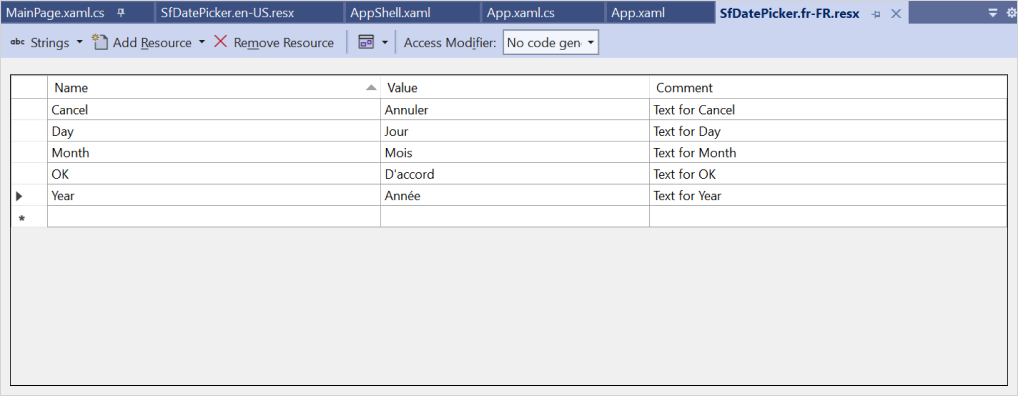
Localization is the process of translating the application resources into different languages for specific cultures. The SfDatePicker can be localized by adding a resource file. The SfDatePicker provides support for localizing the following strings
DayMonthYearOKCancel
Setting CurrentUICulture to the application
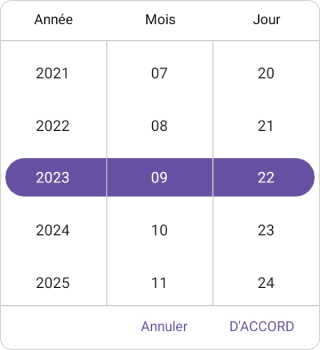
Application culture can be changed by setting CurrentUICulture in the App.xaml.cs file.
using Syncfusion.Maui.Picker;
using System.Globalization;
using System.Resources;

namespace DatePicker;
public partial class App : Application
{
	public App()
	{
		InitializeComponent();
		CultureInfo.CurrentUICulture = new CultureInfo("fr-FR");
		// ResXPath => Full path of the resx file; For example:
		// SfPickerResources.ResourceManager = new ResourceManager("DatePicker.Resources.SfDatePicker", Application.Current.GetType().Assembly);

		SfPickerResources.ResourceManager = new ResourceManager("ResxPath", Application.Current.GetType().Assembly);
		MainPage = new MainPage();
	}
}
NOTE
Place the required
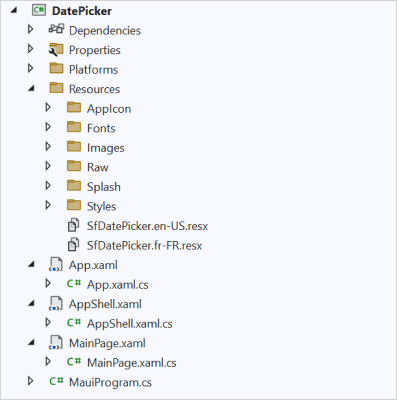
resxfiles withBuild Actionset toEmbeddedResource(the file name should contain the culture code) into theResourcesfolder.
Localize application level
To localize the DatePicker based on CurrentUICulture using resource files, follow the steps below.
-
Create a new folder named
Resourcesin the application. -
Right-click the
Resourcesfolder, selectAdd, and thenNew Item. -
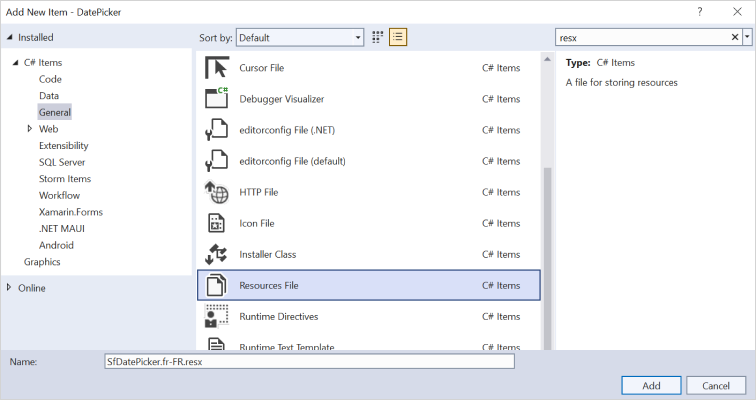
In the Add New Item wizard, select the Resource File option and name the file
SfDatePicker.<culture name>.resx. For example, name itSfDatePicker.fr-FR.resxfor the French culture. -
The culture name indicates the name of the language and country.
-
Now, select Add to add the resource file to the Resources folder.
-
Add the Name/Value pair in the Resource Designer of the
SfDatePicker.fr-FR.resxfile and change each value to the corresponding translation.