Frequently Asked Questions in JavaScript Scheduler
This article provides answers to frequently asked questions and solutions to common issues encountered while working with the Scheduler.
Grouping with empty resources
Enabling grouping without providing resource data causes the following issues:
- Normal (vertical) views render but CRUD operations fail.
- Timeline views do not render at all and display an empty scheduler table.
Recommendation: Avoid enabling grouping when no resource data is available.
Missing e-field attribute in editor template
Error: When using a custom editor template, input field values may not bind correctly if the e-field attribute is missing.
Solution: The e-field attribute is mandatory for binding input values to event fields. Add it to each editor input element. For more information, refer to the editor template documentation.
Missing CSS reference
Error Image:
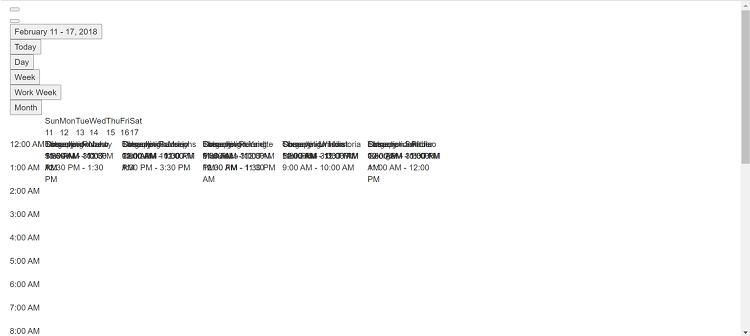
Solution:
This issue occurs when the Scheduler CSS files are not included in the project. Add the appropriate theme CSS to resolve the styling issue:
<html>
<head>
    <title>Syncfusion JavaScript Sample</title>
    <meta charset="utf-8" />
    <meta name="viewport" content="width=device-width, initial-scale=1.0, user-scalable=no" />
    <meta http-equiv="x-ua-compatible" content="ie=edge">
    <meta name="author" content="Syncfusion" />

    <!-- Scheduler CSS is referred from this link -->
    <link href="https://cdn.syncfusion.com/ej2/material.css" rel="stylesheet">
</head>

<body class="material">
    <div id='sample'>
        <!-- Scheduler component -->
    </div>
</body>
</html>
QuickInfoTemplate clipped at bottom
When using the quickInfoTemplate, the quick info popup may appear clipped at the bottom of the Scheduler. Resolve this by refreshing the popup position when it opens using the cellClick and eventClick events.
var eventAdded = false;

var scheduleObj = new ej.schedule.Schedule({
  // ... other options
  cellClick: onClick,
  eventClick: onClick
});

scheduleObj.appendTo('#Schedule');

function onClick(args) {
  if (!this.eventAdded) {
    let popupInstance = document.querySelector('.e-quick-popup-wrapper').ej2_instances[0];
    popupInstance.open = () => {
      popupInstance.refreshPosition();
    };
    this.eventAdded = true;
  }
}
Optionally, add CSS to ensure minimum height:
.e-schedule .e-quick-popup-wrapper {
  min-height: 232px;
}
Culture files not loaded for localization
Error Image:
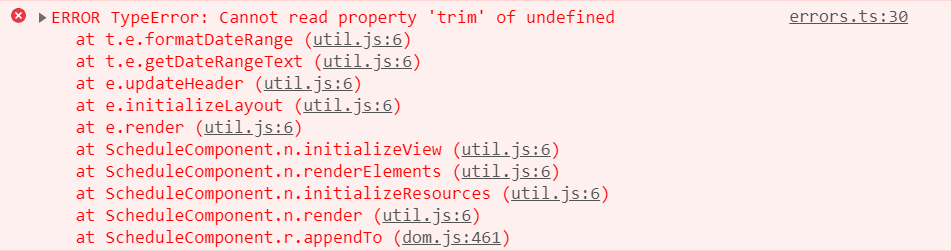
Problem: When using the locale property, localization fails if culture files are not loaded correctly.
Solution: Ensure all required CLDR culture files (numberingSystems, timeZoneNames, etc.) are loaded properly and the loadCultureFiles method is called before initializing the Scheduler.
loadCultureFiles();

var localeTexts;
var localeAjax = new ej.base.Ajax('./locale.json', 'GET', false);
localeAjax.onSuccess = function (value) {
  localeTexts = value;
};
localeAjax.send();
ej.base.L10n.load(JSON.parse(localeTexts));

function loadCultureFiles() {
  // Load CLDR culture files
  var files = ['ca-gregorian.json', 'numbers.json', 'numberingSystems.json', 'timeZoneNames.json'];
  var loader = ej.base.loadCldr;
  var loadCulture = function (prop) {
    var val, ajax;
    ajax = new ej.base.Ajax('./' + files[prop], 'GET', false);
    ajax.onSuccess = function (value) {
      val = value;
    };
    ajax.send();
    loader(JSON.parse(val));
  };
  for (var prop = 0; prop < files.length; prop++) {
    loadCulture(prop);
  }
}

var scheduleObj = new ej.schedule.Schedule({
  width: '100%',
  height: '550px',
  locale: 'fr-CH'
});

scheduleObj.appendTo('#Schedule');
Getting the Scheduler component instance
You can access the Scheduler component instance either from the variable used during initialization or by querying the DOM element and accessing the ej2_instances property.
var scheduleObj = new ej.schedule.Schedule({
  // ... other options
  cellClick: onClick
});

scheduleObj.appendTo('#Schedule');

function onClick(args) {
  // Method 1: Use the initialization variable
  var instance1 = scheduleObj;

  // Method 2: Query from the DOM element
  var instance2 = document.querySelector('.e-schedule').ej2_instances[0];
}