Flutter Event Calendar Localization (SfCalendar)
By default, the calendar widget supports US English localizations. You can change the other languages by specifying the MaterialApp properties and adding the flutter_localizations package to your application.
To use flutter_localizations, add the package as dependency to your pubspec.yaml file.
dependencies:
flutter_localizations:
  sdk: flutter
Next, import the flutter_localizations library and specify localizationsDelegates and supportedLocales for MaterialApp.
import 'package:flutter_localizations/flutter_localizations.dart';

@override
Widget build(BuildContext context) {
return MaterialApp(
        localizationsDelegates: [
            GlobalMaterialLocalizations.delegate,
            GlobalWidgetsLocalizations.delegate,
        ],
        supportedLocales: [
            const Locale('zh'),
            const Locale('ar'),
            const Locale('ja'),
        ],
        locale: const Locale('zh'),
        title: 'Calendar Localization',
        home: Scaffold(
            appBar: AppBar(
            title: Text('Calendar'),
            ),
            body: SfCalendar(
            view: CalendarView.month,
            ),
       ),
   );
}
Localize the custom text in Calendar
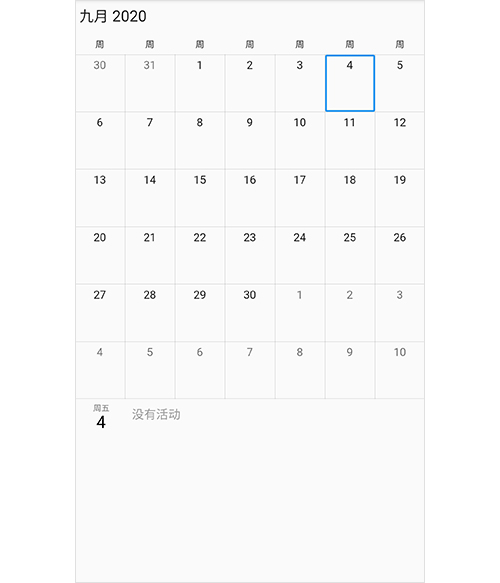
Calendar custom text can be localized using the syncfusion_localizations package and specifying localizationsDelegates in MaterialApp.
To use syncfusion_localizations, add the package as dependency to pubspec.yaml file.
dependencies:
syncfusion_localizations: ^18.1.36
Next, import the syncfusion_localizations library.
import 'package:syncfusion_localizations/syncfusion_localizations.dart';Then, declare the SfGlobalLocalizations.delegate in the localizationsDelegates, which is used to localize the custom string (No events, No selected date) using in calendar and specify the supportedLocales as well.
@override
Widget build(BuildContext context) {
        return MaterialApp(
                localizationsDelegates: [
                        GlobalMaterialLocalizations.delegate,
                        GlobalWidgetsLocalizations.delegate,
                        SfGlobalLocalizations.delegate
                ],
                supportedLocales: [
                        const Locale('zh'),
                        const Locale('ar'),
                        const Locale('ja'),
                ],
                locale: const Locale('zh'),
                title: 'Calendar Localization',
                home: Scaffold(
                appBar: AppBar(
                    title: Text('Calendar'),
                    ),
                    body: SfCalendar(
                    view: CalendarView.month,
                ),
         ),
     );
}