Frequently Asked Questions in Angular Scheduler
In this article, you can find frequently asked questions and their corresponding solutions while working with the Scheduler component.
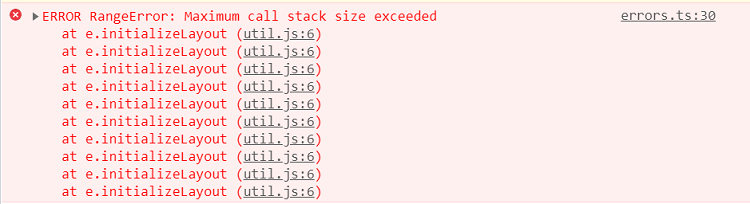
Maximum call stack size exceeded
Error Image:
Solution:
This error occurs when Scheduler views are not imported into the project. You can resolve this issue by importing the required view modules.
In the following code, the Day option is used without injecting the day module, so it throws the above error. You can resolve this problem by injecting the day module in the code below.
import { Component } from '@angular/core';
import { AgendaService, TimelineViewsService, TimelineMonthService, EventSettingsModel } from '@syncfusion/ej2-angular-schedule';

@Component({
    selector: "app-root",
    providers: [ AgendaService, TimelineViewsService, TimelineMonthService],
    // specifies the template string for the Schedule component
    template: `
    <ejs-schedule width="100%" height="550px" [selectedDate]="selectedDate" [views]="views"
      [eventSettings]="eventSettings">
      <e-resources>
        <e-resource field="OwnerId" title="Owner" name="Owners"
          [dataSource]="ownerDataSource" [allowMultiple]="allowMultipleOwner"
          textField="OwnerText" idField="Id" colorField="OwnerColor">
        </e-resource>
      </e-resources>
    </ejs-schedule>`
})
export class AppComponent {
    public selectedDate: Date = new Date(2021, 7, 1);
    // Day view service not imported but still used
    public views: Array<string> = ['Day', 'TimelineWeek', 'TimelineMonth', 'Agenda'];
    public eventSettings: EventSettingsModel = {
        dataSource: resourceData
    };
    public allowMultipleOwner: Boolean = true;
    public ownerDataSource: Object[] = [
        { OwnerText: 'Nancy', Id: 1, OwnerColor: '#ffaa00' },
        { OwnerText: 'Steven', Id: 2, OwnerColor: '#f8a398' },
        { OwnerText: 'Michael', Id: 3, OwnerColor: '#7499e1' }
    ];
}
If
ScheduleAllModulewas injected from module files, the above issue is not thrown.
Grouping with empty resources
Grouping without providing any resource data will cause the following issues:
- Normal (vertical) views are rendered, but you cannot perform CRUD operations.
- Timeline views do not render and display an empty scheduler table.
To avoid this, do not enable grouping when no resources are defined.
Not providing e-field in editor template
Error: When using a custom editor template, the e-field attribute value is missing in the input elements.
Solution: The e-field attribute is mandatory for each form element in the editor template. For more information, refer to customizing event editor using template.
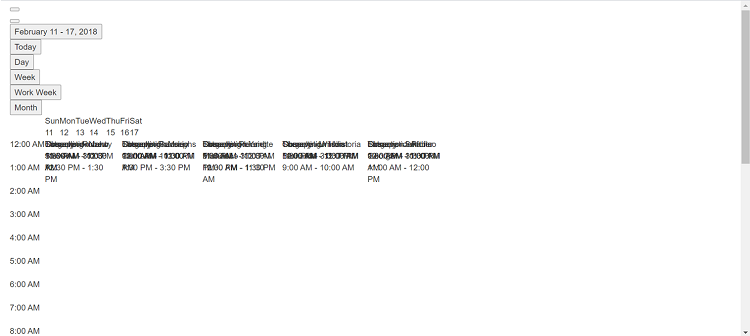
Missing CSS reference
Error Image:
Solution:
This issue occurs when the Scheduler CSS references are missing in a project. You can resolve it by including the proper Scheduler CSS.
<!doctype html>
 <html lang="en">
 <head>
  <meta charset="utf-8">
  <title>EJ2 Angular Schedule Sample</title>

      <!-- Scheduler CSS is referenced from this link -->
  <link href="https://cdn.syncfusion.com/ej2/tailwind3.css" rel="stylesheet">
  <meta name="viewport" content="width=device-width, initial-scale=1">
  <link rel="icon" type="image/x-icon" href="favicon.ico">
 </head>
<body>
  <app-root></app-root>
</body>
</html>
QuickInfoTemplate at bottom
When using the quickInfoTemplate in the Scheduler, the quick info popup may not be shown fully at the bottom of the Scheduler. You can resolve this by using the cellClick and eventClick events and the following code snippet.
 template: "<ejs-schedule #schedule height=\"650px\" (cellClick)=\"onClick($event)\" (eventClick)=\"onClick($event)\"></ejs-schedule>"
  .
  .
  .
  public eventAdded: boolean = false;

  onClick(args: EventClickArgs): void {
    if (!this.eventAdded) {
      let popupInstance = (document.querySelector(".e-quick-popup-wrapper") as any).ej2_instances[0];
      popupInstance.open = () => {
        popupInstance.refreshPosition();
      };
      this.eventAdded = true;
    }
  }
Not importing culture files while using localization
Error Image:
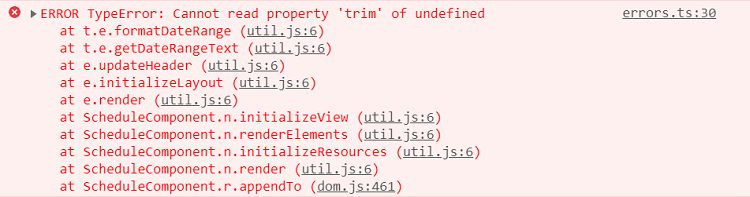
While using locale in the Scheduler, not importing the required culture files properly causes this issue.
Solution: Properly add and import the culture files, such as numberingSystems, timeZoneNames, loadCldr, and L10n, in your project to resolve the issue.
import { loadCldr, L10n } from '@syncfusion/ej2-base';
import enNumberData from '@syncfusion/ej2-cldr-data/main/en-GB/numbers.json';
import enTimeZoneData from '@syncfusion/ej2-cldr-data/main/en-GB/timeZoneNames.json';
import enGregorian from '@syncfusion/ej2-cldr-data/main/en-GB/ca-gregorian.json';
import enNumberingSystem from '@syncfusion/ej2-cldr-data/supplemental/numberingSystems.json';

loadCldr(enNumberData, enTimeZoneData, enGregorian, enNumberingSystem);

L10n.load({
  'en-GB': {
    schedule: {
      day: 'Day',
      week: 'Week',
      workWeek: 'Work Week',
      month: 'Month'
      }
    }
  });