How can I help you?
Getting Started with ReactJS Report Designer
This section explains briefly about how to create a ReportDesigner control in your application with ReactJS.
Script and CSS Reference
The required ReactJS script dependencies as follows. And you can also refer React to know more about ReactJS.
-
react.min.js- https://cdn.syncfusion.com/js/assets/external/react.min.js -
react-dom.min.js- https://cdn.syncfusion.com/js/assets/external/react-dom.min.js -
ej.web.react.min.js- https://cdn.syncfusion.com/33.1.44/js/common/ej.web.react.min.js
External Dependency - Code Mirror
In report designer to edit the SQL queries with syntax highlighter need to refer the below code mirror scripts and themes.
<link href="https://cdnjs.cloudflare.com/ajax/libs/codemirror/5.37.0/codemirror.min.css" rel="stylesheet" />
<link href="https://cdnjs.cloudflare.com/ajax/libs/codemirror/5.37.0/addon/hint/show-hint.min.css" rel="stylesheet" />

<script src="https://cdnjs.cloudflare.com/ajax/libs/codemirror/5.37.0/codemirror.min.js" type="text/javascript"></script>
<script src="https://cdnjs.cloudflare.com/ajax/libs/codemirror/5.37.0/addon/hint/show-hint.min.js" type="text/javascript"></script>
<script src="https://cdnjs.cloudflare.com/ajax/libs/codemirror/5.37.0/addon/hint/sql-hint.min.js" type="text/javascript"></script>
<script src="https://cdnjs.cloudflare.com/ajax/libs/codemirror/5.37.0/mode/sql/sql.min.js" type="text/javascript"></script>
Create a HTML page and add the below script and CSS references in the <head> tag of the html page.
<!DOCTYPE html>
<html>
    <head>
        <!-- theme reference -->
        <link rel="stylesheet" href="http://cdn.syncfusion.com/33.1.44/js/web/bootstrap-theme/ej.web.all.min.css" />
        <link rel="stylesheet" href="http://cdn.syncfusion.com/33.1.44/js/web/bootstrap-theme/ej.reportdesigner.min.css" />
        <!--  code miror theme  -->
        <link href="https://cdnjs.cloudflare.com/ajax/libs/codemirror/5.37.0/codemirror.min.css" rel="stylesheet" />
        <link href="https://cdnjs.cloudflare.com/ajax/libs/codemirror/5.37.0/addon/hint/show-hint.min.css" rel="stylesheet" />
        <!--  react script  -->
        <script src="http://cdn.syncfusion.com/js/assets/external/react.min.js"></script>
        <script src="http://cdn.syncfusion.com/js/assets/external/react-dom.min.js"></script>
        <script src="https://cdnjs.cloudflare.com/ajax/libs/babel-core/5.8.34/browser.min.js"></script>
        <!--  jquery script  -->
        <script src="http://cdn.syncfusion.com/js/assets/external/jquery-3.0.0.min.js"></script>
        <script src="http://cdn.syncfusion.com/js/assets/external/jsrender.min.js"></script>
        <!--  code miror script  -->
        <script src="https://cdnjs.cloudflare.com/ajax/libs/codemirror/5.37.0/codemirror.min.js" type="text/javascript"></script>
        <script src="https://cdnjs.cloudflare.com/ajax/libs/codemirror/5.37.0/addon/hint/show-hint.min.js" type="text/javascript"></script>
        <script src="https://cdnjs.cloudflare.com/ajax/libs/codemirror/5.37.0/addon/hint/sql-hint.min.js" type="text/javascript"></script>
        <script src="https://cdnjs.cloudflare.com/ajax/libs/codemirror/5.37.0/mode/sql/sql.min.js" type="text/javascript"></script>
        <!-- Essential JS UI widget -->
        <script src="http://cdn.syncfusion.com/33.1.44/js/web/ej.web.all.min.js"></script>
        <script src="http://cdn.syncfusion.com/33.1.44/js/web/ej.reportdesigner.min.js"></script>
        <script src="http://cdn.syncfusion.com/33.1.44/js/common/ej.web.react.min.js"></script>
        <!--Add custom scripts here -->
    </head>
    <body>
    </body>
</html>
NOTE
In the above code,
ej.web.all.min.jsscript reference has been added for demonstration purpose. It is not recommended to use this for deployment purpose, as its file size is larger since it contains all the widgets. Instead, you can use [CSG](http://csg.syncfusion.com/# “”) utility to generate a custom script file with the required widgets for deployment purpose.
Initialize and configure the control
Control can be initialized in two ways.
- Using jsx Template
- Without using jsx Template
Using jsx Template
While making use of jsx template, we have to create both the html and jsx files. The .jsx file should be converted into .js file using gulp command and then needs to be added as a reference in the html page.
Add a div container to render the ReportDesigner in HTML page.
<!DOCTYPE html>
<html>
     <body>
         <div id="reportDesigner" style="height: 590px;width: 100%;"></div>
         <script src="scripts/default.js"></script>
     </body>
</html>
Initialize the ReportDesigner by using the EjReportDesigner tag.
"use strict";
ReactDOM.render(
    <EJ.ReportDesigner
		id = "designerId"
		serviceUrl = {'http://js.syncfusion.com/ejservices/api/ReportDesigner'}
	</EJ.ReportDesigner>,
	document.getElementById('reportDesigner')
);
NOTE
The above jsx template needs to be converted from
.jsxto.jsextension by usinggulpnuget package (refer here) and then it must be referred in the html page.
Without using jsx Template
ReportDesigner can be created from a HTML DIV element with the HTML id attribute set to it. Refer to the following code example.
<body>
	<div id="reportdesigner" style="height: 590px;width: 100%;"></div>
</body>
Initialize the ReportDesigner control by adding the following script code to the body section of the HTML document.
<script type="text/javascript">
    ReactDOM.render(
    React.createElement(EJ.ReportDesigner, {
        id: "designerId",
        serviceUrl: 'http://js.syncfusion.com/demos/ejservices/api/ReportDesigner'
    }),
    document.getElementById('reportdesigner')
);
</script>
NOTE
In the report designer service url, need to mention the controller name of the reporting service. To create reporting service for report designer follow the steps explained in the following link Reporting Service .
Run the Application
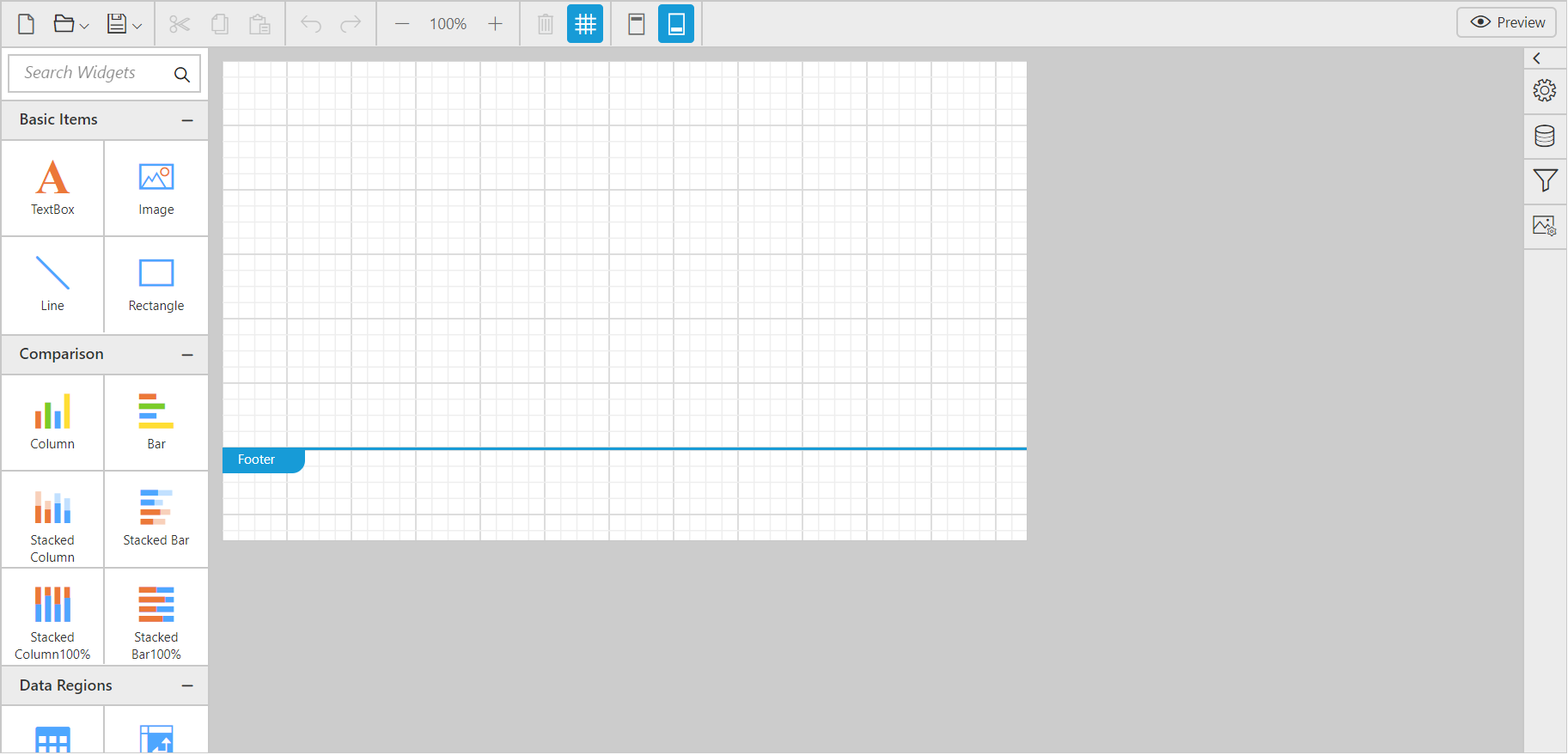
Run the application and you can see the ReportDesigner on the page as displayed in the following screenshot.