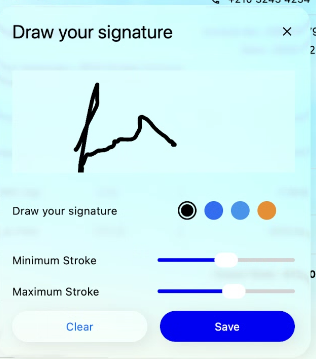
Liquid Glass Effect in .NET MAUI SignaturePad (SfSignaturePad)
21 Jul 20265 minutes to read
The Liquid Glass Effect introduces a modern, translucent design with adaptive color tinting and light refraction, creating a sleek, glass-like user experience that remains clear and accessible. This section explains how to enable and customize the effect in the Syncfusion® .NET MAUI SignaturePad control.
Prerequisites
Before using the SfSignaturePad, Install the Syncfusion.Maui.SignaturePad and Syncfusion.Maui.Core NuGet packages in your .NET MAUI project. The Syncfusion.Maui.Core package is required for the SfGlassEffectView container used to host the Liquid Glass Effect.
For a step-by-step setup, refer to the Getting Started documentation.
NOTE
- The Liquid Glass Effect is supported only on .NET 10 targeting macOS 26 or higher and iOS 26 or higher.
- It is not supported on Android or Windows.
Apply the Liquid Glass Effect
Follow these steps to enable and configure the Liquid Glass Effect in the SignaturePad control:
- Add a sample image (for example,
Wallpaper.png) to theResources/Imagesfolder of your .NET MAUI project. Set the build action to MauiImage so the image can be referenced by file name. - Wrap the
SfSignaturePadcontrol inside the SfGlassEffectView class. - Set the
Backgroundproperty of theSfSignaturePadtoTransparentso that the glass-like effect is preserved across the control.
For more information about the Liquid Glass Effect, refer to the Liquid Glass Getting Started documentation.
Configure the SfGlassEffectView properties
The following table describes the key SfGlassEffectView properties used to configure the effect:
| Property | Type | Description |
|---|---|---|
CornerRadius |
double |
The radius of the rounded corners applied to the glass container. Default is 0. |
EffectType |
LiquidGlassEffectType |
The style of the Liquid Glass Effect. See the enum members below. |
EnableShadowEffect |
bool |
Indicates whether a drop shadow is rendered behind the glass container. Default is false. |
The LiquidGlassEffectType enum exposes the following members:
RegularClear
The following code snippet applies the Liquid Glass Effect to the SfSignaturePad control:
<Grid>
    <Image Source="Wallpaper.png"
           Aspect="AspectFill" />
    <core:SfGlassEffectView CornerRadius="20"
                            HeightRequest="40"
                            EffectType="Regular"
                            EnableShadowEffect="True">
        <signaturePad:SfSignaturePad x:Name="SignaturePad"
                                     Background="Transparent"
                                     StrokeColor="#1F2937"
                                     MaximumStrokeThickness="2"
                                     MinimumStrokeThickness="2" />
    </core:SfGlassEffectView>
</Grid>
using Syncfusion.Maui.Core;
using Syncfusion.Maui.SignaturePad;
var grid = new Grid
{
BackgroundColor = Colors.Transparent,
};
var image = new Image
{
Source = "Wallpaper.png",
Aspect = Aspect.AspectFill,
};
grid.Children.Add(image);
var glassEffects = new SfGlassEffectView
{
CornerRadius = 20,
HeightRequest = 40,
EffectType = LiquidGlassEffectType.Regular,
EnableShadowEffect = true,
};
var signaturePad = new SfSignaturePad
{
BackgroundColor = Colors.Transparent,
StrokeColor = Color.FromArgb("#1F2937"),
StrokeWidth = 2,
HorizontalOptions = LayoutOptions.Fill,
VerticalOptions = LayoutOptions.Fill,
};
glassEffects.Content = signaturePad;
grid.Children.Add(glassEffects);
this.Content = grid;The following screenshot illustrates the SfSignaturePad rendered inside a Liquid Glass container: