Customization in .NET MAUI Signature Pad
18 Nov 20183 minutes to read
This section explains how to customize the appearance of the .NET MAUI Signature Pad control. The following aspects of the SignaturePad can be customized:
- Stroke color
- Stroke thickness
Prerequisites
Before using the SfSignaturePad, ensure the following NuGet package is installed in your .NET MAUI project:
Syncfusion.Maui.SignaturePad
For a step-by-step setup, refer to the Getting Started documentation.
Stroke Color
Customize the stroke color of the SignaturePad control by setting the StrokeColor property. The default stroke color is Colors.Black.
<signaturePad:SfSignaturePad StrokeColor="Red" />SfSignaturePad signaturePad = new SfSignaturePad()
{
StrokeColor = Colors.Red,
};
this.Content = signaturePad;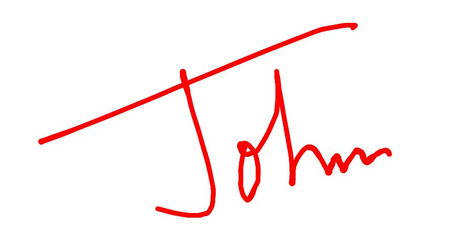
Stroke Thickness
The thickness of the stroke can be customized by setting the MinimumStrokeThickness and MaximumStrokeThickness properties. Both properties accept double values.
Ensure that the value of
MaximumStrokeThicknessis greater than or equal toMinimumStrokeThickness; otherwise, the rendered stroke thickness is undefined.
The MinimumStrokeThickness defines the minimum thickness of the stroke, while the MaximumStrokeThickness defines the maximum thickness of the stroke.
The actual stroke thickness is dynamically computed based on the speed and pressure of the user’s gesture. Faster gestures render closer to MinimumStrokeThickness, and slower gestures render closer to MaximumStrokeThickness. This produces a more realistic signature.
<signaturePad:SfSignaturePad MinimumStrokeThickness="1"
                             MaximumStrokeThickness="6" />
SfSignaturePad signaturePad = new SfSignaturePad()
{
MinimumStrokeThickness = 1,
MaximumStrokeThickness = 6,
};
this.Content = signaturePad;
IsEmpty property
The IsEmpty property indicates whether the Signature Pad contains a signature. It returns true when no strokes have been drawn and false after the user adds a stroke. Use this property to validate that a signature has been provided before continuing a workflow.
Validate the signature
The following example displays a validation message when the user tries to continue without signing.
<VerticalStackLayout Padding="20" Spacing="12">
    <signaturePad:SfSignaturePad x:Name="signaturePad"
                                 HeightRequest="200" />
    <Label x:Name="validationLabel"
           TextColor="Red"
           IsVisible="False" />
    <Button Text="Continue"
            Clicked="OnContinueClicked" />
</VerticalStackLayout>
private void OnContinueClicked(object? sender, EventArgs e)
{
if (signaturePad.IsEmpty)
{
validationLabel.Text = "Please provide a signature.";
validationLabel.IsVisible = true;
return;
}
validationLabel.IsVisible = false;
// Continue to the next step.
}