Overview of .NET MAUI Expander
18 Nov 20185 minutes to read
The Syncfusion® .NET MAUI Expander (SfExpander) is a layout control capable of loading any UI view in both header and content sections. By simply tapping the header, users can effortlessly expand or collapse the control.
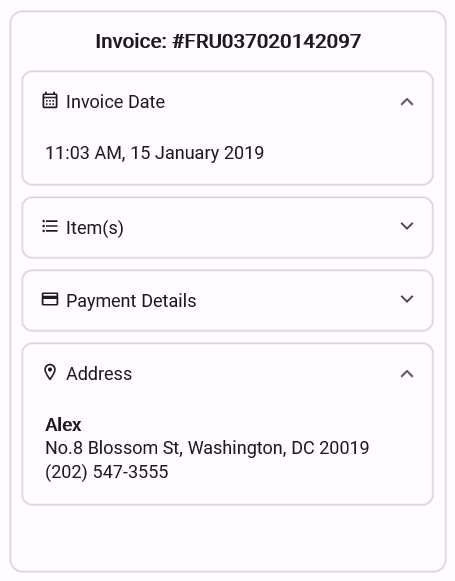
Business use cases
- Mobile and desktop applications that require collapsible sections to manage large amounts of content efficiently.
- Settings and configuration screens that organize options using expandable groups for better usability.
- Frequently asked questions (FAQ) pages that display questions and answers using expandable layouts.
- Data-driven applications that need space optimization by showing details only when required.
Key features
- Expand and collapse support allows users to toggle content visibility easily through header interaction.
- Header and content customization support allows adding text, icons, images, or custom UI elements to create rich expandable sections.
- Animation support allows applying smooth expand and collapse transitions to enhance user experience and interactivity.
Globalization
The following table summarizes the globalization support available in this control.
 Full Support
 Not Applicable
| Control | Localization | RTL | Time zone | Screen reader | Keyboard navigation |
|---|---|---|---|---|---|
| Expander | |
|
|
|
|
Related controls
- Accordion for managing multiple expandable sections in a grouped layout.
- Cards for presenting content in expandable card-based layouts.
- Backdrop Page for creating layered layouts with front and back panels.
See Also
- Getting Started shows a step‑by‑step guide to begin using the Expander control.
- Appearance explains how to customize header and content appearance.
- UI Kit provides interactive demos and ready‑made UI examples.
Resources
Feature Tour
Get a quick overview of key features and capabilities to kick start your journey.
Explore Features
Tutorial Videos
Watch step‑by‑step video guides to quickly understand concepts and implementation.
Watch now
Knowledge Base
Find practical solutions, troubleshooting tips and how‑to guides for common scenarios.
Search KB's
Use Case Sample
Explore a real-world application that demonstrates the practical use of the Expander.
View Sample