Advanced AI Features in React Data Grid
Easily integrate Syncfusion EJ2 React Grid with AI models (e.g., OpenAI GPT-4o-mini, Azure OpenAI) to enable predictive analysis, anomaly detection, and semantic filtering via natural language or data-driven prompts. This toolkit transforms your grid into an intelligent data explorer, predicting future values, spotting irregularities, and enabling semantic searches without exact keywords.
Predictive analysis
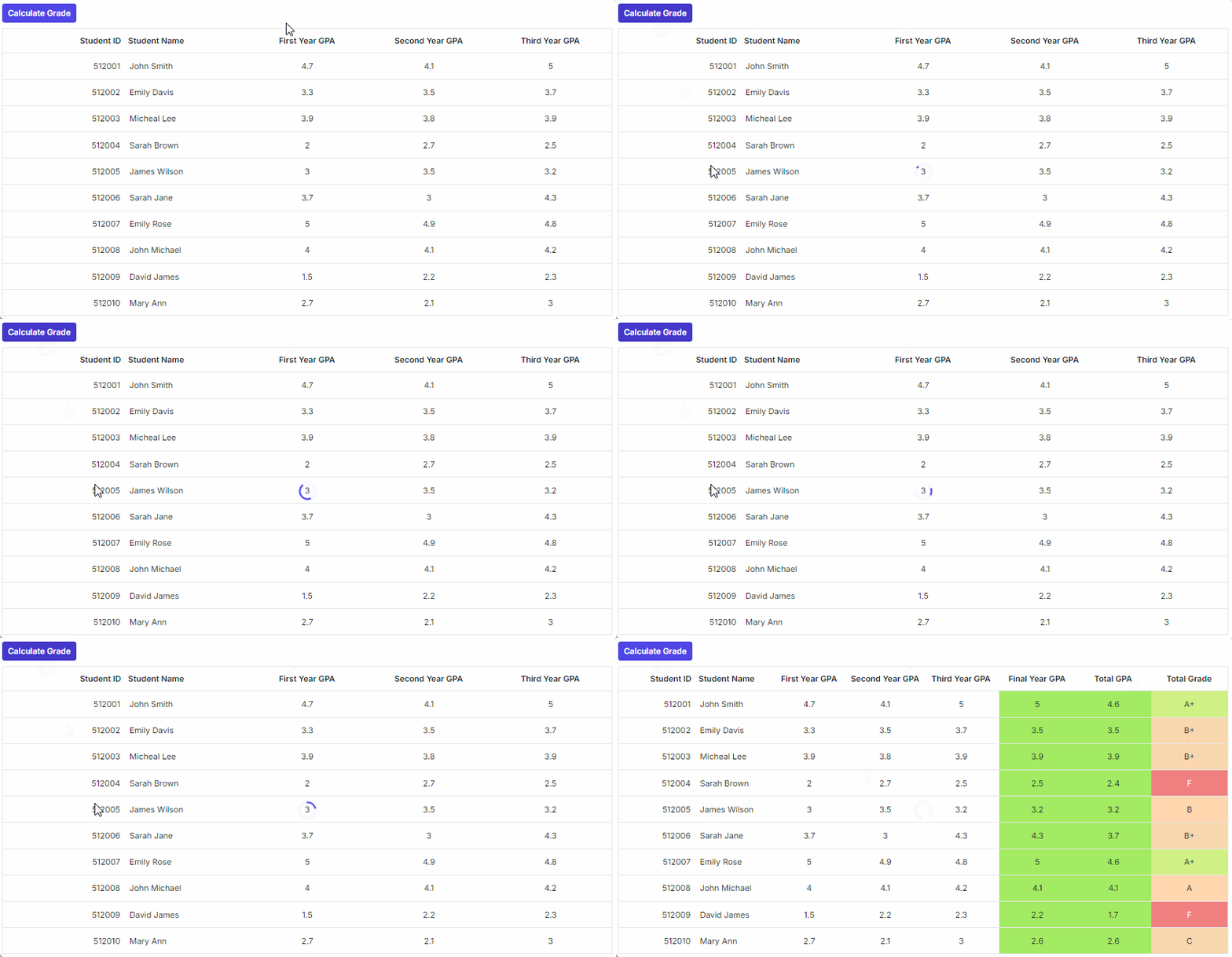
Predictive analysis computes and fills missing or future values based on existing data patterns. To enable predictive analysis, add a button labeled Calculate Grade above the grid. When the user clicks this button, capture the grid’s dataSource and send it to your backend for predictive computation. The backend returns JSON object with predicted values for columns such as Final Year GPA, Total GPA, and Total Grade. Reveal these hidden columns using showColumns and update rows using setRowData with smooth animation for a better user experience. Apply conditional styling through the queryCellInfo event to highlight predicted values.
import React, { useEffect, useRef, useState } from 'react';
import { GridComponent, ColumnsDirective, ColumnDirective } from '@syncfusion/ej2-react-grids';
import { ButtonComponent } from '@syncfusion/ej2-react-buttons';
import { predictiveData, type predictive } from './datasource.ts';
import { getAzureChatAIRequest } from './openai-model.ts';
import './App.css'

const PredictiveGrid: React.FC = () => {
    const gridRef = useRef<GridComponent>(null);
    const [AIgeneratedData, setAIgeneratedData] = useState<predictive[]>([]);

    const handleCalculateGrade = async () => {
        if (!gridRef.current) return;
        gridRef.current.showSpinner();

        const prompt = `Final year GPA column should updated based on GPA of FirstYearGPA, SecondYearGPA and ThirdYearGPA columns. Total GPA should update based on average of all years GPA. Total Grade update based on total GPA. Updated the grade based on following details, 0 - 2.5 = F, 2.6 - 2.9 = C, 3.0 - 3.4 = B, 3.5 - 3.9 = B+, 4.0 - 4.4 = A, 4.5 - 5 = A+. average value decimal should not exceed 1 digit.`;
        const gridReportJson = JSON.stringify(gridRef.current.dataSource);
        const userInput = generatePrompt(gridReportJson, prompt);

        try {
            const aiOutput = await getAzureChatAIRequest({
                messages: [{ role: 'user', content: userInput }]
            });

            const cleanedOutput = aiOutput.replace('```json', '').replace('```', '');
            let parsedData: predictive[] = [];

            try {
                parsedData = JSON.parse(cleanedOutput);
            } catch (err) {
                console.error('Invalid JSON from AI:', cleanedOutput);
            }

            setAIgeneratedData(parsedData);
        } catch (error) {
            console.error('Error calculating grade:', error);
            gridRef.current.hideSpinner();
        }
    };

    const generatePrompt = (data: string, userInput: string): string => {
        return `Given the following datasource are bounded in the Grid table\n\n${data}.\n Return the newly prepared datasource based on following user query: ${userInput}\n\nGenerate an output in JSON format only and Should not include any additional information or contents in response`;
    };

    const customizeCell = (args: any) => {
        if (args.column.field === 'FinalYearGPA' || args.column.field === 'TotalGPA') {
            if ((args.data as predictive).FinalYearGPA! > 0) {
                args.cell.classList.add('e-PredictiveColumn');
            } else if ((args.data as predictive).TotalGPA! > 0) {
                args.cell.classList.add('e-PredictiveColumn');
            }
        }
        if (args.column.field === 'TotalGrade') {
            if ((args.data as predictive).TotalGPA! <= 2.5) {
                args.cell.classList.add('e-inactivecolor');
            } else if ((args.data as predictive).TotalGPA! >= 4.5) {
                args.cell.classList.add('e-activecolor');
            } else if ((args.data as predictive).TotalGPA! > 0) {
                args.cell.classList.add('e-averageColumn');
            }
        }
    };

    // Update grid when AIgeneratedData changes.
    useEffect(() => {
        if (AIgeneratedData.length > 0 && gridRef.current) {
            gridRef.current.showColumns(['Final Year GPA', 'Total GPA', 'Total Grade']);
            updateRows(AIgeneratedData).then(() => {
                gridRef.current?.hideSpinner(); // Hide after updates complete.
            });
        }
    }, [AIgeneratedData]);

    const delay = (ms: number) => new Promise(resolve => setTimeout(resolve, ms));

    const updateRows = async (generatedData: predictive[]): Promise<void> => {
        await delay(300); // Initial delay to match reference sample.
        for (let i = 0; i < generatedData.length; i++) {
            const item = generatedData[i];
            gridRef.current!.setRowData(item.StudentID, item);
            await delay(300); // Smooth update animation.
        }
    };

    return (
        <div>
            <ButtonComponent id="calculate_Grade" isPrimary={true} onClick={handleCalculateGrade} style=>
                Calculate Grade
            </ButtonComponent>
            <GridComponent ref={gridRef} dataSource={predictiveData} queryCellInfo={customizeCell} enableHover={false} allowSelection={false} >
                <ColumnsDirective>
                    <ColumnDirective field="StudentID" isPrimaryKey={true} headerText="Student ID" textAlign="Right" width="100" />
                    <ColumnDirective field="StudentName" headerText="Student Name" width="100" />
                    <ColumnDirective field="FirstYearGPA" headerText="First Year GPA" textAlign="Center" width="100" />
                    <ColumnDirective field="SecondYearGPA" headerText="Second Year GPA" textAlign="Center" width="100" />
                    <ColumnDirective field="ThirdYearGPA" headerText="Third Year GPA" textAlign="Center" width="100" />
                    <ColumnDirective field="FinalYearGPA" headerText="Final Year GPA" visible={false} textAlign="Center" width="100" />
                    <ColumnDirective field="TotalGPA" headerText="Total GPA" visible={false} textAlign="Center" width="100" />
                    <ColumnDirective field="TotalGrade" headerText="Total Grade" visible={false} textAlign="Center" width="100" />
                </ColumnsDirective>
            </GridComponent>
        </div>
    );
};

export default PredictiveGrid;
import './App.css'
import PredictiveGrid from './predictive-data'
function App() {
return (
<div>
<PredictiveGrid />
</div>
)
}
export default Appimport OpenAI from "openai";
const OPENAI_API_KEY = "YOUR_API_KEY";
const openAi = new OpenAI({
apiKey: OPENAI_API_KEY, dangerouslyAllowBrowser: true
});
export async function getAzureChatAIRequest(options: any) {
try {
const completion = await openAi.chat.completions.create({
model: "gpt-4o-mini",
messages: options.messages,
temperature: options.temperature ?? 0.7,
max_tokens: options.maxTokens ?? 1000
});
return completion.choices[0].message.content;
} catch (err) {
console.error("Error occurred:", err);
return null;
}
}
export async function OpenAiModel(description: string) {
const chatCompletion = await getOpenAiModel(description);
return chatCompletion.choices[0].message.content;
}
export async function getOpenAiModel(query: string) {
return await openAi.chat.completions.create({
messages: [{ role: "user", content: query }],
model: "gpt-3.5-turbo",
});
}
// Open AI Embedding.
export async function OpenAiEmbeddingModel(description: string) {
const embedding = await openAi.embeddings.create({
model: "text-embedding-ada-002",
input: description,
encoding_format: "float",
});
return embedding;
}.e-inactivecolor {
background-color: #f08080;
width: 100%;
}
.e-averageColumn{
background-color: #ffd6ae;
}
.fluent-dark .e-inactivecolor,
.fluent2-dark .e-inactivecolor,
.tailwind-dark .e-inactivecolor,
.material-dark .e-inactivecolor,
.material3-dark .e-inactivecolor,
.fabric-dark .e-inactivecolor,
.bootstrap-dark .e-inactivecolor,
.bootstrap4-dark .e-inactivecolor,
.bootstrap5-dark .e-inactivecolor,
.highcontrast .e-inactivecolor {
background-color: #55241E;
}
.e-grid .e-rowcell.e-inactivecolor:not(.e-editedbatchcell):not(.e-updatedtd) {
color: #FFFFFF;
}
.fluent-dark .e-grid .e-rowcell.e-inactivecolor:not(.e-editedbatchcell):not(.e-updatedtd),
.fluent2-dark .e-grid .e-rowcell.e-inactivecolor:not(.e-editedbatchcell):not(.e-updatedtd),
.tailwind-dark .e-grid .e-rowcell.e-inactivecolor:not(.e-editedbatchcell):not(.e-updatedtd),
.material-dark .e-grid .e-rowcell.e-inactivecolor:not(.e-editedbatchcell):not(.e-updatedtd),
.material3-dark .e-grid .e-rowcell.e-inactivecolor:not(.e-editedbatchcell):not(.e-updatedtd),
.fabric-dark .e-grid .e-rowcell.e-inactivecolor:not(.e-editedbatchcell):not(.e-updatedtd),
.bootstrap-dark .e-grid .e-rowcell.e-inactivecolor:not(.e-editedbatchcell):not(.e-updatedtd),
.bootstrap4-dark .e-grid .e-rowcell.e-inactivecolor:not(.e-editedbatchcell):not(.e-updatedtd),
.bootstrap5-dark .e-grid .e-rowcell.e-inactivecolor:not(.e-editedbatchcell):not(.e-updatedtd),
.highcontrast .e-grid .e-rowcell.e-inactivecolor:not(.e-editedbatchcell):not(.e-updatedtd) {
color: #FF9CA0;
}
.e-activecolor {
background-color: #d0ef84;
width: 100%;
}
.fluent-dark .e-activecolor,
.fluent2-dark .e-activecolor,
.tailwind-dark .e-activecolor,
.material-dark .e-activecolor,
.material3-dark .e-activecolor,
.fabric-dark .e-activecolor,
.bootstrap-dark .e-activecolor,
.bootstrap4-dark .e-activecolor,
.bootstrap5-dark .e-activecolor,
.highcontrast .e-activecolor {
background-color: #315C35;
}
.fluent-dark .e-grid .e-rowcell.e-activecolor:not(.e-editedbatchcell):not(.e-updatedtd),
.fluent2-dark .e-grid .e-rowcell.e-activecolor:not(.e-editedbatchcell):not(.e-updatedtd),
.tailwind-dark .e-grid .e-rowcell.e-activecolor:not(.e-editedbatchcell):not(.e-updatedtd),
.material-dark .e-grid .e-rowcell.e-activecolor:not(.e-editedbatchcell):not(.e-updatedtd),
.material3-dark .e-grid .e-rowcell.e-activecolor:not(.e-editedbatchcell):not(.e-updatedtd),
.fabric-dark .e-grid .e-rowcell.e-activecolor:not(.e-editedbatchcell):not(.e-updatedtd),
.bootstrap-dark .e-grid .e-rowcell.e-activecolor:not(.e-editedbatchcell):not(.e-updatedtd),
.bootstrap4-dark .e-grid .e-rowcell.e-activecolor:not(.e-editedbatchcell):not(.e-updatedtd),
.bootstrap5-dark .e-grid .e-rowcell.e-activecolor:not(.e-editedbatchcell):not(.e-updatedtd),
.highcontrast .e-grid .e-rowcell.e-activecolor:not(.e-editedbatchcell):not(.e-updatedtd) {
color: #38FF9C;
}
.e-PredictiveColumn {
background-color: #a3eb63
}
.fluent-dark .e-PredictiveColumn,
.fluent2-dark .e-PredictiveColumn,
.tailwind-dark .e-PredictiveColumn,
.material-dark .e-PredictiveColumn,
.material3-dark .e-PredictiveColumn,
.fabric-dark .e-PredictiveColumn,
.bootstrap-dark .e-PredictiveColumn,
.bootstrap4-dark .e-PredictiveColumn,
.bootstrap5-dark .e-PredictiveColumn,
.highcontrast .e-PredictiveColumn {
background-color: #001F3F;
}export interface predictive {
StudentID: number;
StudentName: string;
FirstYearGPA: number;
SecondYearGPA: number;
ThirdYearGPA: number;
FinalYearGPA?: number;
TotalGPA?: number;
TotalGrade?: string;
};
export let predictiveData: predictive[] = [
{ StudentID: 512001, StudentName: "John Smith", FirstYearGPA: 4.7, SecondYearGPA: 4.1, ThirdYearGPA: 5.0 },
{ StudentID: 512002, StudentName: "Emily Davis", FirstYearGPA: 3.3, SecondYearGPA: 3.5, ThirdYearGPA: 3.7 },
{ StudentID: 512003, StudentName: "Micheal Lee", FirstYearGPA: 3.9, SecondYearGPA: 3.8, ThirdYearGPA: 3.9 },
{ StudentID: 512004, StudentName: "Sarah Brown", FirstYearGPA: 2.0, SecondYearGPA: 2.7, ThirdYearGPA: 2.5 },
{ StudentID: 512005, StudentName: "James Wilson", FirstYearGPA: 3.0, SecondYearGPA: 3.5, ThirdYearGPA: 3.2 },
{ StudentID: 512006, StudentName: "Sarah Jane", FirstYearGPA: 3.7, SecondYearGPA: 3.0, ThirdYearGPA: 4.3 },
{ StudentID: 512007, StudentName: "Emily Rose", FirstYearGPA: 5.0, SecondYearGPA: 4.9, ThirdYearGPA: 4.8 },
{ StudentID: 512008, StudentName: "John Michael", FirstYearGPA: 4.0, SecondYearGPA: 4.1, ThirdYearGPA: 4.2 },
{ StudentID: 512009, StudentName: "David James", FirstYearGPA: 1.5, SecondYearGPA: 2.2, ThirdYearGPA: 2.3 },
{ StudentID: 512010, StudentName: "Mary Ann", FirstYearGPA: 2.7, SecondYearGPA: 2.1, ThirdYearGPA: 3.0 },
];The following screenshot represents the predictive analysis,
Anomaly detection using AI
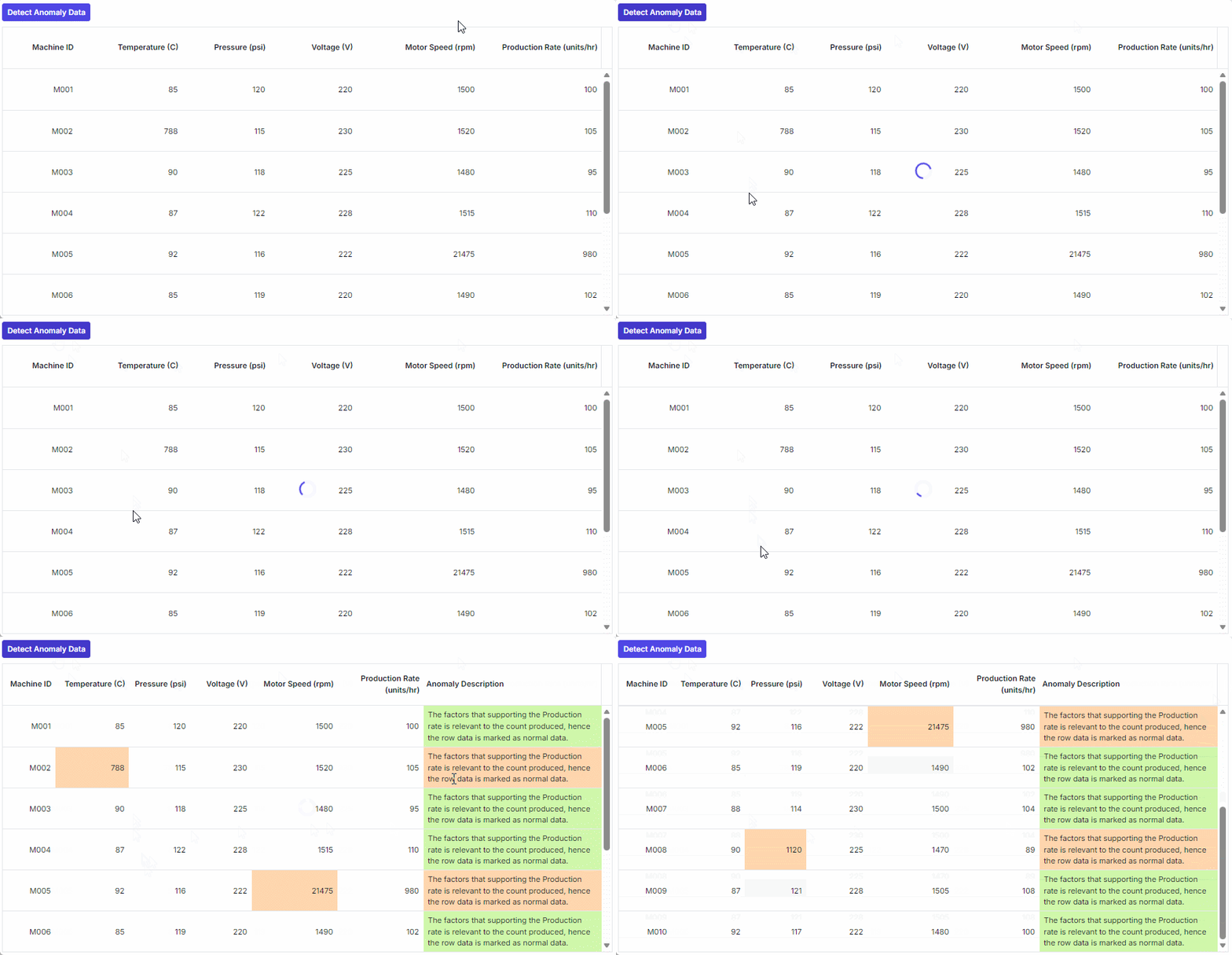
Anomaly detection identifies irregular or illogical entries and provides explanations for flagged records. To integrate anomaly detection, add a button labeled Detect Anomaly Data. When clicked, send the full dataset to the backend for anomaly detection. The backend returns JSON object containing Anomaly FieldName and Anomaly Description. Reveal the hidden Anomaly Description column using showColumns and update affected rows using setRowData. Highlight flagged cells in red and display anomaly descriptions using the queryCellInfo event for clarity.
import React, { useEffect, useRef, useState } from 'react';
import { GridComponent, ColumnsDirective, ColumnDirective } from '@syncfusion/ej2-react-grids';
import { ButtonComponent } from '@syncfusion/ej2-react-buttons';
import { isNullOrUndefined } from '@syncfusion/ej2-base';
import { machineDataList, type MachineData } from './datasource.ts';
import { getAzureChatAIRequest } from './openai-model.ts';
import './App.css'

const AnomalyDetectionGrid: React.FC = () => {
    const gridRef = useRef<GridComponent>(null);
    const [AIgeneratedData, setAIgeneratedData] = useState<MachineData[]>([]);

    const handleDetectAnomaly = async () => {
        if (!gridRef.current) return;
        gridRef.current.showSpinner();

        const gridReportJson = JSON.stringify(gridRef.current.dataSource);
        const userInput = generatePrompt(gridReportJson);

        try {
            const aiOutput = await getAzureChatAIRequest({ messages: [{ role: 'user', content: userInput }] });
            const cleanedOutput = aiOutput.replace('```json', '').replace('```', '');
            const parsedData: MachineData[] = JSON.parse(cleanedOutput);

            gridRef.current.hideSpinner();
            setAIgeneratedData(parsedData);
        } catch (error) {
            console.error('Error detecting anomaly:', error);
            gridRef.current.hideSpinner();
        }
    };

    const generatePrompt = (data: string): string => {
        return `Given the following datasource are bounded in the Grid table\n\n${data}.\n Return the anomaly data rows (ie. pick the ir-relevant datas mentioned in the corresponding table) present in the table mentioned above as like in the same format provided do not change the format. Example: Watch out the production rate count and the factors that is used to acheive the mentioned production rate(Temprature, Pressure, Motor Speed) If the production rate is not relevant to the concern factors mark it as anomaly Data. If it is anomaly data then due to which column data it is marked as anomaly that particular column name should be updated in the AnomalyFieldName. Also Update the AnomalyDescription stating that due to which reason it is marked as anomaly a short description. Example if the data is marked as anomaly due to the Temperature column, Since the mentioned temperature is too high than expected, it is marked as anomaly data.\n\nGenerate an output in JSON format only and Should not include any additional information or contents in response`;
    };

    const customizeCell = (args: any) => {
        if (!isNullOrUndefined(AIgeneratedData) && AIgeneratedData.length > 0) {
            let isAnomalyData = false;
            AIgeneratedData.forEach(e => {
                if (!isNullOrUndefined(e.AnomalyFieldName) &&
                    e.MachineID === args.data.MachineID &&
                    (e.AnomalyFieldName === args.column.field || args.column.field === 'AnomalyDescription')) {
                    isAnomalyData = true;
                }
            });
            if (isAnomalyData) {
                args.cell.classList.add('anomaly-cell');
                args.cell.classList.remove('normal-cell');
            } else if (args.column.field === 'AnomalyDescription') {
                args.cell.classList.add('normal-cell');
                args.cell.classList.remove('anomaly-cell');
            }
        } else if (args.column.field === 'AnomalyDescription') {
            args.cell.classList.add('normal-cell');
            args.cell.classList.remove('anomaly-cell');
        }
    };

    useEffect(() => {
        if (AIgeneratedData.length > 0 && gridRef.current) {
            gridRef.current.showColumns(['Anomaly Description']);
            AIgeneratedData.forEach(item => {
                gridRef.current?.setRowData(item.MachineID, item);
            });
            gridRef.current.refresh();
        }
    }, [AIgeneratedData]);

    return (
        <div>
            <ButtonComponent id="anomaly" isPrimary={true} onClick={handleDetectAnomaly} style=>
                Detect Anomaly Data
            </ButtonComponent>
            <GridComponent ref={gridRef} dataSource={machineDataList} queryCellInfo={customizeCell} enableHover={false} enableStickyHeader={true}
                allowTextWrap={true} allowSelection={false} rowHeight={75} height={450} >
                <ColumnsDirective>
                    <ColumnDirective field="MachineID" isPrimaryKey={true} headerText="Machine ID" textAlign="Right" width="85" />
                    <ColumnDirective field="Temperature" headerText="Temperature (C)" textAlign="Right" width="120" />
                    <ColumnDirective field="Pressure" headerText="Pressure (psi)" textAlign="Right" width="100" />
                    <ColumnDirective field="Voltage" headerText="Voltage (V)" textAlign="Right" width="100" />
                    <ColumnDirective field="MotorSpeed" headerText="Motor Speed (rpm)" textAlign="Right" width="140" />
                    <ColumnDirective field="ProductionRate" headerText="Production Rate (units/hr)" textAlign="Right" width="140" />
                    <ColumnDirective field="AnomalyDescription" visible={false} headerText="Anomaly Description" width="290" />
                </ColumnsDirective>
            </GridComponent>
        </div>
    );
};

export default AnomalyDetectionGrid;
import AnomalyDetectionGrid from './anomaly-detection'
import './App.css'
function App() {
return (
<div>
<AnomalyDetectionGrid />
</div>
)
}
export default Appimport OpenAI from "openai";
const OPENAI_API_KEY = "YOUR_API_KEY";
const openAi = new OpenAI({
apiKey: OPENAI_API_KEY, dangerouslyAllowBrowser: true
});
export async function getAzureChatAIRequest(options: any) {
try {
const completion = await openAi.chat.completions.create({
model: "gpt-4o-mini",
messages: options.messages,
temperature: options.temperature ?? 0.7,
max_tokens: options.maxTokens ?? 1000
});
return completion.choices[0].message.content;
} catch (err) {
console.error("Error occurred:", err);
return null;
}
}
export async function OpenAiModel(description: string) {
const chatCompletion = await getOpenAiModel(description);
return chatCompletion.choices[0].message.content;
}
export async function getOpenAiModel(query: string) {
return await openAi.chat.completions.create({
messages: [{ role: "user", content: query }],
model: "gpt-3.5-turbo",
});
}
// Open AI Embedding.
export async function OpenAiEmbeddingModel(description: string) {
const embedding = await openAi.embeddings.create({
model: "text-embedding-ada-002",
input: description,
encoding_format: "float",
});
return embedding;
}.anomaly-cell {
background-color: #ffd6ae;
}
.fluent-dark .anomaly-cell,
.fluent2-dark .anomaly-cell,
.tailwind-dark .anomaly-cell,
.material-dark .anomaly-cell,
.material3-dark .anomaly-cell,
.fabric-dark .anomaly-cell,
.bootstrap-dark .anomaly-cell,
.bootstrap4-dark .anomaly-cell,
.bootstrap5-dark .anomaly-cell,
.highcontrast .anomaly-cell {
background-color: #55241E;
}
/* .e-grid .e-rowcell.anomaly-cell:not(.e-editedbatchcell):not(.e-updatedtd) {
color: #FFFFFF;
} */
.fluent-dark .e-grid .e-rowcell.anomaly-cell:not(.e-editedbatchcell):not(.e-updatedtd),
.fluent2-dark .e-grid .e-rowcell.anomaly-cell:not(.e-editedbatchcell):not(.e-updatedtd),
.tailwind-dark .e-grid .e-rowcell.anomaly-cell:not(.e-editedbatchcell):not(.e-updatedtd),
.material-dark .e-grid .e-rowcell.anomaly-cell:not(.e-editedbatchcell):not(.e-updatedtd),
.material3-dark .e-grid .e-rowcell.anomaly-cell:not(.e-editedbatchcell):not(.e-updatedtd),
.fabric-dark .e-grid .e-rowcell.anomaly-cell:not(.e-editedbatchcell):not(.e-updatedtd),
.bootstrap-dark .e-grid .e-rowcell.anomaly-cell:not(.e-editedbatchcell):not(.e-updatedtd),
.bootstrap4-dark .e-grid .e-rowcell.anomaly-cell:not(.e-editedbatchcell):not(.e-updatedtd),
.bootstrap5-dark .e-grid .e-rowcell.anomaly-cell:not(.e-editedbatchcell):not(.e-updatedtd),
.highcontrast .e-grid .e-rowcell.anomaly-cell:not(.e-editedbatchcell):not(.e-updatedtd) {
color: #FF9CA0;
}
.normal-cell {
background-color: #d0f8ab;
}
.fluent-dark .normal-cell,
.fluent2-dark .normal-cell,
.tailwind-dark .normal-cell,
.material-dark .normal-cell,
.material3-dark .normal-cell,
.fabric-dark .normal-cell,
.bootstrap-dark .normal-cell,
.bootstrap4-dark .normal-cell,
.bootstrap5-dark .normal-cell,
.highcontrast .normal-cell {
background-color: #315C35;
}
.fluent-dark .e-grid .e-rowcell.normal-cell:not(.e-editedbatchcell):not(.e-updatedtd),
.fluent2-dark .e-grid .e-rowcell.normal-cell:not(.e-editedbatchcell):not(.e-updatedtd),
.tailwind-dark .e-grid .e-rowcell.normal-cell:not(.e-editedbatchcell):not(.e-updatedtd),
.material-dark .e-grid .e-rowcell.normal-cell:not(.e-editedbatchcell):not(.e-updatedtd),
.material3-dark .e-grid .e-rowcell.normal-cell:not(.e-editedbatchcell):not(.e-updatedtd),
.fabric-dark .e-grid .e-rowcell.normal-cell:not(.e-editedbatchcell):not(.e-updatedtd),
.bootstrap-dark .e-grid .e-rowcell.normal-cell:not(.e-editedbatchcell):not(.e-updatedtd),
.bootstrap4-dark .e-grid .e-rowcell.normal-cell:not(.e-editedbatchcell):not(.e-updatedtd),
.bootstrap5-dark .e-grid .e-rowcell.normal-cell:not(.e-editedbatchcell):not(.e-updatedtd),
.highcontrast .e-grid .e-rowcell.normal-cell:not(.e-editedbatchcell):not(.e-updatedtd) {
color: #38FF9C;
}export interface MachineData {
MachineID: string;
Temperature: number;
Pressure: number;
Voltage: number;
MotorSpeed: number;
ProductionRate: number;
AnomalyDescription?: string;
};
let description: string = "The factors that supporting the Production rate is relevant to the count produced, hence the row data is marked as normal data.";
export let machineDataList: MachineData[] = [
{
MachineID: "M001",
Temperature: 85,
Pressure: 120,
Voltage: 220,
MotorSpeed: 1500,
ProductionRate: 100,
AnomalyDescription: description,
},
{
MachineID: "M002",
Temperature: 788,
Pressure: 115,
Voltage: 230,
MotorSpeed: 1520,
ProductionRate: 105,
AnomalyDescription: description,
},
{
MachineID: "M003",
Temperature: 90,
Pressure: 118,
Voltage: 225,
MotorSpeed: 1480,
ProductionRate: 95,
AnomalyDescription: description,
},
{
MachineID: "M004",
Temperature: 87,
Pressure: 122,
Voltage: 228,
MotorSpeed: 1515,
ProductionRate: 110,
AnomalyDescription: description,
},
{
MachineID: "M005",
Temperature: 92,
Pressure: 116,
Voltage: 222,
MotorSpeed: 21475,
ProductionRate: 980,
AnomalyDescription: description,
},
{
MachineID: "M006",
Temperature: 85,
Pressure: 119,
Voltage: 220,
MotorSpeed: 1490,
ProductionRate: 102,
AnomalyDescription: description,
},
{
MachineID: "M007",
Temperature: 88,
Pressure: 114,
Voltage: 230,
MotorSpeed: 1500,
ProductionRate: 104,
AnomalyDescription: description,
},
{
MachineID: "M008",
Temperature: 90,
Pressure: 1120,
Voltage: 225,
MotorSpeed: 1470,
ProductionRate: 89,
AnomalyDescription: description,
},
{
MachineID: "M009",
Temperature: 87,
Pressure: 121,
Voltage: 228,
MotorSpeed: 1505,
ProductionRate: 108,
AnomalyDescription: description,
},
{
MachineID: "M010",
Temperature: 92,
Pressure: 117,
Voltage: 222,
MotorSpeed: 1480,
ProductionRate: 100,
AnomalyDescription: description,
}
];The following screenshot represents the anomaly detection,
Semantic filtering
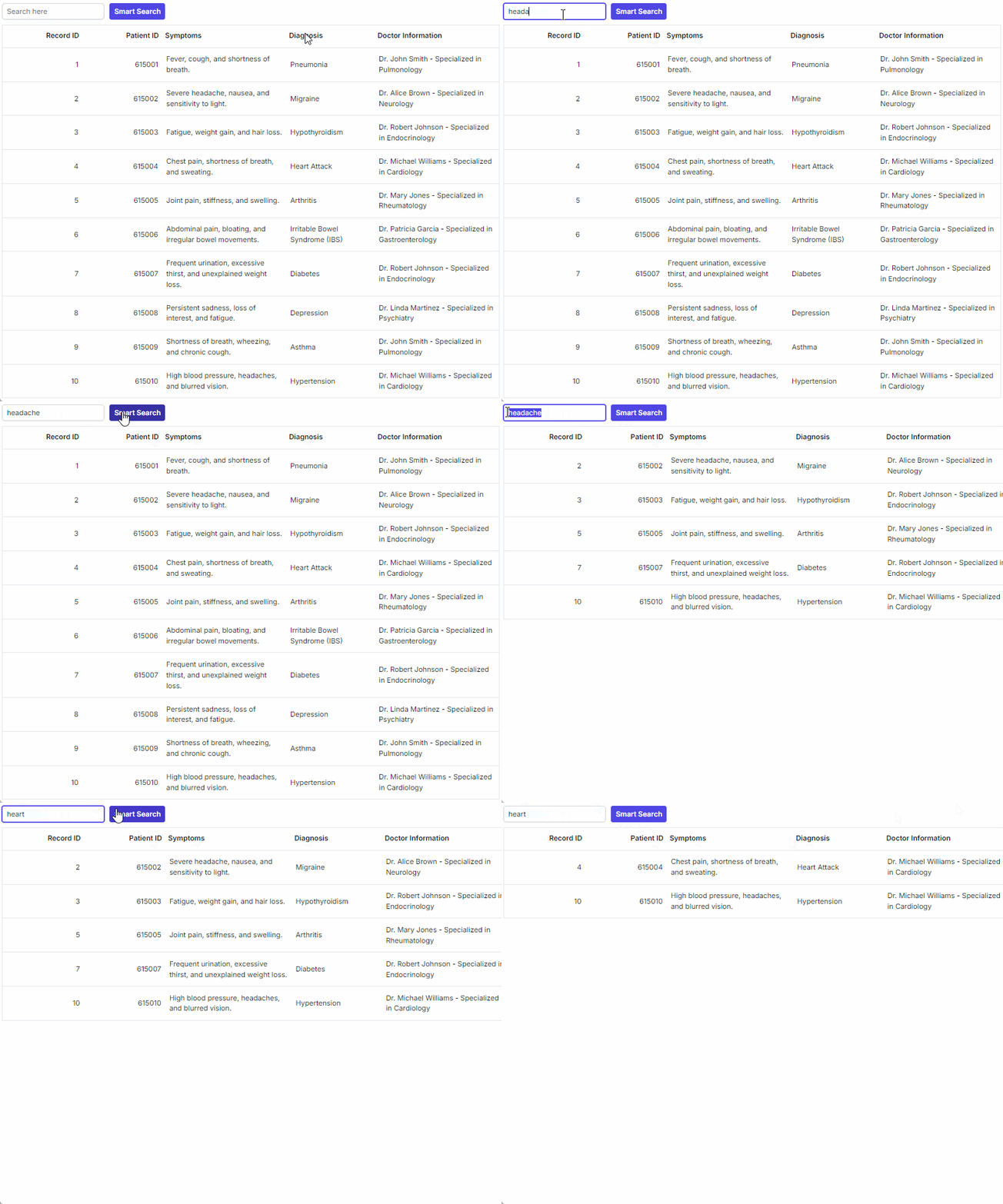
Semantic filtering enables natural language search for semantically related records. To enable semantic filtering, compute text embeddings in advance for all records during component mount, either locally or via a backend service. Add a search input and a Smart Search button to the UI. When the user clicks the button, generate an embedding for the search term and compute similarity against stored vectors. Select records above a similarity threshold, build a dynamic OR predicate using Predicate, and apply it through grid.query.
import React, { useEffect, useRef, useState } from 'react';
import {GridComponent, ColumnsDirective, ColumnDirective } from '@syncfusion/ej2-react-grids';
import { TextBoxComponent } from '@syncfusion/ej2-react-inputs';
import { ButtonComponent } from '@syncfusion/ej2-react-buttons';
import { Query, Predicate } from '@syncfusion/ej2-data';
import { MedicalRecords, type MedicalRecord } from './datasource';
import { cosineSimilarity } from './cosine-similarity';
import { embeddingModel } from './embedding-model';

const SemanticFilteringGrid: React.FC = () => {
    const gridRef = useRef<GridComponent>(null);
    const [productEmbeddings, setProductEmbeddings] = useState<{ [key: string]: number[] }>({});
    const [searchValue, setSearchValue] = useState<string>('');
    const [isEmbeddingsLoaded, setIsEmbeddingsLoaded] = useState<boolean>(false);

    // Generate embeddings for all records on mount.
    useEffect(() => {
        const getEmbeddingsData = async () => {
            try {
                const embeddings: { [key: string]: number[] } = {};
                for (let record of MedicalRecords) {
                    const data = (await embeddingModel(
                        `${record.DoctorDetails} ${record.PatientID} ${record.Symptoms} ${record.Diagnosis}`
                    )) as number[];
                    embeddings[record.RecordID] = data;
                }
                setProductEmbeddings(embeddings);
                setIsEmbeddingsLoaded(true);
            } catch (error) {
                console.error('Failed to generate embeddings:', error);
                setIsEmbeddingsLoaded(false);
            }
        };
        getEmbeddingsData();
    }, []);

    const handleSmartSearch = async () => {
        if (!gridRef.current) return;

        if (!isEmbeddingsLoaded) {
            console.warn('Embeddings not loaded yet. Please wait.');
            return;
        }

        if (searchValue.trim()) {
            gridRef.current.showSpinner();
            await executePrompt(searchValue.trim());
        } else {
            gridRef.current.query = new Query();
        }
    };

    const executePrompt = async (queryText: string) => {
        try {
            const queryVector = await embeddingModel(queryText);
            if (!Array.isArray(queryVector)) {
                console.error('Invalid query vector:', queryVector);
                gridRef.current!.hideSpinner();
                return;
            }
            const similarityThreshold = 0.8;

            const outputData = MedicalRecords.filter((record: any) => {
                const emb = productEmbeddings[record.RecordID];
                if (!emb || !Array.isArray(emb)) {
                    return false; // Skip if embedding missing or invalid.
                }
                const similarity = cosineSimilarity(emb, queryVector);
                return similarity > similarityThreshold;
            });

            gridRef.current!.hideSpinner();

            if (outputData.length > 0) {
                gridRef.current!.query = new Query().where(generatePredicate(outputData));
            } else {
                gridRef.current!.query = new Query().take(0);
            }
        } catch (error) {
            console.error('Error in executePrompt:', error);
            gridRef.current!.hideSpinner();
        }
    };

    const generatePredicate = (filteredData: MedicalRecord[]) => {
        const predicates: Predicate[] = [];
        for (let i = 0; i < filteredData.length; i++) {
            predicates.push(new Predicate('Symptoms', 'contains', filteredData[i].Symptoms));
        }
        return Predicate.or(predicates);
    };

    return (
        <div>
            <div style=>
                <TextBoxComponent placeholder="Search here" width={200} value={searchValue} input={(e: any) => setSearchValue(e.value)}/>
                <ButtonComponent isPrimary={true} onClick={handleSmartSearch} disabled={!isEmbeddingsLoaded}>Smart Search</ButtonComponent>
            </div>
            <GridComponent ref={gridRef} dataSource={MedicalRecords} enableAltRow={true} allowTextWrap={true}>
                <ColumnsDirective>
                    <ColumnDirective field="RecordID" headerText="Record ID" textAlign="Right" width="90" />
                    <ColumnDirective field="PatientID" headerText="Patient ID" textAlign="Right" width="90" />
                    <ColumnDirective field="Symptoms" headerText="Symptoms" width="140" />
                    <ColumnDirective field="Diagnosis" headerText="Diagnosis" width="100" />
                    <ColumnDirective field="DoctorDetails" headerText="Doctor Information" width="140" />
                </ColumnsDirective>
            </GridComponent>
        </div>
    );
};

export default SemanticFilteringGrid;
import SemanticFilteringGrid from './semantic-search'
function App() {
return (
<div>
<SemanticFilteringGrid />
</div>
)
}
export default Appimport { pipeline, env } from "@xenova/transformers";
// Force remote model loading and disable caching to avoid bundler/HTML fetch issues.
env.allowLocalModels = false;
env.useBrowserCache = false;
env.localModelPath = './';
env.allowRemoteModels = true;
let pipe: any = null;
export async function initializePipeline() {
pipe = await pipeline("feature-extraction", "Supabase/gte-small");
return pipe;
}
export async function embeddingModel(description: string) {
if (!pipe) {
pipe = await initializePipeline();
}
try {
// Generate the embedding from text.
const output = await pipe(description, {
pooling: "mean",
normalize: true,
});
// Extract the embedding output.
const embedding = Array.from(output.data);
return embedding;
} catch (error) {
console.error('Embedding model error:', error);
// Log raw output if available for debugging (e.g., if it's HTML).
if (output) {
console.error('Raw output:', output);
}
throw error; // Re-throw to propagate.
}
}export function cosineSimilarity(vector1: number[], vector2: number[]): number {
let dotProduct = 0.0;
let magnitude1 = 0.0;
let magnitude2 = 0.0;
for (let i = 0; i < vector1.length; i++) {
dotProduct += vector1[i] * vector2[i];
magnitude1 += Math.pow(vector1[i], 2);
magnitude2 += Math.pow(vector2[i], 2);
}
magnitude1 = Math.sqrt(magnitude1);
magnitude2 = Math.sqrt(magnitude2);
if (magnitude1 === 0 || magnitude2 === 0) {
return 0.0;
}
return dotProduct / (magnitude1 * magnitude2);
}import OpenAI from "openai";
const OPENAI_API_KEY = "YOUR_API_KEY";
const openAi = new OpenAI({
apiKey: OPENAI_API_KEY, dangerouslyAllowBrowser: true
});
export async function getAzureChatAIRequest(options: any) {
try {
const completion = await openAi.chat.completions.create({
model: "gpt-4o-mini",
messages: options.messages,
temperature: options.temperature ?? 0.7,
max_tokens: options.maxTokens ?? 1000
});
return completion.choices[0].message.content;
} catch (err) {
console.error("Error occurred:", err);
return null;
}
}
export async function OpenAiModel(description: string) {
const chatCompletion = await getOpenAiModel(description);
return chatCompletion.choices[0].message.content;
}
export async function getOpenAiModel(query: string) {
return await openAi.chat.completions.create({
messages: [{ role: "user", content: query }],
model: "gpt-3.5-turbo",
});
}
// Open AI Embedding.
export async function OpenAiEmbeddingModel(description: string) {
const embedding = await openAi.embeddings.create({
model: "text-embedding-ada-002",
input: description,
encoding_format: "float",
});
return embedding;
}export interface MedicalRecord {
RecordID: number;
PatientID: number;
Symptoms: string;
Diagnosis: string;
DoctorDetails: string;
};
export let MedicalRecords: MedicalRecord[] = [
{ RecordID: 1, PatientID: 615001, Symptoms: "Fever, cough, and shortness of breath.", Diagnosis: "Pneumonia", DoctorDetails: "Dr. John Smith - Specialized in Pulmonology" },
{ RecordID: 2, PatientID: 615002, Symptoms: "Severe headache, nausea, and sensitivity to light.", Diagnosis: "Migraine", DoctorDetails: "Dr. Alice Brown - Specialized in Neurology" },
{ RecordID: 3, PatientID: 615003, Symptoms: "Fatigue, weight gain, and hair loss.", Diagnosis: "Hypothyroidism", DoctorDetails: "Dr. Robert Johnson - Specialized in Endocrinology" },
{ RecordID: 4, PatientID: 615004, Symptoms: "Chest pain, shortness of breath, and sweating.", Diagnosis: "Heart Attack", DoctorDetails: "Dr. Michael Williams - Specialized in Cardiology" },
{ RecordID: 5, PatientID: 615005, Symptoms: "Joint pain, stiffness, and swelling.", Diagnosis: "Arthritis", DoctorDetails: "Dr. Mary Jones - Specialized in Rheumatology" },
{ RecordID: 6, PatientID: 615006, Symptoms: "Abdominal pain, bloating, and irregular bowel movements.", Diagnosis: "Irritable Bowel Syndrome (IBS)", DoctorDetails: "Dr. Patricia Garcia - Specialized in Gastroenterology" },
{ RecordID: 7, PatientID: 615007, Symptoms: "Frequent urination, excessive thirst, and unexplained weight loss.", Diagnosis: "Diabetes", DoctorDetails: "Dr. Robert Johnson - Specialized in Endocrinology" },
{ RecordID: 8, PatientID: 615008, Symptoms: "Persistent sadness, loss of interest, and fatigue.", Diagnosis: "Depression", DoctorDetails: "Dr. Linda Martinez - Specialized in Psychiatry" },
{ RecordID: 9, PatientID: 615009, Symptoms: "Shortness of breath, wheezing, and chronic cough.", Diagnosis: "Asthma", DoctorDetails: "Dr. John Smith - Specialized in Pulmonology" },
{ RecordID: 10, PatientID: 615010, Symptoms: "High blood pressure, headaches, and blurred vision.", Diagnosis: "Hypertension", DoctorDetails: "Dr. Michael Williams - Specialized in Cardiology" }
];The following screenshot represents the semantic filtering,