Merged Cells in .NET MAUI DataGrid (SfDataGrid)
The SfDataGrid control allows you to merge a range of adjacent cells using the QueryCoveredRange event to span multiple rows and columns. Merged cells can be exported to Excel and PDF.
The QueryCoveredRange event is fired when each cell is arranged, and the custom range is stored for visible rows and columns in SfDataGrid.CoveredCells. This event is not fired for cells that are not visible or for cells that are already present in SfDataGrid.CoveredCells. When scrolling, the merged range will be added for newly visible rows and columns through this event, and removed for rows and columns that go out of view.
DataGridQueryCoveredRangeEventArgs of the QueryCoveredRange event provides information about the cell that triggered the event. By using the DataGridQueryCoveredRangeEventArgs.Range property, adjacent cells can be merged.
Cell merging works independently of the selection configuration. However, when SelectionMode is not None, set the SelectionUnit to Cell and the NavigationMode to Cell to avoid conflicts between row selection and merged cell rendering.
Note:
SelectionUnitandNavigationModedo not need to be set toCellwhenSelectionModeisNone, as selection is disabled and there is no conflict with merged cell behavior.
To enable cell merging, subscribe to the QueryCoveredRange event in your XAML or code-behind:
<syncfusion:SfDataGrid x:Name="dataGrid"
                       ItemsSource="{Binding OrderInfoCollection}"
                       GridLinesVisibility="Both"
                       HeaderGridLinesVisibility="Both"
QueryCoveredRange="dataGrid_QueryCoveredRange" />this.dataGrid.QueryCoveredRange += dataGrid_QueryCoveredRange;
private void dataGrid_QueryCoveredRange(object sender, DataGridQueryCoveredRangeEventArgs e)
{
}Merging cells
You can merge a range of adjacent cells by setting the Range property of DataGridQueryCoveredRangeEventArgs to a CoveredCellInfo object within the QueryCoveredRange event handler.
CoveredCellInfo Parameters
The CoveredCellInfo constructor takes four parameters in the following order:
new CoveredCellInfo(left, right, top, bottom)- left: Column index of the leftmost cell in the merge range
- right: Column index of the rightmost cell in the merge range
- top: Row index of the topmost cell in the merge range
- bottom: Row index of the bottommost cell in the merge range
Merging cells horizontally
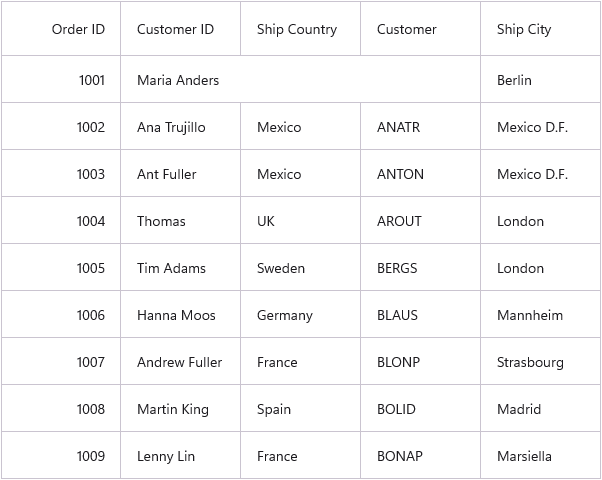
You can merge columns in a single row by setting the left and right column indices using the left and right parameters of CoveredCellInfo:
private void dataGrid_QueryCoveredRange(object sender, DataGridQueryCoveredRangeEventArgs e)
{
    // Merge columns 1-3 in row 1
    if (e.RowColumnIndex.RowIndex == 1)
    {
        if (e.RowColumnIndex.ColumnIndex >= 1 && e.RowColumnIndex.ColumnIndex <= 3)
        {
            // Parameters: left=1, right=3, top=1, bottom=1
            e.Range = new CoveredCellInfo(1, 3, 1, 1);
            e.Handled = true;
        }
    }
}
Merging cells vertically
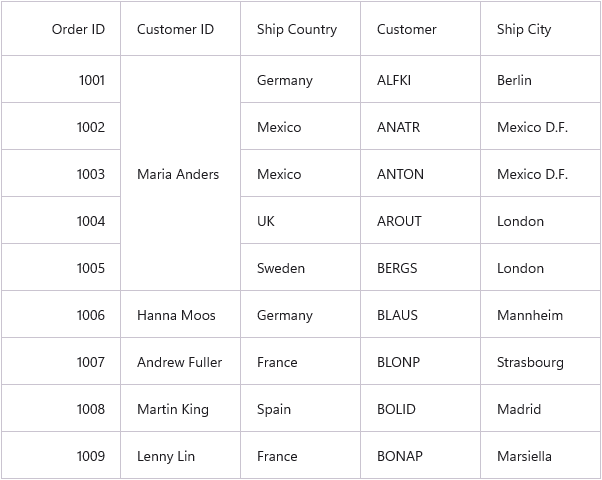
You can merge multiple rows in a single column by setting the top and bottom row indices using the top and bottom parameters of CoveredCellInfo:
private void dataGrid_QueryCoveredRange(object sender, DataGridQueryCoveredRangeEventArgs e)
{
    // Merge rows 1-5 in column 1
    if (e.RowColumnIndex.ColumnIndex == 1)
    {
        if (e.RowColumnIndex.RowIndex >= 1 && e.RowColumnIndex.RowIndex <= 5)
        {
            // Parameters: left=1, right=1, top=1, bottom=5
            e.Range = new CoveredCellInfo(1, 1, 1, 5);
            e.Handled = true;
        }
    }
}
Merging rows and columns
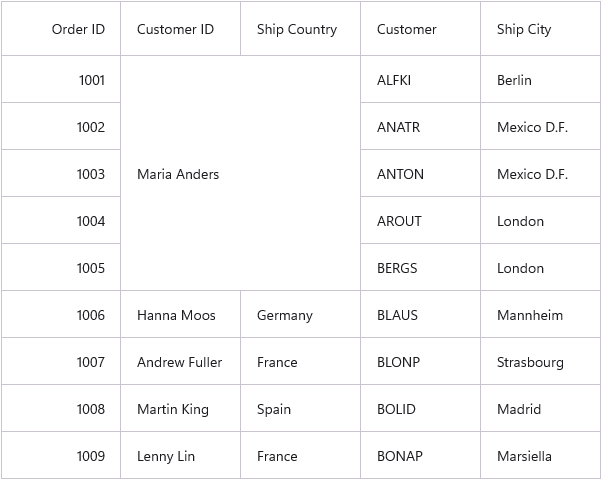
You can merge multiple rows and columns simultaneously by setting all four parameters of CoveredCellInfo:
private void dataGrid_QueryCoveredRange(object sender, DataGridQueryCoveredRangeEventArgs e)
{
    // Merge columns 1-2 and rows 1-5
    if (e.RowColumnIndex.ColumnIndex == 1 && e.RowColumnIndex.RowIndex == 1)
    {
        // Parameters: left=1, right=2, top=1, bottom=5
        e.Range = new CoveredCellInfo(1, 2, 1, 5);
        e.Handled = true;
    }
}
Merging cells based on content
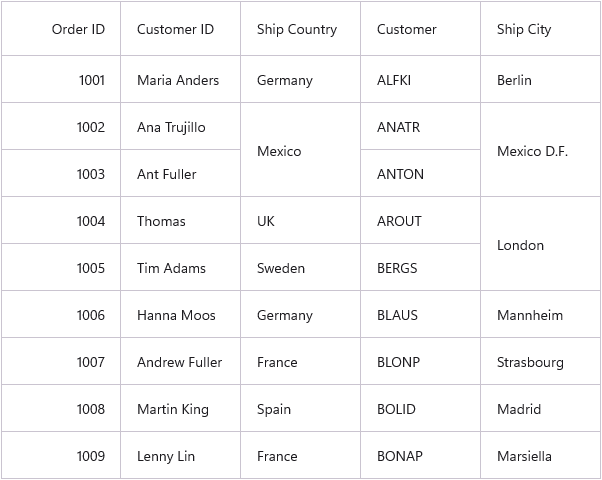
You can automatically merge adjacent cells that contain identical data by implementing a content-based merge algorithm. This section demonstrates how to merge redundant data in both horizontal and vertical directions.
The following code implements a GetRange method that:
- Compares the current cell’s content with adjacent cells (horizontally and vertically)
- Returns a merge range that spans all consecutive cells with identical content
- Uses CoveredCells.IsInRange to prevent redundant range calculations
public partial class MainPage : ContentPage
{
    public MainPage()
    {
        InitializeComponent();
        dataGrid.QueryCoveredRange += DataGrid_QueryCoveredRange;
        dataGrid.ItemsSourceChanged += DataGrid_ItemsSourceChanged;
    }

    private void DataGrid_ItemsSourceChanged(object sender, DataGridItemsSourceChangedEventArgs e)
    {
        // Remove covered cells when the data source changes
        dataGrid.CoveredCells.Clear();
    }

    private void DataGrid_QueryCoveredRange(object sender, DataGridQueryCoveredRangeEventArgs e)
    {
        var range = GetRange(e.Column, e.RowColumnIndex.RowIndex, e.RowColumnIndex.ColumnIndex, e.Record);

        if (range == null)
            return;

        // Check if the range already exists in CoveredCells
        if (!dataGrid.CoveredCells.IsInRange(range))
        {
            e.Range = range;
            e.Handled = true;
        }
    }

    private CoveredCellInfo GetRange(DataGridColumn column, int rowIndex, int columnIndex, object rowData)
    {
        // Initial range (single cell)
        var range = new CoveredCellInfo(columnIndex, columnIndex, rowIndex, rowIndex);

        if (rowData == null || column == null)
            return null;

        var propertyInfo = rowData.GetType().GetProperty(column.MappingName);
        if (propertyInfo == null)
            return null;

        object data = propertyInfo.GetValue(rowData);

        int leftColumnIndex  = columnIndex;
        int rightColumnIndex = columnIndex;

        // Compare right columns for identical content
        for (int i = dataGrid.Columns.IndexOf(column) + 1; i < dataGrid.Columns.Count; i++)
        {
            var nextColumn = dataGrid.Columns[i];
            var nextPropertyInfo = rowData.GetType().GetProperty(nextColumn.MappingName);
            if (nextPropertyInfo == null) break;

            var compareData = nextPropertyInfo.GetValue(rowData);
            if (compareData == null || !compareData.Equals(data)) break;

            // ResolveToScrollColumnIndex converts from collection index to visible column index
            rightColumnIndex = dataGrid.ResolveToScrollColumnIndex(i);
        }

        // Compare left columns for identical content
        for (int i = dataGrid.Columns.IndexOf(column) - 1; i >= 0; i--)
        {
            var prevColumn = dataGrid.Columns[i];
            var prevPropertyInfo = rowData.GetType().GetProperty(prevColumn.MappingName);
            if (prevPropertyInfo == null) break;

            var compareData = prevPropertyInfo.GetValue(rowData);
            if (compareData == null || !compareData.Equals(data)) break;

            leftColumnIndex = dataGrid.ResolveToScrollColumnIndex(i);
        }

        // If horizontal merge is found, return it
        if (leftColumnIndex != columnIndex || rightColumnIndex != columnIndex)
        {
            return new CoveredCellInfo(leftColumnIndex, rightColumnIndex, rowIndex, rowIndex);
        }

        // Otherwise, attempt vertical merge
        int topRowIndex    = rowIndex;
        int bottomRowIndex = rowIndex;

        // Get total record count from the DataGrid's View
        var recordsCount = dataGrid.View?.Records?.Count ?? 0;

        // Compare previous rows for identical content (skip row 0 as it is the header)
        for (int i = rowIndex - 1; i >= 1; i--)
        {
            var prevData = dataGrid.GetRecordAtRowIndex(i);
            if (prevData == null) break;

            var prevPropertyInfo = prevData.GetType().GetProperty(column.MappingName);
            if (prevPropertyInfo == null) break;

            var compareData = prevPropertyInfo.GetValue(prevData);
            if (compareData == null || !compareData.Equals(data)) break;

            topRowIndex = i;
        }

        // Compare next rows for identical content (row index < recordsCount ensures we don't exceed available records)
        for (int i = rowIndex + 1; i < recordsCount; i++)
        {
            var nextData = dataGrid.GetRecordAtRowIndex(i);
            if (nextData == null) break;

            var nextPropertyInfo = nextData.GetType().GetProperty(column.MappingName);
            if (nextPropertyInfo == null) break;

            var compareData = nextPropertyInfo.GetValue(nextData);
            if (compareData == null || !compareData.Equals(data)) break;

            bottomRowIndex = i;
        }

        // Return vertical merge if rows span more than one row
        if (topRowIndex != rowIndex || bottomRowIndex != rowIndex)
        {
            return new CoveredCellInfo(columnIndex, columnIndex, topRowIndex, bottomRowIndex);
        }

        return null;
    }
}
Merge cells in Master-Details view
In a Master-Details view, you can merge cells in the nested details grid by handling the QueryCoveredRange event of the DetailsViewDataGrid. Each details grid instance maintains its own merged cell collection independently from the parent grid.
The following example demonstrates how to merge cells in a details grid:
<syncfusion:SfDataGrid x:Name="dataGrid"
                       ItemsSource="{Binding OrderInfoCollection}"
                       GridLinesVisibility="Both"
                       HeaderGridLinesVisibility="Both">
    <syncfusion:SfDataGrid.DetailsViewDefinition>
        <syncfusion:DataGridViewDefinition RelationalColumn="Orders">
            <syncfusion:DataGridViewDefinition.DataGrid>
                <syncfusion:SfDataGrid x:Name="FirstLevelNestedGrid"
                                       GridLinesVisibility="Both"
                                       HeaderGridLinesVisibility="Both"
                                       QueryCoveredRange="FirstLevelNestedGrid_QueryCoveredRange" />
            </syncfusion:DataGridViewDefinition.DataGrid>
        </syncfusion:DataGridViewDefinition>
    </syncfusion:SfDataGrid.DetailsViewDefinition>
</syncfusion:SfDataGrid>
// Handle the QueryCoveredRange event of the nested details grid
private void FirstLevelNestedGrid_QueryCoveredRange(object sender, DataGridQueryCoveredRangeEventArgs e)
{
// Merge column 3, rows 2-3 in the details grid
if (e.RowColumnIndex.ColumnIndex == 3)
{
e.Range = new CoveredCellInfo(3, 3, 2, 3);
e.Handled = true;
}
}Note: The
x:Nameattribute on the nested grid is required to reference the event handler in code-behind.

Merging range of parent cells
When a parent row has an expanded details view beneath it, you cannot vertically merge that parent row with adjacent rows. Use the CanMergeNextRows helper method to check whether a row can be merged before defining the merge range:
private void dataGrid_QueryCoveredRange(object sender, DataGridQueryCoveredRangeEventArgs e)
{
    // Check if the row has an expanded details view
    // CanMergeNextRows returns true only if the row can be safely merged vertically
    if (!dataGrid.CanMergeNextRows(e.Record))
        return; // Skip merging this row

}
Refreshing merged cells at runtime
After programmatically modifying merged cells, you must call GetVisualContainer().InvalidateMeasure() to invalidate the layout and trigger a visual refresh. This forces the grid to recalculate and redraw the affected cells.
Add a covered range
Use the AddRange helper method to add a merge range at runtime:
private void AddRange_Clicked(object sender, EventArgs e)
{
    // Add a new merged range
    dataGrid.AddRange(new CoveredCellInfo(2, 3, 3, 3));

    // Invalidate the layout to apply the change immediately
    dataGrid.GetVisualContainer().InvalidateMeasure();
}
Remove a covered range
Use the RemoveRange helper method to remove a merge range at runtime:
private void RemoveRange_Clicked(object sender, EventArgs e)
{
    // Remove the merged range
    dataGrid.RemoveRange(new CoveredCellInfo(2, 3, 3, 3));

    // Invalidate the layout to apply the change immediately
    dataGrid.GetVisualContainer().InvalidateMeasure();
}
Trigger QueryCoveredRange event programmatically
You can trigger the QueryCoveredRange event for a particular cell by removing its range from SfDataGrid.CoveredCells and calling GetVisualContainer().InvalidateMeasure() to invalidate the layout. You can retrieve the range for a particular cell in CoveredCells by passing the row and column index to the CoveredCells.GetCoveredCellInfo method.
For example, if you want to merge adjacent cells with the same content while editing, you can remove the existing range and invalidate the container in the CurrentCellEndEdit event so that the QueryCoveredRange event is triggered again to recalculate the merged ranges.
private void dataGrid_CurrentCellEndEdit(object sender, DataGridCurrentCellEndEditEventArgs e)
{
    var rowIndex    = e.RowColumnIndex.RowIndex;
    var columnIndex = e.RowColumnIndex.ColumnIndex;

    // Retrieve the current merged range for this cell
    var range = dataGrid.CoveredCells.GetCoveredCellInfo(rowIndex, columnIndex);
    if (range != null)
    {
        // Remove the old range so QueryCoveredRange will be triggered for this cell
        dataGrid.RemoveRange(range);

        // Invalidate the layout to recalculate the range
        dataGrid.GetVisualContainer().InvalidateMeasure();
    }
}
Limitations
The following limitations apply when using cell merging in the SfDataGrid:
-
Selection mode: When
SelectionModeis notNone,SelectionUnitmust be set toCellandNavigationModemust be set toCell. Row-level selection (SelectionUnitasRoworAny) is not supported alongside cell merging. - Heterogeneous rows: Cells in heterogeneous rows cannot be merged.
- Frozen panes: Frozen rows and columns do not support cell merging.
- Swiping: Swiping is not enabled when merged cells are applied.
- Master-Details views: Parent rows with expanded details views cannot have vertically merged cells.