Editing customization in Blazor TreeGrid
The appearance of editing elements in the Blazor TreeGrid can be customized using CSS. Styling options are available for different parts of the editing interface:
- Edited and newly added rows: Highlights rows that are being modified or newly inserted.
- Edit form input fields: Displays text boxes used to enter or update values during editing.
- Edit dialog header: Shows the title or context of the current editing operation.
- Command column buttons: Displays action buttons such as Edit, Delete, Update, and Cancel.
Customize edited and added row elements
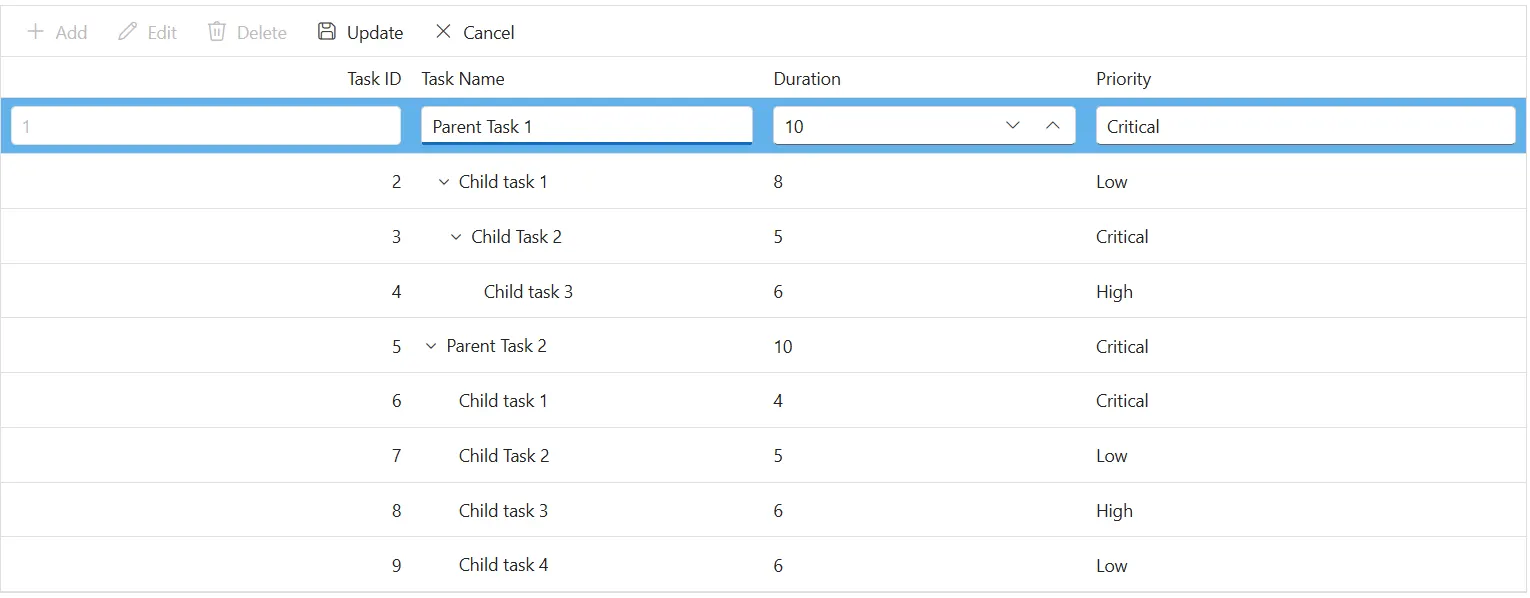
The .e-editedrow and .e-addedrow classes style edited and newly added rows. Apply CSS to make these rows stand out:
.e-treegrid .e-editedrow table, .e-treegrid .e-addedrow table {
	    background-color: #62b2eb;
}
Adjust properties such as background-color or border styles to highlight rows that are in edit mode.
Customize edited row input elements
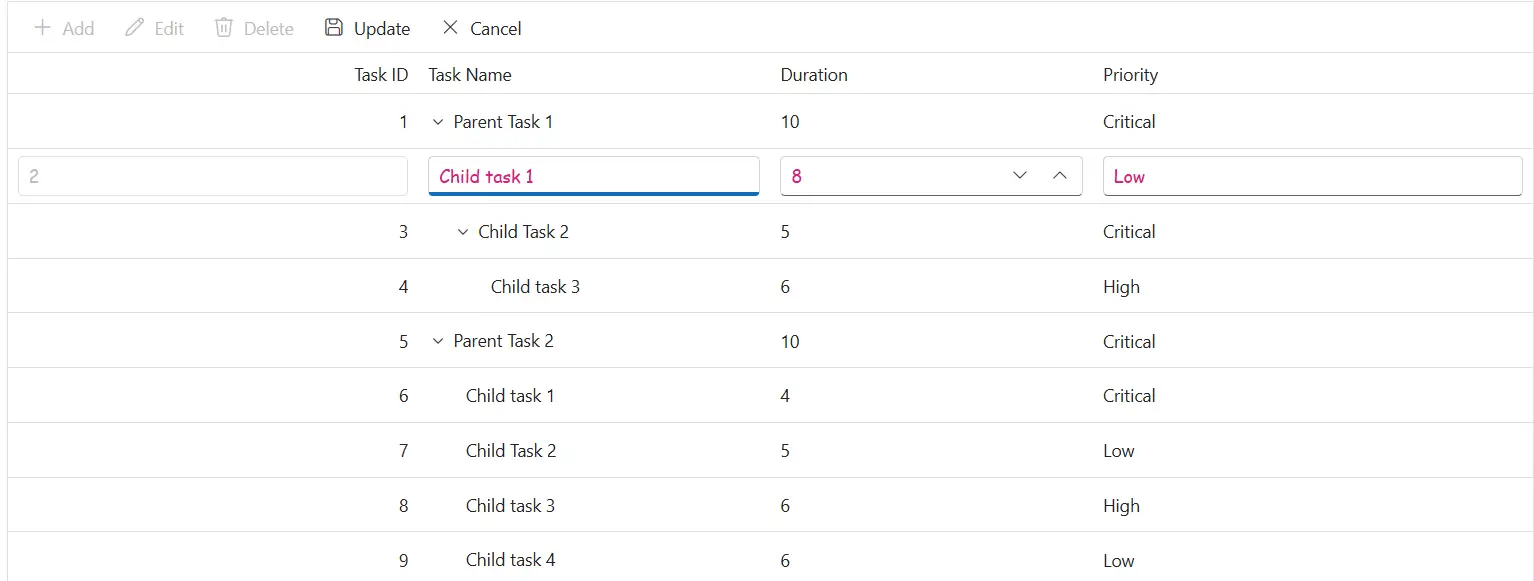
The .e-treegridform and .e-input classes style inputs inside the inline edit form in the Blazor TreeGrid. Use CSS to adjust their appearance:
.e-treegrid .e-rowcell .e-input-group .e-input {
    font-family: cursive;
    color:rgb(214, 33, 123)
}
Modify properties such as font-family, color, or padding to improve readability.
@using Syncfusion.Blazor.TreeGrid

<SfTreeGrid DataSource="@TreeGridData" IdMapping="TaskId" ParentIdMapping="ParentId" TreeColumnIndex="1" Toolbar="@(new List<string>() { "Add", "Edit", "Delete", "Update", "Cancel" })">
    <TreeGridEditSettings AllowAdding="true" AllowEditing="true" AllowDeleting="true"  Mode="Syncfusion.Blazor.TreeGrid.EditMode.Row"></TreeGridEditSettings>
    <TreeGridColumns>
        <TreeGridColumn Field=@nameof(TreeData.BusinessObject.TaskId) HeaderText="Task ID" IsPrimaryKey="true" TextAlign="Syncfusion.Blazor.Grids.TextAlign.Right" Width="140"></TreeGridColumn>
        <TreeGridColumn Field=@nameof(TreeData.BusinessObject.TaskName) HeaderText="Task Name" Width="120"></TreeGridColumn>
        <TreeGridColumn Field=@nameof(TreeData.BusinessObject.Duration) HeaderText="Duration" Width="110"></TreeGridColumn>
        <TreeGridColumn Field=@nameof(TreeData.BusinessObject.Priority) HeaderText="Priority" Width="150"></TreeGridColumn>
    </TreeGridColumns>
</SfTreeGrid>

<style>
    .e-treegrid .e-editedrow table,
    .e-treegrid .e-addedrow table { background-color: #62b2eb; }
    .e-treegrid .e-rowcell .e-input-group .e-input { font-family: cursive; color: rgb(214,33,123); }
    .e-treegrid .e-rowcell:focus-visible { outline: 2px solid #005a9e; outline-offset: -2px; }
</style>

@code {
    private List<TreeData.BusinessObject> TreeGridData { get; set; }
    protected override void OnInitialized()
    {
        TreeGridData = TreeData.GetSelfDataSource().ToList();
    }
}
namespace TreeGridComponent.Data
{
public class TreeData
{
public class BusinessObject
{
public int TaskId { get; set; }
public string TaskName { get; set; }
public int? Duration { get; set; }
public int? Progress { get; set; }
public string Priority { get; set; }
public int? ParentId { get; set; }
}
internal static List<BusinessObject> GetSelfDataSource()
{
List<BusinessObject> BusinessObjectCollection = new List<BusinessObject>();
BusinessObjectCollection.Add(new BusinessObject() { TaskId = 1, TaskName = "Parent Task 1", Duration = 10, Progress = 70, Priority = "Critical", ParentId = null });
BusinessObjectCollection.Add(new BusinessObject() { TaskId = 2, TaskName = "Child task 1", Duration = 8, Progress = 80, Priority = "Low", ParentId = 1 });
BusinessObjectCollection.Add(new BusinessObject() { TaskId = 3, TaskName = "Child Task 2", Duration = 5, Progress = 65, Priority = "Critical", ParentId = 2 });
BusinessObjectCollection.Add(new BusinessObject() { TaskId = 4, TaskName = "Child task 3", Duration = 6, Progress = 77, Priority = "High", ParentId = 3 });
BusinessObjectCollection.Add(new BusinessObject() { TaskId = 5, TaskName = "Parent Task 2", Duration = 10, Progress = 70, Priority = "Critical", ParentId = null });
BusinessObjectCollection.Add(new BusinessObject() { TaskId = 6, TaskName = "Child task 1", Duration = 4, Progress = 80, Priority = "Critical", ParentId = 5 });
BusinessObjectCollection.Add(new BusinessObject() { TaskId = 7, TaskName = "Child Task 2", Duration = 5, Progress = 65, Priority = "Low", ParentId = 5 });
BusinessObjectCollection.Add(new BusinessObject() { TaskId = 8, TaskName = "Child task 3", Duration = 6, Progress = 77, Priority = "High", ParentId = 5 });
BusinessObjectCollection.Add(new BusinessObject() { TaskId = 9, TaskName = "Child task 4", Duration = 6, Progress = 77, Priority = "Low", ParentId = 5 });
return BusinessObjectCollection;
}
}
}Customize the edit dialog header
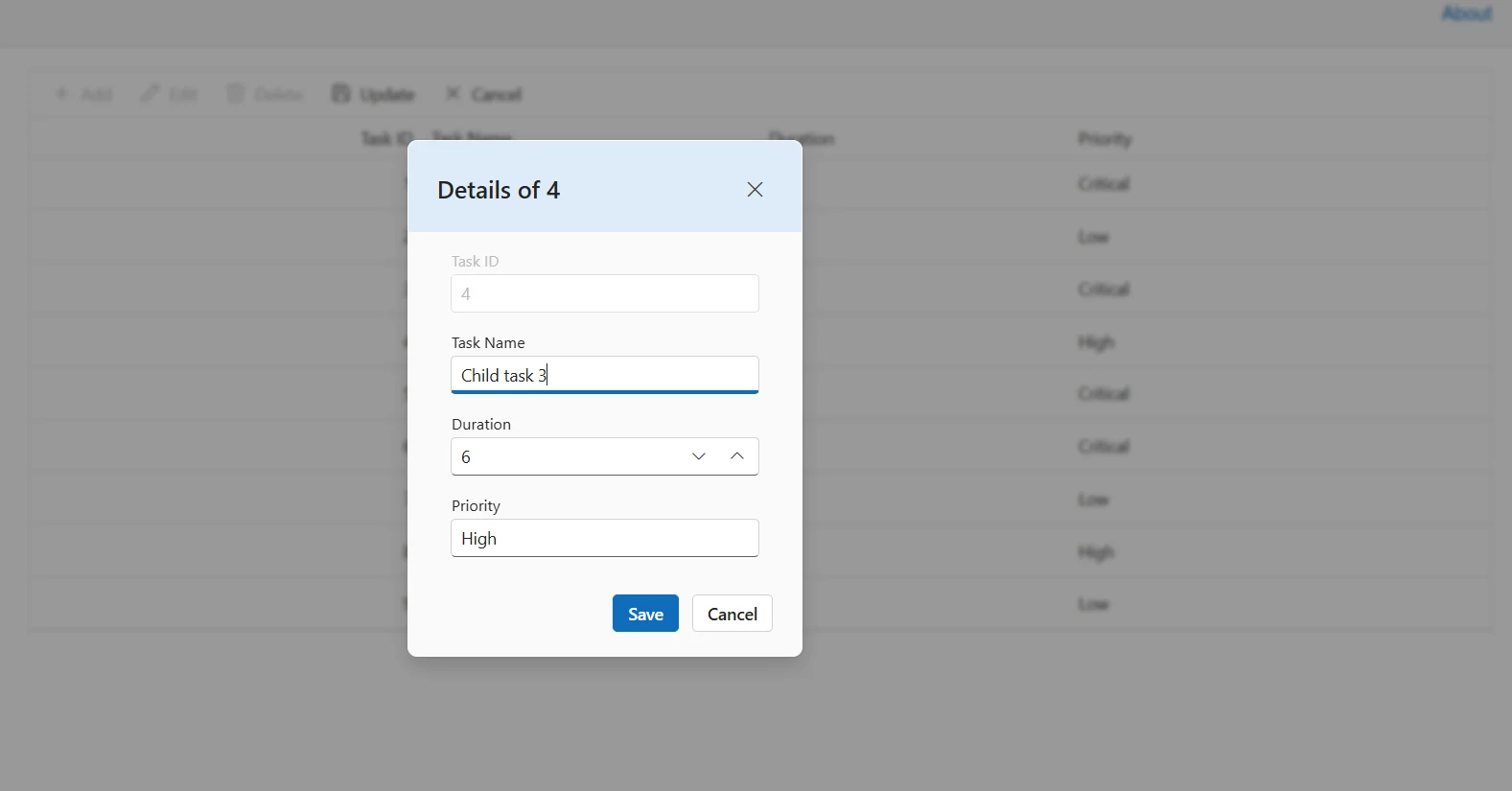
The .e-edit-dialog and .e-dlg-header-content classes style the dialog header when dialog editing is enabled. Apply CSS to differentiate the header:
.e-edit-dialog .e-dlg-header-content {
    background-color: #deecf9;
}
Change properties such as background-color to visually separate the header from the rest of the dialog content.
@using Syncfusion.Blazor.TreeGrid

<SfTreeGrid DataSource="@TreeGridData" IdMapping="TaskId" ParentIdMapping="ParentId" TreeColumnIndex="1" Toolbar="@(new List<string>() { "Add", "Edit", "Delete", "Update", "Cancel" })">
    <TreeGridEditSettings AllowAdding="true" AllowEditing="true" AllowDeleting="true" Mode="EditMode.Dialog"></TreeGridEditSettings>
    <TreeGridColumns>
        <TreeGridColumn Field=@nameof(TreeData.BusinessObject.TaskId) HeaderText="Task ID" IsPrimaryKey="true" TextAlign="Syncfusion.Blazor.Grids.TextAlign.Right" Width="140"></TreeGridColumn>
        <TreeGridColumn Field=@nameof(TreeData.BusinessObject.TaskName) HeaderText="Task Name" Width="120"></TreeGridColumn>
        <TreeGridColumn Field=@nameof(TreeData.BusinessObject.Duration) HeaderText="Duration" Width="110"></TreeGridColumn>
        <TreeGridColumn Field=@nameof(TreeData.BusinessObject.Priority) HeaderText="Priority" Width="150"></TreeGridColumn>
    </TreeGridColumns>
</SfTreeGrid>

<style>
    .e-edit-dialog .e-dlg-header-content { background-color: #deecf9; color: #0b345d; }
    .e-edit-dialog .e-dlg-header-content .e-btn.e-dlg-closeicon-btn:focus-visible { outline: 2px solid #005a9e; outline-offset: 2px; }
</style>

@code {
    private List<TreeData.BusinessObject> TreeGridData { get; set; }

    protected override void OnInitialized()
    {
        TreeGridData = TreeData.GetSelfDataSource().ToList();
    }
}
namespace TreeGridComponent.Data
{
public class TreeData
{
public class BusinessObject
{
public int TaskId { get; set; }
public string TaskName { get; set; }
public int? Duration { get; set; }
public int? Progress { get; set; }
public string Priority { get; set; }
public int? ParentId { get; set; }
}
internal static List<BusinessObject> GetSelfDataSource()
{
List<BusinessObject> BusinessObjectCollection = new List<BusinessObject>();
BusinessObjectCollection.Add(new BusinessObject() { TaskId = 1, TaskName = "Parent Task 1", Duration = 10, Progress = 70, Priority = "Critical", ParentId = null });
BusinessObjectCollection.Add(new BusinessObject() { TaskId = 2, TaskName = "Child task 1", Duration = 8, Progress = 80, Priority = "Low", ParentId = 1 });
BusinessObjectCollection.Add(new BusinessObject() { TaskId = 3, TaskName = "Child Task 2", Duration = 5, Progress = 65, Priority = "Critical", ParentId = 2 });
BusinessObjectCollection.Add(new BusinessObject() { TaskId = 4, TaskName = "Child task 3", Duration = 6, Progress = 77, Priority = "High", ParentId = 3 });
BusinessObjectCollection.Add(new BusinessObject() { TaskId = 5, TaskName = "Parent Task 2", Duration = 10, Progress = 70, Priority = "Critical", ParentId = null });
BusinessObjectCollection.Add(new BusinessObject() { TaskId = 6, TaskName = "Child task 1", Duration = 4, Progress = 80, Priority = "Critical", ParentId = 5 });
BusinessObjectCollection.Add(new BusinessObject() { TaskId = 7, TaskName = "Child Task 2", Duration = 5, Progress = 65, Priority = "Low", ParentId = 5 });
BusinessObjectCollection.Add(new BusinessObject() { TaskId = 8, TaskName = "Child task 3", Duration = 6, Progress = 77, Priority = "High", ParentId = 5 });
BusinessObjectCollection.Add(new BusinessObject() { TaskId = 9, TaskName = "Child task 4", Duration = 6, Progress = 77, Priority = "Low", ParentId = 5 });
return BusinessObjectCollection;
}
}
}Customize command column buttons
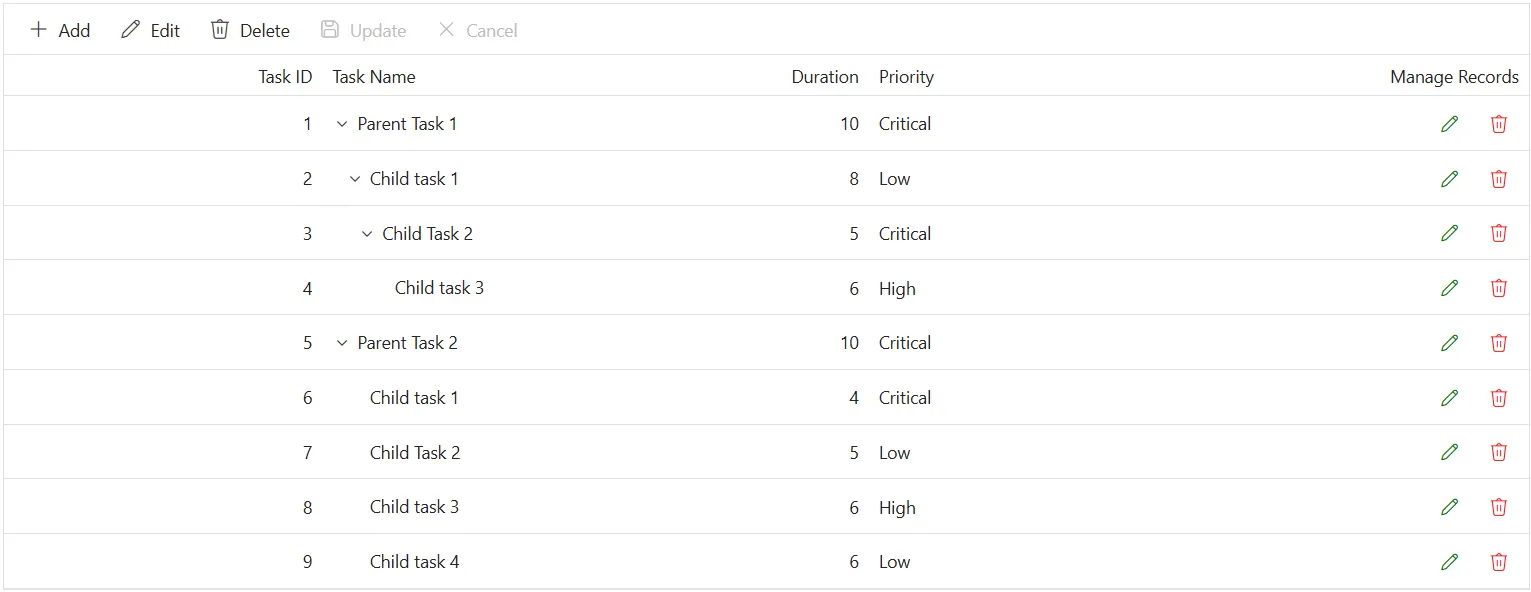
The .e-edit, .e-delete, .e-update, and .e-cancel-icon classes style the command column buttons in the Blazor TreeGrid. Use CSS to adjust their appearance:
.e-treegrid .e-unboundcelldiv .e-delete::before,
.e-treegrid .e-unboundcelldiv .e-cancel-icon::before {
    color: #f51717;
}

.e-treegrid .e-unboundcelldiv .e-edit::before,
.e-treegrid .e-unboundcelldiv .e-update::before {
    color: #077005;
}
Style properties like color, font-size, and font-weight can be adjusted to differentiate action icons and enhance visibility during interaction.
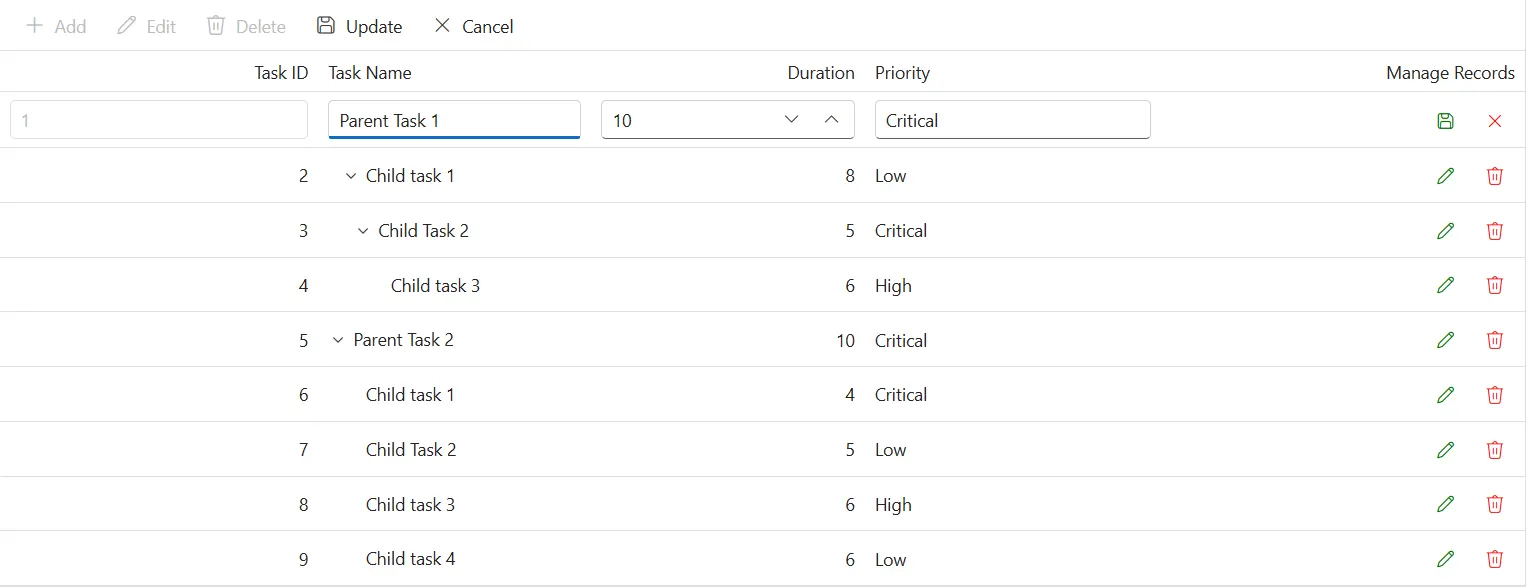
@using Syncfusion.Blazor.TreeGrid

<SfTreeGrid DataSource="@TreeGridData" IdMapping="TaskId" ParentIdMapping="ParentId" TreeColumnIndex="1" Toolbar="@(new List<string>() { "Add", "Edit", "Delete", "Update", "Cancel" })">
    <TreeGridEditSettings AllowAdding="true" AllowEditing="true" AllowDeleting="true"  Mode="Syncfusion.Blazor.TreeGrid.EditMode.Row"></TreeGridEditSettings>
    <TreeGridColumns>
        <TreeGridColumn Field=@nameof(TreeData.BusinessObject.TaskId) HeaderText="Task ID" IsPrimaryKey="true" TextAlign="Syncfusion.Blazor.Grids.TextAlign.Right" Width="140"></TreeGridColumn>
        <TreeGridColumn Field=@nameof(TreeData.BusinessObject.TaskName) HeaderText="Task Name" Width="120"></TreeGridColumn>
        <TreeGridColumn Field=@nameof(TreeData.BusinessObject.Duration) HeaderText="Duration" TextAlign="Syncfusion.Blazor.Grids.TextAlign.Right" Width="120"></TreeGridColumn>
        <TreeGridColumn Field=@nameof(TreeData.BusinessObject.Priority) HeaderText="Priority" Width="130"></TreeGridColumn>
        <TreeGridColumn HeaderText="Manage Records" Width="160">
            <TreeGridCommandColumns>
                <TreeGridCommandColumn Type="CommandButtonType.Edit" ButtonOption="@(new CommandButtonOptions { IconCss = "e-icons e-edit", CssClass = "e-flat" })"></TreeGridCommandColumn>
                <TreeGridCommandColumn Type="CommandButtonType.Delete" ButtonOption="@(new CommandButtonOptions { IconCss = "e-icons e-delete", CssClass = "e-flat" })"></TreeGridCommandColumn>
                <TreeGridCommandColumn Type="CommandButtonType.Save" ButtonOption="@(new CommandButtonOptions { IconCss = "e-icons e-update", CssClass = "e-flat" })"></TreeGridCommandColumn>
                <TreeGridCommandColumn Type="CommandButtonType.Cancel" ButtonOption="@(new CommandButtonOptions { IconCss = "e-icons e-cancel-icon", CssClass = "e-flat" })"></TreeGridCommandColumn>
            </TreeGridCommandColumns>
        </TreeGridColumn>
    </TreeGridColumns>
</SfTreeGrid>
<style>
    .e-treegrid .e-unboundcelldiv .e-delete::before,
    .e-treegrid .e-unboundcelldiv .e-cancel-icon::before {
        color: #f51717;
    }

    .e-treegrid .e-unboundcelldiv .e-edit::before,
    .e-treegrid .e-unboundcelldiv .e-update::before {
        color: #077005;
    }
</style>
@code {
    private List<TreeData.BusinessObject> TreeGridData { get; set; }
    protected override void OnInitialized()
    {
        TreeGridData = TreeData.GetSelfDataSource().ToList();
    }
}
namespace TreeGridComponent.Data
{
public class TreeData
{
public class BusinessObject
{
public int TaskId { get; set; }
public string TaskName { get; set; }
public int? Duration { get; set; }
public int? Progress { get; set; }
public string Priority { get; set; }
public int? ParentId { get; set; }
}
internal static List<BusinessObject> GetSelfDataSource()
{
List<BusinessObject> BusinessObjectCollection = new List<BusinessObject>();
BusinessObjectCollection.Add(new BusinessObject() { TaskId = 1, TaskName = "Parent Task 1", Duration = 10, Progress = 70, Priority = "Critical", ParentId = null });
BusinessObjectCollection.Add(new BusinessObject() { TaskId = 2, TaskName = "Child task 1", Duration = 8, Progress = 80, Priority = "Low", ParentId = 1 });
BusinessObjectCollection.Add(new BusinessObject() { TaskId = 3, TaskName = "Child Task 2", Duration = 5, Progress = 65, Priority = "Critical", ParentId = 2 });
BusinessObjectCollection.Add(new BusinessObject() { TaskId = 4, TaskName = "Child task 3", Duration = 6, Progress = 77, Priority = "High", ParentId = 3 });
BusinessObjectCollection.Add(new BusinessObject() { TaskId = 5, TaskName = "Parent Task 2", Duration = 10, Progress = 70, Priority = "Critical", ParentId = null });
BusinessObjectCollection.Add(new BusinessObject() { TaskId = 6, TaskName = "Child task 1", Duration = 4, Progress = 80, Priority = "Critical", ParentId = 5 });
BusinessObjectCollection.Add(new BusinessObject() { TaskId = 7, TaskName = "Child Task 2", Duration = 5, Progress = 65, Priority = "Low", ParentId = 5 });
BusinessObjectCollection.Add(new BusinessObject() { TaskId = 8, TaskName = "Child task 3", Duration = 6, Progress = 77, Priority = "High", ParentId = 5 });
BusinessObjectCollection.Add(new BusinessObject() { TaskId = 9, TaskName = "Child task 4", Duration = 6, Progress = 77, Priority = "Low", ParentId = 5 });
return BusinessObjectCollection;
}
}
}