Aggregate customization in Blazor TreeGrid
Aggregates are displayed as summary rows in the TreeGrid footer, providing a consolidated view of totals, averages, or counts. These rows can be styled using CSS to match the layout and design of the TreeGrid. Styling options are available for:
- Aggregate root container: The outer wrapper of the footer row.
- Aggregate summary row and cells: The row that shows summary values, and the cells that display each result.
Customize the aggregate root element
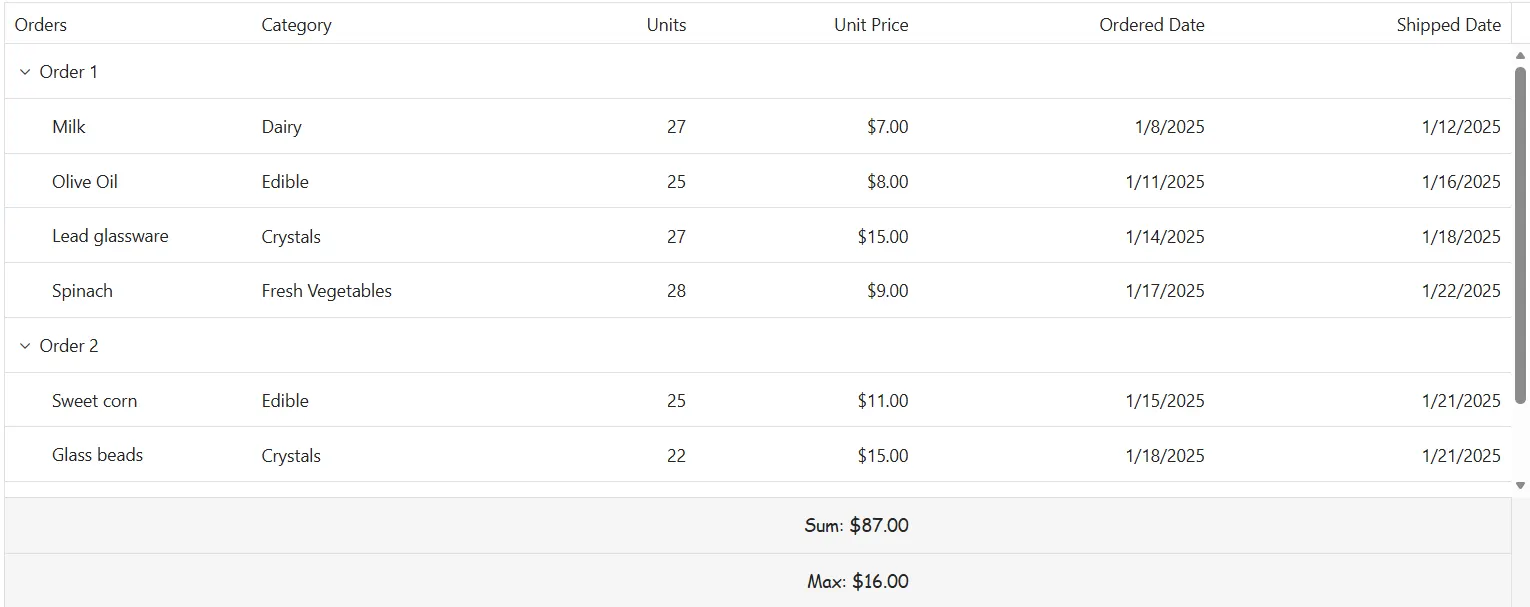
The .e-gridfooter class styles the root container of the aggregate footer row. Use CSS to adjust its appearance:
.e-treegrid .e-gridfooter {
    font-family: cursive;
}
Properties like font-family, font-size, and padding can be changed to fit the TreeGrid layout design.
Customize the aggregate cell elements
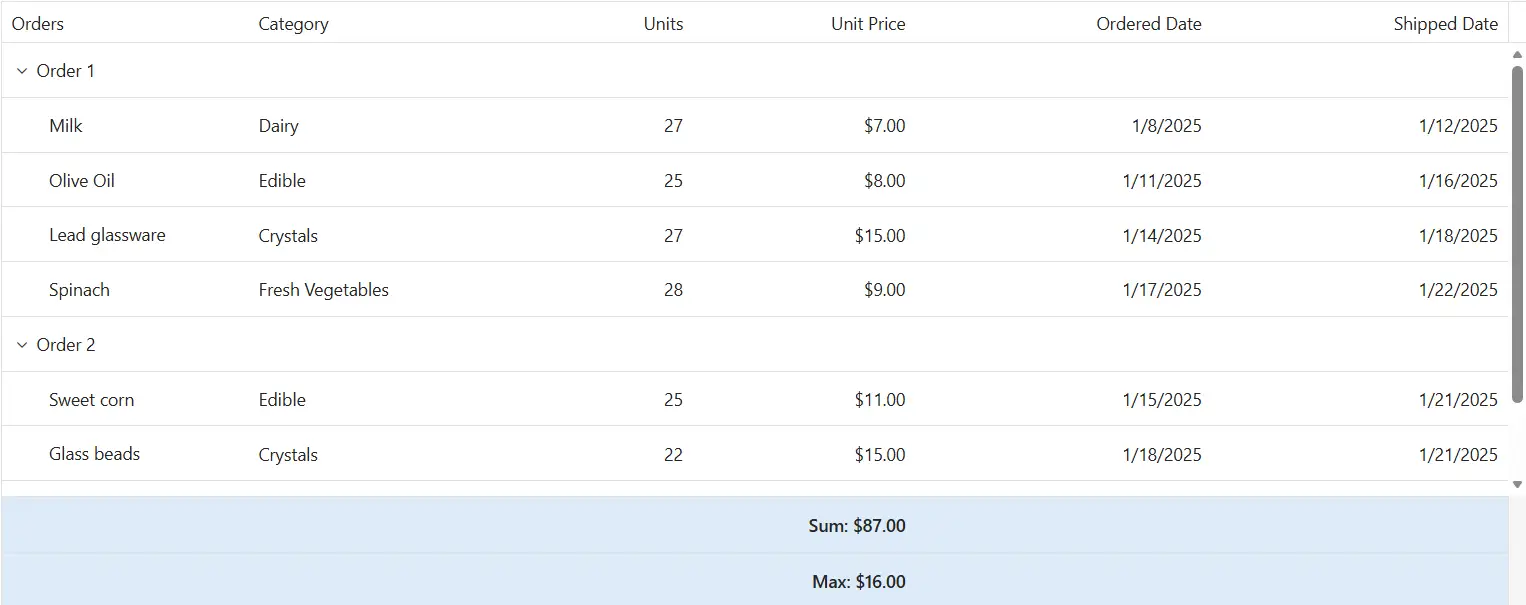
The .e-summaryrow and .e-summarycell classes define the appearance of the summary row and its individual cells in the Blazor TreeGrid. Apply CSS to modify their look:
.e-treegrid .e-summaryrow .e-summarycell {
    background-color: #deecf9;
}
Properties such as background-color, color, and text-align can be adjusted to improve clarity and interaction.
@using Syncfusion.Blazor.TreeGrid
@using Syncfusion.Blazor.Grids
<SfTreeGrid DataSource="@TreeGridData" IdMapping="ID" ParentIdMapping="ParentID" Height="362" TreeColumnIndex="1" AllowPaging="true">
    <TreeGridPageSettings PageSizes="@PageSizes" PageCount="5" PageSize="2" PageSizeMode="PageSizeMode.Root"></TreeGridPageSettings>
    <TreeGridEditSettings AllowEditing="true"></TreeGridEditSettings>
    <TreeGridColumns>
        <TreeGridColumn Field="ShipID" HeaderText="Ship ID" Width="80" Visible="false" IsPrimaryKey="true" TextAlign="TextAlign.Right"></TreeGridColumn>
        <TreeGridColumn Field="Name" ClipMode="ClipMode.EllipsisWithTooltip" HeaderText="Orders" Width="100"></TreeGridColumn>
        <TreeGridColumn Field="ShipmentCategory" HeaderText="Category" Width="100"></TreeGridColumn>
        <TreeGridColumn Field="Units" HeaderText="Units" Width="80" TextAlign="TextAlign.Right"></TreeGridColumn>
        <TreeGridColumn Field="UnitPrice" ClipMode="ClipMode.EllipsisWithTooltip" HeaderText="Unit Price" Format="c2" Width="90" TextAlign="TextAlign.Right"></TreeGridColumn>
        <TreeGridColumn Field="OrderDate" HeaderText="Ordered Date" ClipMode="ClipMode.EllipsisWithTooltip" Format="d" Type="ColumnType.Date" Width="120" TextAlign="TextAlign.Right"></TreeGridColumn>
        <TreeGridColumn Field="ShippedDate" HeaderText="Shipped Date" ClipMode="ClipMode.EllipsisWithTooltip" Format="d" Type="ColumnType.Date" Width="120" TextAlign="TextAlign.Right"></TreeGridColumn>

    </TreeGridColumns>
    <TreeGridAggregates>
        <TreeGridAggregate ShowChildSummary="false">
            <TreeGridAggregateColumns>
                <TreeGridAggregateColumn Field="UnitPrice" Type="Syncfusion.Blazor.Grids.AggregateType.Sum" Format="C2">
                    <FooterTemplate>
                        @{
                            var sumvalue = (context as Syncfusion.Blazor.Grids.AggregateTemplateContext);
                            <div  class="aggregate-chip">
                                Sum: @sumvalue.Sum
                            </div>
                        }
                    </FooterTemplate>
                </TreeGridAggregateColumn>
            </TreeGridAggregateColumns>
        </TreeGridAggregate>
        <TreeGridAggregate ShowChildSummary="false">
            <TreeGridAggregateColumns>
                <TreeGridAggregateColumn Field="UnitPrice" Type="Syncfusion.Blazor.Grids.AggregateType.Max" Format="C2">
                    <FooterTemplate>
                        @{
                            var sumvalue = (context as Syncfusion.Blazor.Grids.AggregateTemplateContext);
                            <div  class="aggregate-chip">
                                Max: @sumvalue.Max
                            </div>
                        }
                    </FooterTemplate>
                </TreeGridAggregateColumn>
            </TreeGridAggregateColumns>
        </TreeGridAggregate>
    </TreeGridAggregates>
</SfTreeGrid>

<style>
    .e-treegrid .e-gridfooter { font-family: cursive; background-color: #f5f8fc; }
    .e-treegrid .e-summaryrow .e-summarycell { background-color: #deecf9; }
    .aggregate-chip { padding: 4px 8px; border-radius: 6px; background-color: #fff; border: 1px solid #bcd3ea; display: inline-block; min-width: 120px; text-align: center; color: #0b3f73; font-weight: 600; }
    .e-treegrid .e-summarycell:focus-visible { outline: 2px solid #005a9e; outline-offset: -2px; }
</style>

@code {
    private List<ShipmentData> TreeGridData { get; set; } = new List<ShipmentData>();
    private List<string> PageSizes { get; set; } = new List<string>();
    protected override void OnInitialized()
    {
        TreeGridData = ShipmentData.GetData();
        PageSizes = new List<string>() { "2", "4", "5", "10", "15", "20", "All" };
    }
}
public class ShipmentData
{
public int? ID { get; set; }
public int? ShipID { get; set; }
public string? Name { get; set; }
public int? Units { get; set; }
public string? Category { get; set; }
public int? UnitPrice { get; set; }
public int? Price { get; set; }
public int? TotalPrice { get; set; } // Added for total price calculation (sum for parents, individual for items)
public string? ShipmentCategory { get; set; }
public DateTime? ShippedDate { get; set; } = null;
public DateTime? OrderDate { get; set; } = null;
public string? OrderReached { get; set; } = null;
public int? ParentID { get; set; }
private static void CalculateTotalPrices(List<ShipmentData> data)
{
// For items (non-parents), TotalPrice = Price
// For parents, TotalPrice = sum of children's TotalPrice
var parents = data.Where(d => d.ParentID == null).ToList();
foreach (var parent in parents)
{
var children = data.Where(d => d.ParentID == parent.ID).ToList();
parent.TotalPrice = children.Sum(c => c.Price ?? 0);
// Recursively set for children if nested, but here it's flat tree
}
// Set for items
foreach (var item in data.Where(d => d.ParentID != null))
{
item.TotalPrice = item.Price;
}
}
public static List<ShipmentData> GetData()
{
var data = new List<ShipmentData>(capacity: 150);
var rnd = new Random(42); // deterministic
var baseOrderDate = new DateTime(2025, 1, 1);
// pools for categories/items - standardized to Title Case
var categories = new[]
{
("Seafood", new[] { "Mackerel", "Herrings", "Tilapias", "White Shrimp", "Yellowfin Tuna" }),
("Dairy", new[] { "Fresh Cheese", "Blue Veined Cheese", "Butter", "Milk", "Yogurt" }),
("Edible", new[] { "Preserved Olives", "Sweet corn", "Pickles", "Tomato Puree", "Olive Oil" }),
("Crystals", new[] { "Lead glassware", "Pharmaceutical glass", "Glass beads", "Crystal vials", "Borosilicate glass" }),
("Fresh Vegetables", new[] { "Broccoli", "Spinach", "Carrots", "Lettuce", "Cabbage" }),
("Leafy Greens", new[] { "Kale", "Arugula", "Chard", "Collards", "Mustard Greens" }),
("Root Vegetables", new[] { "Beets", "Radish", "Parsnip", "Turnip", "Rutabaga" }),
("Paper", new[] { "Printer Paper", "Photo Paper", "Sticky Notes", "Card Stock", "Plotter Rolls" }),
("Consumables", new[] { "Ink Cartridges", "Toner", "Markers", "Glue Sticks", "Tape Rolls" }),
("Tools", new[] { "Staplers", "Hole Punch", "Cutters", "Rulers", "Scissors" }),
("Stationery", new[] { "Notebooks", "Pens", "Pencils", "Folders", "Envelopes" })
};
int id = 0;
int shipSeed = 4500;
for (int p = 1; p <= 40; p++)
{
int parentId = id++;
data.Add(new ShipmentData
{
ID = parentId,
Name = $"Order {p}",
ParentID = null
});
for (int c = 0; c < 4; c++)
{
// pick a category and item name
var (cat, items) = categories[(p + c) % categories.Length];
var itemName = items[(p * 3 + c) % items.Length];
// numbers
int units = 20 + rnd.Next(11); // 20..30
int unitPrice = 5 + rnd.Next(20); // 5..24
int price = units * unitPrice;
// dates
var orderDate = baseOrderDate.AddDays(p * 7 + c * 3);
var shipLag = 3 + rnd.Next(10); // 3..12 days
var shippedDate = orderDate.AddDays(shipLag);
// reached?
var reached = shippedDate >= orderDate.AddDays(7) && rnd.Next(100) > 30 ? "Yes" : "No";
data.Add(new ShipmentData
{
ID = id,
ShipID = shipSeed + id,
Name = itemName,
Category = cat,
Units = units,
UnitPrice = unitPrice,
Price = price,
OrderDate = orderDate,
ShippedDate = shippedDate,
ShipmentCategory = cat,
OrderReached = reached,
ParentID = parentId
});
id++;
}
}
CalculateTotalPrices(data);
return data;
}
}