Use custom helper inside the loop with templates in ASP.NET MVC Grid
The Syncfusion ASP.NET MVC Grid allows you to use custom helpers inside the loop with Template property of a column. This feature enables you to create complex templates that can incorporate additional helper functions.
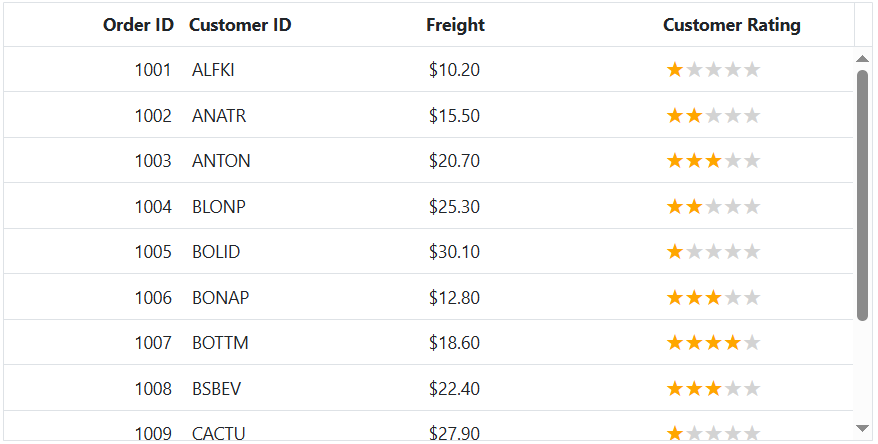
The Customer Rating column includes a custom template defined using Template. Inside this template, iterates through the item array and generates tag, displayed as stars using the CSS below:
.e-grid .rating .star:before {
    content: '★';
}

.e-grid .rating .star {
    font-size: 132%;
    color: lightgrey;
}
The class is dynamically assigned based on the rating value, highlighting the stars using the CSS below:
.e-grid .rating .star.checked {
    color: #ffa600;
}
This is demonstrated in the following example:
@Html.EJS().Grid("Grid").DataSource((IEnumerable<object>)ViewBag.DataSource).Height("348px").Columns(col =>
{
    col.Field("OrderID").HeaderText("Order ID").Width("120").TextAlign(Syncfusion.EJ2.Grids.TextAlign.Right).Add();
    col.Field("CustomerID").HeaderText("Customer ID").Width("150").Add();
    col.Field("Freight").HeaderText("Freight").Width("120").Format("C2").TextAlign(Syncfusion.EJ2.Grids.TextAlign.Right).Add();
    col.Field("CustomerRating").HeaderText("Customer Rating").Width("150").Template("#ratingTemplate").Add();
}).Render()
<script type="text/x-template" id="ratingTemplate">
    ${ RatingStars(data.CustomerRating) }
</script>
<script>
    function RatingStars(rating) {
        let ratingHTML = '<span class="rating">';
        for (let i = 1; i <= 5; i++) {
            ratingHTML += `<span class="star ${i <= rating ? 'checked' : ''}"></span>`;
        }
        ratingHTML += '</span>';
        return ratingHTML;
    }
</script>
<style>
    .e-grid .rating .star:before {
        content: '★';
    }

    .e-grid .rating .star {
        font-size: 132%;
        color: lightgrey;
    }

    .rating .star.checked {
        color: #ffa600;
    }
</style>
public IActionResult Index()
{
ViewBag.DataSource = OrderDetails.GetAllRecords();
return View();
}