About Syncfusion TypeScript DOCX Editor Control
28 Aug 20262 minutes to read
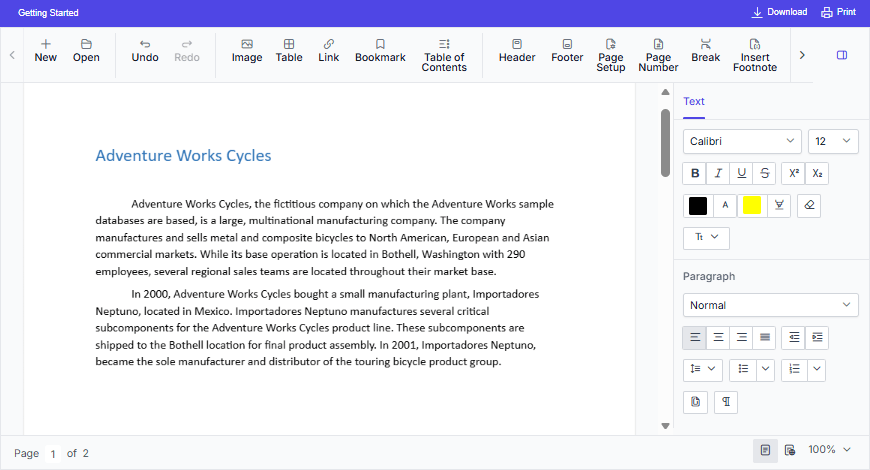
The TypeScript DOCX Editor (Document Editor) is a feature-rich, user-interactive component that enables creating, editing, viewing, and printing Word documents with advanced formatting, editing capabilities, and broad support for document import and export formats.
Key Features
-
Opens native
Syncfusion Document Text (*.sfdt)format documents on the client side. -
Saves the documents on the client side as
Syncfusion Document Text (*.sfdt)andWord document (*.docx). - Supports document elements like text, image, table, fields, bookmark, shapes, section, header and footer.
- Supports the commonly used fields like hyperlink, page number, page count, and table of contents.
- Supports formats like text, paragraph, bullets and numbering, table, and page settings.
- Supports creating, editing, and applying paragraph and character styles.
- Supports find and replace text within the document.
- Supports all the common editing and formatting operations along with undo and redo.
- Supports cut, copy, and paste of rich text content within the component. Also supports pasting plain text to and from other applications.
- Supports inserting and editing form fields.
- Supports inserting and editing comments.
- Supports tracking inserted and deleted content.
- Supports spell checking for any input text.
- Allows user interactions like zoom, scroll, and selecting contents through touch, mouse, and keyboard.
- Provides intuitive UI options like context menu, dialogs, and navigation pane.
- Provides a ribbon interface similar to Microsoft Word, with tab-based commands for quick and intuitive access to features.
- Localizes all the static text to any desired language.
- Allows creating a lightweight Word viewer using module injection to view and print Word documents.
- Provides a server-side helper library to open Word documents like DOCX, DOC, WordML, RTF, and Text by converting them to SFDT file format.
Supported platforms for server-side dependencies
The DOCX Editor component requires server-side interactions for the following operations:
- Open file formats other than SFDT
- Paste with formatting
- Restrict editing
- Spell check
- Save as file formats other than SFDT and DOCX
You can deploy web APIs for the server-side dependencies of the DOCX Editor component on the following platforms.
To know more about server-side dependencies, refer to this page.
If you don’t require the above functionalities, then you can deploy it as a pure client-side component without any server-side interactions.