Comments in TypeScript DOCX Editor
12 Oct 20269 minutes to read
TypeScript DOCX Editor (Document Editor) allows you to add comments to documents. You can add, navigate, and remove comments in code and from the UI.
Add a new comment
Comments can be inserted into the selected text.
//Add new comment in the document.
documentEditor.editor.insertComment('Test comment');
Add a New Comment with Date, Author, and Status
Comments can be inserted into the selected text with a specified date, author, and status using insertComment.
// In this example, a comment with the text "Hello world"
// is added by the author Nancy Davolio on July 23, 2024, at 2:30 PM.
// The isResolved status is set to false.

// Create a specific date: July 23, 2024, at 2:30:00 PM.
// Note: July is represented by 6 (0-based index).
let specificDate = new Date(2024, 6, 23, 14, 30, 0);


// Define the properties of the comment including author, date, and resolution status.
let commentProperties: CommentProperties = {
    author: 'Nancy Davolio',          // The author of the comment.
    dateTime: specificDate,           // The date and time when the comment is created.
    isResolved: false                 // The status of the comment; false indicates it is unresolved.
};

// Insert the comment with the specified properties into the document editor.
documentEditor.editor.insertComment('Hello world', commentProperties);
Add a Reply Comment with Date, Author, and Status
Reply comments can be inserted into the parent comment with a specified date, author, and status using insertReplyComment.
// In this example, a comment with the text "Hello world"
// is added by the author Nancy Davolio on July 23, 2024, at 2:30 PM.
// The isResolved status is set to false.

// Create a specific date: July 23, 2024, at 2:30:00 PM.
// Note: July is represented by 6 (0-based index).
let specificDate = new Date(2024, 6, 23, 14, 30, 0);

// Define the properties of the comment including author, date, and resolution status.
let commentProperties: CommentProperties = {
    author: 'Nancy Davolio',          // The author of the comment.
    dateTime: specificDate,           // The date and time when the comment is created.
    isResolved: false                 // The status of the comment; false indicates it is unresolved.
};

// Insert the comment with the specified properties into the Document Editor.
let comment: Comment = documentEditor.editor.insertComment('Hello world', commentProperties);
// Insert a reply comment with specified properties into the Document Editor
documentEditor.editor.insertReplyComment(comment.id, 'Hello world', commentProperties);
Get Comments
The DOCX Editor allows you to get the comments along with their reply and comment properties using getComments.
//Get Comments in the document along with the properties author, date, status.
let commentinfo: CommentInfo[] = container.documentEditor.getComments();
Comment navigation
Next and previous comments can be navigated using the below code snippet.
//Navigate to next comment
documentEditor.selection.navigateNextComment();

//Navigate to previous comment
documentEditor.selection.navigatePreviousComment();
Delete comment
Current comment can be deleted using deleteComment.
//Delete the current selected comment.
container.documentEditor.editor.deleteComment();

//Get Comments in the document along with the properties author, date, status.
let commentinfo: CommentInfo[] = container.documentEditor.getComments();

//Delete the particular parent comment and all of its reply comments
container.documentEditor.editor.deleteComment(commentinfo[0].id);

//Delete the particular reply comment.
container.documentEditor.editor.deleteComment(commentinfo[0].replies[0].id);
Delete all comments
All the comments in the document can be deleted using the below code snippet.
//Delete all the comments present in the current document.
documentEditor.editor.deleteAllComments();
Protect the document in comments-only mode
The DOCX Editor provides support for protecting the document with CommentsOnly protection. In this protection, the user is allowed to add or edit comments alone in the document.
The DOCX Editor provides an option to protect and unprotect the document using enforceProtection and stopProtection API.
The following example code illustrates how to enforce and stop protection in the Document Editor container.
let container: DocumentEditorContainer = new DocumentEditorContainer({
  enableToolbar: true,
  height: '590px',
});
DocumentEditorContainer.Inject(Toolbar);
container.serviceUrl =
  'http://localhost:5000/api/documenteditor/';
container.appendTo('#container');

//enforce protection
container.documentEditor.editor.enforceProtection('123', 'CommentsOnly');

//stop the document protection
container.documentEditor.editor.stopProtection('123');
Comment only protection can be enabled in the UI by using the Restrict Editing pane
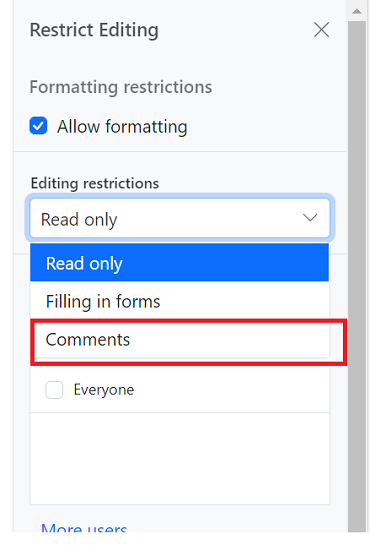
In the enforce Protection method, the first parameter denotes the password and the second parameter denotes the protection type. Possible values of protection type are
NoProtection | ReadOnly | FormFieldsOnly | CommentsOnly. In the stop protection method, the parameter denotes the password.
Mention Support in comments
Mention support displays a list of items that users can select or tag from the suggested list. To use this feature, type the @ character in the comment box and select or tag the user from the suggestion list.
The following example illustrates how to enable mention support in the DOCX Editor.
let mentionData: any = [
    { "Name": "Mary Kate", "EmailId": "[email protected]" },
    { "Name": "Andrew James", "EmailId": "[email protected]" },
    { "Name": "Andrew Fuller", "EmailId": "[email protected]"}
];
let container: DocumentEditorContainer = new DocumentEditorContainer({ enableToolbar: true,height: '590px',
// Enable mention support in document editor
  documentEditorSettings: {
    mentionSettings: { dataSource: mentionData, fields: { text: 'Name' }},
  }
});
DocumentEditorContainer.Inject(Toolbar);
container.serviceUrl = 'https://document.syncfusion.com/web-services/docx-editor/api/documenteditor/';
container.appendTo('#container');
The Web API hosted link
https://document.syncfusion.com/web-services/docx-editor/api/documenteditor/utilized in the DOCX Editor’s serviceUrl property is intended solely for demonstration and evaluation purposes. For production deployment, please host your own web service with your required server configurations. You can refer and reuse the GitHub Web Service example or Docker image for hosting your own web service and use for the serviceUrl property.
Highlight comments by author
When highlightCommentsByAuthor is enabled, each comment marker is displayed in the author’s avatar color. Selecting a comment highlights the corresponding text and comment pane border in that color. If multiple comments appear on the same line, the marker retains the first author’s avatar color.
The following example illustrates how to enable comment highlighting using the highlightCommentsByAuthor property in the CommentSettings API Reference.
var container = new ej.documenteditor.DocumentEditorContainer({
    enableToolbar: true,
    height: '590px',
    // Enable mention support in document editor
    documentEditorSettings: { commentSettings: { highlightCommentsByAuthor : true } }
});

ej.documenteditor.DocumentEditorContainer.Inject(ej.documenteditor.Toolbar);
container.serviceUrl = 'https://document.syncfusion.com/web-services/docx-editor/api/documenteditor/';
container.appendTo('#container');
Events
The DOCX Editor provides beforeCommentAction event, which is triggered on comment actions like post, edit, reply, resolve, and reopen. This event provides an opportunity to perform custom logic on comment actions like post, edit, reply, resolve, and reopen. The event handler receives the CommentActionEventArgs object as an argument, which allows access to information about the comment.
To demonstrate a specific use case, let’s consider an example where we want to restrict the delete functionality based on the author’s name. The following code snippet illustrates how to allow only the author of a comment to delete:
import { DocumentEditorContainer, Toolbar, CommentActionEventArgs } from '@syncfusion/ej2-documenteditor';

// Inject require modules.
DocumentEditorContainer.Inject(Toolbar);
let mentionData: any = [
    { "Name": "Mary Kate", "EmailId": "[email protected]" },
    { "Name": "Andrew James", "EmailId": "[email protected]" },
    { "Name": "Andrew Fuller", "EmailId": "[email protected]"}
];
let container: DocumentEditorContainer = new DocumentEditorContainer({ enableToolbar: true,height: '590px', beforeCommentAction:beforecomment,
// Enable mention support in document editor
  documentEditorSettings: {
    mentionSettings: { dataSource: mentionData, fields: { text: 'Name' }},
  }
});
DocumentEditorContainer.Inject(Toolbar);
container.serviceUrl = 'https://document.syncfusion.com/web-services/docx-editor/api/documenteditor/';
container.appendTo('#container');
container.currentUser="Guest User";

// Event get triggerd on comment actions like Post, edit, reply, resolve and reopen
function beforecomment(args : CommentActionEventArgs){
    // Check the type and author of the comment and current user are different
    if(args.type === "Delete" && container.currentUser !== args.author){
        // Cancel the comment action
        args.cancel = true;
    }
}
The Web API hosted link
https://document.syncfusion.com/web-services/docx-editor/api/documenteditor/utilized in the DOCX Editor’s serviceUrl property is intended solely for demonstration and evaluation purposes. For production deployment, please host your own web service with your required server configurations. You can refer and reuse the GitHub Web Service example or Docker image for hosting your own web service and use for the serviceUrl property.
Online Demo
Explore how to add, view, and manage comments in Word documents using the JavaScript DOCX Editor in this live demo here.