Filling PDF Forms in WPF Pdf Viewer
14 Aug 20266 minutes to read
Filling PDF Forms in WPF PDF Viewer enables efficient entry and updating of form data in existing PDF documents. This functionality is supported through three distinct approaches:
- Form Filling Through User Interface
- Filling Form Fields Programmatically
- Filling PDF Forms through Export and Import Data
Fill PDF forms through the User Interface
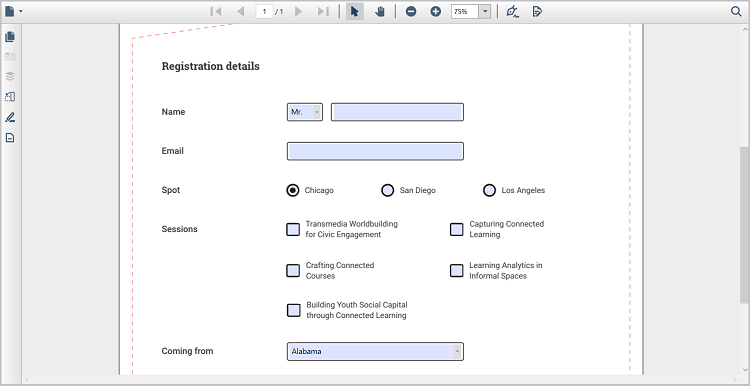
The WPF PDF Viewer enables PDF form fields to be filled directly through the built‑in user interface without requiring any code. Form fields can be selected and populated by entering text or choosing values based on the field type, providing a smooth and interactive form‑filling experience.
Fill PDF forms programmatically
WPF PDF Viewer allows PDF form fields to be filled or updated programmatically by accessing existing form fields and assigning values through APIs. This approach is useful when form data needs to be populated dynamically based on application logic or automated workflows.
The following example demonstrates how to update PDF form field values programmatically in the WPF PDF Viewer, including TextBox, CheckBox, ComboBox, ListBox and RadioButton form fields using the available APIs:
private void UpdateTextbox_Click(object sender, RoutedEventArgs e)
{
     if (pdfViewer.LoadedDocument.Form != null)
 {
     if (pdfViewer.LoadedDocument.Form.Fields[0] is PdfLoadedTextBoxField)
     {
        (pdfViewer.LoadedDocument.Form.Fields[0] as PdfLoadedTextBoxField).Text = "Syncfusion";
     }
     if(pdfViewer.LoadedDocument.Form.Fields[1] is PdfLoadedCheckBoxField)
     {
         (pdfViewer.LoadedDocument.Form.Fields[1] as PdfLoadedCheckBoxField).Checked = true;
     }
     if(pdfViewer.LoadedDocument.Form.Fields[2] is PdfLoadedComboBoxField)
     {
         (pdfViewer.LoadedDocument.Form.Fields[2] as PdfLoadedComboBoxField).SelectedIndex = 1;
     }
     if(pdfViewer.LoadedDocument.Form.Fields[3] is PdfLoadedListBoxField)
     {
         (pdfViewer.LoadedDocument.Form.Fields[3] as PdfLoadedListBoxField).SelectedIndex = new int[2] { 1, 2 };
     }
     if (pdfViewer.LoadedDocument.Form.Fields[5] is PdfLoadedRadioButtonListField)
     {
         (pdfViewer.LoadedDocument.Form.Fields[5] as PdfLoadedRadioButtonListField).SelectedIndex = 1;
     }
 }
}
Private Sub UpdateTextbox_Click(sender As Object, e As RoutedEventArgs)
If pdfViewer.LoadedDocument Is Nothing OrElse pdfViewer.LoadedDocument.Form Is Nothing Then
Return
End If
Dim form = pdfViewer.LoadedDocument.Form
' TextBox (Field 0)
Dim textBox = TryCast(form.Fields(0), PdfLoadedTextBoxField)
If textBox IsNot Nothing Then
textBox.Text = "Syncfusion"
End If
' CheckBox (Field 1)
Dim checkBox = TryCast(form.Fields(1), PdfLoadedCheckBoxField)
If checkBox IsNot Nothing Then
checkBox.Checked = True
End If
' ComboBox (Field 2)
Dim combo = TryCast(form.Fields(2), PdfLoadedComboBoxField)
If combo IsNot Nothing Then
combo.SelectedIndex = 1
End If
' ListBox (Field 3)
Dim listBox = TryCast(form.Fields(3), PdfLoadedListBoxField)
If listBox IsNot Nothing Then
listBox.SelectedIndex = New Integer() {1, 2}
End If
' RadioButtonList (Field 5)
Dim radioList = TryCast(form.Fields(5), PdfLoadedRadioButtonListField)
If radioList IsNot Nothing Then
radioList.SelectedIndex = 1
End If
End SubFill PDF forms through Export and Import Data
In WPF PDF Viewer, exporting and importing form data simplifies working with PDF forms through both programmatic APIs and the built‑in user interface. Filled form data can be exported programmatically or through UI actions and stored in a database or file storage, preserving all entered values for later use. This capability helps save progress, share data between applications, and restore form states when needed.
The same exported data can be imported back into an existing PDF document using the ImportFormData API or supported UI options, allowing form fields to be pre-filled using external data sources without manual entry. During the import process, form data is automatically mapped to the corresponding form fields based on field names. Once imported, the populated values are displayed in the PDF Viewer and remain editable through the user interface if required.
private void button1_Click(object sender, RoutedEventArgs e)
{
    //Import PDF form data
    pdfViewer.ImportFormData("Import.fdf", Syncfusion.Pdf.Parsing.DataFormat.Fdf);
}
Private Sub button1_Click(sender As Object, e As RoutedEventArgs)
'Import PDF form data
pdfViewer.ImportFormData("Import.fdf", Syncfusion.Pdf.Parsing.DataFormat.Fdf)
End SubFor more details, see Import Form Data and Export Form Data.