Modify Form Field values in WPF Pdf Viewer
14 Aug 20268 minutes to read
WPF PDF Viewer allows PDF form field values to be updated through the user interface for manual changes or through programmatic APIs for automated and dynamic updates.
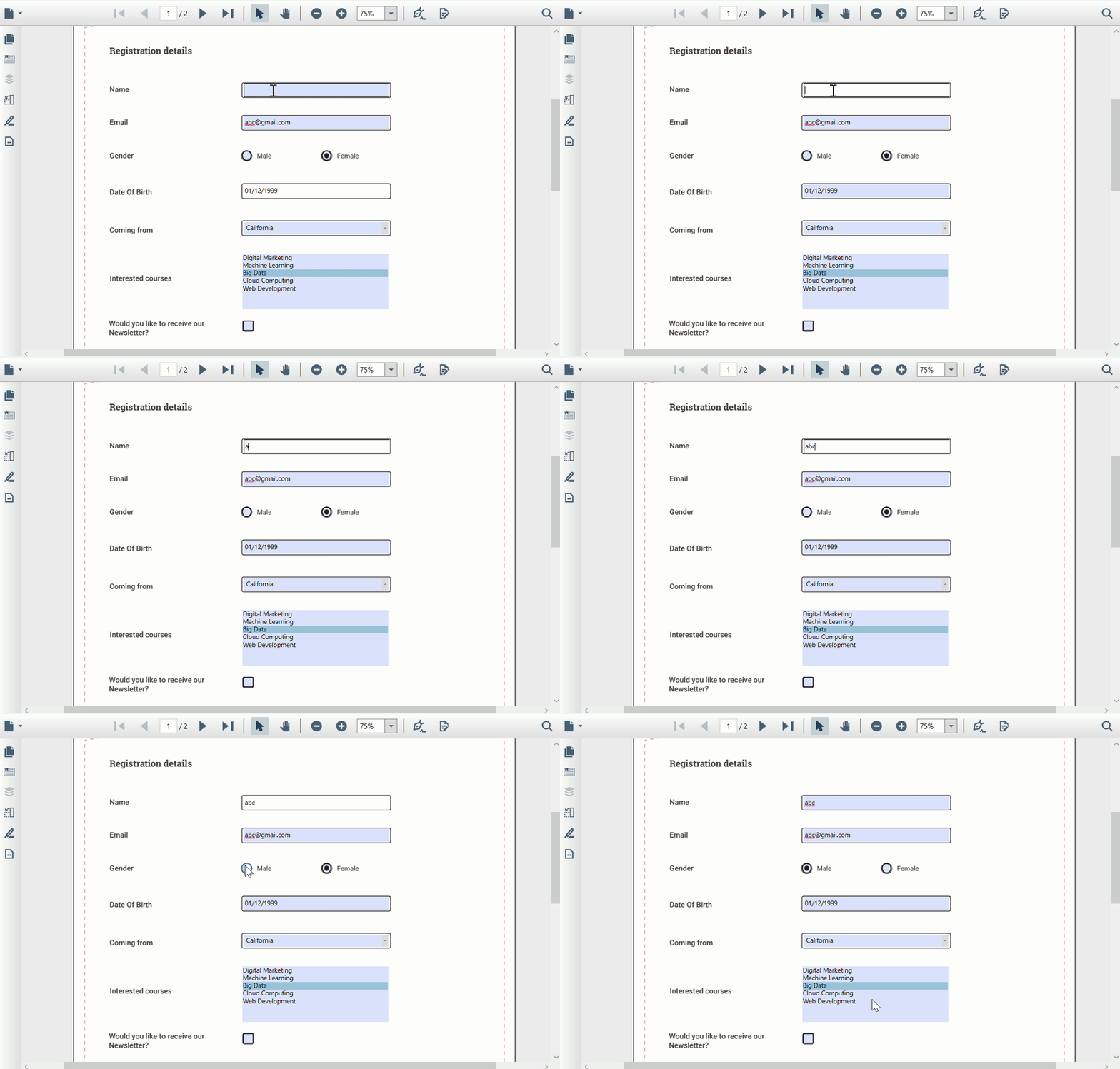
Modify Form Field values in WPF Pdf Viewer using UI
The Syncfusion WPF PDF Viewer allows you to modify PDF form fields values directly through the user interface without using code. Users can click on form fields and enter or select values based on the field type. It supports common form fields such as text boxes, check boxes, radio buttons and list boxes. Filled values can be edited at any time, and the entered data is retained during the viewing session.
Note > PDF signature field modification through programmatic APIs is not supported. However, users can add, modify, or delete signatures directly through the UI alone.
Modify Form Field values in WPF Pdf Viewer programmatically
WPF PDF Viewer allows PDF form field values to be modified programmatically by accessing existing form fields through APIs. Developers can retrieve form fields from the loaded PDF document’s form collection and update their values using code. This approach is useful for dynamically setting form data based on application logic.
TextBox
A text box form field can be updated using code by accessing it from the loaded PDF document. Developers can retrieve the PdfLoadedTextBoxField from the document’s form fields collection and change its text value programmatically to automatically fill or update data.
private void Update_Click(object sender, RoutedEventArgs e)
{
    if (pdfViewer.LoadedDocument.Form != null)
	{
		if (pdfViewer.LoadedDocument.Form.Fields[0] is PdfLoadedTextBoxField)
		{
			(pdfViewer.LoadedDocument.Form.Fields[0] as PdfLoadedTextBoxField).Text = "Syncfusion";
		}
	}
}
Private Sub Update_Click(sender As Object, e As RoutedEventArgs)
If pdfViewer.LoadedDocument Is Nothing OrElse pdfViewer.LoadedDocument.Form Is Nothing Then
Return
End If
Dim form = pdfViewer.LoadedDocument.Form
' TextBox (Field 0)
Dim textBox = TryCast(form.Fields(0), PdfLoadedTextBoxField)
If textBox IsNot Nothing Then
textBox.Text = "Syncfusion"
End If
End SubCheckBox
A CheckBox form field value can be updated programmatically by accessing it from the loaded PDF document. Developers can retrieve the PdfLoadedCheckBoxField from the document’s form fields collection and set its Checked property to true or false using code.
private void UpdateCheckBox_Click(object sender, RoutedEventArgs e)
{
    if (pdfViewer.LoadedDocument == null || pdfViewer.LoadedDocument.Form == null) return;

    var cb = pdfViewer.LoadedDocument.Form.Fields[2] as PdfLoadedCheckBoxField; // replace index
    if (cb != null)
    {
        cb.Checked = true; // or false
    }
}
Private Sub UpdateCheckBox_Click(sender As Object, e As RoutedEventArgs)
If pdfViewer.LoadedDocument Is Nothing OrElse pdfViewer.LoadedDocument.Form Is Nothing Then Return
Dim cb = TryCast(pdfViewer.LoadedDocument.Form.Fields(2), PdfLoadedCheckBoxField)
If cb IsNot Nothing Then
cb.Checked = True
End If
End SubRadioButton
A Radio Button form field value can be updated programmatically by accessing it from the loaded PDF document. Developers can retrieve the PdfLoadedRadioButtonListField from the document’s form fields collection and change its selected option by setting the SelectedIndex property.
private void UpdateRadio_Click(object sender, RoutedEventArgs e)
{
    if (pdfViewer.LoadedDocument == null || pdfViewer.LoadedDocument.Form == null) return;

    var radioList = pdfViewer.LoadedDocument.Form.Fields[3] as PdfLoadedRadioButtonListField; // replace index
    if (radioList != null)
    {
        radioList.SelectedIndex = 1; // 0-based index
    }
}
Private Sub UpdateRadio_Click(sender As Object, e As RoutedEventArgs)
If pdfViewer.LoadedDocument Is Nothing OrElse pdfViewer.LoadedDocument.Form Is Nothing Then Return
Dim radioList = TryCast(pdfViewer.LoadedDocument.Form.Fields(3), PdfLoadedRadioButtonListField)
If radioList IsNot Nothing Then
radioList.SelectedIndex = 1
End If
End SubListBox
A ListBox form field value can be updated programmatically by accessing it from the loaded PDF document. Developers can retrieve the PdfLoadedListBoxField from the document’s form fields collection and set its selected items using the SelectedIndex property.
private void UpdateListBox_Click(object sender, RoutedEventArgs e)
{
    if (pdfViewer.LoadedDocument == null || pdfViewer.LoadedDocument.Form == null) return;

    var listBox = pdfViewer.LoadedDocument.Form.Fields[4] as PdfLoadedListBoxField; // replace index
    if (listBox != null)
    {
        listBox.SelectedIndex = new int[] { 1, 2 }; // select multiple indices
    }
}
Private Sub UpdateListBox_Click(sender As Object, e As RoutedEventArgs)
If pdfViewer.LoadedDocument Is Nothing OrElse pdfViewer.LoadedDocument.Form Is Nothing Then Return
Dim listBox = TryCast(pdfViewer.LoadedDocument.Form.Fields(4), PdfLoadedListBoxField)
If listBox IsNot Nothing Then
listBox.SelectedIndex = New Integer() {1, 2}
End If
End SubComboBox
A ComboBox form field value can be updated programmatically by accessing it from the loaded PDF document. Developers can retrieve the PdfLoadedComboBoxField from the document’s form fields collection and set the selected option using the SelectedIndex property.
private void UpdateComboBox_Click(object sender, RoutedEventArgs e)
{
    if (pdfViewer.LoadedDocument == null || pdfViewer.LoadedDocument.Form == null) return;

    var combo = pdfViewer.LoadedDocument.Form.Fields[5] as PdfLoadedComboBoxField; // replace index
    if (combo != null)
    {
        combo.SelectedIndex = 1;
    }
}
Private Sub UpdateComboBox_Click(sender As Object, e As RoutedEventArgs)
If pdfViewer.LoadedDocument Is Nothing OrElse pdfViewer.LoadedDocument.Form Is Nothing Then Return
Dim combo = TryCast(pdfViewer.LoadedDocument.Form.Fields(5), PdfLoadedComboBoxField)
If combo IsNot Nothing Then
combo.SelectedIndex = 1
End If
End Sub