Fill PDF Form Fields in Vue PDF Viewer
21 Aug 202610 minutes to read
The PDF Viewer supports three form-filling approaches:
-
Filling Form Fields Programmatically
Form fields can be filled or updated programmatically using the updateFormFieldsValue API. This approach is useful when form data must be set dynamically by application logic.
-
Form Filling Through User Interface
End users can fill PDF form fields directly through the PDF Viewer interface by typing text, selecting options, or interacting with supported form elements.
-
The PDF Viewer can import form field data into an existing PDF document to pre-fill fields from external data sources.
Fill PDF forms programmatically
Form field values can be updated programmatically using the updateFormFieldsValue API. This method allows applications to set or modify form field values dynamically without end-user interaction.
The following example demonstrates how to update PDF form field values programmatically:
<template>
  <div>
    <button @click="fillForm">Fill Form Fields</button>
    <ejs-pdfviewer id="pdfViewer" ref="pdfviewer" :documentPath="documentPath" :resourceUrl="resourceUrl" style="height:640px" />
  </div>
</template>

<script>
import {
  PdfViewerComponent,
  Toolbar,
  Magnification,
  Navigation,
  Annotation,
  TextSelection,
  TextSearch,
  FormFields,
  FormDesigner,
  PageOrganizer,
} from '@syncfusion/ej2-vue-pdfviewer';


export default {
  components: { 'ejs-pdfviewer': PdfViewerComponent },
  data() {
    return {
      documentPath: 'https://cdn.syncfusion.com/content/pdf/form-filling-document.pdf',
      resourceUrl: 'https://cdn.syncfusion.com/ej2/31.1.23/dist/ej2-pdfviewer-lib',
    };
  },
  provide: {
    PdfViewer: [Toolbar, Magnification, Navigation, Annotation, TextSelection, TextSearch, FormFields, FormDesigner, PageOrganizer],
  },
  methods: {
    fillForm() {
      const pdfviewer = this.$refs.pdfviewer.ej2Instances;
      const fields = pdfviewer.retrieveFormFields?.() || pdfviewer.formFieldCollection || [];
      const field = fields.find((f) => f?.name === 'name') || fields[0];
      if (field) {
        field.value = 'John Doe';
        field.tooltip = 'First';
        pdfviewer.updateFormFieldsValue(field);
      } else {
        console.warn('No form fields available to update.');
      }
    },
  },
};
</script>
Fill PDF forms through the User Interface
The PDF Viewer enables end users to complete form fields directly in the interface without code. Fields accept input appropriate to their type.
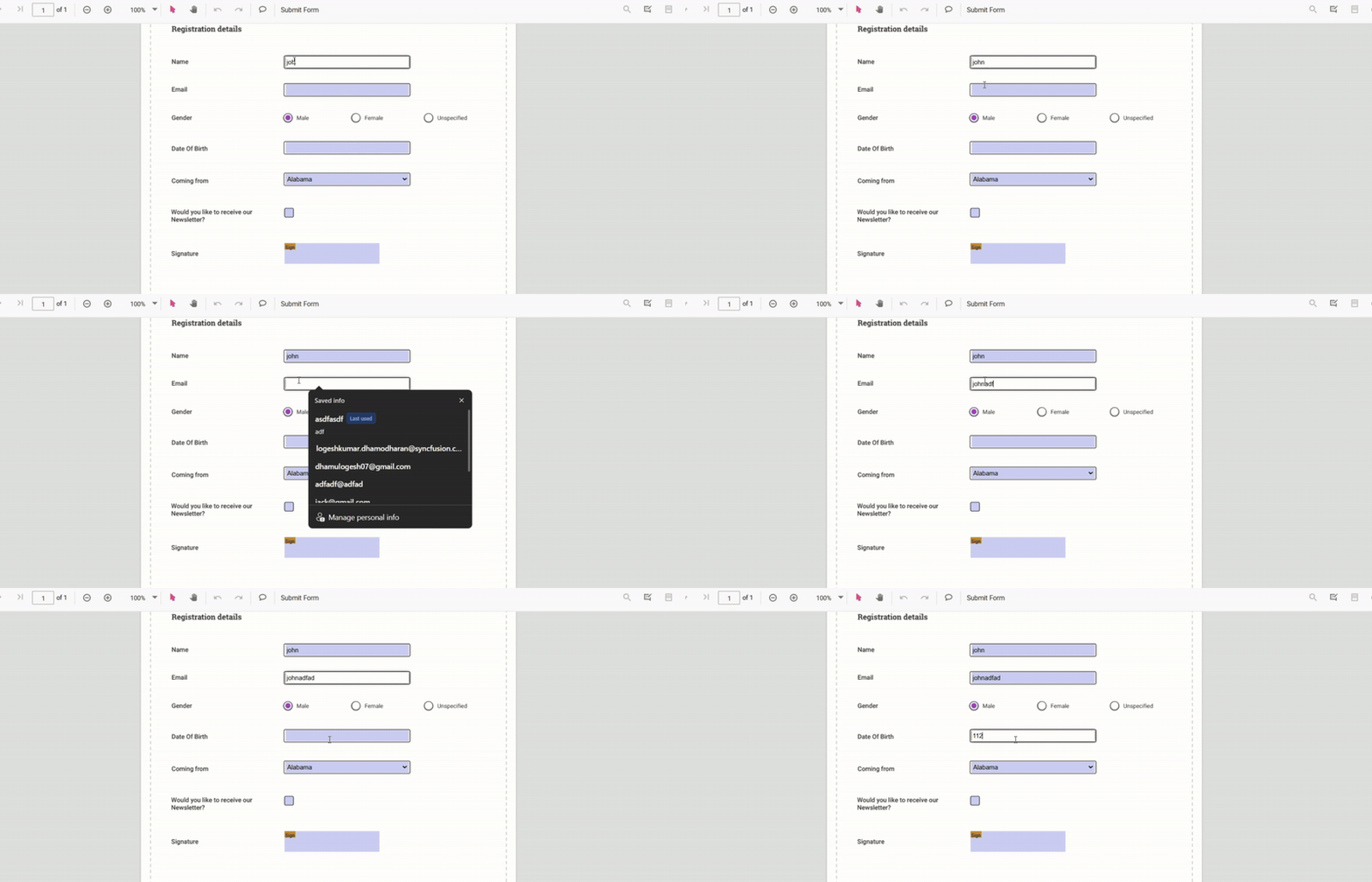
The PDF Viewer supports common form fields such as text boxes, check boxes, radio buttons, drop-down lists, list boxes, and signature fields. Entered values remain editable during the viewing session.
Fill PDF forms through Import Data
The PDF Viewer can import form field data into an existing PDF document using the importFormFields API. This enables pre-filling fields from external data sources without manual entry.
Imported data is mapped to PDF form fields by field name. The imported values appear in the viewer and remain editable if the document permits modification. Refer to Import Form Data for details about expected data formats and mapping rules.
<template>
  <div>
    <button @click="importJson">Import JSON</button>
    <ejs-pdfviewer id="pdfViewer" ref="pdfviewer" :documentPath="documentPath" :resourceUrl="resourceUrl" style="height:640px" />
  </div>
</template>

<script>
import {
  PdfViewerComponent,
  Toolbar,
  Magnification,
  Navigation,
  Annotation,
  TextSelection,
  TextSearch,
  FormFields,
  FormDesigner,
  PageOrganizer,
  FormFieldDataFormat
} from '@syncfusion/ej2-vue-pdfviewer';


export default {
  components: { 'ejs-pdfviewer': PdfViewerComponent },
  data() {
    return {
      documentPath: 'https://cdn.syncfusion.com/content/pdf/form-filling-document.pdf',
      resourceUrl: 'https://cdn.syncfusion.com/ej2/31.1.23/dist/ej2-pdfviewer-lib',
    };
  },
  provide: {
    PdfViewer: [Toolbar, Magnification, Navigation, Annotation, TextSelection, TextSearch, FormFields, FormDesigner, PageOrganizer],
  },
  methods: {
    importJson() {
      const pdfviewer = this.$refs.pdfviewer.ej2Instances;
      // The file for importing should be accessible at the given path or as a file stream depending on your integration
      pdfviewer.importFormFields('File', FormFieldDataFormat.Json);
    },
  },
};
</script>
For more details, see Import Form Data.
How to get the filled data and store it to a backing system
Filled form field data can be exported from the PDF Viewer and stored in a backing system such as a database or file storage. Exported data can be re-imported later to restore form state. See Export Form Data for supported export formats and recommended persistence patterns.
For more details, see Export Form Data.
How to Validate Form Fields using validateFormFields Event
The validateFormFields event fires when a download or submit action is attempted while validation is enabled. The retrieveFormFields() API returns all form fields so the application can validate values before proceeding.
Validation applies to all field types: a textbox is considered empty if it contains no text; a list box or dropdown is empty when no item is selected; a signature or initial field is empty if no signature exists; and radio buttons or checkboxes are empty when none are chosen.
Enable enableFormFieldsValidation and handle the event to cancel submit/download actions when required fields are missing.
<template>
  <div>
    <ejs-pdfviewer id="pdfViewer" ref="pdfviewer" :documentPath="documentPath" :resourceUrl="resourceUrl" style="height:640px" @documentLoad="onDocumentLoad" />
  </div>
</template>

<script>
import {
  PdfViewerComponent,
  Toolbar,
  Magnification,
  Navigation,
  Annotation,
  TextSelection,
  TextSearch,
  FormFields,
  FormDesigner,
  PageOrganizer,
} from '@syncfusion/ej2-vue-pdfviewer';

export default {
  components: { 'ejs-pdfviewer': PdfViewerComponent },
  data() {
    return {
      documentPath: 'https://cdn.syncfusion.com/content/pdf/form-filling-document.pdf',
      resourceUrl: 'https://cdn.syncfusion.com/ej2/31.1.23/dist/ej2-pdfviewer-lib',
    };
  },
  provide: {
    PdfViewer: [Toolbar, Magnification, Navigation, Annotation, TextSelection, TextSearch, FormFields, FormDesigner, PageOrganizer],
  },
  methods: {
    onDocumentLoad() {
      const pdfviewer = this.$refs.pdfviewer.ej2Instances;
      pdfviewer.enableFormFieldsValidation = true;

      // Add required fields
      pdfviewer.formDesignerModule.addFormField('Textbox', {
        name: 'Email',
        bounds: { X: 146, Y: 260, Width: 220, Height: 24 },
        isRequired: true,
        tooltip: 'Email is required',
      });

      pdfviewer.formDesignerModule.addFormField('Textbox', {
        name: 'Phone',
        bounds: { X: 146, Y: 300, Width: 220, Height: 24 },
        isRequired: true,
        tooltip: 'Phone number is required',
      });

      // Validate only the added fields
      pdfviewer.validateFormFields = (args) => {
        const fields = pdfviewer.retrieveFormFields();
        fields.forEach((field) => {
          if ((field.name === 'Email' || field.name === 'Phone') && !field.value) {
            alert(field.name + ' field cannot be empty.');
            args.isFormSubmitCancelled = true;
          }
        });
      };
    },
  },
};
</script>