Group Form Fields in Vue PDF Viewer
21 Aug 20266 minutes to read
The Syncfusion Vue PDF Viewer allows you to group multiple form fields into a single logical field by assigning the same name to them. Grouped form fields share their values and states automatically based on the field type. Group form fields using the Form Designer UI or programmatically via APIs to keep related fields synchronized across a PDF document.
This page covers:
- How form field grouping works
- Field behavior based on type
- How to group form fields using the UI
- How to group form fields programmatically
- Related references and samples
How grouping works
In a PDF form, multiple PDF form fields can represent the same logical field. When PDF form fields share the same Name, they are treated as a group and stay synchronized.
Field behavior by type
- Textbox and Password — Text entered in one widget appears in all widgets with the same Name.
- CheckBox — Checking one widget sets the checked state for all checkboxes with the same Name.
- RadioButton — Widgets with the same Name form a radio group; only one option can be selected.
- ListBox and DropDown — The selected value is shared across widgets with the same Name.
- Signature and Initial fields — Applied signature/initial is mirrored across grouped widgets.
Form field grouping is controlled by the Name property. The position of each widget is determined only by its bounds; grouping is not affected by location.
Group using the Form Designer UI
Steps
- Enable the Form Designer toolbar.
- Add the form fields you want to group.
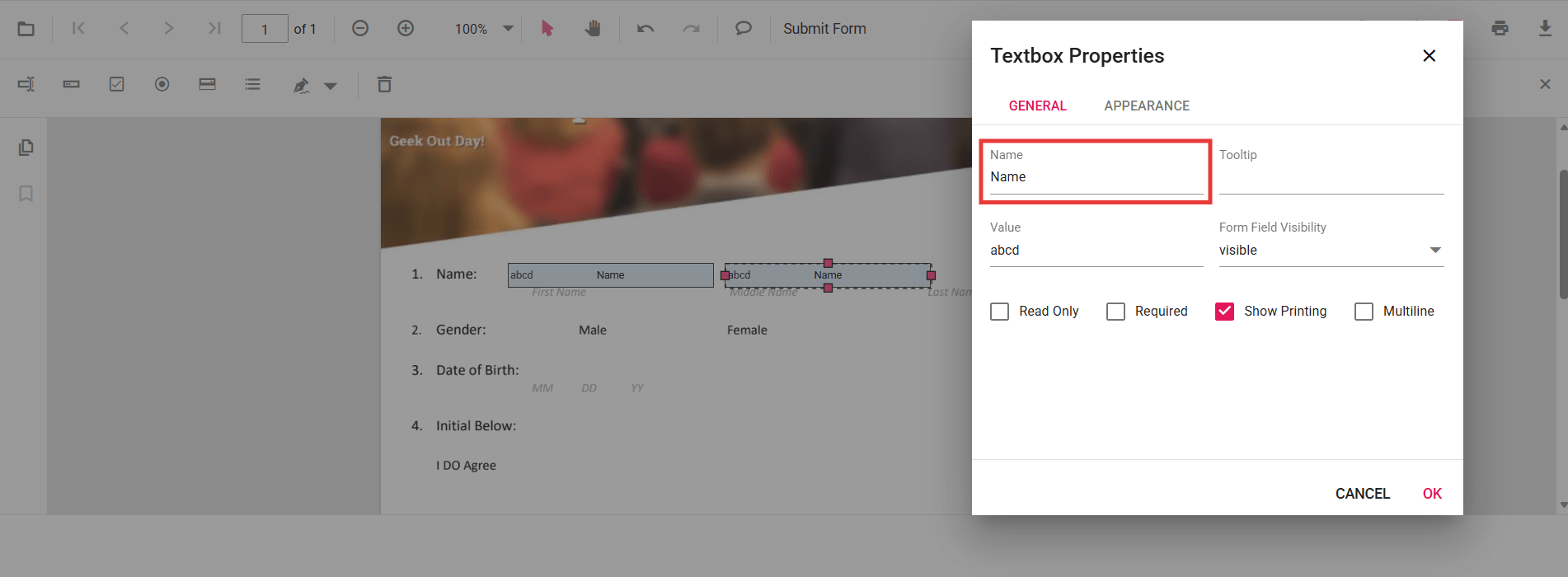
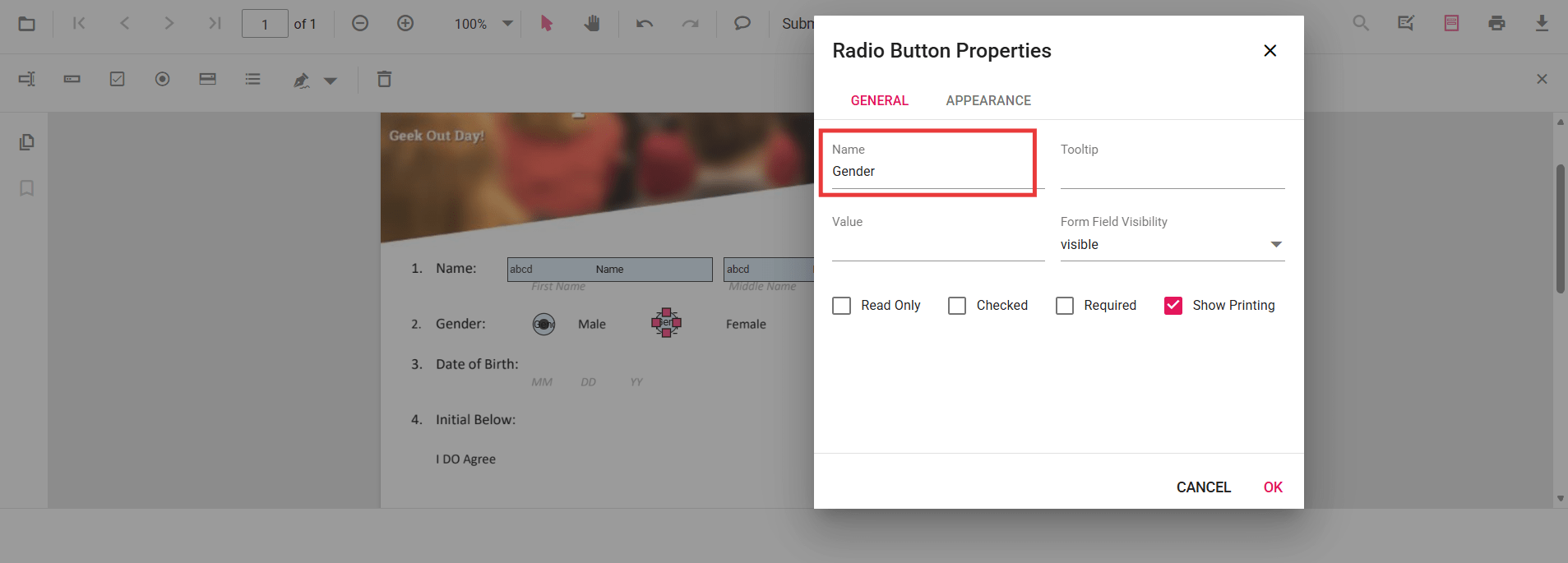
- Select a form field, open Properties, and set the Name value.
- Assign the same Name to all PDF form fields that belong to the group.
- Apply the changes and verify that updates in one widget reflect in the others.
Group PDF Form Fields Programmatically
You can also group form fields during creation by assigning the same Name through code.
Example Scenarios
- Two textboxes named EmployeeId share the same value across both widgets.
- A radio button group named Gender allows a single selection across the group.
- Two checkboxes named Subscribe share the same checked state.
<template>
  <div id="app">
    <ejs-pdfviewer
      id="pdfViewer"
      ref="pdfviewer"
      :documentPath="documentPath"
      :resourceUrl="resourceUrl"
      style="height: 640px"
      @documentLoad="onDocumentLoad"
    />
  </div>
</template>

<script>
import {
  PdfViewerComponent,
  Toolbar,
  Magnification,
  Navigation,
  Annotation,
  TextSelection,
  TextSearch,
  FormFields,
  FormDesigner,
  PageOrganizer,
} from '@syncfusion/ej2-vue-pdfviewer';

export default {
  name: 'App',
  components: {
    'ejs-pdfviewer': PdfViewerComponent,
  },
  data() {
    return {
      documentPath: 'https://cdn.syncfusion.com/content/pdf/form-filling-document.pdf',
      resourceUrl: 'https://cdn.syncfusion.com/ej2/31.1.23/dist/ej2-pdfviewer-lib',
    };
  },
  provide: {
    PdfViewer: [
      Toolbar,
      Magnification,
      Navigation,
      Annotation,
      TextSelection,
      TextSearch,
      FormFields,
      FormDesigner,
      PageOrganizer,
    ],
  },
  methods: {
    onDocumentLoad() {
      // Get the EJ2 instance from the Vue wrapper
      const pdfviewer = this.$refs.pdfviewer.ej2Instances;

      // Textbox group: same name => mirrored value
      pdfviewer.formDesignerModule.addFormField('Textbox', {
        name: 'EmployeeId',
        bounds: { X: 146, Y: 229, Width: 150, Height: 24 },
      });

      pdfviewer.formDesignerModule.addFormField('Textbox', {
        name: 'EmployeeId',
        bounds: { X: 338, Y: 229, Width: 150, Height: 24 },
      });

      // Radio group: same name => exclusive selection
      pdfviewer.formDesignerModule.addFormField('RadioButton', {
        name: 'Gender',
        bounds: { X: 148, Y: 289, Width: 18, Height: 18 },
        isSelected: false,
      });

      pdfviewer.formDesignerModule.addFormField('RadioButton', {
        name: 'Gender',
        bounds: { X: 292, Y: 289, Width: 18, Height: 18 },
        isSelected: false,
      });

      // CheckBox group: same name => mirrored checked state
      pdfviewer.formDesignerModule.addFormField('CheckBox', {
        name: 'Subscribe',
        bounds: { X: 56, Y: 664, Width: 20, Height: 20 },
        isChecked: false,
      });

      pdfviewer.formDesignerModule.addFormField('CheckBox', {
        name: 'Subscribe',
        bounds: { X: 242, Y: 664, Width: 20, Height: 20 },
        isChecked: false,
      });
    },
  },
};
</script>