Move and Resize Form Fields in React PDF Viewer
14 Aug 20265 minutes to read
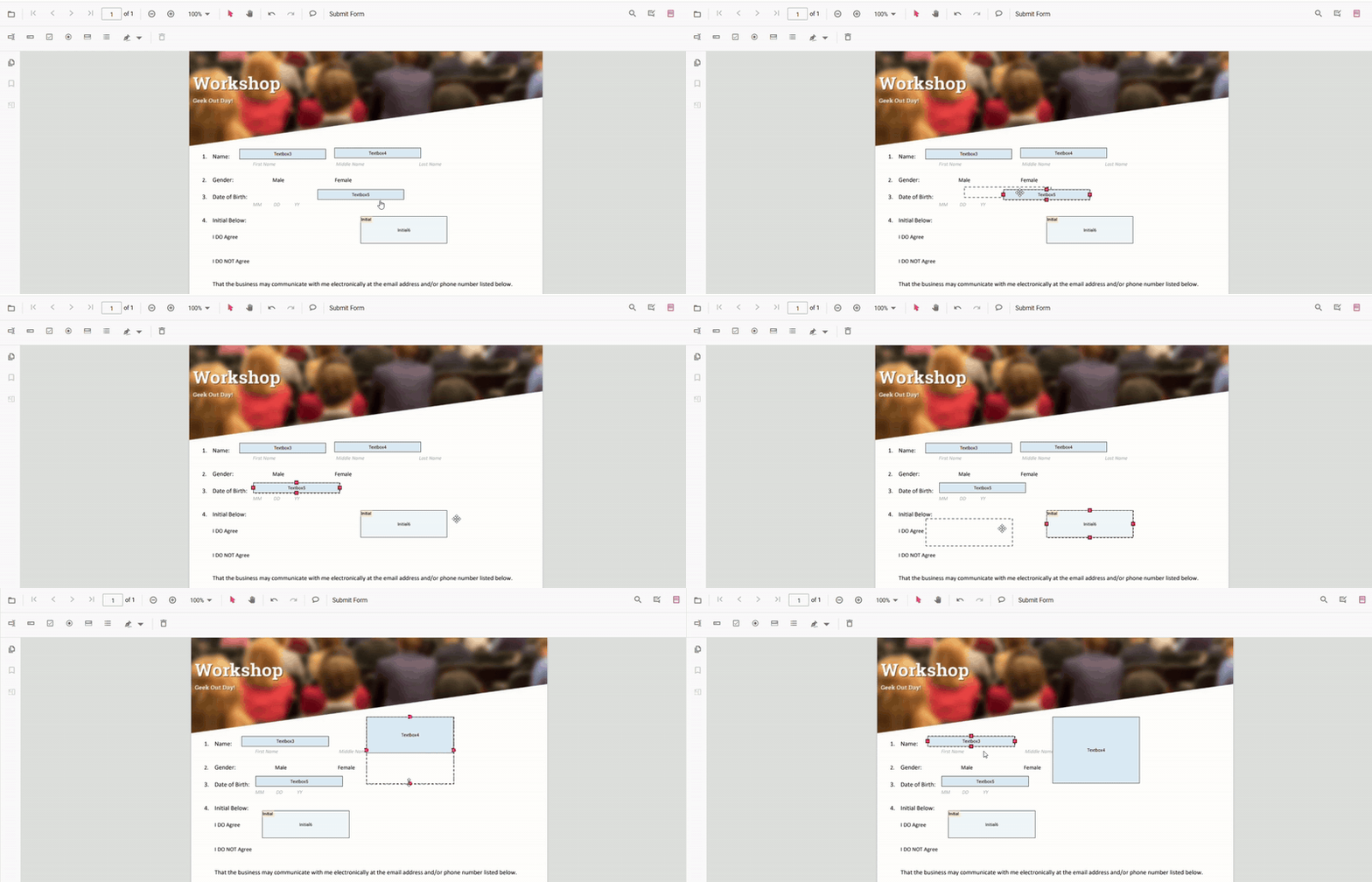
The PDF Viewer supports moving and resizing form fields.
- Move: drag the form field to reposition it.
- Resize: use the resize handles to change width and height.
Move and resize fields programmatically
The API supports setting absolute bounds. Pass a bounds object with the shape { X, Y, Width, Height } (in PDF page coordinates) to updateFormField.
Set absolute bounds
import * as ReactDOM from 'react-dom/client';
import React, { useRef, useCallback } from 'react';
import './index.css';
import {
  PdfViewerComponent,
  Toolbar,
  Magnification,
  Navigation,
  LinkAnnotation,
  BookmarkView,
  ThumbnailView,
  Print,
  TextSelection,
  Annotation,
  TextSearch,
  FormDesigner,
  FormFields,
  Inject,
} from '@syncfusion/ej2-react-pdfviewer';

export function App() {
  const viewerRef = useRef(null);

  const onDocumentLoad = useCallback(() => {
    const viewer = viewerRef.current;
    if (!viewer) return;

    viewer.formDesignerModule.addFormField('Textbox', {
      name: 'First Name',
      bounds: { X: 146, Y: 229, Width: 150, Height: 24 },
    });

    viewer.formDesignerModule.addFormField('Password', {
      name: 'Password',
      bounds: { X: 338, Y: 229, Width: 150, Height: 24 },
    });

    viewer.formDesignerModule.addFormField('SignatureField', {
      name: 'Sign Here',
      bounds: { X: 146, Y: 280, Width: 200, Height: 43 },
    });
  }, []);

  const resizeAndMove = useCallback(() => {
    const viewer = viewerRef.current;
    if (!viewer) return;

    const fields = (viewer.retrieveFormFields?.() || viewer.formFieldCollection || []);
    if (!fields.length) return;

    const field = fields.find(f => f.name === 'First Name') || fields[0];
    if (!field) return;

    viewer.formDesignerModule.updateFormField(field, {
      bounds: { X: 140, Y: 210, Width: 220, Height: 24 },
    });
  }, []);

  return (
    <div>
      <div className="control-section">
        <div style=>
          <button onClick={resizeAndMove}>Resize and Move “First Name”</button>
        </div>

        <PdfViewerComponent
          ref={viewerRef}
          id="container"
          documentPath="https://cdn.syncfusion.com/content/pdf/form-designer.pdf"
          resourceUrl="https://cdn.syncfusion.com/ej2/31.2.2/dist/ej2-pdfviewer-lib"
          documentLoad={onDocumentLoad}
          style=
        >
          <Inject
            services={[
              Toolbar,
              Magnification,
              Navigation,
              Annotation,
              LinkAnnotation,
              BookmarkView,
              ThumbnailView,
              Print,
              TextSelection,
              TextSearch,
              FormDesigner,
              FormFields,
            ]}
          />
        </PdfViewerComponent>
      </div>
    </div>
  );
}

const root = ReactDOM.createRoot(document.getElementById('sample'));
root.render(<App />);