Remove form fields in JavaScript PDF Viewer
14 Jan 20263 minutes to read
The PDF Viewer component allows users to remove PDF form fields using the Form Designer UI and programmatically.
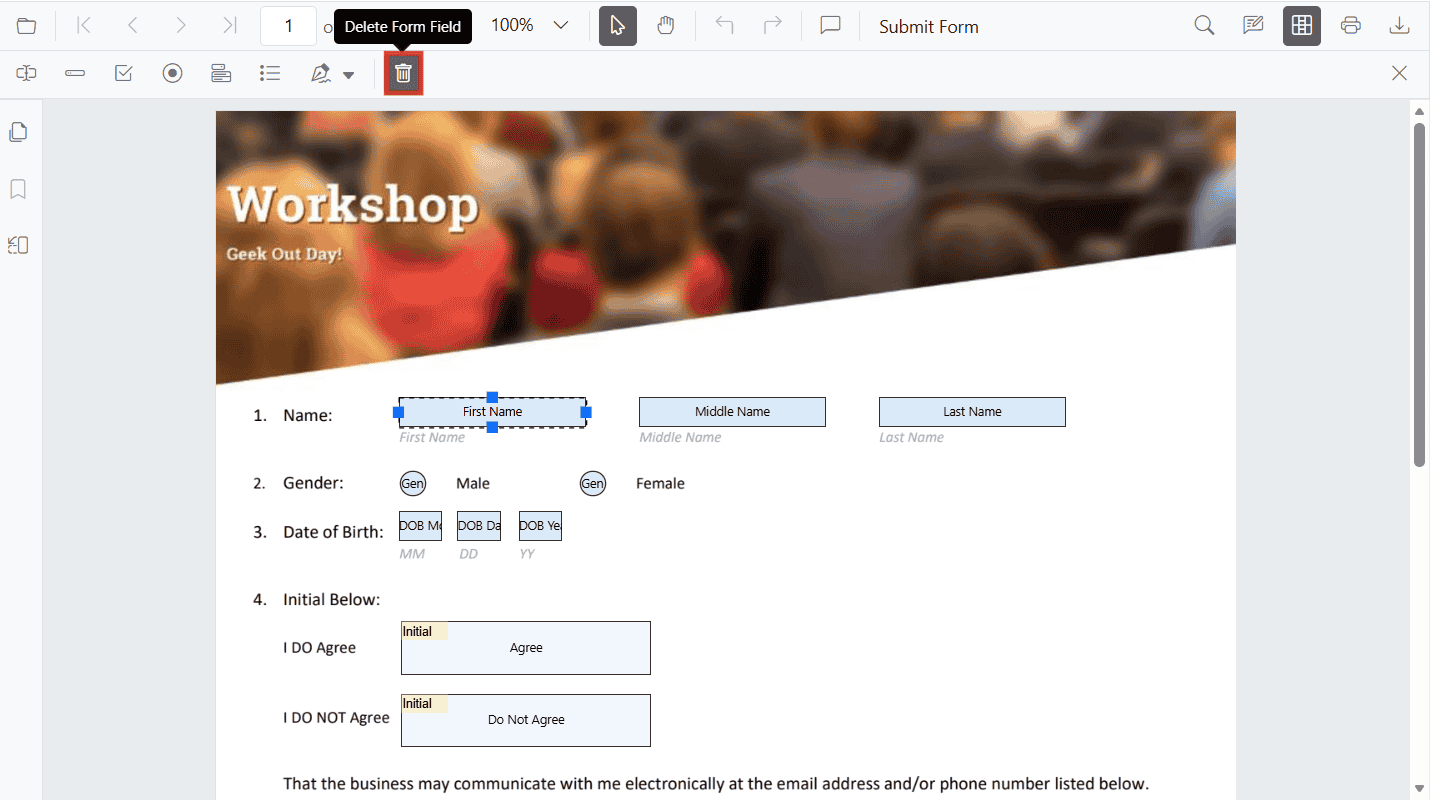
Remove form fields using the UI
You can remove designed form fields directly from the Form Designer toolbar.
Steps:
- Select the target form field on the page.
- Click the Delete Form Field icon on the Form Designer toolbar.
- Alternatively, press the
Delete keyafter selecting one or more fields.
Remove form fields programmatically
Use the deleteFormField method to remove form fields programmatically. Retrieve the target field from the retrieveFormFields() API (by object or ID) and pass it to deleteFormField.
The following example adds three fields on document load (Textbox, Password, and Signature) and shows two ways to remove them using buttons.
<button id="deleteAllFields">Delete Form Fields</button>
<button id="deleteById">Delete First Field By ID</button>
<div id="PdfViewer" style="height:500px;width:100%"></div>
// Inject required modules
ej.pdfviewer.PdfViewer.Inject(
ej.pdfviewer.Toolbar,
ej.pdfviewer.Magnification,
ej.pdfviewer.Navigation,
ej.pdfviewer.LinkAnnotation,
ej.pdfviewer.ThumbnailView,
ej.pdfviewer.BookmarkView,
ej.pdfviewer.TextSelection,
ej.pdfviewer.Annotation,
ej.pdfviewer.FormDesigner,
ej.pdfviewer.FormFields
);
var pdfviewer = new ej.pdfviewer.PdfViewer({
documentPath: 'https://cdn.syncfusion.com/content/pdf/form-designer.pdf',
resourceUrl: 'https://cdn.syncfusion.com/ej2/31.2.2/dist/ej2-pdfviewer-lib'
});
// Optional server-backed
// pdfviewer.serviceUrl = 'https://document.syncfusion.com/web-services/pdf-viewer/api/pdfviewer/';
pdfviewer.appendTo('#PdfViewer');
// Add form fields on document load
pdfviewer.documentLoad = function () {
pdfviewer.formDesignerModule.addFormField('Textbox', {
name: 'First Name',
bounds: { X: 146, Y: 229, Width: 150, Height: 24 }
});
pdfviewer.formDesignerModule.addFormField('Password', {
name: 'Password',
bounds: { X: 338, Y: 229, Width: 150, Height: 24 }
});
pdfviewer.formDesignerModule.addFormField('SignatureField', {
name: 'Sign Here',
bounds: { X: 146, Y: 280, Width: 200, Height: 43 }
});
};
// Delete all added form fields on button click (passing field objects)
document.getElementById('deleteAllFields') && document.getElementById('deleteAllFields').addEventListener('click', function () {
// Clone to avoid mutation while deleting
var fields = pdfviewer.retrieveFormFields().slice();
fields.forEach(function (field) {
pdfviewer.formDesignerModule.deleteFormField(field);
});
});
// Delete by ID on button click (example uses the first field's ID)
document.getElementById('deleteById') && document.getElementById('deleteById').addEventListener('click', function () {
var list = pdfviewer.retrieveFormFields();
if (list.length > 0 && list[0].id) {
pdfviewer.formDesignerModule.deleteFormField(list[0].id);
}
});NOTE
To configure the server-backed PDF Viewer, add the following
serviceUrlin your script:
pdfviewer.serviceUrl = 'https://document.syncfusion.com/web-services/pdf-viewer/api/pdfviewer/';