Freehand Highlight Annotation in Angular PDF Viewer
19 Nov 20267 minutes to read
Freehand Highlight annotations let users emphasize content in a PDF by drawing freehand strokes over the document. Unlike a regular Ink annotation, which is drawn on a layer above the page content, a Freehand Highlight stroke is rendered on the highlight blend layer. This allows the underlying page content to remain visible and readable through the highlighted region, ensuring the marked text can still be read while highlighted.
The feature is available in the annotation toolbar of the Angular PDF Viewer, and freehand highlights can also be added and deleted programmatically.
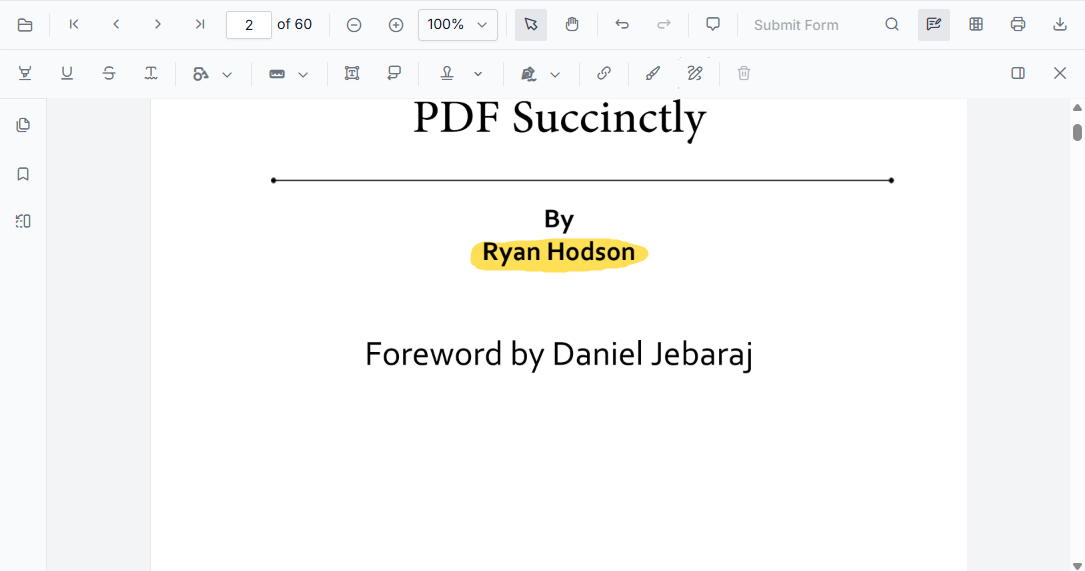
Freehand Highlight annotations are stored as Ink annotations with the
enableInkHighlightflag set totrue. This keeps the stroke data compatible with the Ink annotation APIs while rendering it with the highlight blend effect.
Enable Freehand Highlight in the Viewer
To enable Freehand Highlight annotations, inject the following modules into the Angular PDF Viewer:
import { Component } from '@angular/core';
import {
  PdfViewerModule,
  ToolbarService,
  AnnotationService
} from '@syncfusion/ej2-angular-pdfviewer';

@Component({
  selector: 'app-root',
  template: `
    <div class="content-wrapper">
      <ejs-pdfviewer
        id="pdfViewer"
        [documentPath]="document"
        [resourceUrl]="resource"
        style="height:650px;display:block">
      </ejs-pdfviewer>
    </div>
  `,
  imports: [PdfViewerModule],
  providers: [ToolbarService, AnnotationService]
})
export class AppComponent {

  public document: string =
    'https://cdn.syncfusion.com/content/pdf/pdf-succinctly.pdf';

  public resource: string =
    'https://cdn.syncfusion.com/ej2/31.2.2/dist/ej2-pdfviewer-lib';
}
Add Freehand Highlight Annotation
Add Freehand Highlight Using the Toolbar
- Open the Annotation Toolbar.
- Click the Freehand Highlight icon, which appears next to the Ink tool.
- Draw a freehand stroke over the text that should be highlighted.
- Release the mouse or pointer to complete the annotation.
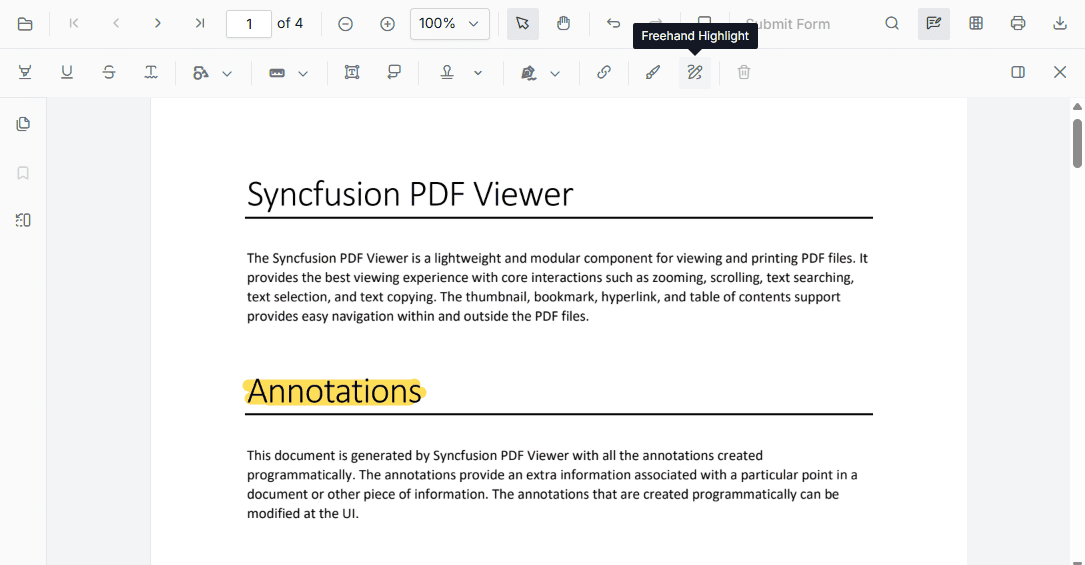
The stroke is drawn with the highlight blend effect, so the text underneath the stroke remains visible.
The Freehand Highlight tool uses the highlight color configured in the
highlightSettingsproperty, so changing the highlight color also changes the color of the freehand strokes.
Add Freehand Highlight Programmatically
Use the addAnnotation API with the 'Ink' type and set enableInkHighlight to true to create a freehand highlight at a specific location.
addFreehandHighlight(): void {
  const viewer = (document.getElementById('pdfViewer') as any).ej2_instances[0];

  viewer.annotation.addAnnotation('Ink', {
    offset: { x: 250, y: 100 },
    pageNumber: 1,
    width: 200,
    height: 60,
    enableInkHighlight: true,
    path: '[{"command":"M","x":244.83,"y":982.00},{"command":"L","x":250.83,"y":953.33}]'
  });
}
The following properties are used in the above example:
| Property | Description |
|---|---|
offset |
Specifies the top-left position of the annotation on the PDF page. |
pageNumber |
Specifies the page on which the annotation is added. |
width |
Specifies the width of the annotation. |
height |
Specifies the height of the annotation. |
enableInkHighlight |
Renders the stroke on the highlight blend layer so the underlying content stays visible. |
path |
Specifies the stroke geometry as an array of move (M) and line (L) commands. |
When
enableInkHighlightis set totrue, the annotation is created with the Freehand Highlight defaults (thickness12, opacity1, and the subjectFreehand Highlight).
Delete Freehand Highlight Programmatically
Use the deleteAnnotationById API to remove a freehand highlight by its annotation ID.
deleteFreehandHighlight(): void {
  const viewer = (document.getElementById('pdfViewer') as any).ej2_instances[0];

  if (viewer.annotationCollection && viewer.annotationCollection.length > 0) {
    viewer.annotation.deleteAnnotationById(
      viewer.annotationCollection[viewer.annotationCollection.length - 1].annotationId
    );
  }
}
A freehand highlight can also be deleted from the UI using the Delete button in the annotation toolbar or the Delete option in the context menu. For the complete list of deletion workflows, see Delete Annotation.
Enable and Disable Freehand Highlight
Use the enableFreehandHighlight property to enable or disable the Freehand Highlight tool in the annotation toolbar.
toggleFreehandHighlight(): void {
  const viewer = (document.getElementById('pdfViewer') as any).ej2_instances[0];

  viewer.enableFreehandHighlight = !viewer.enableFreehandHighlight;
  viewer.dataBind();
}
The property can also be set while initializing the viewer.
import { Component } from '@angular/core';
import {
  PdfViewerModule,
  ToolbarService,
  AnnotationService
} from '@syncfusion/ej2-angular-pdfviewer';

@Component({
  selector: 'app-root',
  template: `
    <div class="content-wrapper">
      <ejs-pdfviewer
        id="pdfViewer"
        [documentPath]="document"
        [resourceUrl]="resource"
        [enableFreehandHighlight]="true"
        style="height:650px;display:block">
      </ejs-pdfviewer>
    </div>
  `,
  imports: [PdfViewerModule],
  providers: [ToolbarService, AnnotationService]
})
export class AppComponent {

  public document: string =
    'https://cdn.syncfusion.com/content/pdf/pdf-succinctly.pdf';

  public resource: string =
    'https://cdn.syncfusion.com/ej2/31.2.2/dist/ej2-pdfviewer-lib';
}
The Freehand Highlight tool is enabled by default. Setting
enableFreehandHighlighttofalsedisables the toolbar item and restricts the creation of new freehand highlight annotations. Annotations that are already present in the document remain unaffected.
Customize Freehand Highlight Appearance
The Edit Stroke Color, Edit Thickness, and Edit Opacity tools in the annotation toolbar change the appearance of the selected freehand highlight. For the Ink annotation appearance options, see Ink Annotation.
Handle Freehand Highlight Events
The PDF viewer provides annotation life-cycle events that notify when annotations are added, modified, selected, or removed.
For the full list of available events and their descriptions, see Annotation Events.
Export and Import
Freehand Highlight annotations can be exported or imported along with the other annotations.
For the supported formats and steps, see Export and Import annotations.
Key Notes
- Freehand Highlight strokes are rendered on the highlight blend layer, so the underlying text stays visible and readable.
- The tool is available in the annotation toolbar next to the Ink tool, and it can also be enabled or disabled with the
enableFreehandHighlightproperty. - Freehand highlights are Ink annotations with the
enableInkHighlightflag set totrue, so they can be added and deleted with the standard Ink annotation APIs.