Highlight Annotation in Angular PDF Viewer
14 Aug 20268 minutes to read
This guide explains how to enable, apply, customize, and manage Highlight text markup annotations in the Syncfusion Angular PDF Viewer.
You can highlight text using the toolbar or context menu, programmatically invoke highlight mode, customize default settings, handle events, and export the PDF with annotations.
Enable Highlight in the Viewer
To enable Highlight annotations, inject the following modules into the Angular PDF Viewer:
This minimal setup enables UI interactions like selection and highlighting.
import { Component } from '@angular/core';
import {
  PdfViewerModule,
  ToolbarService,
  AnnotationService,
  TextSelectionService
} from '@syncfusion/ej2-angular-pdfviewer';

@Component({
  selector: 'app-root',
  template: `
    <div class="content-wrapper">
      <ejs-pdfviewer
        id="pdfViewer"
        [documentPath]="document"
        [resourceUrl]="resource"
        style="height:650px;display:block">
      </ejs-pdfviewer>
    </div>
  `,
  imports: [PdfViewerModule],
  providers: [ToolbarService, AnnotationService, TextSelectionService]
})
export class AppComponent {

  public document: string =
    'https://cdn.syncfusion.com/content/pdf/pdf-succinctly.pdf';

  public resource: string =
    'https://cdn.syncfusion.com/ej2/31.2.2/dist/ej2-pdfviewer-lib';
}
Add Highlight Annotation
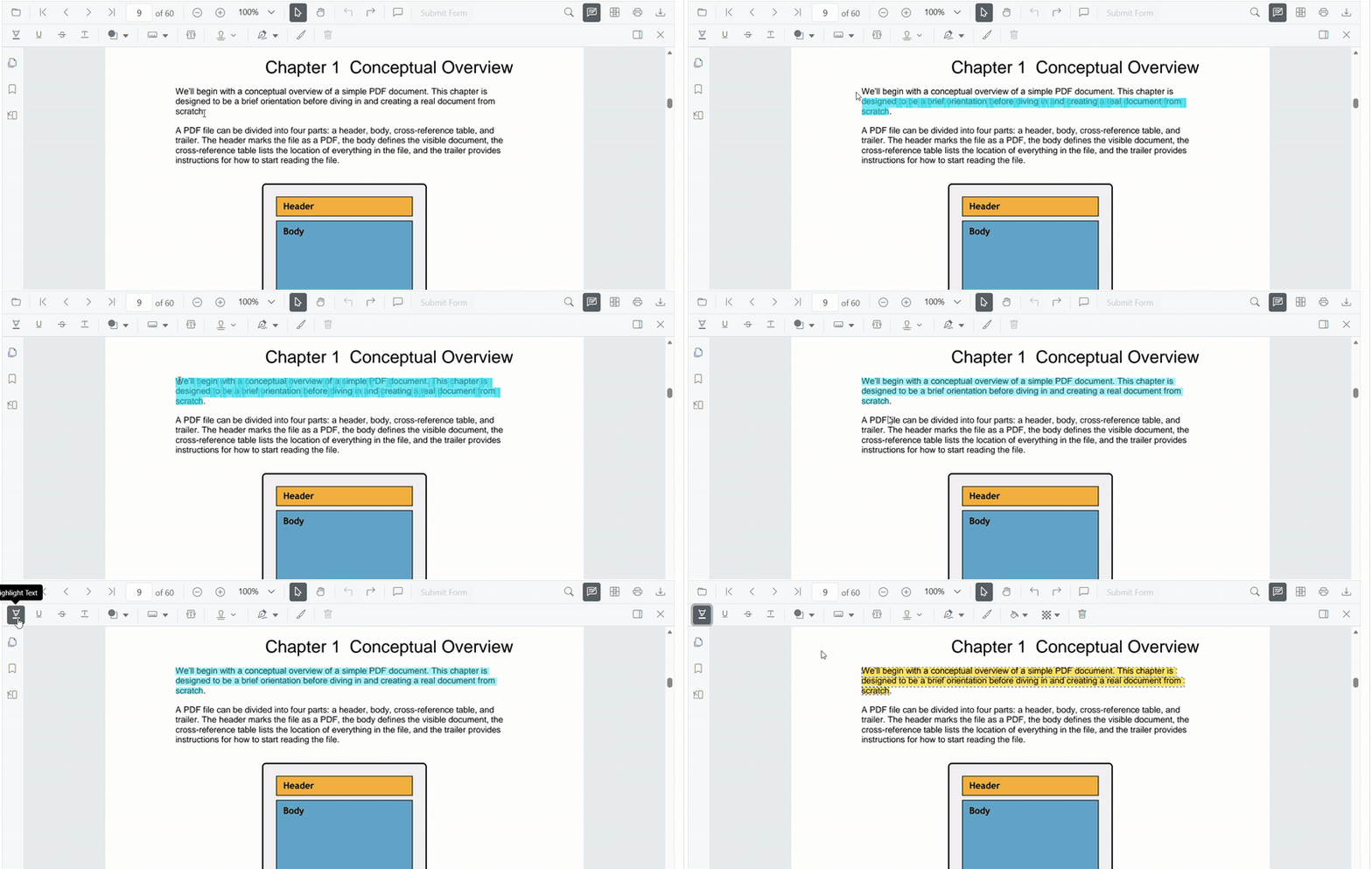
Add Highlight Using the Toolbar
- Select the text you want to highlight.
- Click the Highlight icon in the annotation toolbar.
- If Pan Mode is active, the viewer automatically switches to Text Selection mode.
Add Highlight Using the Context Menu
Right-click a selected text region → select Highlight.
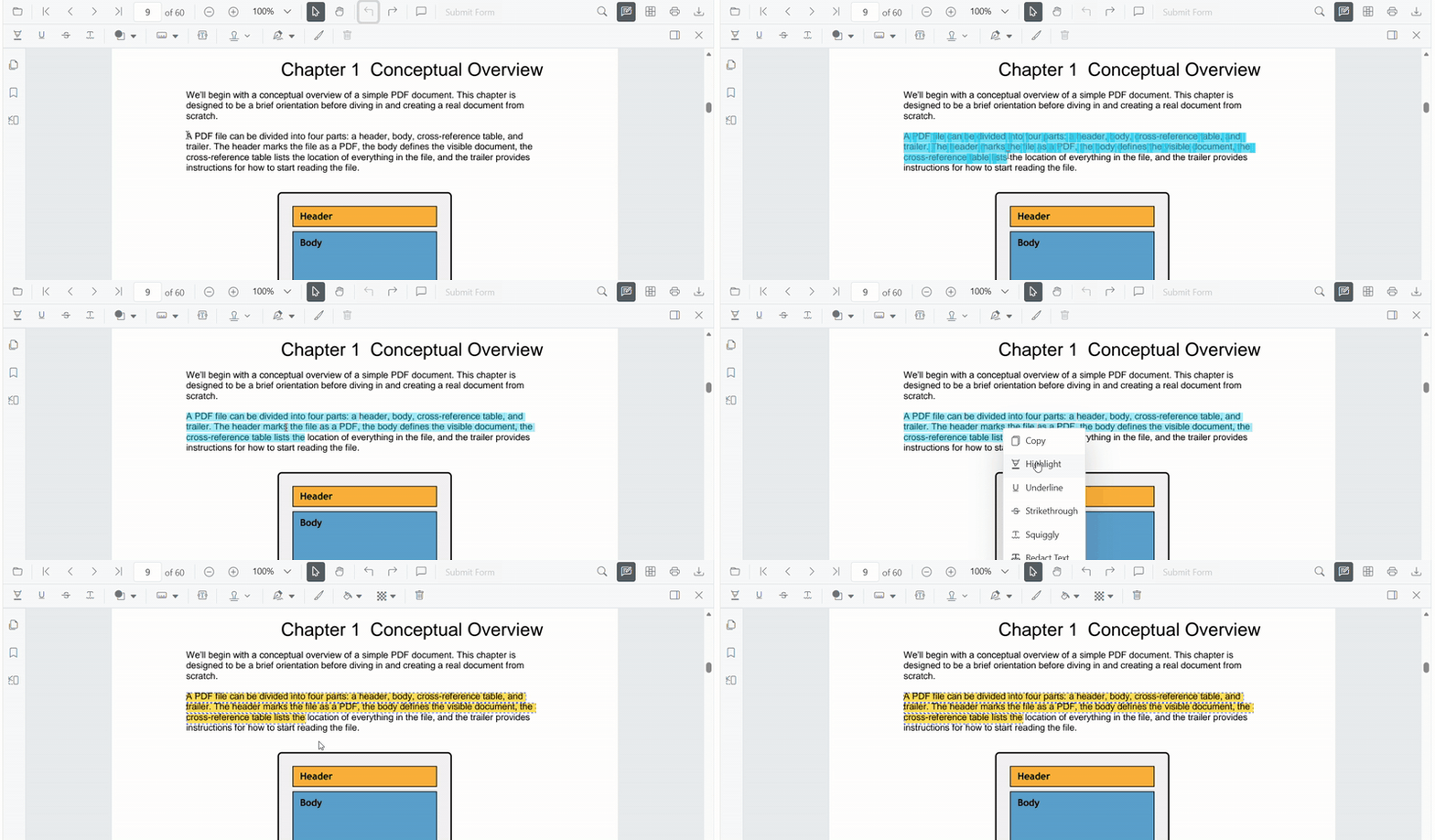
To customize menu items, refer to Customize Context Menu documentation.
Enable Highlight Mode
Switch the viewer into highlight mode using setAnnotationMode('Highlight').
enableHighlight(): void {
  const pdfViewer = (document.getElementById('pdfViewer') as any).ej2_instances[0];
  pdfViewer.annotationModule.setAnnotationMode('Highlight');
}
Exit Highlight Mode
Switch back to normal mode using:
disableHighlightMode(): void {
  const pdfViewer = (document.getElementById('pdfViewer') as any).ej2_instances[0];
  pdfViewer.annotationModule.setAnnotationMode('None');
}
Add Highlight Programmatically
Use addAnnotation() to insert highlight at a specific location.
addHighlight(): void {
  const pdfViewer = (document.getElementById('pdfViewer') as any).ej2_instances[0];

  pdfViewer.annotation.addAnnotation('Highlight', {
    bounds: [{ x: 97, y: 110, width: 350, height: 14 }],
    pageNumber: 1
  });
}
Customize Highlight Appearance
Configure default highlight settings such as color, opacity, and author using highlightSettings.
import { Component } from '@angular/core';
import {
  PdfViewerModule,
  ToolbarService,
  AnnotationService,
  TextSelectionService
} from '@syncfusion/ej2-angular-pdfviewer';

@Component({
  selector: 'app-root',
  template: `
    <div class="content-wrapper">
      <ejs-pdfviewer
        id="pdfViewer"
        [documentPath]="document"
        [resourceUrl]="resource"
        [highlightSettings]="highlightSettings"
        style="height:650px;display:block">
      </ejs-pdfviewer>
    </div>
  `,
  imports: [PdfViewerModule],
  providers: [ToolbarService, AnnotationService, TextSelectionService]
})
export class AppComponent {

  public document: string =
    'https://cdn.syncfusion.com/content/pdf/pdf-succinctly.pdf';

  public resource: string =
    'https://cdn.syncfusion.com/ej2/31.2.2/dist/ej2-pdfviewer-lib';

  public highlightSettings = {
    author: 'Guest User',
    subject: 'Important',
    color: '#ffff00',
    opacity: 0.9
  };
}
Manage Highlight (Edit, Delete, Comment)
Edit Highlight
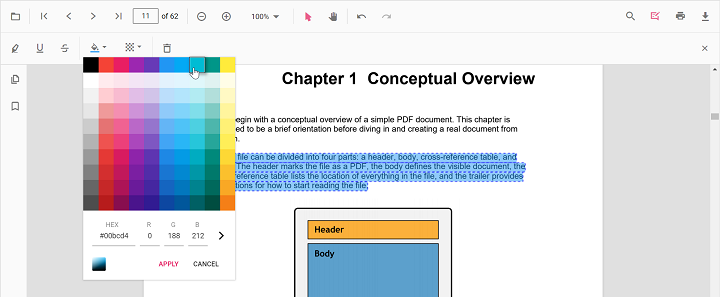
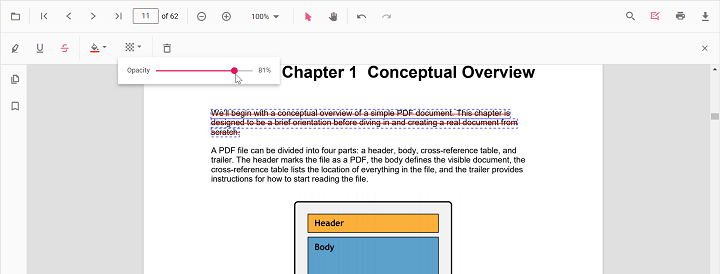
Edit Highlight Appearance (UI)
Use the annotation toolbar:
-
Edit Color tool
-
Edit Opacity slider
Edit Highlight Programmatically
Modify an existing highlight programmatically using editAnnotation().
editHighlightProgrammatically(): void {
  const pdfViewer = (document.getElementById('pdfViewer') as any).ej2_instances[0];

  for (let annot of pdfViewer.annotationCollection) {
    if (annot.textMarkupAnnotationType === 'Highlight') {
      annot.color = '#0000ff';
      annot.opacity = 0.8;
      pdfViewer.annotation.editAnnotation(annot);
      break;
    }
  }
}
Delete Highlight
The PDF Viewer supports deleting existing annotations through both the UI and API.
For detailed behavior, supported deletion workflows, and API reference, see Delete Annotation
Comments
Use the Comments panel to add, view, and reply to threaded discussions linked to highlight annotations.
It provides a dedicated UI for reviewing feedback, tracking conversations, and collaborating on annotation‑related notes within the PDF Viewer.
Set properties while adding Individual Annotation
Set properties for individual annotation before creating the control using highlightSettings
addMultipleHighlights(): void {
  const pdfViewer = (document.getElementById('pdfViewer') as any).ej2_instances[0];

  // Highlight 1
  pdfViewer.annotation.addAnnotation('Highlight', {
    bounds: [{ x: 100, y: 150, width: 320, height: 14 }],
    pageNumber: 1,
    author: 'User 1',
    color: '#ffff00',
    opacity: 0.9
  });

  // Highlight 2
  pdfViewer.annotation.addAnnotation('Highlight', {
    bounds: [{ x: 110, y: 220, width: 300, height: 14 }],
    pageNumber: 1,
    author: 'User 2',
    color: '#ff1010',
    opacity: 0.9
  });
}
Disable TextMarkup Annotation
Disable text markup annotations (including highlight) using the enableTextMarkupAnnotation property.
import { Component } from '@angular/core';
import {
  PdfViewerModule,
  ToolbarService,
  AnnotationService,
  TextSelectionService
} from '@syncfusion/ej2-angular-pdfviewer';

@Component({
  selector: 'app-root',
  template: `
    <div class="content-wrapper">
      <ejs-pdfviewer
        id="pdfViewer"
        [enableTextMarkupAnnotation]="false"
        [documentPath]="document"
        [resourceUrl]="resource"
        style="height:650px;display:block">
      </ejs-pdfviewer>
    </div>
  `,
  imports: [PdfViewerModule],
  providers: [ToolbarService, AnnotationService, TextSelectionService]
})
export class AppComponent {

  public document: string =
    'https://cdn.syncfusion.com/content/pdf/pdf-succinctly.pdf';

  public resource: string =
    'https://cdn.syncfusion.com/ej2/31.2.2/dist/ej2-pdfviewer-lib';
}
Handle Highlight Events
The PDF viewer provides annotation life-cycle events that notify when highlight annotations are added, modified, selected, or removed.
For the full list of available events and their descriptions, see Annotation Events
Export and Import
The PDF Viewer supports exporting and importing annotations, allowing you to save annotations as a separate file or load existing annotations back into the viewer.
For full details on supported formats and steps to export or import annotations, see Export and Import Annotation