BPMN Connectors in Blazor Diagram Component
The BPMN Connectors are lines that connect BPMN flow objects.
They are primarily classified into three categories:
- Association
- Sequence
- Message
How to Create an Association
A BPMN AssociationFlow is used to link flow objects with their corresponding text or artifact. It is represented as a dotted graphical line with an open arrow.
To create an association, set the Flow property of the BpmnFlowShape to one of the association types.
The available association types are:
- DirectionalAssociationFlow: A dotted graphical line with a single arrowhead at one end.
- BiDirectionalAssociationFlow: A dotted graphical line with arrowheads at both ends.
- AssociationFlow: A dotted graphical line with no arrowhead.
The following code example explains how to create an association.
@using Syncfusion.Blazor.Diagram

@* Initialize Diagram *@
<SfDiagramComponent Height="600px" Connectors="@_connectors"/>

@code
{
    // Create connector and store it in the connector collection.
    DiagramObjectCollection<Connector> _connectors;

    protected override void OnInitialized()
    {
        _connectors = new DiagramObjectCollection<Connector>();
        Connector connector = new Connector()
        {
            // Unique Id of the connector.
            ID = "connector1",
            // Start and end point of the connector
            SourcePoint = new DiagramPoint () { X = 100, Y = 200 },
            TargetPoint = new DiagramPoint () { X = 300, Y = 300 },
            // Sets the type to Bpmn, flow to AssociationFlow.
            Shape = new BpmnFlow()
            {
                Flow = BpmnFlowType.AssociationFlow,
            }
        };
        _connectors.Add(connector);
    }
}A complete working sample can be downloaded from GitHub
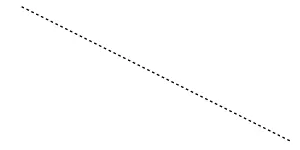
The following table shows the visual representation of association flows.
| Association | Image |
|---|---|
| AssociationFlow | |
| DirectionalAssociationFlow | 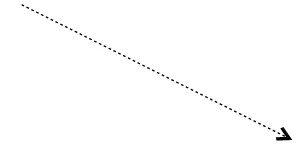 |
| BiDirectionalAssociationFlow | 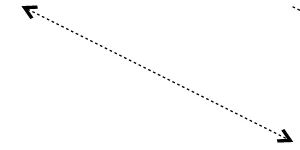 |
How to Create a Sequence
A Sequence flow defines the order in which activities are performed in a BPMN process and is represented by a solid graphical line. To create a SequenceFlow, set the Flow property of the BpmnFlowShape shape to one of the sequence types.
The available sequence types are:
- SequenceFlow: Sequence flows represent the typical path between the two flow objects.
- ConditionalSequenceFlow: Conditional sequence flows are used to control the flow of a process based on certain conditions.
- DefaultSequenceFlow: Default sequence flows are represented by an arrow with a tic mark on one end.
The following code example explains how to create a sequence flow.
@using Syncfusion.Blazor.Diagram

@* Initialize Diagram *@
<SfDiagramComponent Height="600px" Connectors="@_connectors"/>

@code
{
    // Create connector and store it in the connector collection.
    DiagramObjectCollection<Connector> _connectors;

    protected override void OnInitialized()
    {
        _connectors = new DiagramObjectCollection<Connector>();
        Connector connector = new Connector()
        {
            // Unique Id of the connector.
            ID = "connector1",
            // Start and end point of the connector.
            SourcePoint = new DiagramPoint() { X = 100, Y = 200 },
            TargetPoint = new DiagramPoint() { X = 300, Y = 300 },
            // Sets the flow to SequenceFlow.
            Shape = new BpmnFlow()
            {
                Flow = BpmnFlowType.SequenceFlow,
            }
        };
        _connectors.Add(connector);
    }
}A complete working sample can be downloaded from GitHub
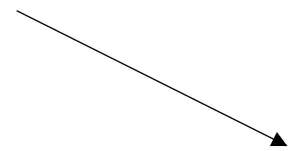
The following table shows the different representations of sequence flows.
| Sequence | Image |
|---|---|
| DefaultSequenceFlow | 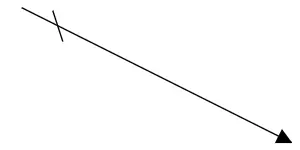 |
| ConditionalSequenceFlow | 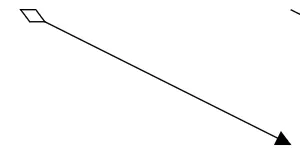 |
| SequenceFlow | |
Note: The default value for the property
Sequenceis Normal.
How to Create a Message
A Message flow is used when two separately controlled processes communicate and collaborate with one another. An activity or event in one pool can initiate a message to another pool. Message flows are depicted as lines with an empty circle at the origin and an empty arrowhead at the termination. To create a MessageFlow, the Flow property of the BpmnFlowShape should be set to one of the message types.
The available message flow types are:
- InitiatingMessageFlow: An activity or event in one pool can initiate a message to another pool.
- NonInitiatingMessageFlow: An activity or event in one pool cannot initiate a message to another pool.
- MessageFlow: A MessageFlow shows the flow of messages between two participants and is represented by line.
The following code example explains how to define a message flow.
@using Syncfusion.Blazor.Diagram

@* Initialize Diagram *@
<SfDiagramComponent Height="600px" Connectors="@_connectors"/>

@code
{
    // Create connector and store it in the connector collection.
    DiagramObjectCollection<Connector> _connectors;

    protected override void OnInitialized()
    {
        _connectors = new DiagramObjectCollection<Connector>();
        Connector connector = new Connector()
        {
            // Unique Id of the connector.
            ID = "connector1",
            // Start and end point of the connector.
            SourcePoint = new DiagramPoint() { X = 100, Y = 200 },
            TargetPoint = new DiagramPoint() { X = 300, Y = 300 },
            // Sets the flow to MessageFlow.
            Shape = new BpmnFlow()
            {
                Flow = BpmnFlowType.MessageFlow,
            }
        };
        _connectors.Add(connector);
    }
}A complete working sample can be downloaded from GitHub
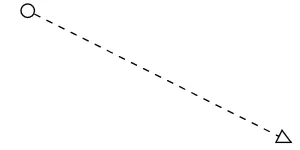
The following table shows the different representations of message flows.
| Message | Image |
|---|---|
| MessageFlow | |
| InitiatingMessageFlow | 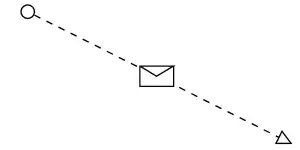 |
| NonInitiatingMessageFlow | 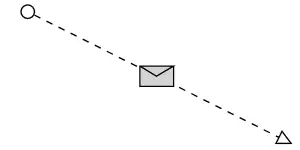 |
Note: The default value for the
Flowproperty of aBpmnFlowshape is SequenceFlow.