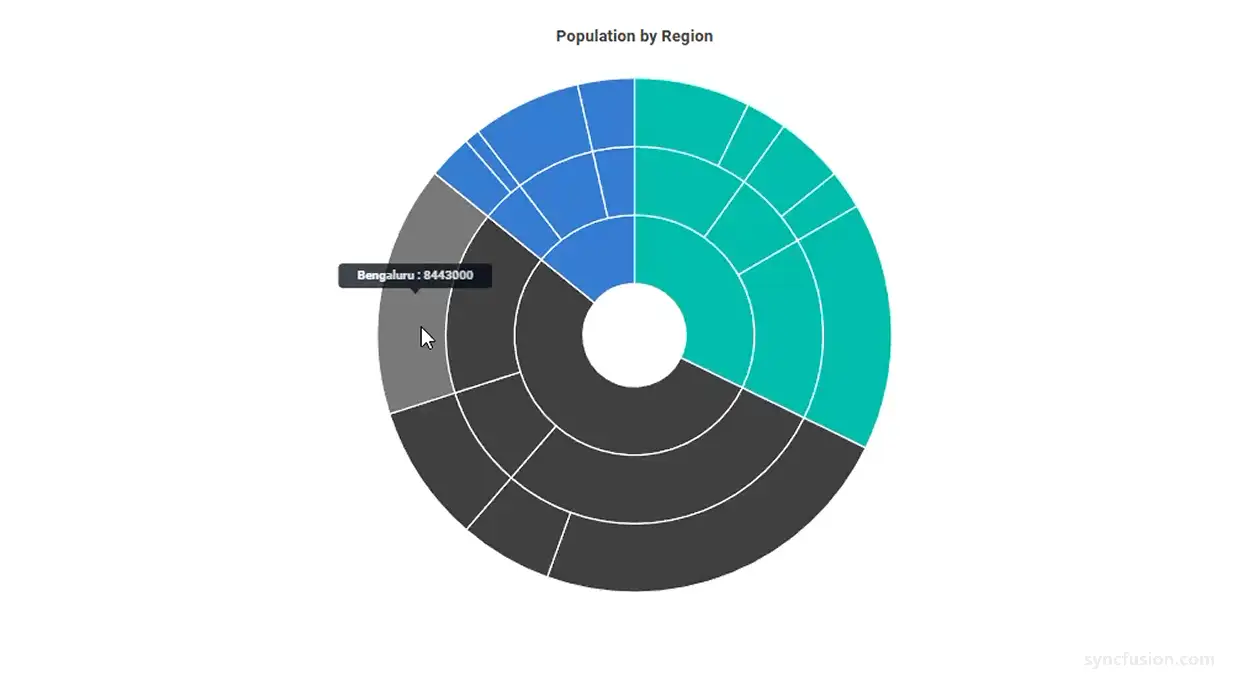
Blazor Sunburst Chart Highlight
Highlighting on the Blazor Sunburst Chart visually emphasizes the segment under the pointer so that users can immediately tell which part of the hierarchy they are inspecting. It is most useful when the chart contains many small segments or several nested levels, where the active segment can otherwise blend into its siblings and ancestors.
Highlighting is driven by the SunburstHighlightSettings child component.
Default behavior:
Enableisfalse, so highlighting is disabled until it is explicitly turned on. WhenEnableistrue, other segments are dimmed while the active segment stays full-color, so users can clearly see which segment is focused.
Enable highlighting
Set Enable of SunburstHighlightSettings to true to highlight the segment under the pointer. While highlighting is active, the non-highlighted segments are dimmed so the active one stands out.
@using Syncfusion.Blazor.Charts

<SfSunburstChart TItem="RegionData"
                 Title="Population by Region"
                 DataSource="@Regions"
                 IdMemberPath="@nameof(RegionData.Id)"
                 ParentIdMemberPath="@nameof(RegionData.ParentId)"
                 LabelMemberPath="@nameof(RegionData.Label)"
                 ValueMemberPath="@nameof(RegionData.Population)"
                 Width="100%" Height="600px">
    <SunburstHighlightSettings Enable="true" />
</SfSunburstChart>

@code {
    public class RegionData
    {
        public string Id { get; set; } = string.Empty;
        public string? ParentId { get; set; }
        public string Label { get; set; } = string.Empty;
        public double Population { get; set; }
    }

    public List<RegionData> Regions = new List<RegionData>
    {
        new RegionData { Id = "USA", ParentId = null, Label = "USA" },
        new RegionData { Id = "India", ParentId = null, Label = "India" },
        new RegionData { Id = "Germany", ParentId = null, Label = "Germany" },

        new RegionData { Id = "USA-California", ParentId = "USA", Label = "California" },
        new RegionData { Id = "USA-Texas", ParentId = "USA", Label = "Texas" },
        new RegionData { Id = "USA-NewYork", ParentId = "USA", Label = "New York" },

        new RegionData { Id = "India-Maharashtra", ParentId = "India", Label = "Maharashtra" },
        new RegionData { Id = "India-TamilNadu", ParentId = "India", Label = "Tamil Nadu" },
        new RegionData { Id = "India-Karnataka", ParentId = "India", Label = "Karnataka" },

        new RegionData { Id = "Germany-Bavaria", ParentId = "Germany", Label = "Bavaria" },
        new RegionData { Id = "Germany-Berlin", ParentId = "Germany", Label = "Berlin" },
        new RegionData { Id = "Germany-Hamburg", ParentId = "Germany", Label = "Hamburg" },

        new RegionData { Id = "USA-California-LosAngeles", ParentId = "USA-California", Label = "Los Angeles", Population = 3898000 },
        new RegionData { Id = "USA-California-SanDiego", ParentId = "USA-California", Label = "San Diego", Population = 1381000 },
        new RegionData { Id = "USA-Texas-Houston", ParentId = "USA-Texas", Label = "Houston", Population = 2304000 },
        new RegionData { Id = "USA-Texas-Dallas", ParentId = "USA-Texas", Label = "Dallas", Population = 1304000 },
        new RegionData { Id = "USA-NewYork-NewYorkCity", ParentId = "USA-NewYork", Label = "New York City", Population = 8336000 },

        new RegionData { Id = "India-Maharashtra-Mumbai", ParentId = "India-Maharashtra", Label = "Mumbai", Population = 12440000 },
        new RegionData { Id = "India-Maharashtra-Pune", ParentId = "India-Maharashtra", Label = "Pune", Population = 3120000 },
        new RegionData { Id = "India-TamilNadu-Chennai", ParentId = "India-TamilNadu", Label = "Chennai", Population = 4646000 },
        new RegionData { Id = "India-Karnataka-Bengaluru", ParentId = "India-Karnataka", Label = "Bengaluru", Population = 8443000 },

        new RegionData { Id = "Germany-Bavaria-Munich", ParentId = "Germany-Bavaria", Label = "Munich", Population = 1488000 },
        new RegionData { Id = "Germany-Bavaria-Nuremberg", ParentId = "Germany-Bavaria", Label = "Nuremberg", Population = 515000 },
        new RegionData { Id = "Germany-Berlin-BerlinCity", ParentId = "Germany-Berlin", Label = "Berlin", Population = 3664000 },
        new RegionData { Id = "Germany-Hamburg-HamburgCity", ParentId = "Germany-Hamburg", Label = "Hamburg", Population = 1899000 }
    };
}
Supported highlight modes
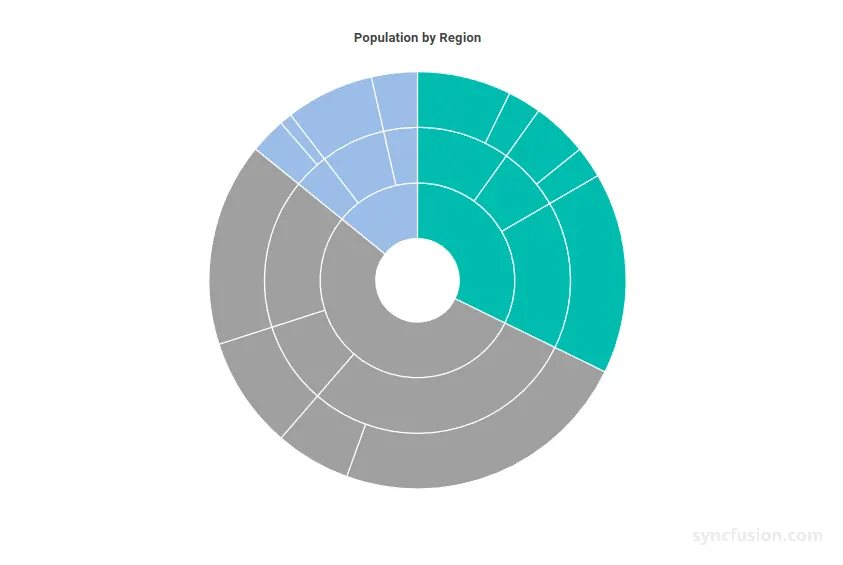
Use Mode to decide which related segments are highlighted together with the segment under the pointer. The mode is a SunburstHighlightMode enum value.
-
Single– Highlights only the segment under the pointer. Use this when you want a strict one-segment focus. -
Parent– Highlights the segment under the pointer and its parent segments. Use this when you want the segment’s hierarchy path to remain visible. -
Child– Highlights the segment under the pointer and its child segments. Use this when you want to focus on a segment and its descendants. -
All– Highlights the segment under the pointer together with its parent and child segments. Use this when you want to focus on the complete hierarchy branch.
The following example configures the Parent mode so that hovering over a deep segment also keeps its ancestors visible.
@using Syncfusion.Blazor.Charts

<SfSunburstChart TItem="RegionData"
                 Title="Population by Region"
                 DataSource="@Regions"
                 IdMemberPath="@nameof(RegionData.Id)"
                 ParentIdMemberPath="@nameof(RegionData.ParentId)"
                 LabelMemberPath="@nameof(RegionData.Label)"
                 ValueMemberPath="@nameof(RegionData.Population)"
                 Width="100%" Height="600px">
    <SunburstHighlightSettings Enable="true" Mode="SunburstHighlightMode.Parent" />
</SfSunburstChart>

@code {
    public class RegionData
    {
        public string Id { get; set; } = string.Empty;
        public string? ParentId { get; set; }
        public string Label { get; set; } = string.Empty;
        public double Population { get; set; }
    }

    public List<RegionData> Regions = new List<RegionData>
    {
        new RegionData { Id = "USA", ParentId = null, Label = "USA" },
        new RegionData { Id = "India", ParentId = null, Label = "India" },
        new RegionData { Id = "Germany", ParentId = null, Label = "Germany" },

        new RegionData { Id = "USA-California", ParentId = "USA", Label = "California" },
        new RegionData { Id = "USA-Texas", ParentId = "USA", Label = "Texas" },
        new RegionData { Id = "USA-NewYork", ParentId = "USA", Label = "New York" },

        new RegionData { Id = "India-Maharashtra", ParentId = "India", Label = "Maharashtra" },
        new RegionData { Id = "India-TamilNadu", ParentId = "India", Label = "Tamil Nadu" },
        new RegionData { Id = "India-Karnataka", ParentId = "India", Label = "Karnataka" },

        new RegionData { Id = "Germany-Bavaria", ParentId = "Germany", Label = "Bavaria" },
        new RegionData { Id = "Germany-Berlin", ParentId = "Germany", Label = "Berlin" },
        new RegionData { Id = "Germany-Hamburg", ParentId = "Germany", Label = "Hamburg" },

        new RegionData { Id = "USA-California-LosAngeles", ParentId = "USA-California", Label = "Los Angeles", Population = 3898000 },
        new RegionData { Id = "USA-California-SanDiego", ParentId = "USA-California", Label = "San Diego", Population = 1381000 },
        new RegionData { Id = "USA-Texas-Houston", ParentId = "USA-Texas", Label = "Houston", Population = 2304000 },
        new RegionData { Id = "USA-Texas-Dallas", ParentId = "USA-Texas", Label = "Dallas", Population = 1304000 },
        new RegionData { Id = "USA-NewYork-NewYorkCity", ParentId = "USA-NewYork", Label = "New York City", Population = 8336000 },

        new RegionData { Id = "India-Maharashtra-Mumbai", ParentId = "India-Maharashtra", Label = "Mumbai", Population = 12440000 },
        new RegionData { Id = "India-Maharashtra-Pune", ParentId = "India-Maharashtra", Label = "Pune", Population = 3120000 },
        new RegionData { Id = "India-TamilNadu-Chennai", ParentId = "India-TamilNadu", Label = "Chennai", Population = 4646000 },
        new RegionData { Id = "India-Karnataka-Bengaluru", ParentId = "India-Karnataka", Label = "Bengaluru", Population = 8443000 },

        new RegionData { Id = "Germany-Bavaria-Munich", ParentId = "Germany-Bavaria", Label = "Munich", Population = 1488000 },
        new RegionData { Id = "Germany-Bavaria-Nuremberg", ParentId = "Germany-Bavaria", Label = "Nuremberg", Population = 515000 },
        new RegionData { Id = "Germany-Berlin-BerlinCity", ParentId = "Germany-Berlin", Label = "Berlin", Population = 3664000 },
        new RegionData { Id = "Germany-Hamburg-HamburgCity", ParentId = "Germany-Hamburg", Label = "Hamburg", Population = 1899000 }
    };
}
Customization
You can customize the appearance of the highlight using the following properties.
SunburstHighlightSettings Properties
Configure the main highlight appearance:
In the SunburstHighlightSettings:
-
Enable: Enables or disables highlighting on pointer hover. The default value isfalse. -
Mode: Specifies which segments are highlighted together with the segment under the pointer. Use theSunburstHighlightModeenum (Single,Parent,Child, orAll). The default value isAll. -
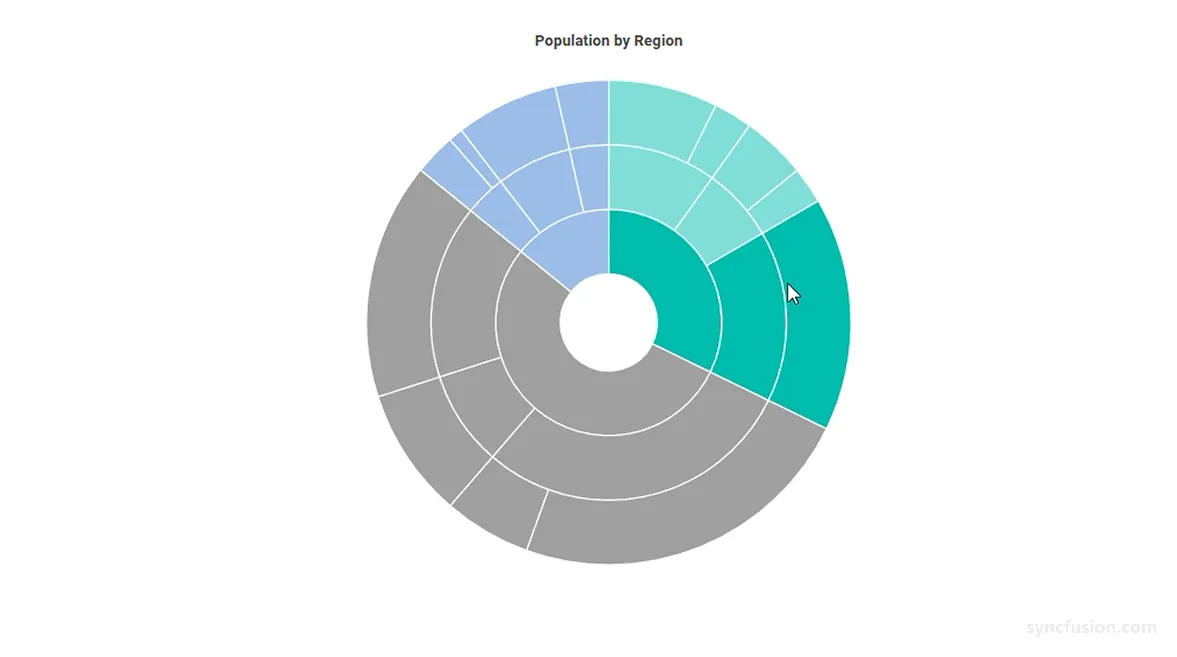
Color: Sets the color applied to highlighted segments. Any valid CSS color value (named, hex, RGB, or RGBA) is accepted. The default value is empty; when empty, the highlighted segment uses its parent segment color (or its own color for the root segment). -
Opacity: Sets the transparency of highlighted segments, from0(fully transparent) to1(fully opaque). The default value is1.
When
Enableistrue, the non-highlighted segments are always dimmed. That dim is a fixed visual effect and is not controlled byColororOpacity; it just gives the active segment extra emphasis while the user moves the pointer over the chart.
Use Color to recolor the highlighted segments and Opacity to make them more transparent. The two properties are independent and can be used together: setting only Color recolors the highlighted segments, setting only Opacity adjusts their transparency, and setting both applies both effects at the same time.
When Color is left empty, the highlighted segment falls back to its parent segment color (or its own color for the root segment), preserving each segment’s visual identity.
@using Syncfusion.Blazor.Charts

<SfSunburstChart TItem="RegionData"
                 Title="Population by Region"
                 DataSource="@Regions"
                 IdMemberPath="@nameof(RegionData.Id)"
                 ParentIdMemberPath="@nameof(RegionData.ParentId)"
                 LabelMemberPath="@nameof(RegionData.Label)"
                 ValueMemberPath="@nameof(RegionData.Population)"
                 Width="100%" Height="600px">
    <SunburstHighlightSettings Enable="true"
                               Mode="SunburstHighlightMode.All"
                               Color="#FFD200"
                               Opacity="0.8" />
</SfSunburstChart>

@code {
    public class RegionData
    {
        public string Id { get; set; } = string.Empty;
        public string? ParentId { get; set; }
        public string Label { get; set; } = string.Empty;
        public double Population { get; set; }
    }

    public List<RegionData> Regions = new List<RegionData>
    {
        new RegionData { Id = "USA", ParentId = null, Label = "USA" },
        new RegionData { Id = "India", ParentId = null, Label = "India" },
        new RegionData { Id = "Germany", ParentId = null, Label = "Germany" },

        new RegionData { Id = "USA-California", ParentId = "USA", Label = "California" },
        new RegionData { Id = "USA-Texas", ParentId = "USA", Label = "Texas" },
        new RegionData { Id = "USA-NewYork", ParentId = "USA", Label = "New York" },

        new RegionData { Id = "India-Maharashtra", ParentId = "India", Label = "Maharashtra" },
        new RegionData { Id = "India-TamilNadu", ParentId = "India", Label = "Tamil Nadu" },
        new RegionData { Id = "India-Karnataka", ParentId = "India", Label = "Karnataka" },

        new RegionData { Id = "Germany-Bavaria", ParentId = "Germany", Label = "Bavaria" },
        new RegionData { Id = "Germany-Berlin", ParentId = "Germany", Label = "Berlin" },
        new RegionData { Id = "Germany-Hamburg", ParentId = "Germany", Label = "Hamburg" },

        new RegionData { Id = "USA-California-LosAngeles", ParentId = "USA-California", Label = "Los Angeles", Population = 3898000 },
        new RegionData { Id = "USA-California-SanDiego", ParentId = "USA-California", Label = "San Diego", Population = 1381000 },
        new RegionData { Id = "USA-Texas-Houston", ParentId = "USA-Texas", Label = "Houston", Population = 2304000 },
        new RegionData { Id = "USA-Texas-Dallas", ParentId = "USA-Texas", Label = "Dallas", Population = 1304000 },
        new RegionData { Id = "USA-NewYork-NewYorkCity", ParentId = "USA-NewYork", Label = "New York City", Population = 8336000 },

        new RegionData { Id = "India-Maharashtra-Mumbai", ParentId = "India-Maharashtra", Label = "Mumbai", Population = 12440000 },
        new RegionData { Id = "India-Maharashtra-Pune", ParentId = "India-Maharashtra", Label = "Pune", Population = 3120000 },
        new RegionData { Id = "India-TamilNadu-Chennai", ParentId = "India-TamilNadu", Label = "Chennai", Population = 4646000 },
        new RegionData { Id = "India-Karnataka-Bengaluru", ParentId = "India-Karnataka", Label = "Bengaluru", Population = 8443000 },

        new RegionData { Id = "Germany-Bavaria-Munich", ParentId = "Germany-Bavaria", Label = "Munich", Population = 1488000 },
        new RegionData { Id = "Germany-Bavaria-Nuremberg", ParentId = "Germany-Bavaria", Label = "Nuremberg", Population = 515000 },
        new RegionData { Id = "Germany-Berlin-BerlinCity", ParentId = "Germany-Berlin", Label = "Berlin", Population = 3664000 },
        new RegionData { Id = "Germany-Hamburg-HamburgCity", ParentId = "Germany-Hamburg", Label = "Hamburg", Population = 1899000 }
    };
}
Tooltip highlighting
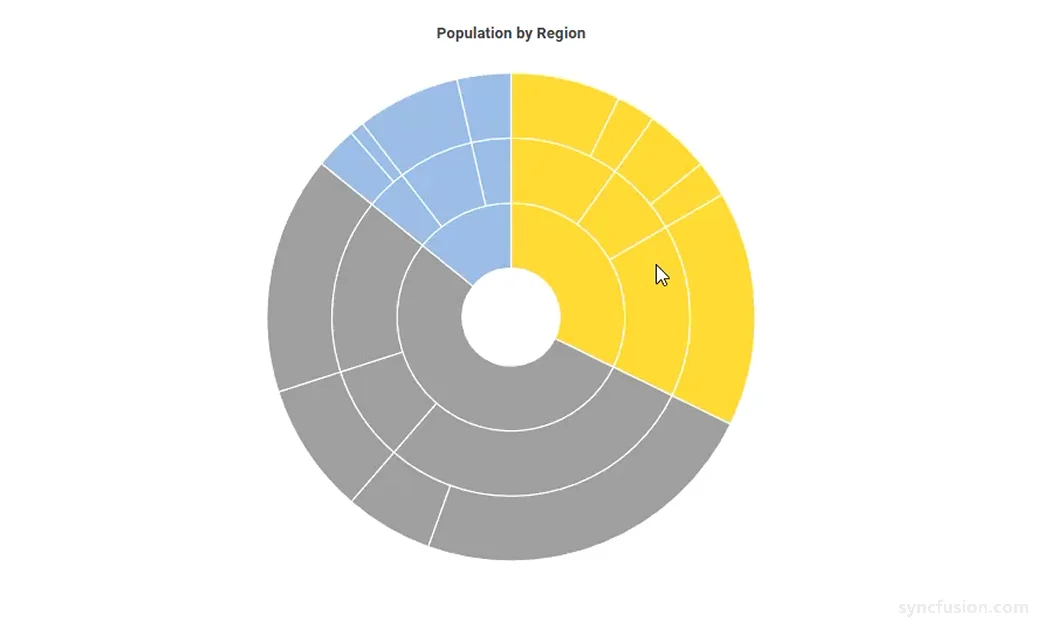
The Sunburst Chart highlights the segment associated with the active tooltip when the EnableHighlight property of SunburstTooltipSettings is set to true. The default value is false. When the tooltip is shown for a segment, that segment is visually emphasized using the same highlight behavior.
EnableHighlight is independent of SunburstHighlightSettings.Enable, and both can be active at the same time. Setting EnableHighlight="false" disables tooltip-driven highlighting while leaving pointer-hover highlighting unaffected when SunburstHighlightSettings.Enable is true. If both properties are disabled, no highlighting is rendered.
@using Syncfusion.Blazor.Charts

<SfSunburstChart TItem="RegionData"
                 Title="Population by Region"
                 DataSource="@Regions"
                 IdMemberPath="@nameof(RegionData.Id)"
                 ParentIdMemberPath="@nameof(RegionData.ParentId)"
                 LabelMemberPath="@nameof(RegionData.Label)"
                 ValueMemberPath="@nameof(RegionData.Population)"
                 Width="100%" Height="600px">
    <SunburstTooltipSettings Enable="true" EnableHighlight="true" />
</SfSunburstChart>

@code {
    public class RegionData
    {
        public string Id { get; set; } = string.Empty;
        public string? ParentId { get; set; }
        public string Label { get; set; } = string.Empty;
        public double Population { get; set; }
    }

    public List<RegionData> Regions = new List<RegionData>
    {
        new RegionData { Id = "USA", ParentId = null, Label = "USA" },
        new RegionData { Id = "India", ParentId = null, Label = "India" },
        new RegionData { Id = "Germany", ParentId = null, Label = "Germany" },

        new RegionData { Id = "USA-California", ParentId = "USA", Label = "California" },
        new RegionData { Id = "USA-Texas", ParentId = "USA", Label = "Texas" },
        new RegionData { Id = "USA-NewYork", ParentId = "USA", Label = "New York" },

        new RegionData { Id = "India-Maharashtra", ParentId = "India", Label = "Maharashtra" },
        new RegionData { Id = "India-TamilNadu", ParentId = "India", Label = "Tamil Nadu" },
        new RegionData { Id = "India-Karnataka", ParentId = "India", Label = "Karnataka" },

        new RegionData { Id = "Germany-Bavaria", ParentId = "Germany", Label = "Bavaria" },
        new RegionData { Id = "Germany-Berlin", ParentId = "Germany", Label = "Berlin" },
        new RegionData { Id = "Germany-Hamburg", ParentId = "Germany", Label = "Hamburg" },

        new RegionData { Id = "USA-California-LosAngeles", ParentId = "USA-California", Label = "Los Angeles", Population = 3898000 },
        new RegionData { Id = "USA-California-SanDiego", ParentId = "USA-California", Label = "San Diego", Population = 1381000 },
        new RegionData { Id = "USA-Texas-Houston", ParentId = "USA-Texas", Label = "Houston", Population = 2304000 },
        new RegionData { Id = "USA-Texas-Dallas", ParentId = "USA-Texas", Label = "Dallas", Population = 1304000 },
        new RegionData { Id = "USA-NewYork-NewYorkCity", ParentId = "USA-NewYork", Label = "New York City", Population = 8336000 },

        new RegionData { Id = "India-Maharashtra-Mumbai", ParentId = "India-Maharashtra", Label = "Mumbai", Population = 12440000 },
        new RegionData { Id = "India-Maharashtra-Pune", ParentId = "India-Maharashtra", Label = "Pune", Population = 3120000 },
        new RegionData { Id = "India-TamilNadu-Chennai", ParentId = "India-TamilNadu", Label = "Chennai", Population = 4646000 },
        new RegionData { Id = "India-Karnataka-Bengaluru", ParentId = "India-Karnataka", Label = "Bengaluru", Population = 8443000 },

        new RegionData { Id = "Germany-Bavaria-Munich", ParentId = "Germany-Bavaria", Label = "Munich", Population = 1488000 },
        new RegionData { Id = "Germany-Bavaria-Nuremberg", ParentId = "Germany-Bavaria", Label = "Nuremberg", Population = 515000 },
        new RegionData { Id = "Germany-Berlin-BerlinCity", ParentId = "Germany-Berlin", Label = "Berlin", Population = 3664000 },
        new RegionData { Id = "Germany-Hamburg-HamburgCity", ParentId = "Germany-Hamburg", Label = "Hamburg", Population = 1899000 }
    };
}