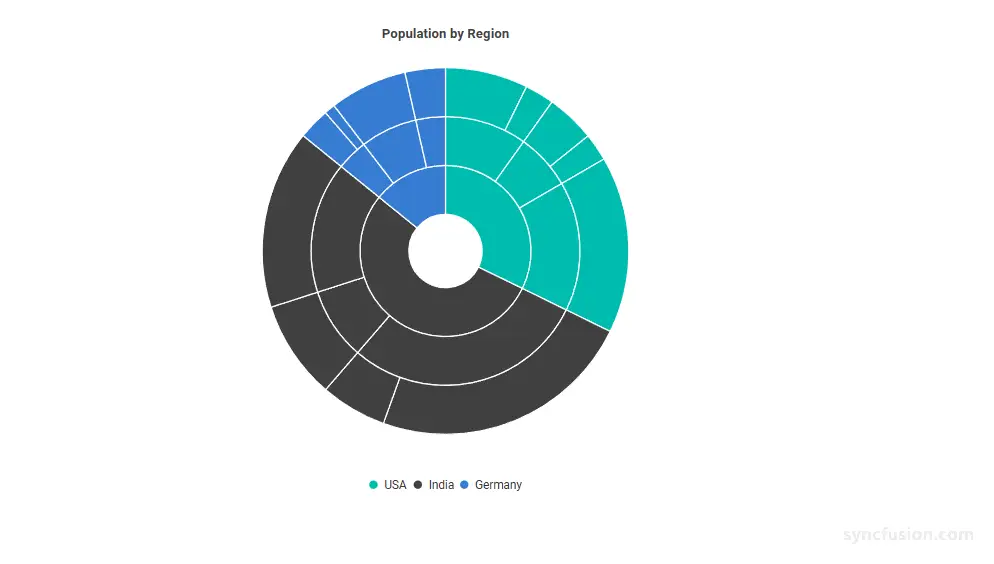
Blazor Sunburst Chart Legend
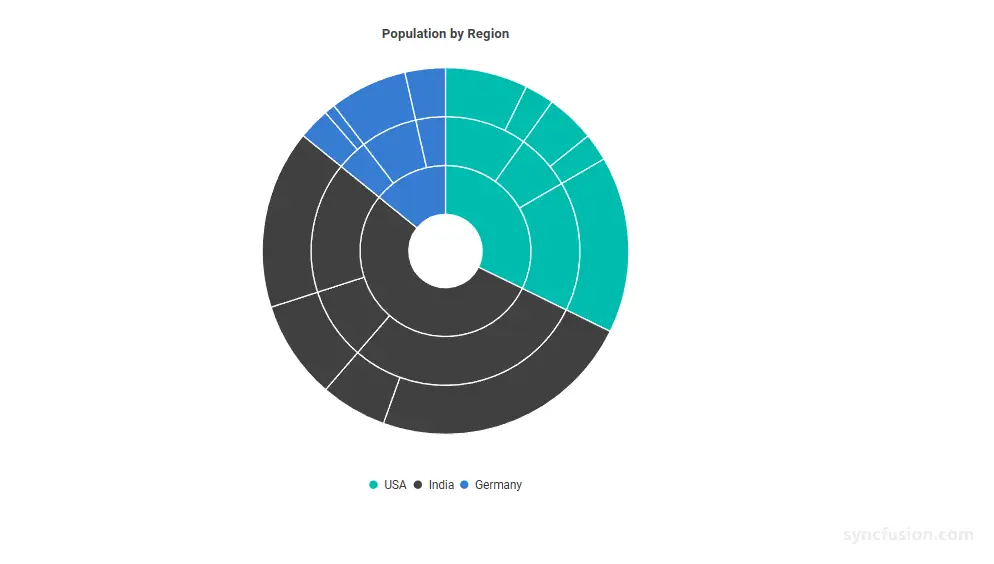
The legend provides a visual key for the top-level (root) categories of a Blazor Sunburst Chart. It helps users identify what each color in the chart represents, and clicking a legend item can interactively show or hide the related segment group. Legends are recommended whenever the chart contains more than one root category and is being read in a context where quick lookup is important. By making the chart an interactive Sunburst Chart, the legend becomes a powerful tool for understanding hierarchical data visualization across your multi-level pie chart.
The legend of the Blazor Sunburst Chart can be enabled and customized using the SunburstLegendSettings child component.
Supported positions:
SunburstLegendSettings.PositionsupportsSunburstLegendPosition.Top,Bottom,Left, andRight. The default position isBottom.
Enable the legend
The legend is hidden by default. Set the Visible property of SunburstLegendSettings to true to render it.
@using Syncfusion.Blazor.Charts

<SfSunburstChart TItem="RegionData"
                 Title="Population by Region"
                 DataSource="@Regions"
                 IdMemberPath="@nameof(RegionData.Id)"
                 ParentIdMemberPath="@nameof(RegionData.ParentId)"
                 LabelMemberPath="@nameof(RegionData.Label)"
                 ValueMemberPath="@nameof(RegionData.Population)"
                 Width="100%" Height="600px">
    <SunburstLegendSettings Visible="true" Position="SunburstLegendPosition.Bottom" ToggleVisibility="true" />
</SfSunburstChart>

@code {
    public class RegionData
    {
        public string Id { get; set; } = string.Empty;
        public string? ParentId { get; set; }
        public string Label { get; set; } = string.Empty;
        public double Population { get; set; }
    }

    public List<RegionData> Regions = new List<RegionData>
    {
        new RegionData { Id = "USA", ParentId = null, Label = "USA" },
        new RegionData { Id = "India", ParentId = null, Label = "India" },
        new RegionData { Id = "Germany", ParentId = null, Label = "Germany" },

        new RegionData { Id = "USA-California", ParentId = "USA", Label = "California" },
        new RegionData { Id = "USA-Texas", ParentId = "USA", Label = "Texas" },
        new RegionData { Id = "USA-NewYork", ParentId = "USA", Label = "New York" },

        new RegionData { Id = "India-Maharashtra", ParentId = "India", Label = "Maharashtra" },
        new RegionData { Id = "India-TamilNadu", ParentId = "India", Label = "Tamil Nadu" },
        new RegionData { Id = "India-Karnataka", ParentId = "India", Label = "Karnataka" },

        new RegionData { Id = "Germany-Bavaria", ParentId = "Germany", Label = "Bavaria" },
        new RegionData { Id = "Germany-Berlin", ParentId = "Germany", Label = "Berlin" },
        new RegionData { Id = "Germany-Hamburg", ParentId = "Germany", Label = "Hamburg" },

        new RegionData { Id = "USA-California-LosAngeles", ParentId = "USA-California", Label = "Los Angeles", Population = 3898000 },
        new RegionData { Id = "USA-California-SanDiego", ParentId = "USA-California", Label = "San Diego", Population = 1381000 },
        new RegionData { Id = "USA-Texas-Houston", ParentId = "USA-Texas", Label = "Houston", Population = 2304000 },
        new RegionData { Id = "USA-Texas-Dallas", ParentId = "USA-Texas", Label = "Dallas", Population = 1304000 },
        new RegionData { Id = "USA-NewYork-NewYorkCity", ParentId = "USA-NewYork", Label = "New York City", Population = 8336000},

        new RegionData { Id = "India-Maharashtra-Mumbai", ParentId = "India-Maharashtra", Label = "Mumbai", Population = 12440000 },
        new RegionData { Id = "India-Maharashtra-Pune", ParentId = "India-Maharashtra", Label = "Pune", Population = 3120000 },
        new RegionData { Id = "India-TamilNadu-Chennai", ParentId = "India-TamilNadu", Label = "Chennai", Population = 4646000 },
        new RegionData { Id = "India-Karnataka-Bengaluru", ParentId = "India-Karnataka", Label = "Bengaluru", Population = 8443000 },

        new RegionData { Id = "Germany-Bavaria-Munich", ParentId = "Germany-Bavaria", Label = "Munich", Population = 1488000 },
        new RegionData { Id = "Germany-Bavaria-Nuremberg", ParentId = "Germany-Bavaria", Label = "Nuremberg", Population = 515000 },
        new RegionData { Id = "Germany-Berlin-BerlinCity", ParentId = "Germany-Berlin", Label = "Berlin", Population = 3664000 },
        new RegionData { Id = "Germany-Hamburg-HamburgCity", ParentId = "Germany-Hamburg", Label = "Hamburg", Population = 1899000 }
    };
}
Customization
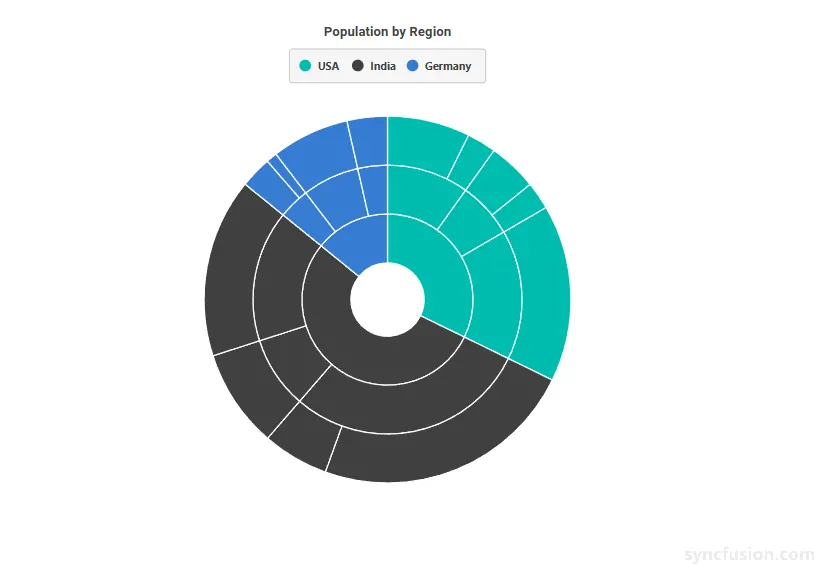
You can customize the appearance of the legend using the following properties.
SunburstLegendSettings Properties
Configure the main legend appearance:
In the SunburstLegendSettings:
-
Visible: Enables or disables the display of the legend. Set totrueto render the legend for the Blazor Sunburst Chart. -
Position: Specifies the position of the legend in the Sunburst chart. Use theSunburstLegendPositionenum (Top,Bottom,Left, orRight). The default value isBottom. -
Background: Specifies the background color of the legend container. Any valid CSS color value is accepted, for example a hex value like#F5F5F5, an RGB value likergb(173, 216, 230), or a named CSS color such asskyblue. -
Opacity: Specifies the transparency of the legend container. The accepted range is0to1, where0is fully transparent and1is fully opaque. For example, setOpacity="0.8"for 80% opacity. -
ShapeWidth: Specifies the width of the marker drawn beside each legend item, in pixels. -
ShapeHeight: Specifies the height of the marker drawn beside each legend item, in pixels. -
ItemPadding: Specifies the spacing between adjacent legend items, in pixels. -
ToggleVisibility: Whentrue, clicking a legend item toggles the visibility of its corresponding root-level segment group in the chart. Set tofalseto render an entirely non-interactive legend. The default value istrue. -
Focusable: Specifies whether the legend can receive keyboard focus. The default value istrue. -
AccessibilityDescription: Specifies additional descriptive text for the legend. The default value isnull. -
AccessibilityRole: Specifies the semantic accessibility role applied to the legend. The default value isnull.
In the SunburstLegendTextStyle:
-
FontSize: Specifies the font size of the legend text, in pixels (for example"14px"). When unset, the value falls back to the active Syncfusion theme. -
FontFamily: Specifies the font family of the legend text. Multiple families can be specified as a comma-separated list. -
FontWeight: Specifies the font weight of the legend text. Valid values includeNormal,Bold,Bolder,Lighter, and numeric values such as400,500, and700. When unset, the value falls back to the active theme. -
FontStyle: Specifies the font style of the legend text. Valid values includeNormal,Italic, andOblique. When unset, the value falls back to the active theme. -
Color: Specifies the color of the legend text. Any valid CSS color value is accepted. When unset, the value falls back to the active theme. -
Opacity: Specifies the transparency of the legend text. The accepted range is0to1.
In the SunburstLegendBorder:
-
Color: Specifies the color of the border drawn around the legend container. Any valid CSS color value is accepted. -
Width: Specifies the width of the border around the legend container, in pixels. The border is only rendered whenWidthis greater than0.
@using Syncfusion.Blazor.Charts

<SfSunburstChart TItem="RegionData"
                 Title="Population by Region"
                 DataSource="@Regions"
                 IdMemberPath="@nameof(RegionData.Id)"
                 ParentIdMemberPath="@nameof(RegionData.ParentId)"
                 LabelMemberPath="@nameof(RegionData.Label)"
                 ValueMemberPath="@nameof(RegionData.Population)"
                 Width="100%" Height="600px">
    <SunburstLegendSettings Visible="true"
                            Position="SunburstLegendPosition.Top"
                            Background="#F5F5F5"
                            Opacity="0.95"
                            ShapeWidth="14"
                            ShapeHeight="14"
                            ItemPadding="12"
                            ToggleVisibility="true">
        <SunburstLegendBorder Color="#BDBDBD" Width="1" />
        <SunburstLegendTextStyle FontSize="13px"
                                 FontFamily="Segoe UI"
                                 FontWeight="Bold"
                                 FontStyle="Normal"
                                 Color="#424242"
                                 Opacity="1" />
    </SunburstLegendSettings>
</SfSunburstChart>

@code {
    public class RegionData
    {
        public string Id { get; set; } = string.Empty;
        public string? ParentId { get; set; }
        public string Label { get; set; } = string.Empty;
        public double Population { get; set; }
    }

    public List<RegionData> Regions = new List<RegionData>
    {
        new RegionData { Id = "USA", ParentId = null, Label = "USA" },
        new RegionData { Id = "India", ParentId = null, Label = "India" },
        new RegionData { Id = "Germany", ParentId = null, Label = "Germany" },

        new RegionData { Id = "USA-California", ParentId = "USA", Label = "California" },
        new RegionData { Id = "USA-Texas", ParentId = "USA", Label = "Texas" },
        new RegionData { Id = "USA-NewYork", ParentId = "USA", Label = "New York" },

        new RegionData { Id = "India-Maharashtra", ParentId = "India", Label = "Maharashtra" },
        new RegionData { Id = "India-TamilNadu", ParentId = "India", Label = "Tamil Nadu" },
        new RegionData { Id = "India-Karnataka", ParentId = "India", Label = "Karnataka" },

        new RegionData { Id = "Germany-Bavaria", ParentId = "Germany", Label = "Bavaria" },
        new RegionData { Id = "Germany-Berlin", ParentId = "Germany", Label = "Berlin" },
        new RegionData { Id = "Germany-Hamburg", ParentId = "Germany", Label = "Hamburg" },

        new RegionData { Id = "USA-California-LosAngeles", ParentId = "USA-California", Label = "Los Angeles", Population = 3898000 },
        new RegionData { Id = "USA-California-SanDiego", ParentId = "USA-California", Label = "San Diego", Population = 1381000 },
        new RegionData { Id = "USA-Texas-Houston", ParentId = "USA-Texas", Label = "Houston", Population = 2304000 },
        new RegionData { Id = "USA-Texas-Dallas", ParentId = "USA-Texas", Label = "Dallas", Population = 1304000 },
        new RegionData { Id = "USA-NewYork-NewYorkCity", ParentId = "USA-NewYork", Label = "New York City", Population = 8336000},

        new RegionData { Id = "India-Maharashtra-Mumbai", ParentId = "India-Maharashtra", Label = "Mumbai", Population = 12440000 },
        new RegionData { Id = "India-Maharashtra-Pune", ParentId = "India-Maharashtra", Label = "Pune", Population = 3120000 },
        new RegionData { Id = "India-TamilNadu-Chennai", ParentId = "India-TamilNadu", Label = "Chennai", Population = 4646000 },
        new RegionData { Id = "India-Karnataka-Bengaluru", ParentId = "India-Karnataka", Label = "Bengaluru", Population = 8443000 },

        new RegionData { Id = "Germany-Bavaria-Munich", ParentId = "Germany-Bavaria", Label = "Munich", Population = 1488000 },
        new RegionData { Id = "Germany-Bavaria-Nuremberg", ParentId = "Germany-Bavaria", Label = "Nuremberg", Population = 515000 },
        new RegionData { Id = "Germany-Berlin-BerlinCity", ParentId = "Germany-Berlin", Label = "Berlin", Population = 3664000 },
        new RegionData { Id = "Germany-Hamburg-HamburgCity", ParentId = "Germany-Hamburg", Label = "Hamburg", Population = 1899000 }
    };
}
Toggle segment visibility from the legend
When ToggleVisibility is true, selecting a legend item hides or restores its corresponding hierarchy branch and descendants. The chart recalculates the visible layout based on the remaining visible branches.
@using Syncfusion.Blazor.Charts

<SfSunburstChart TItem="RegionData"
                 Title="Population by Region"
                 DataSource="@Regions"
                 IdMemberPath="@nameof(RegionData.Id)"
                 ParentIdMemberPath="@nameof(RegionData.ParentId)"
                 LabelMemberPath="@nameof(RegionData.Label)"
                 ValueMemberPath="@nameof(RegionData.Population)"
                 Width="100%" Height="600px">
    <SunburstLegendSettings Visible="true"
                            Position="SunburstLegendPosition.Right"
                            ToggleVisibility="true" />
</SfSunburstChart>

@code {
    public class RegionData
    {
        public string Id { get; set; } = string.Empty;
        public string? ParentId { get; set; }
        public string Label { get; set; } = string.Empty;
        public double Population { get; set; }
    }

    public List<RegionData> Regions = new List<RegionData>
    {
        new RegionData { Id = "USA", ParentId = null, Label = "USA" },
        new RegionData { Id = "India", ParentId = null, Label = "India" },
        new RegionData { Id = "Germany", ParentId = null, Label = "Germany" },

        new RegionData { Id = "USA-California", ParentId = "USA", Label = "California" },
        new RegionData { Id = "USA-Texas", ParentId = "USA", Label = "Texas" },
        new RegionData { Id = "USA-NewYork", ParentId = "USA", Label = "New York" },

        new RegionData { Id = "India-Maharashtra", ParentId = "India", Label = "Maharashtra" },
        new RegionData { Id = "India-TamilNadu", ParentId = "India", Label = "Tamil Nadu" },
        new RegionData { Id = "India-Karnataka", ParentId = "India", Label = "Karnataka" },

        new RegionData { Id = "Germany-Bavaria", ParentId = "Germany", Label = "Bavaria" },
        new RegionData { Id = "Germany-Berlin", ParentId = "Germany", Label = "Berlin" },
        new RegionData { Id = "Germany-Hamburg", ParentId = "Germany", Label = "Hamburg" },

        new RegionData { Id = "USA-California-LosAngeles", ParentId = "USA-California", Label = "Los Angeles", Population = 3898000 },
        new RegionData { Id = "USA-California-SanDiego", ParentId = "USA-California", Label = "San Diego", Population = 1381000 },
        new RegionData { Id = "USA-Texas-Houston", ParentId = "USA-Texas", Label = "Houston", Population = 2304000 },
        new RegionData { Id = "USA-Texas-Dallas", ParentId = "USA-Texas", Label = "Dallas", Population = 1304000 },
        new RegionData { Id = "USA-NewYork-NewYorkCity", ParentId = "USA-NewYork", Label = "New York City", Population = 8336000},

        new RegionData { Id = "India-Maharashtra-Mumbai", ParentId = "India-Maharashtra", Label = "Mumbai", Population = 12440000 },
        new RegionData { Id = "India-Maharashtra-Pune", ParentId = "India-Maharashtra", Label = "Pune", Population = 3120000 },
        new RegionData { Id = "India-TamilNadu-Chennai", ParentId = "India-TamilNadu", Label = "Chennai", Population = 4646000 },
        new RegionData { Id = "India-Karnataka-Bengaluru", ParentId = "India-Karnataka", Label = "Bengaluru", Population = 8443000 },

        new RegionData { Id = "Germany-Bavaria-Munich", ParentId = "Germany-Bavaria", Label = "Munich", Population = 1488000 },
        new RegionData { Id = "Germany-Bavaria-Nuremberg", ParentId = "Germany-Bavaria", Label = "Nuremberg", Population = 515000 },
        new RegionData { Id = "Germany-Berlin-BerlinCity", ParentId = "Germany-Berlin", Label = "Berlin", Population = 3664000 },
        new RegionData { Id = "Germany-Hamburg-HamburgCity", ParentId = "Germany-Hamburg", Label = "Hamburg", Population = 1899000 }
    };
}