How can I help you?
CenterButton Customization in Xamarin Radial Menu (SfRadialMenu)
17 May 202124 minutes to read
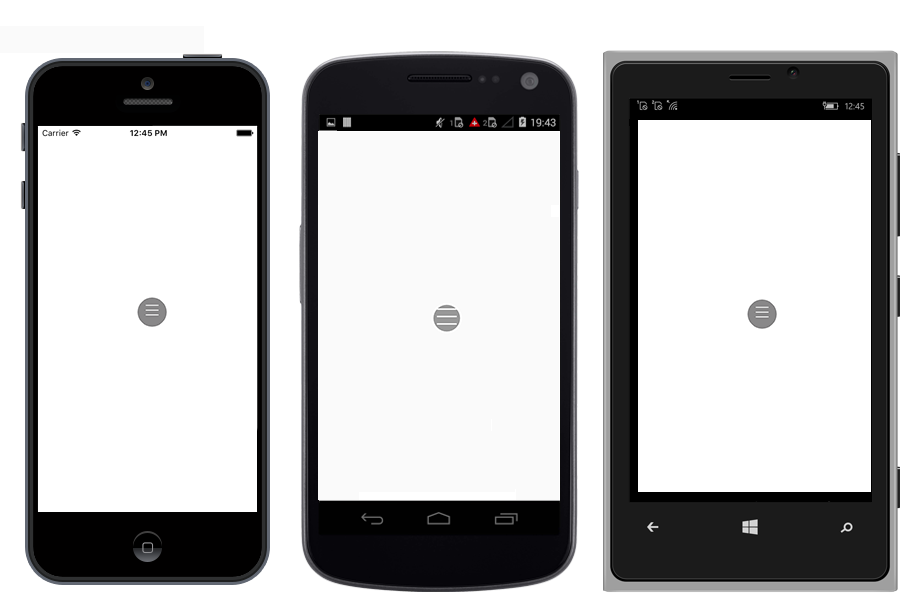
The CenterButton or BackButton in radial menu is a view in the center of the radial menu. It performs the operations such as opening and closing the rim and navigating to next level items. The radial menu allows you customize the CenterButton/BackButton with FontIcon, Custom View, and Caption.
CenterButtonText and CenterButtonBackText
The CenterButtonText changes the text of the center button in SfRadialMenu, and the CenterButtonBackText changes the text of the center back button in SfRadialMenu.
<?xml version="1.0" encoding="utf-8" ?>
<ContentPage xmlns="http://xamarin.com/schemas/2014/forms"
xmlns:x="http://schemas.microsoft.com/winfx/2009/xaml"
xmlns:local="clr-namespace:RadialSample"
xmlns:radialMenu="clr-namespace:Syncfusion.SfRadialMenu.XForms;assembly=Syncfusion.SfRadialMenu.XForms"
x:Class="RadialSample.MainPage">
<radialMenu:SfRadialMenu CenterButtonText=""
CenterButtonBackText="">
<radialMenu:SfRadialMenu.Items>
<radialMenu:SfRadialMenuItem Text="Bold" FontSize="12"/>
<radialMenu:SfRadialMenuItem Text="Copy" FontSize="12"/>
<radialMenu:SfRadialMenuItem Text="Undo" FontSize="12"/>
<radialMenu:SfRadialMenuItem Text="Paste" FontSize="12"/>
<radialMenu:SfRadialMenuItem Text="Color" FontSize="12"/>
</radialMenu:SfRadialMenu.Items>
</radialMenu:SfRadialMenu>
</ContentPage>using Syncfusion.SfRadialMenu.XForms;
using System.Collections.ObjectModel;
using Xamarin.Forms;
namespace RadialSample
{
public partial class MainPage : ContentPage
{
public MainPage()
{
InitializeComponent();
SfRadialMenu radialMenu = new SfRadialMenu()
{
CenterButtonText = "\uE700",
CenterButtonBackText = "\uE72b"
};
ObservableCollection<SfRadialMenuItem> itemCollection = new ObservableCollection<SfRadialMenuItem>();
itemCollection.Add(new SfRadialMenuItem() { Text = "Bold", FontSize = 12 });
itemCollection.Add(new SfRadialMenuItem() { Text = "Copy", FontSize = 12 });
itemCollection.Add(new SfRadialMenuItem() { Text = "Paste", FontSize = 12 });
itemCollection.Add(new SfRadialMenuItem() { Text = "Undo", FontSize = 12 });
itemCollection.Add(new SfRadialMenuItem() { Text = "Color", FontSize = 12 });
radialMenu.Items = itemCollection;
this.Content = radialMenu;
}
}
}CenterButtonTextColor and CenterButtonBackTextColor
The CenterButtonTextColor changes the text color of the center button in SfRadialMenu, and the CenterButtonBackTextColor changes the text color of the center back button in SfRadialMenu.
<?xml version="1.0" encoding="utf-8" ?>
<ContentPage xmlns="http://xamarin.com/schemas/2014/forms"
xmlns:x="http://schemas.microsoft.com/winfx/2009/xaml"
xmlns:local="clr-namespace:RadialSample"
xmlns:radialMenu="clr-namespace:Syncfusion.SfRadialMenu.XForms;assembly=Syncfusion.SfRadialMenu.XForms"
x:Class="RadialSample.MainPage">
<radialMenu:SfRadialMenu CenterButtonText=""
CenterButtonBackText=""
CenterButtonTextColor="#000000"
CenterButtonBackTextColor="#000000">
<radialMenu:SfRadialMenu.Items>
<radialMenu:SfRadialMenuItem Text="Bold" FontSize="12"/>
<radialMenu:SfRadialMenuItem Text="Copy" FontSize="12"/>
<radialMenu:SfRadialMenuItem Text="Undo" FontSize="12"/>
<radialMenu:SfRadialMenuItem Text="Paste" FontSize="12"/>
<radialMenu:SfRadialMenuItem Text="Color" FontSize="12"/>
</radialMenu:SfRadialMenu.Items>
</radialMenu:SfRadialMenu>
</ContentPage>using Syncfusion.SfRadialMenu.XForms;
using System.Collections.ObjectModel;
using Xamarin.Forms;
namespace RadialSample
{
public partial class MainPage : ContentPage
{
public MainPage()
{
InitializeComponent();
SfRadialMenu radialMenu = new SfRadialMenu()
{
CenterButtonText = "\uE700",
CenterButtonBackText = "\uE72b",
CenterButtonTextColor = Color.FromHex("#000000"),
CenterButtonBackTextColor = Color.FromHex("#000000")
};
ObservableCollection<SfRadialMenuItem> itemCollection = new ObservableCollection<SfRadialMenuItem>();
itemCollection.Add(new SfRadialMenuItem() { Text = "Bold", FontSize = 12 });
itemCollection.Add(new SfRadialMenuItem() { Text = "Copy", FontSize = 12 });
itemCollection.Add(new SfRadialMenuItem() { Text = "Paste", FontSize = 12 });
itemCollection.Add(new SfRadialMenuItem() { Text = "Undo", FontSize = 12 });
itemCollection.Add(new SfRadialMenuItem() { Text = "Color", FontSize = 12 });
radialMenu.Items = itemCollection;
this.Content = radialMenu;
}
}
}CenterButtonBackgroundColor
The CenterButtonBackgroundColor changes the background color of the center button in SfRadialMenu.
<?xml version="1.0" encoding="utf-8" ?>
<ContentPage xmlns="http://xamarin.com/schemas/2014/forms"
             xmlns:x="http://schemas.microsoft.com/winfx/2009/xaml"
             xmlns:local="clr-namespace:RadialSample"
             xmlns:radialMenu="clr-namespace:Syncfusion.SfRadialMenu.XForms;assembly=Syncfusion.SfRadialMenu.XForms"
             x:Class="RadialSample.MainPage">
    <radialMenu:SfRadialMenu  CenterButtonBackgroundColor="#000000">
        <radialMenu:SfRadialMenu.Items>
            <radialMenu:SfRadialMenuItem Text="Bold" FontSize="12"/>
            <radialMenu:SfRadialMenuItem Text="Copy" FontSize="12"/>
            <radialMenu:SfRadialMenuItem Text="Undo" FontSize="12"/>
            <radialMenu:SfRadialMenuItem Text="Paste" FontSize="12"/>
            <radialMenu:SfRadialMenuItem Text="Color" FontSize="12"/>
        </radialMenu:SfRadialMenu.Items>
    </radialMenu:SfRadialMenu>
</ContentPage>
using Syncfusion.SfRadialMenu.XForms;
using System.Collections.ObjectModel;
using Xamarin.Forms;
namespace RadialSample
{
public partial class MainPage : ContentPage
{
public MainPage()
{
InitializeComponent();
SfRadialMenu radialMenu = new SfRadialMenu()
{
CenterButtonBackgroundColor = Color.FromHex("#000000")
};
ObservableCollection<SfRadialMenuItem> itemCollection = new ObservableCollection<SfRadialMenuItem>();
itemCollection.Add(new SfRadialMenuItem() { Text = "Bold", FontSize = 12 });
itemCollection.Add(new SfRadialMenuItem() { Text = "Copy", FontSize = 12 });
itemCollection.Add(new SfRadialMenuItem() { Text = "Paste", FontSize = 12 });
itemCollection.Add(new SfRadialMenuItem() { Text = "Undo", FontSize = 12 });
itemCollection.Add(new SfRadialMenuItem() { Text = "Color", FontSize = 12 });
radialMenu.Items = itemCollection;
this.Content = radialMenu;
}
}
}CenterButtonRadius
The CenterButtonRadius changes the radius of the center button in SfRadialMenu.
<?xml version="1.0" encoding="utf-8" ?>
<ContentPage xmlns="http://xamarin.com/schemas/2014/forms"
             xmlns:x="http://schemas.microsoft.com/winfx/2009/xaml"
             xmlns:local="clr-namespace:RadialSample"
             xmlns:radialMenu="clr-namespace:Syncfusion.SfRadialMenu.XForms;assembly=Syncfusion.SfRadialMenu.XForms"
             x:Class="RadialSample.MainPage">
    <radialMenu:SfRadialMenu  CenterButtonRadius="5">
        <radialMenu:SfRadialMenu.Items>
            <radialMenu:SfRadialMenuItem Text="Bold" FontSize="12"/>
            <radialMenu:SfRadialMenuItem Text="Copy" FontSize="12"/>
            <radialMenu:SfRadialMenuItem Text="Undo" FontSize="12"/>
            <radialMenu:SfRadialMenuItem Text="Paste" FontSize="12"/>
            <radialMenu:SfRadialMenuItem Text="Color" FontSize="12"/>
        </radialMenu:SfRadialMenu.Items>
    </radialMenu:SfRadialMenu>
</ContentPage>
using Syncfusion.SfRadialMenu.XForms;
using System.Collections.ObjectModel;
using Xamarin.Forms;
namespace RadialSample
{
public partial class MainPage : ContentPage
{
public MainPage()
{
InitializeComponent();
SfRadialMenu radialMenu = new SfRadialMenu()
{
CenterButtonRadius = 5
};
ObservableCollection<SfRadialMenuItem> itemCollection = new ObservableCollection<SfRadialMenuItem>();
itemCollection.Add(new SfRadialMenuItem() { Text = "Bold", FontSize = 12 });
itemCollection.Add(new SfRadialMenuItem() { Text = "Copy", FontSize = 12 });
itemCollection.Add(new SfRadialMenuItem() { Text = "Paste", FontSize = 12 });
itemCollection.Add(new SfRadialMenuItem() { Text = "Undo", FontSize = 12 });
itemCollection.Add(new SfRadialMenuItem() { Text = "Color", FontSize = 12 });
radialMenu.Items = itemCollection;
this.Content = radialMenu;
}
}
}CenterButtonFontFamily and CenterButtonBackFontFamily
The CenterButtonFontFamily changes the font family of the center button in SfRadialMenu, and the CenterButtonBackFontFamily changes the font family of the center back button in SfRadialMenu.
<?xml version="1.0" encoding="utf-8" ?>
<ContentPage xmlns="http://xamarin.com/schemas/2014/forms"
xmlns:x="http://schemas.microsoft.com/winfx/2009/xaml"
xmlns:local="clr-namespace:RadialSample"
xmlns:radialMenu="clr-namespace:Syncfusion.SfRadialMenu.XForms;assembly=Syncfusion.SfRadialMenu.XForms"
x:Class="RadialSample.MainPage">
<ContentPage.Resources>
<ResourceDictionary>
<OnPlatform x:TypeArguments="x:String"
x:Key="customfontfamily"
iOS="Segoe MDL2 Assets"
Android="radialmenu_Segoe MDL2 Assets.ttf"
UWP="radialmenu_Segoe_MDL2_Assets.ttf#Segoe MDL2 Assets" />
</ResourceDictionary>
</ContentPage.Resources>
<radialMenu:SfRadialMenu CenterButtonText=""
CenterButtonBackText=""
CenterButtonTextColor="#000000"
CenterButtonBackTextColor="#000000"
CenterButtonFontFamily="{StaticResource customfontfamily}"
CenterButtonBackFontFamily="{StaticResource customfontfamily}">
<radialMenu:SfRadialMenu.Items>
<radialMenu:SfRadialMenuItem Text="Bold" FontSize="12"/>
<radialMenu:SfRadialMenuItem Text="Copy" FontSize="12"/>
<radialMenu:SfRadialMenuItem Text="Undo" FontSize="12"/>
<radialMenu:SfRadialMenuItem Text="Paste" FontSize="12"/>
<radialMenu:SfRadialMenuItem Text="Color" FontSize="12"/>
</radialMenu:SfRadialMenu.Items>
</radialMenu:SfRadialMenu>
</ContentPage>using Syncfusion.SfRadialMenu.XForms;
using System.Collections.ObjectModel;
using Xamarin.Forms;
namespace RadialSample
{
public partial class MainPage : ContentPage
{
public MainPage()
{
InitializeComponent();
SfRadialMenu radialMenu = new SfRadialMenu()
{
CenterButtonText = "\uE700",
CenterButtonBackText = "\uE72b",
CenterButtonTextColor = Color.FromHex("#000000"),
CenterButtonBackTextColor = Color.FromHex("#000000"),
CenterButtonFontFamily = Device.RuntimePlatform == Device.iOS ? "Segoe MDL2 Assets" : Device.RuntimePlatform == Device.Android ? "radialmenu_Segoe MDL2 Assets.ttf" : "radialmenu_Segoe_MDL2_Assets.ttf#Segoe MDL2 Assets",
CenterButtonBackFontFamily = Device.RuntimePlatform == Device.iOS ? "Segoe MDL2 Assets" : Device.RuntimePlatform == Device.Android ? "radialmenu_Segoe MDL2 Assets.ttf" : "radialmenu_Segoe_MDL2_Assets.ttf#Segoe MDL2 Assets"
};
ObservableCollection<SfRadialMenuItem> itemCollection = new ObservableCollection<SfRadialMenuItem>();
itemCollection.Add(new SfRadialMenuItem() { Text = "Bold", FontSize = 12 });
itemCollection.Add(new SfRadialMenuItem() { Text = "Copy", FontSize = 12 });
itemCollection.Add(new SfRadialMenuItem() { Text = "Paste", FontSize = 12 });
itemCollection.Add(new SfRadialMenuItem() { Text = "Undo", FontSize = 12 });
itemCollection.Add(new SfRadialMenuItem() { Text = "Color", FontSize = 12 });
radialMenu.Items = itemCollection;
this.Content = radialMenu;
}
}
}CenterButtonFontSize and CenterButtonBackFontSize
The CenterButtonFontSize changes the font size of the center button in SfRadialMenu, and the CenterButtonBackFontSize changes the font size of the center back button in SfRadialMenu.
<?xml version="1.0" encoding="utf-8" ?>
<ContentPage xmlns="http://xamarin.com/schemas/2014/forms"
xmlns:x="http://schemas.microsoft.com/winfx/2009/xaml"
xmlns:local="clr-namespace:RadialSample"
xmlns:radialMenu="clr-namespace:Syncfusion.SfRadialMenu.XForms;assembly=Syncfusion.SfRadialMenu.XForms"
x:Class="RadialSample.MainPage">
<ContentPage.Resources>
<ResourceDictionary>
<OnPlatform x:TypeArguments="x:String"
x:Key="customfontfamily"
iOS="Segoe MDL2 Assets"
Android="radialmenu_Segoe MDL2 Assets.ttf"
UWP="radialmenu_Segoe_MDL2_Assets.ttf#Segoe MDL2 Assets" />
</ResourceDictionary>
</ContentPage.Resources>
<radialMenu:SfRadialMenu CenterButtonText=""
CenterButtonBackText=""
CenterButtonTextColor="#000000"
CenterButtonBackTextColor="#000000"
CenterButtonFontFamily="{StaticResource customfontfamily}"
CenterButtonBackFontFamily="{StaticResource customfontfamily}"
CenterButtonFontSize="10"
CenterButtonBackFontSize="10">
<radialMenu:SfRadialMenu.Items>
<radialMenu:SfRadialMenuItem Text="Bold" FontSize="12"/>
<radialMenu:SfRadialMenuItem Text="Copy" FontSize="12"/>
<radialMenu:SfRadialMenuItem Text="Undo" FontSize="12"/>
<radialMenu:SfRadialMenuItem Text="Paste" FontSize="12"/>
<radialMenu:SfRadialMenuItem Text="Color" FontSize="12"/>
</radialMenu:SfRadialMenu.Items>
</radialMenu:SfRadialMenu>
</ContentPage>using Syncfusion.SfRadialMenu.XForms;
using System.Collections.ObjectModel;
using Xamarin.Forms;
namespace RadialSample
{
public partial class MainPage : ContentPage
{
public MainPage()
{
InitializeComponent();
SfRadialMenu radialMenu = new SfRadialMenu()
{
CenterButtonText = "\uE700",
CenterButtonBackText = "\uE72b",
CenterButtonTextColor = Color.FromHex("#000000"),
CenterButtonBackTextColor = Color.FromHex("#000000"),
CenterButtonFontFamily = Device.RuntimePlatform == Device.iOS ? "Segoe MDL2 Assets" : Device.RuntimePlatform == Device.Android ? "radialmenu_Segoe MDL2 Assets.ttf" : "radialmenu_Segoe_MDL2_Assets.ttf#Segoe MDL2 Assets",
CenterButtonBackFontFamily = Device.RuntimePlatform == Device.iOS ? "Segoe MDL2 Assets" : Device.RuntimePlatform == Device.Android ? "radialmenu_Segoe MDL2 Assets.ttf" : "radialmenu_Segoe_MDL2_Assets.ttf#Segoe MDL2 Assets",
CenterButtonFontSize = 10,
CenterButtonBackFontSize = 10
};
ObservableCollection<SfRadialMenuItem> itemCollection = new ObservableCollection<SfRadialMenuItem>();
itemCollection.Add(new SfRadialMenuItem() { Text = "Bold", FontSize = 12 });
itemCollection.Add(new SfRadialMenuItem() { Text = "Copy", FontSize = 12 });
itemCollection.Add(new SfRadialMenuItem() { Text = "Paste", FontSize = 12 });
itemCollection.Add(new SfRadialMenuItem() { Text = "Undo", FontSize = 12 });
itemCollection.Add(new SfRadialMenuItem() { Text = "Color", FontSize = 12 });
radialMenu.Items = itemCollection;
this.Content = radialMenu;
}
}
}CenterButtonFontAttributes
The CenterButtonFontAttributes changes the font attributes of the center button in SfRadialMenu.
<?xml version="1.0" encoding="utf-8" ?>
<ContentPage xmlns="http://xamarin.com/schemas/2014/forms"
xmlns:x="http://schemas.microsoft.com/winfx/2009/xaml"
xmlns:local="clr-namespace:RadialSample"
xmlns:radialMenu="clr-namespace:Syncfusion.SfRadialMenu.XForms;assembly=Syncfusion.SfRadialMenu.XForms"
x:Class="RadialSample.MainPage">
<ContentPage.Resources>
<ResourceDictionary>
<OnPlatform x:TypeArguments="x:String"
x:Key="customfontfamily"
iOS="Segoe MDL2 Assets"
Android="radialmenu_Segoe MDL2 Assets.ttf"
UWP="radialmenu_Segoe_MDL2_Assets.ttf#Segoe MDL2 Assets" />
</ResourceDictionary>
</ContentPage.Resources>
<radialMenu:SfRadialMenu CenterButtonText=""
CenterButtonBackText=""
CenterButtonTextColor="#000000"
CenterButtonBackTextColor="#000000"
CenterButtonFontFamily="{StaticResource customfontfamily}"
CenterButtonBackFontFamily="{StaticResource customfontfamily}"
CenterButtonFontSize="10"
CenterButtonBackFontSize="10"
CenterButtonFontAttributes="Bold">
<radialMenu:SfRadialMenu.Items>
<radialMenu:SfRadialMenuItem Text="Bold" FontSize="12"/>
<radialMenu:SfRadialMenuItem Text="Copy" FontSize="12"/>
<radialMenu:SfRadialMenuItem Text="Undo" FontSize="12"/>
<radialMenu:SfRadialMenuItem Text="Paste" FontSize="12"/>
<radialMenu:SfRadialMenuItem Text="Color" FontSize="12"/>
</radialMenu:SfRadialMenu.Items>
</radialMenu:SfRadialMenu>
</ContentPage>using Syncfusion.SfRadialMenu.XForms;
using System.Collections.ObjectModel;
using Xamarin.Forms;
namespace RadialSample
{
public partial class MainPage : ContentPage
{
public MainPage()
{
InitializeComponent();
SfRadialMenu radialMenu = new SfRadialMenu()
{
CenterButtonText = "\uE700",
CenterButtonBackText = "\uE72b",
CenterButtonTextColor = Color.FromHex("#000000"),
CenterButtonBackTextColor = Color.FromHex("#000000"),
CenterButtonFontFamily = Device.RuntimePlatform == Device.iOS ? "Segoe MDL2 Assets" : Device.RuntimePlatform == Device.Android ? "radialmenu_Segoe MDL2 Assets.ttf" : "radialmenu_Segoe_MDL2_Assets.ttf#Segoe MDL2 Assets",
CenterButtonBackFontFamily = Device.RuntimePlatform == Device.iOS ? "Segoe MDL2 Assets" : Device.RuntimePlatform == Device.Android ? "radialmenu_Segoe MDL2 Assets.ttf" : "radialmenu_Segoe_MDL2_Assets.ttf#Segoe MDL2 Assets",
CenterButtonFontSize = 10,
CenterButtonBackFontSize = 10,
CenterButtonFontAttributes = FontAttributes.Bold
};
ObservableCollection<SfRadialMenuItem> itemCollection = new ObservableCollection<SfRadialMenuItem>();
itemCollection.Add(new SfRadialMenuItem() { Text = "Bold", FontSize = 12 });
itemCollection.Add(new SfRadialMenuItem() { Text = "Copy", FontSize = 12 });
itemCollection.Add(new SfRadialMenuItem() { Text = "Paste", FontSize = 12 });
itemCollection.Add(new SfRadialMenuItem() { Text = "Undo", FontSize = 12 });
itemCollection.Add(new SfRadialMenuItem() { Text = "Color", FontSize = 12 });
radialMenu.Items = itemCollection;
this.Content = radialMenu;
}
}
}CenterButtonBorderColor
The CenterButtonBorderColor changes the border color of the center button in SfRadialMenu.
<?xml version="1.0" encoding="utf-8" ?>
<ContentPage xmlns="http://xamarin.com/schemas/2014/forms"
xmlns:x="http://schemas.microsoft.com/winfx/2009/xaml"
xmlns:local="clr-namespace:RadialSample"
xmlns:radialMenu="clr-namespace:Syncfusion.SfRadialMenu.XForms;assembly=Syncfusion.SfRadialMenu.XForms"
x:Class="RadialSample.MainPage">
<ContentPage.Resources>
<ResourceDictionary>
<OnPlatform x:TypeArguments="x:String"
x:Key="customfontfamily"
iOS="Segoe MDL2 Assets"
Android="radialmenu_Segoe MDL2 Assets.ttf"
UWP="radialmenu_Segoe_MDL2_Assets.ttf#Segoe MDL2 Assets" />
</ResourceDictionary>
</ContentPage.Resources>
<radialMenu:SfRadialMenu CenterButtonText=""
CenterButtonBackText=""
CenterButtonTextColor="#000000"
CenterButtonBackTextColor="#000000"
CenterButtonFontFamily="{StaticResource customfontfamily}"
CenterButtonBackFontFamily="{StaticResource customfontfamily}"
CenterButtonFontSize="10"
CenterButtonBackFontSize="10"
CenterButtonFontAttributes="Bold"
CenterButtonBorderColor="Black">
<radialMenu:SfRadialMenu.Items>
<radialMenu:SfRadialMenuItem Text="Bold" FontSize="12"/>
<radialMenu:SfRadialMenuItem Text="Copy" FontSize="12"/>
<radialMenu:SfRadialMenuItem Text="Undo" FontSize="12"/>
<radialMenu:SfRadialMenuItem Text="Paste" FontSize="12"/>
<radialMenu:SfRadialMenuItem Text="Color" FontSize="12"/>
</radialMenu:SfRadialMenu.Items>
</radialMenu:SfRadialMenu>
</ContentPage>using Syncfusion.SfRadialMenu.XForms;
using System.Collections.ObjectModel;
using Xamarin.Forms;
namespace RadialSample
{
public partial class MainPage : ContentPage
{
public MainPage()
{
InitializeComponent();
SfRadialMenu radialMenu = new SfRadialMenu()
{
CenterButtonText = "\uE700",
CenterButtonBackText = "\uE72b",
CenterButtonTextColor = Color.FromHex("#000000"),
CenterButtonBackTextColor = Color.FromHex("#000000"),
CenterButtonFontFamily = Device.RuntimePlatform == Device.iOS ? "Segoe MDL2 Assets" : Device.RuntimePlatform == Device.Android ? "radialmenu_Segoe MDL2 Assets.ttf" : "radialmenu_Segoe_MDL2_Assets.ttf#Segoe MDL2 Assets",
CenterButtonBackFontFamily = Device.RuntimePlatform == Device.iOS ? "Segoe MDL2 Assets" : Device.RuntimePlatform == Device.Android ? "radialmenu_Segoe MDL2 Assets.ttf" : "radialmenu_Segoe_MDL2_Assets.ttf#Segoe MDL2 Assets",
CenterButtonFontSize = 10,
CenterButtonBackFontSize = 10,
CenterButtonFontAttributes = FontAttributes.Bold,
CenterButtonBorderColor = Color.Black
};
ObservableCollection<SfRadialMenuItem> itemCollection = new ObservableCollection<SfRadialMenuItem>();
itemCollection.Add(new SfRadialMenuItem() { Text = "Bold", FontSize = 12 });
itemCollection.Add(new SfRadialMenuItem() { Text = "Copy", FontSize = 12 });
itemCollection.Add(new SfRadialMenuItem() { Text = "Paste", FontSize = 12 });
itemCollection.Add(new SfRadialMenuItem() { Text = "Undo", FontSize = 12 });
itemCollection.Add(new SfRadialMenuItem() { Text = "Color", FontSize = 12 });
radialMenu.Items = itemCollection;
this.Content = radialMenu;
}
}
}CenterButtonBorderThickness
The CenterButtonBorderThickness changes the border thickness of the center button in SfRadialMenu.
<?xml version="1.0" encoding="utf-8" ?>
<ContentPage xmlns="http://xamarin.com/schemas/2014/forms"
xmlns:x="http://schemas.microsoft.com/winfx/2009/xaml"
xmlns:local="clr-namespace:RadialSample"
xmlns:radialMenu="clr-namespace:Syncfusion.SfRadialMenu.XForms;assembly=Syncfusion.SfRadialMenu.XForms"
x:Class="RadialSample.MainPage">
<ContentPage.Resources>
<ResourceDictionary>
<OnPlatform x:TypeArguments="x:String"
x:Key="customfontfamily"
iOS="Segoe MDL2 Assets"
Android="radialmenu_Segoe MDL2 Assets.ttf"
UWP="radialmenu_Segoe_MDL2_Assets.ttf#Segoe MDL2 Assets" />
</ResourceDictionary>
</ContentPage.Resources>
<radialMenu:SfRadialMenu CenterButtonText=""
CenterButtonBackText=""
CenterButtonTextColor="#000000"
CenterButtonBackTextColor="#000000"
CenterButtonFontFamily="{StaticResource customfontfamily}"
CenterButtonBackFontFamily="{StaticResource customfontfamily}"
CenterButtonFontSize="10"
CenterButtonBackFontSize="10"
CenterButtonFontAttributes="Bold"
CenterButtonBorderColor="Black"
CenterButtonBorderThickness="2">
<radialMenu:SfRadialMenu.Items>
<radialMenu:SfRadialMenuItem Text="Bold" FontSize="12"/>
<radialMenu:SfRadialMenuItem Text="Copy" FontSize="12"/>
<radialMenu:SfRadialMenuItem Text="Undo" FontSize="12"/>
<radialMenu:SfRadialMenuItem Text="Paste" FontSize="12"/>
<radialMenu:SfRadialMenuItem Text="Color" FontSize="12"/>
</radialMenu:SfRadialMenu.Items>
</radialMenu:SfRadialMenu>
</ContentPage>using Syncfusion.SfRadialMenu.XForms;
using System.Collections.ObjectModel;
using Xamarin.Forms;
namespace RadialSample
{
public partial class MainPage : ContentPage
{
public MainPage()
{
InitializeComponent();
SfRadialMenu radialMenu = new SfRadialMenu()
{
CenterButtonText = "\uE700",
CenterButtonBackText = "\uE72b",
CenterButtonTextColor = Color.FromHex("#000000"),
CenterButtonBackTextColor = Color.FromHex("#000000"),
CenterButtonFontFamily = Device.RuntimePlatform == Device.iOS ? "Segoe MDL2 Assets" : Device.RuntimePlatform == Device.Android ? "radialmenu_Segoe MDL2 Assets.ttf" : "radialmenu_Segoe_MDL2_Assets.ttf#Segoe MDL2 Assets",
CenterButtonBackFontFamily = Device.RuntimePlatform == Device.iOS ? "Segoe MDL2 Assets" : Device.RuntimePlatform == Device.Android ? "radialmenu_Segoe MDL2 Assets.ttf" : "radialmenu_Segoe_MDL2_Assets.ttf#Segoe MDL2 Assets",
CenterButtonFontSize = 10,
CenterButtonBackFontSize = 10,
CenterButtonFontAttributes = FontAttributes.Bold,
CenterButtonBorderColor = Color.Black,
CenterButtonBorderThickness = 2
};
ObservableCollection<SfRadialMenuItem> itemCollection = new ObservableCollection<SfRadialMenuItem>();
itemCollection.Add(new SfRadialMenuItem() { Text = "Bold", FontSize = 12 });
itemCollection.Add(new SfRadialMenuItem() { Text = "Copy", FontSize = 12 });
itemCollection.Add(new SfRadialMenuItem() { Text = "Paste", FontSize = 12 });
itemCollection.Add(new SfRadialMenuItem() { Text = "Undo", FontSize = 12 });
itemCollection.Add(new SfRadialMenuItem() { Text = "Color", FontSize = 12 });
radialMenu.Items = itemCollection;
this.Content = radialMenu;
}
}
}CenterButtonPlacement
The CenterButtonPlacement changes the placement of the center button in SfRadialMenu
<?xml version="1.0" encoding="utf-8" ?>
<ContentPage xmlns="http://xamarin.com/schemas/2014/forms"
             xmlns:x="http://schemas.microsoft.com/winfx/2009/xaml"
             xmlns:local="clr-namespace:RadialSample"
             xmlns:radialMenu="clr-namespace:Syncfusion.SfRadialMenu.XForms;assembly=Syncfusion.SfRadialMenu.XForms"
             x:Class="RadialSample.MainPage">
    <radialMenu:SfRadialMenu CenterButtonPlacement="Center">
        <radialMenu:SfRadialMenu.Items>
            <radialMenu:SfRadialMenuItem Text="Bold" FontSize="12"/>
            <radialMenu:SfRadialMenuItem Text="Copy" FontSize="12"/>
            <radialMenu:SfRadialMenuItem Text="Undo" FontSize="12"/>
            <radialMenu:SfRadialMenuItem Text="Paste" FontSize="12"/>
            <radialMenu:SfRadialMenuItem Text="Color" FontSize="12"/>
        </radialMenu:SfRadialMenu.Items>
    </radialMenu:SfRadialMenu>
</ContentPage>
using Syncfusion.SfRadialMenu.XForms;
using System.Collections.ObjectModel;
using Xamarin.Forms;
namespace RadialSample
{
public partial class MainPage : ContentPage
{
public MainPage()
{
InitializeComponent();
SfRadialMenu radialMenu = new SfRadialMenu()
{
CenterButtonPlacement = SfRadialMenuCenterButtonPlacement.Center
};
ObservableCollection<SfRadialMenuItem> itemCollection = new ObservableCollection<SfRadialMenuItem>();
itemCollection.Add(new SfRadialMenuItem() { Text = "Bold", FontSize = 12 });
itemCollection.Add(new SfRadialMenuItem() { Text = "Copy", FontSize = 12 });
itemCollection.Add(new SfRadialMenuItem() { Text = "Paste", FontSize = 12 });
itemCollection.Add(new SfRadialMenuItem() { Text = "Undo", FontSize = 12 });
itemCollection.Add(new SfRadialMenuItem() { Text = "Color", FontSize = 12 });
radialMenu.Items = itemCollection;
this.Content = radialMenu;
}
}
}Center button view and center back button view
You can customize the center button using CenterButtonViewand center back button using CenterButtonBackView in SfRadialMenu.
<?xml version="1.0" encoding="utf-8" ?>
<ContentPage xmlns="http://xamarin.com/schemas/2014/forms"
             xmlns:x="http://schemas.microsoft.com/winfx/2009/xaml"
             xmlns:local="clr-namespace:RadialSample"
             xmlns:radialMenu="clr-namespace:Syncfusion.SfRadialMenu.XForms;assembly=Syncfusion.SfRadialMenu.XForms"
             x:Class="RadialSample.MainPage">
    <radialMenu:SfRadialMenu x:Name="radialMenu">
        <radialMenu:SfRadialMenu.CenterButtonView >
            <Grid>
                <StackLayout VerticalOptions="Center">
                    <Image Source="Beverage1.png"/>
                </StackLayout>
            </Grid>
        </radialMenu:SfRadialMenu.CenterButtonView>
        <radialMenu:SfRadialMenu.CenterButtonBackView>
            <Grid>
                <StackLayout VerticalOptions="Center">
                    <Image Source="Beverage2.png"/>
                </StackLayout>
            </Grid>
        </radialMenu:SfRadialMenu.CenterButtonBackView>
    </radialMenu:SfRadialMenu>
</ContentPage>
using Syncfusion.SfRadialMenu.XForms;
using System.Collections.ObjectModel;
using Xamarin.Forms;
namespace RadialSample
{
public partial class MainPage : ContentPage
{
public MainPage()
{
InitializeComponent();
Grid centerButtonGrid = new Grid();
Grid centerButtonBackGrid = new Grid();
StackLayout centerButtonLayout = new StackLayout()
{
VerticalOptions = LayoutOptions.Center
};
StackLayout centerButtonBackLayout = new StackLayout()
{
VerticalOptions = LayoutOptions.Center
};
centerButtonLayout.Children.Add(new Image() { Source = "Beverage1.png" });
centerButtonGrid.Children.Add(centerButtonLayout);
centerButtonBackLayout.Children.Add(new Image() { Source = "Beverage2.png" });
centerButtonBackGrid.Children.Add(centerButtonBackLayout);
SfRadialMenu radialMenu = new SfRadialMenu()
{
CenterButtonView = centerButtonGrid,
CenterButtonBackView = centerButtonBackGrid
};
}
}
}EnableCenterButtonAnimation
The EnableCenterButtonAnimation is used to either enable or disable animation of the center button in SfRadialMenu.
<?xml version="1.0" encoding="utf-8" ?>
<ContentPage xmlns="http://xamarin.com/schemas/2014/forms"
             xmlns:x="http://schemas.microsoft.com/winfx/2009/xaml"
             xmlns:local="clr-namespace:RadialSample"
             xmlns:radialMenu="clr-namespace:Syncfusion.SfRadialMenu.XForms;assembly=Syncfusion.SfRadialMenu.XForms"
             x:Class="RadialSample.MainPage">
    <radialMenu:SfRadialMenu  EnableCenterButtonAnimation="True">
        <radialMenu:SfRadialMenu.Items>
            <radialMenu:SfRadialMenuItem Text="Bold" FontSize="12"/>
            <radialMenu:SfRadialMenuItem Text="Copy" FontSize="12"/>
            <radialMenu:SfRadialMenuItem Text="Undo" FontSize="12"/>
            <radialMenu:SfRadialMenuItem Text="Paste" FontSize="12"/>
            <radialMenu:SfRadialMenuItem Text="Color" FontSize="12"/>
        </radialMenu:SfRadialMenu.Items>
    </radialMenu:SfRadialMenu>
</ContentPage>
using Syncfusion.SfRadialMenu.XForms;
using System.Collections.ObjectModel;
using Xamarin.Forms;
namespace RadialSample
{
public partial class MainPage : ContentPage
{
public MainPage()
{
InitializeComponent();
SfRadialMenu radialMenu = new SfRadialMenu()
{
EnableCenterButtonAnimation = true
};
ObservableCollection<SfRadialMenuItem> itemCollection = new ObservableCollection<SfRadialMenuItem>();
itemCollection.Add(new SfRadialMenuItem() { Text = "Bold", FontSize = 12 });
itemCollection.Add(new SfRadialMenuItem() { Text = "Copy", FontSize = 12 });
itemCollection.Add(new SfRadialMenuItem() { Text = "Paste", FontSize = 12 });
itemCollection.Add(new SfRadialMenuItem() { Text = "Undo", FontSize = 12 });
itemCollection.Add(new SfRadialMenuItem() { Text = "Color", FontSize = 12 });
radialMenu.Items = itemCollection;
this.Content = radialMenu;
}
}
}