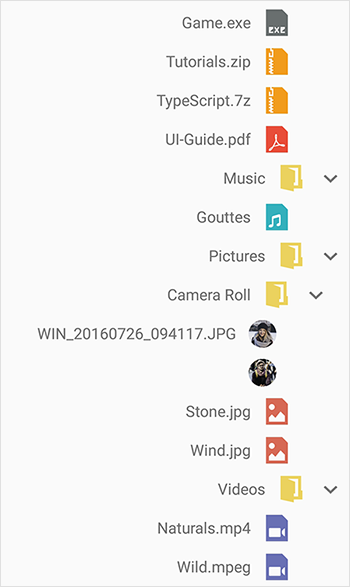
Right to left(RTL)
3 Sep 20203 minutes to read
TreeView supports the right-to-left localization by setting SemanticContentAttribute to UISemanticContentAttribute.ForceRightToLeft.TreeView also supports RTL based on device language layout direction.
NOTE
Specific setup is required to enable right-to-left localization. For this you can refer Localization Basics in iOS.
SfTreeView treeView = new SfTreeView();
treeView.SemanticContentAttribute = UISemanticContentAttribute.ForceRightToLeft;
NOTE
If you need to customize Adapter with your custom views, layout views in based on device layout direction to respond for right-to-left changes.
// Customized content view

public class NodeImageView : UIView
{

    UILabel label1;
    UIImageView imageIcon;
    SfTreeView view;

    public NodeImageView(SfTreeView treeView)
    {
        view = treeView;
        label1 = new UILabel();
        if (GetUserInterfaceLayoutDirection(view.SemanticContentAttribute) == UIUserInterfaceLayoutDirection.RightToLeft)
            label1.TextAlignment = UITextAlignment.Right;
        imageIcon = new UIImageView();
        imageIcon.ClipsToBounds = true;
        imageIcon.AdjustsImageSizeForAccessibilityContentSizeCategory = true;
        imageIcon.InsetsLayoutMarginsFromSafeArea = true;
        this.AddSubview(imageIcon);
        this.AddSubview(label1);
    }

    public override void LayoutSubviews()
    {
        var imageWidth = 40;
        if (GetUserInterfaceLayoutDirection(view.SemanticContentAttribute) == UIUserInterfaceLayoutDirection.RightToLeft)
        {
            this.imageIcon.Frame = new CGRect(this.Frame.Width- imageWidth, 0, imageWidth, this.Frame.Height);
            this.label1.Frame = new CGRect(0, 0, this.Frame.Width- imageWidth, this.Frame.Height);
        }
        else
        {
            this.imageIcon.Frame = new CGRect(0, 0, imageWidth, this.Frame.Height);
            this.label1.Frame = new CGRect(imageWidth, 0, this.Frame.Width, this.Frame.Height);
        }
        base.LayoutSubviews();
    }

    protected override void Dispose(bool disposing)
    {
        base.Dispose(disposing);
    }
}
You can download the entire source code here.