How can I help you?
Shape Type
8 Jan 20257 minutes to read
SfMaps allows to provide various shape types in ShapeFileLayer such as Polygon, Polyline, and Points.
Polygon
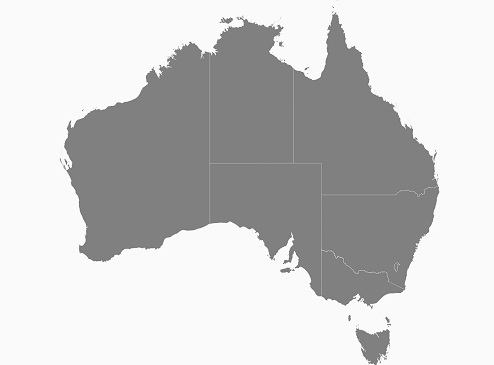
Polygon is a two-dimensional surface stored as a sequence of points defining its exterior bounding ring and 0 or more interior rings. Polygons are always simple. Mostly the polygon shape type defines a group of land, water bodies, and other features that have a spatial extent.
Polyline
The polyline is a shape that has a dimension of 1. It is called a simple line if it does not intersect itself. The polylines are often used to define linear features such as roads, rivers, and power lines. Mostly the shape file layer with the polyline shape type is used as sublayer.
The following code example demonstrates the sublayer with polyline shape type. The roads (sublayer) of Bahrain (base layer) is displayed using the shape file layer of maps.
SFMap maps = new SFMap();

SFShapeFileLayer layer = new SFShapeFileLayer();

layer.Uri = (NSString)"Bahrain.shp";

SFShapeSetting layerSetting = new SFShapeSetting();

layerSetting.Fill = UIColor.FromRGB(188, 188, 188);

layer.ShapeSettings = layerSetting;

SFShapeFileLayer subLayer = new SFShapeFileLayer();

subLayer.Uri = (NSString)"roads.shp";

SFShapeSetting subLayerSetting = new SFShapeSetting();

subLayerSetting.Fill = UIColor.Black;

subLayerSetting.StrokeThickness = 2;

subLayer.ShapeSettings = subLayerSetting;

layer.Sublayers.Add(subLayer);

maps.Layers.Add(layer);

View.AddSubview(maps);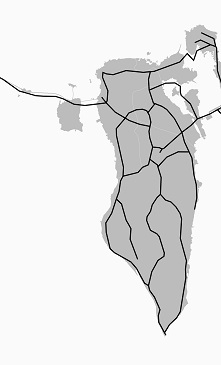
Points
A point is shape with a dimension of 0 that occupies a single location in coordinate space. A point has a single x, y coordinate value. The points are often used to define features such as oil wells, landmarks, and elevations.
The following code example demonstrates the sublayer with the points shape type. The places (sublayer) of Australia (base layer) is displayed using the shape file layer of maps.
SFMap maps = new SFMap();

SFShapeFileLayer layer = new SFShapeFileLayer();

layer.Uri = (NSString)"australia.shp";

SFShapeSetting layerSetting = new SFShapeSetting();

layerSetting.Fill = UIColor.FromRGB(188, 188, 188);

layer.ShapeSettings = layerSetting;

SFShapeFileLayer subLayer = new SFShapeFileLayer();

subLayer.Uri = (NSString)"points.shp";

subLayer.MapPointIconSize = 5;

SFShapeSetting subLayerSetting = new SFShapeSetting();

subLayerSetting.Fill = UIColor.Black;

subLayer.ShapeSettings = subLayerSetting;

layer.Sublayers.Add(subLayer);

maps.Layers.Add(layer);

View.AddSubview(maps);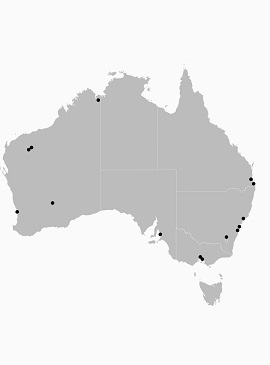
Customization of Points
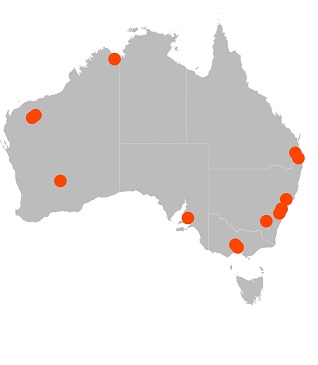
The size, shape, and position of the map points can be customized using the [MapPointIconSize], [MapPointIcon], [MapPointHorizontalAlignment] and [MapPointVerticalAlignment] properties of shape file layer.
Map point icon
The shape of the map point is customized using the [MapPointIcon] property of ShapeFileLayer. SfMap supports the following map point icon types:
- Circle,
- Rectangle,
- Square,
- Diamond,
- Star
SFMap maps = new SFMap();

SFShapeFileLayer layer = new SFShapeFileLayer();

layer.Uri = (NSString)"australia.shp";

SFShapeSetting layerSetting = new SFShapeSetting();

layerSetting.Fill = UIColor.FromRGB(188, 188, 188);

layer.ShapeSettings = layerSetting;

SFShapeFileLayer subLayer = new SFShapeFileLayer();

subLayer.Uri = (NSString)"points.shp";

subLayer.MapPointIcon = SFMapPointIcon.SFMapPointIconCircle;

subLayer.MapPointIconSize = 15;

SFShapeSetting subLayerSetting = new SFShapeSetting();

subLayerSetting.Fill = UIColor.Green;

subLayer.ShapeSettings = subLayerSetting;

layer.Sublayers.Add(subLayer);

maps.Layers.Add(layer);

View.AddSubview(maps);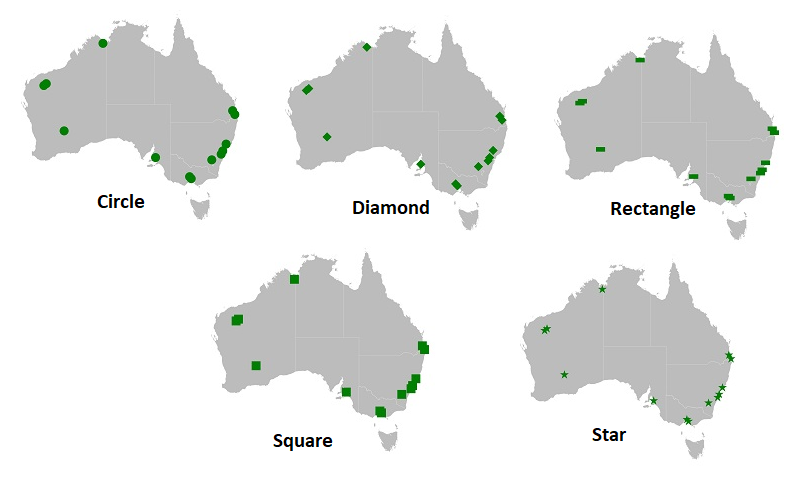
Map point position
The position of the map points can be customized using the [MapPointHorizontalAlignment] and [MapPointVerticalAlignment] properties of shape file layer. These properties allow to vary the position to Near, Far, and Center by considering the provided latitude, longitude, and the map point icon size.
SFMap maps = new SFMap();

SFShapeFileLayer layer = new SFShapeFileLayer();

layer.Uri = (NSString)"australia.shp";

SFShapeSetting layerSetting = new SFShapeSetting();

layerSetting.Fill = UIColor.FromRGB(188, 188, 188);

layer.ShapeSettings = layerSetting;

SFShapeFileLayer subLayer = new SFShapeFileLayer();

subLayer.Uri = (NSString)"points.shp";

subLayer.MapPointIcon = SFMapPointIcon.SFMapPointIconCircle;

subLayer.MapPointIconSize = 15;

subLayer.MapPointHorizontalAlignment = MarkerAlignment.Near;

subLayer.MapPointHorizontalAlignment = MarkerAlignment.Near;

SFShapeSetting subLayerSetting = new SFShapeSetting();

subLayerSetting.Fill = UIColor.Green;

subLayer.ShapeSettings = subLayerSetting;

layer.Sublayers.Add(subLayer);

maps.Layers.Add(layer);

View.AddSubview(maps);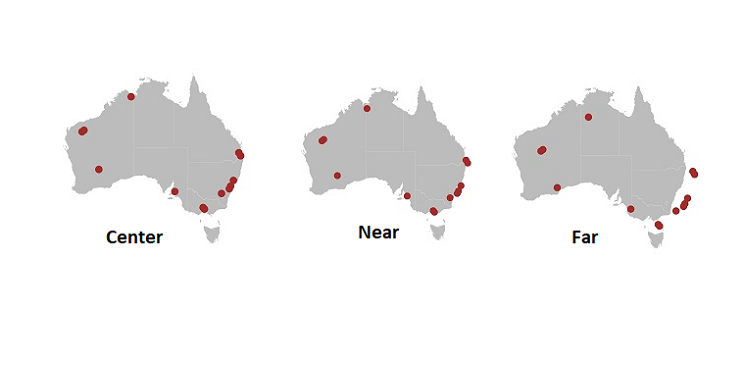
Map point size
The size of the map points can be customized using the [MapPointIconSize] property of ShapeFileLayer.
SFMap maps = new SFMap();

SFShapeFileLayer layer = new SFShapeFileLayer();

layer.Uri = (NSString)"australia.shp";

SFShapeSetting layerSetting = new SFShapeSetting();

layerSetting.Fill = UIColor.FromRGB(188, 188, 188);

layer.ShapeSettings = layerSetting;

SFShapeFileLayer subLayer = new SFShapeFileLayer();

subLayer.Uri = (NSString)"points.shp";

subLayer.MapPointIcon = SFMapPointIcon.SFMapPointIconCircle;

subLayer.MapPointIconSize = 15;

SFShapeSetting subLayerSetting = new SFShapeSetting();

subLayerSetting.Fill = UIColor.Orange;

subLayer.ShapeSettings = subLayerSetting;

layer.Sublayers.Add(subLayer);

maps.Layers.Add(layer);

View.AddSubview(maps);