Populating items
17 Jan 20254 minutes to read
The combo box control, supports binding to different data sources such as IList Data Source and Observable Collection Data Source.
Using combo box source item
- The ComboBoxSource property in the SfComboBox control is used to set the list of strings to the dropdown list.
NSMutableArray countryList = new NSMutableArray();
countryList.Add((NSString)"Argentina");
countryList.Add((NSString)"Australia");
countryList.Add((NSString)"Belgium");
countryList.Add((NSString)"Brazil");
countryList.Add((NSString)"Canada");
countryList.Add((NSString)"China");
countryList.Add((NSString)"Denmark");
countryList.Add((NSString)"Dominica");
combobox.ComboBoxSource = countryList;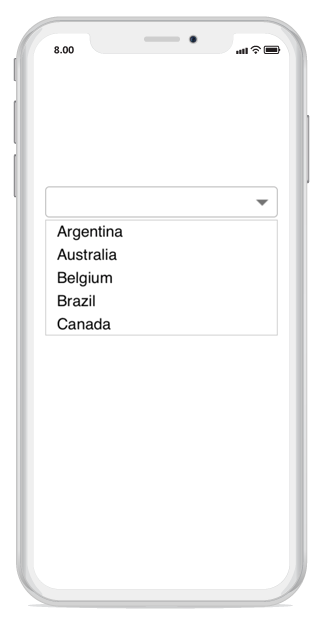
Using binding
DataSource is a collection of SfComboBox items which is capable of holding any objects and displaying the items based on the provided DisplayMemberPath value.
To populate items using data source, create a model class with the properties that to be bound.
public class Employee
{
private string name;
public string Name
{
    get
    {
        return name;
    }

set
    {
        name = value;
    }
}

private string employee_ID;
public string Employee_ID
{
    get
    {
        return employee_ID;
    }

set
    {
        employee_ID = value;
    }
}

public Employee(string name, string employee_ID)
{
    this.Name = name;
    this.Employee_ID = employee_ID;

}
public string getName()
{
    return Name;
}
public string getEmployee_ID()
{
    return Employee_ID;
}
}- Create student collection using student class and assign the collection to the DataSource property of SfComboBox
public ObservableCollection<Employee> EmployeeDetails
{
    get;
    set;
}
void GetEmployeeData()
{
    EmployeeDetails = new ObservableCollection<Employee>();
    EmployeeDetails.Add(new Employee("Aldrin", "1"));
    EmployeeDetails.Add(new Employee("Frank", "2"));
    EmployeeDetails.Add(new Employee("Howard", "3"));
    EmployeeDetails.Add(new Employee("James", "4"));
    EmployeeDetails.Add(new Employee("John", "5"));
    EmployeeDetails.Add(new Employee("Michael", "6"));
    EmployeeDetails.Add(new Employee("Mark", "7"));
    EmployeeDetails.Add(new Employee("Steve", "8"));
}- Here student collection has two properties. So you should intimate by which property it should filter suggestions, it must provide the drop-down list. In this case, make the control to provide suggestions based on Name.
SfComboBox combobox = new SfComboBox();
this.GetEmployeeData();
combobox.DisplayMemberPath = (NSString)"Name";
combobox.SelectedValuePath = (NSString)"Employee_ID";
combobox.DataSource = EmployeeDetails;-
DisplayMemberPathdecides the suggestions to be shown in dropdown. Setting theSelectedValuePathproperty makes theSelectedValueproperty to return the value you have selected here.