Tick Setting
8 Jan 20257 minutes to read
The TickSetting property helps you to identify the gauge’s data value by marking the gauge scale in regular increments.
Show ticks for scale
The ShowTicks property allows you to enable or disable the ticks of circular gauge.
SFCircularGauge circularGauge = new SFCircularGauge();
            ObservableCollection<SFCircularScale> scales = new ObservableCollection<SFCircularScale>();
            SFCircularScale scale = new SFCircularScale();
            scale.StartValue = 0;
            scale.EndValue = 100;
            scale.ShowTicks = false;
            circularGauge.Scales.Add(scale);
            this.View.AddSubview(circularGauge);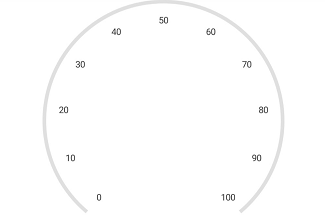
Ticks customization
The Interval property is used to calculate the tick counts for a scale. Similar to ticks, minor ticks are calculated by using the MinorTicksPerInterval property.
Color and thickness of the tick are set by using the Color and Width UI properties. You can also customize the length of the ticks by using the Size property. First, you should set the Offset property for ticks, then increase the size of the ticks.
Customize major ticks for scale
SFCircularGauge circularGauge = new SFCircularGauge();
            ObservableCollection<SFCircularScale> scales = new ObservableCollection<SFCircularScale>();
            SFCircularScale scale = new SFCircularScale();
            scale.StartValue = 0;
            scale.EndValue = 100;
            SFTickSettings majorTicks = new SFTickSettings();
            majorTicks.Size = 15;
            majorTicks.Color = UIColor.Brown;
            majorTicks.Width = 4;
            majorTicks.Offset = 0.97f;
            scale.MajorTickSettings = majorTicks;
            circularGauge.Scales.Add(scale);
            this.View.AddSubview(circularGauge);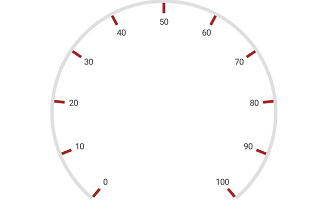
Customize minor ticks for scale
SFCircularGauge circularGauge = new SFCircularGauge();
            ObservableCollection<SFCircularScale> scales = new ObservableCollection<SFCircularScale>();
            SFCircularScale scale = new SFCircularScale();
            scale.StartValue = 0;
            scale.EndValue = 100;
            SFTickSettings minorTicks = new SFTickSettings();
            minorTicks.Size = 4;
            minorTicks.Color = UIColor.FromRGB(135,206,250);
            minorTicks.Width = 4;
            minorTicks.Offset = 0.97f;
            scale.MinorTickSettings = minorTicks;
            circularGauge.Scales.Add(scale);
            this.View.AddSubview(circularGauge);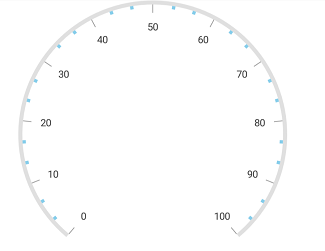
Setting position for ticks
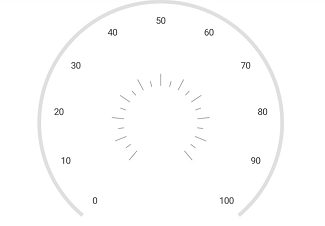
The major and minor ticks can be positioned far away from the rim by using the following two ways:
1.Offset property.
2.StartOffset and EndOffset properties.
Setting offset for scale
SFCircularGauge circularGauge = new SFCircularGauge();
            ObservableCollection<SFCircularScale> scales = new ObservableCollection<SFCircularScale>();
            SFCircularScale scale = new SFCircularScale();
            scale.StartValue = 0;
            scale.EndValue = 100;
            SFTickSettings majorTicks = new SFTickSettings();
            majorTicks.Offset = 0.5f;
            scale.MajorTickSettings = majorTicks;
            SFTickSettings minorTicks = new SFTickSettings();
            minorTicks.Offset = 0.5f;
            scale.MinorTickSettings = minorTicks;
            circularGauge.Scales.Add(scale);
            this.View.AddSubview(circularGauge);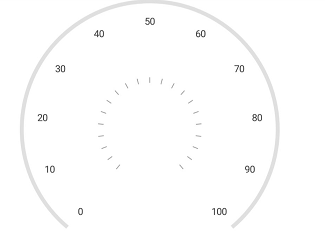
Setting scale start and end offset for scale
SFCircularGauge circularGauge = new SFCircularGauge();
            ObservableCollection<SFCircularScale> scales = new ObservableCollection<SFCircularScale>();
            SFCircularScale scale = new SFCircularScale();
            scale.StartValue = 0;
            scale.EndValue = 100;
            SFTickSettings majorTicks = new SFTickSettings();
            majorTicks.StartOffset = 0.3f;
            majorTicks.EndOffset = 0.4f;
            scale.MajorTickSettings = majorTicks;
            SFTickSettings minorTicks = new SFTickSettings();
            minorTicks.StartOffset = 0.3f;
            minorTicks.EndOffset = 0.35f;
            scale.MinorTickSettings = minorTicks;
            circularGauge.Scales.Add(scale);
            this.View.AddSubview(circularGauge);