Appointment Drag and Drop in WinUI Scheduler (SfScheduler)
22 Jul 20264 minutes to read
The Scheduler supports rescheduling appointments by performing drag and drop operations.
NOTE
The Syncfusion WinUI controls have been upgraded to Windows App SDK 1.1 release note, and there is a framework break with drag and drop functionality and the following framework issue in this report link, so appointment drag and drop will not work until the framework resolves this issue.
Disable drag and drop
The Scheduler supports disabling appointment drag and drop by setting the AppointmentEditFlag property except DragDrop. In this case, appointment drag and drop cannot be performed.
<Window
    ...
    xmlns:scheduler="using:Syncfusion.UI.Xaml.Scheduler">
    <scheduler:SfScheduler x:Name="Schedule"
                           AppointmentEditFlag="Add,Edit,Resize">
    </scheduler:SfScheduler>
</Window>
using Syncfusion.UI.Xaml.Scheduler;
this.Schedule.AppointmentEditFlag = AppointmentEditFlag.Add | AppointmentEditFlag.Edit | AppointmentEditFlag.Resize;Show/Hide the time indicator on appointment dragging
Show or hide the time indicator at a specific time to drag the appointment, by using the ShowTimeIndicator property of DragDropSettings and setting it to true.
using Syncfusion.UI.Xaml.Scheduler;

this.Schedule.ViewType = SchedulerViewType.Week;
this.Schedule.DragDropSettings.ShowTimeIndicator = true;
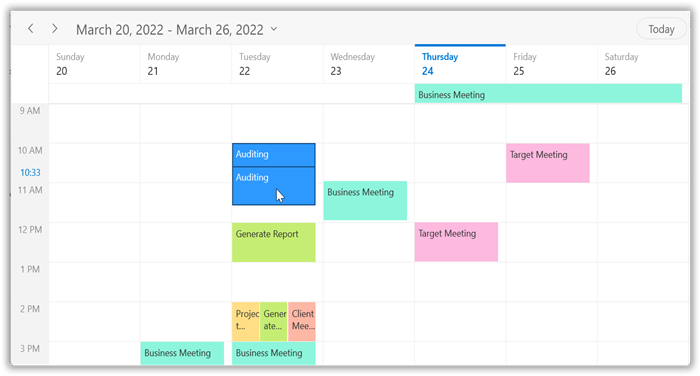
NOTE
- Not applicable for the
MonthandTimeline Monthviews.- If the TimeRulerSize property value is set to zero to collapse the time ruler labels, the time indicator will not be shown while dragging.
Appointment dragging time indicator text formatting
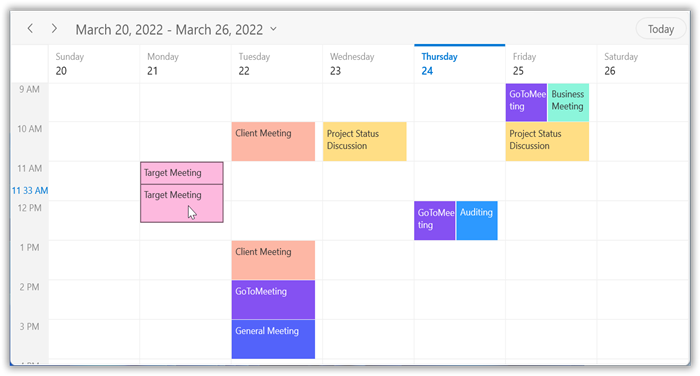
Customize the format of the appointment dragging time indicator by setting the TimeIndicatorFormat property of DragDropSettings in the Scheduler.
using Syncfusion.UI.Xaml.Scheduler;

this.Schedule.ViewType = SchedulerViewType.Week;
this.Schedule.DragDropSettings.TimeIndicatorFormat = "HH mm tt";
AppointmentDragOver event
The Scheduler notifies with AppointmentDragOver when the appointment is being dragged. The AppointmentDragOverEventArgs has the following members that provide the information for the AppointmentDragOver event.
Appointment: Gets the appointment that is being dragged.
DraggingPoint: Gets the dragging point of the schedule appointment UI.
DraggingTime: Gets the dragging time of the dragged appointment object.
SourceResource: Gets the SchedulerResource where the appointment was located before the drag started.
TargetResource: Gets the SchedulerResource where the appointment is currently being dragged over.
using Syncfusion.UI.Xaml.Scheduler;

this.Schedule.AppointmentDragOver += Schedule_AppointmentDragOver;

private void Schedule_AppointmentDragOver(object sender, AppointmentDragOverEventArgs e)
{
    //To notify when dragging the appointment.
}
AppointmentDragStarting event
The Scheduler is notified by the AppointmentDragStarting event when starting to drag the appointment. The AppointmentDragStartingEventArgs has the following members that provide the information for the AppointmentDragStarting event.
Appointment: Gets the selected appointment.
Cancel: Cancels the appointment dragging by setting this property to true.
Resource: Gets the resource of an appointment under which the appointment is located.
using Syncfusion.UI.Xaml.Scheduler;

this.Schedule.AppointmentDragStarting += Schedule_AppointmentDragStarting;

private void Schedule_AppointmentDragStarting(object sender, AppointmentDragStartingEventArgs e)
{
    //To notify when start to drag the appointment.
}
AppointmentDropping event
The Scheduler is notified by AppointmentDropping when the appointment is dropped. The AppointmentDroppingEventArgs has the following members that provide information for the AppointmentDropping event.
Appointment: Gets the selected appointment that is being dragged and dropped.
Cancel: Cancels the appointment dropping by setting this property to true.
DropTime: Gets the drop time of the dragged appointment.
SourceResource: Gets the SchedulerResource where the appointment was located before the drag started.
TargetResource: Gets the SchedulerResource where the appointment is currently being dragged over.
using Syncfusion.UI.Xaml.Scheduler;

this.Schedule.AppointmentDropping += Schedule_AppointmentDropping;

private void Schedule_AppointmentDropping(object sender, AppointmentDroppingEventArgs e)
{
    //To notify when the appointment is dropping.
}