Reminder in WPF Scheduler
WPF Scheduler alerts you for a particular appointment with a reminder window when enabling the EnableReminder property. The reminder window supports Dismiss, DismissAll, or setting the SnoozeTime for the reminder appointments.
Enable reminder
Reminder can be set by setting the EnableReminder property to true. The reminder time can be set using the Reminders property of ScheduleAppointment.
<Window
    . . .
    xmlns:syncfusion="http://schemas.syncfusion.com/wpf">
    <Grid>
        <syncfusion:SfScheduler x:Name="Scheduler"
                            ViewType="Week"
                             EnableReminder="True" >
        </syncfusion:SfScheduler>
    </Grid>
</Window>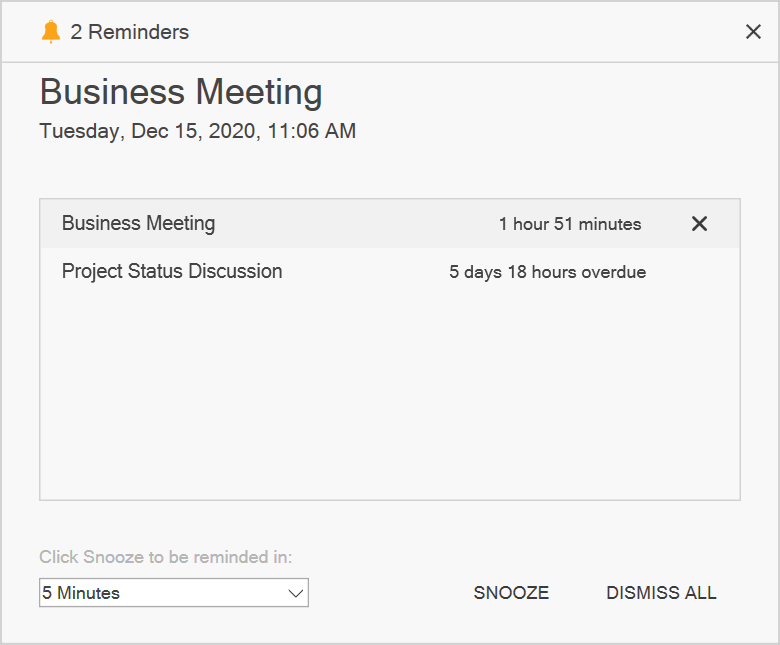
Adding reminders
Configure the appointment reminders with SchedulerReminder. The SchedulerReminder has the following properties for reminder alert,
| Properties | Description |
|---|---|
| Gets or sets the time interval that decides to open the reminder alert window before the appointment’s start time. | |
| Gets the reminder time that decides when to show a reminder alert of the appointment. | |
| Gets the appointment details for which the reminder is created. | |
| Gets the reminder data object associated with the `SchedulerReminder.` | |
| Gets or sets whether the reminder is dismissed. |
<Window
    . . .
    xmlns:syncfusion="http://schemas.syncfusion.com/wpf">
    <Grid>
     <Grid.DataContext>
        <local:ReminderViewModel/>
     </Grid.DataContext>
     <syncfusion:SfScheduler x:Name="schedule"
                    ItemsSource="{Binding Events}"
                    EnableReminder="True">
      </syncfusion:SfScheduler>
    </Grid>
</Window>
using Syncfusion.UI.Xaml.Scheduler;
. . .
public class ReminderViewModel
{
...
public ScheduleAppointmentCollection Events { get; set; } = new ScheduleAppointmentCollection();
this.Events.Add(new ScheduleAppointment()
{
StartTime = DateTime.Now,
EndTime = DateTime.Now.AddHours(1),
AppointmentBackground = new SolidColorBrush((Color)ColorConverter.ConvertFromString("#FF339933")),
Subject = "Conference",
Reminders = new ObservableCollection<SchedulerReminder>
{
new SchedulerReminder { ReminderTimeInterval = new TimeSpan(0)},
}
});
}Creating business object for reminder
Reminders supports mapping the custom object with the ScheduleAppointment.Reminders.
using Syncfusion.UI.Xaml.Scheduler;
. . .

/// <summary>
/// Represents custom data properties.
/// </summary>
 public class Event
    {
        public Event()
        {
        }

        public DateTime From { get; set; }
        public DateTime To { get; set; }
        public bool IsAllDay { get; set; }
        public string EventName { get; set; }
        public string Notes { get; set; }
        public string StartTimeZone { get; set; }
        public string EndTimeZone { get; set; }
        public Brush Color { get; set; }
        public object RecurrenceId { get; set; }
        public object Id { get; set; }
        public string RecurrenceRule { get; set; }
        public ObservableCollection<DateTime> RecurrenceExceptions { get; set; }
        public ObservableCollection<Reminder> Reminders { get; set; }
    }
The ReminderMapping provides the mapping information about the SchedulerReminder properties to the Data object. ReminderMapping has the following properties for reminder alert,
-
ReminderTimeInterval - Maps the property name of custom class, which is equivalent for the
SchedulerReminder.ReminderTimeInterval. -
IsDismissed - Maps the property name of custom class, which is equivalent for the
SchedulerReminder.IsDismissed.
using Syncfusion.UI.Xaml.Scheduler;
. . .

/// <summary>
/// Represents custom data properties.
/// </summary>
public class Reminder
{
    /// <summary>
    /// Gets or sets the value indicating whether the reminder is dismissed or not.
    /// </summary>
    public bool Dismissed { get; set; }

    /// <summary>
    /// Gets or sets the value to display reminder alert before appointment start time.
    /// </summary>
    public TimeSpan TimeInterval { get; set; }

}
Map the properties of the Meeting class with the SfScheduler control by using the AppointmentMapping and map CustomReminder properties with SchedulerReminder by using the ReminderMapping.
<Window
    . . .
    xmlns:syncfusion="http://schemas.syncfusion.com/wpf">
    <Grid>
     <syncfusion:SfScheduler x:Name="schedule"
                    ItemsSource="{Binding Events}"
                    EnableReminder="True">
                <syncfusion:SfScheduler.AppointmentMapping>
                    <syncfusion:AppointmentMapping
                        Subject="EventName"
                        StartTime="From"
                        EndTime="To"
                        AppointmentBackground="Color"
                        IsAllDay="IsAllDay"
                        StartTimeZone="StartTimeZone"
                        EndTimeZone="EndTimeZone"
                        RecurrenceExceptionDates="RecurrenceExceptions"
                        RecurrenceRule="RecurrenceRule"
                        RecurrenceId="RecurrenceId"
                        Reminders="Reminders">
                        <syncfusion:AppointmentMapping.ReminderMapping>
                            <syncfusion:ReminderMapping IsDismissed="Dismissed"
                                                        ReminderTimeInterval="TimeInterval"/>
                        </syncfusion:AppointmentMapping.ReminderMapping>
                    </syncfusion:AppointmentMapping>
                </syncfusion:SfScheduler.AppointmentMapping>
            </syncfusion:SfScheduler>
    </Grid>
</Window>
using Syncfusion.UI.Xaml.Scheduler;
. . .
public class ReminderViewModel
{
...
public ObservableCollection<Event> Events { get; set; } = new ObservableCollection<Event>();
this.Events.Add(new Event()
{
From = DateTime.Now,
To = DateTime.Now.AddHours(1),
Color = new SolidColorBrush((Color)ColorConverter.ConvertFromString("#FF339933")),
EventName = "Conference",
Reminders = new ObservableCollection<Reminder>
{
new Reminder { TimeInterval = new TimeSpan(0)},
}
});
}ReminderAlertOpening event
Scheduler notifies by the ReminderAlertOpening event when appearing in the reminder window. The ReminderAlertOpeningEventArgs has following properties,
- Reminders - Gets a list of reminders that are used to display the appointment reminders in the reminder alert window.
- Cancel - To avoid the reminder window opening by enabling this property.
using Syncfusion.UI.Xaml.Scheduler;

scheduler.ReminderAlertOpening += Scheduler_ReminderAlertOpening;

private void Scheduler_ReminderAlertOpening(object sender, ReminderAlertOpeningEventArgs e)
{
    var reminders = e.Reminders;
    var appointment = e.Reminders[0].Appointment;
}
ReminderAlertActionChanged event
The Scheduler notifies by the ReminderAlertActionChangedEvent when appointment reminders’ dismiss, dismiss all, or snooze action is changed in the Scheduler reminder alert window.
The ReminderAlertActionChangedEventArgs has following properties which provides information for the ReminderAlertActionChanged event.
ReminderAction - Gets the appointment reminder actions such as dismiss, dismiss all, and snooze performed in the reminder alert window and specifies the appointment reminder that was dismissed in the reminder alert window, the reminders for all appointments were dismissed in the reminder alert window and the appointment reminder is snoozed in the reminder alert window.
Reminders - Gets the reminders collection where dismiss, dismiss all, or snooze action is performed in the reminder alert window.
SnoozeTime - Gets the snooze time value of an appointment in the reminder alert window.
using Syncfusion.UI.Xaml.Scheduler;

this.Schedule.ReminderAlertActionChanged += OnScheduleReminderAlertActionChanged;

private void OnScheduleReminderAlertActionChanged(object sender, Syncfusion.UI.Xaml.Scheduler.ReminderAlertActionChangedEventArgs e)
{
    if (e.ReminderAction == ReminderAction.Dismiss)
    {
        var reminder = e.Reminders[0];
    }
    else if (e.ReminderAction == ReminderAction.DismissAll)
    {
        var reminders = e.Reminders;
    }
    else if (e.ReminderAction == ReminderAction.Snooze)
    {
        var reminder = e.Reminders[0];
        var snoozeTime = e.SnoozeTime;
    }
}
You can also explore our WPF Scheduler example to know how to schedule and manage appointments through an intuitive user interface, similar to the Outlook calendar. For information on appointment data binding, see Appointments.