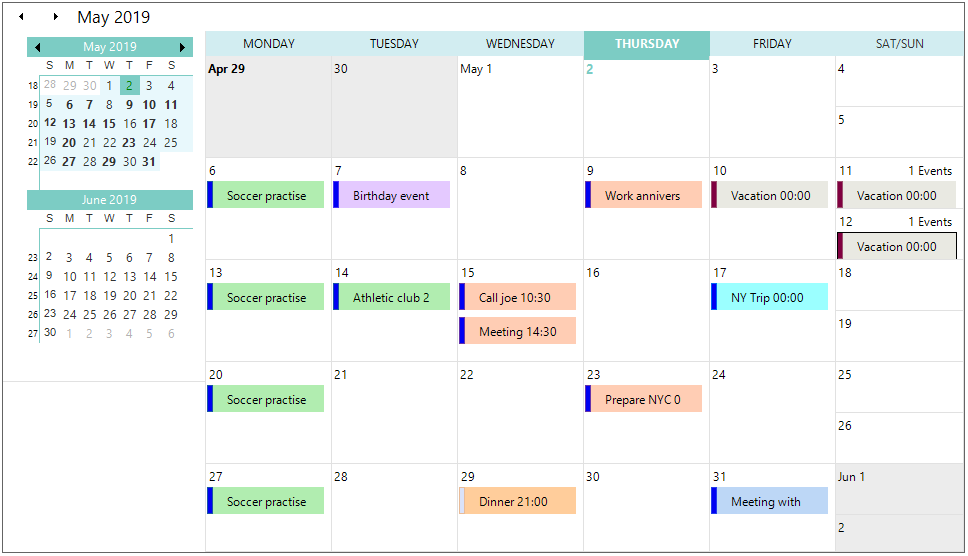
Metro Theme in Windows Forms Scheduler
This feature enables you to apply the Metro theme to the Schedule control.
Use case scenario
The Metro theme support is useful for commercial applications to attract end users with inspiring UI look and feel.
Property
| Property | Description |
|---|---|
| VisualStyle | This is an enumeration type property used to get or set the visual styles (skins) such as Office2010, Office2007, Office2003, Metro, etc. |
Event
| Event | Parameters | Description |
|---|---|---|
| ThemeChanged | Object sender, EventArgs e | Occurs when the ThemesEnabled property is changed. |
Applying Metro Theme to the Schedule Control
You can apply Metro theme to the Schedule control by setting the GridVisualStyles property as Metro.
using Syncfusion.Windows.Forms.Schedule;

this.scheduleControl1.GetScheduleHost().Schedule.Appearance.VisualStyle = Syncfusion.Windows.Forms.GridVisualStyles.Metro;
Imports Syncfusion.Windows.Forms.Schedule
Me.scheduleControl1.GetScheduleHost().Schedule.Appearance.VisualStyle = Syncfusion.Windows.Forms.GridVisualStyles.Metro