Getting Started with React Scheduler and Axios
This section provides a step-by-step guide for setting up a React application and integrating the React Scheduler component with an ASP.NET Core Web API backend (using EF Core and SQL Server) through Axios.
What is Axios?
Axios is a lightweight and popular JavaScript library used to make HTTP requests from React to a backend API. It simplifies sending and receiving JSON data, provides clean error handling, and offers a straightforward API for performing CRUD operations.
In this integration, Axios serves as the communication bridge between the Syncfusion® React Scheduler and the ASP.NET Core Web API (built with EF Core and SQL Server), ensuring smooth data transfer between the frontend and backend.
Overview
This integration enables full CRUD (Create, Read, Update, Delete) operations for calendar events using:
- Frontend: React + Syncfusion React Scheduler
- Backend: ASP.NET Core Web API (EF Core)
- Database: SQL Server LocalDB
- Communication: REST APIs via Axios
With this setup, Axios sends all Scheduler actions to the ASP.NET Core backend, where appointments are created, updated, and stored in the SQL Server database.
Prerequisites
Before getting started with the application, ensure the following prerequisites are met:
Required
-
Node.js ≥ 18.x — Required for running the React application with modern JavaScript tooling.
Verify:node --version -
.NET 10 SDK — Required to build and run the ASP.NET Core 10 backend.
Verify:dotnet --version -
SQL Server 2022 / SQL Server LocalDB (MSSQLLocalDB) — Required for storing event data.
Verify:sqllocaldb info(should show “MSSQLLocalDB”)
Note: If not installed, download SQL Server Express with LocalDB from Microsoft -
Axios ≥ 1.x — Required for REST API calls. Installed via npm in section 2.1.
Recommended
- Visual Studio Code or Visual Studio 2022 — For development and debugging
- SQL Server Management Studio (SSMS) — Optional, for database inspection
- Postman — Optional, for testing API endpoints independently
Architecture Overview
Below is the architecture that explains how all parts communicate with each other:
                    ┌─────────────────────────┐
                    │      React Frontend     │
                    │  (Syncfusion Scheduler) │
                    └───────────┬───────────┘
                                │
                                ▼
                        Axios HTTP Requests
                                │
                                ▼
                ┌─────────────────────────────────┐
                │   ASP.NET Core Web API Server   │
                │       (SchedulerController)     │
                └───────────────┬───────────────┘
                                │
                                ▼
                    In-Memory List / Database
1. Backend – ASP.NET Core Web API
Provides the backend service that exposes the REST endpoints used by the Syncfusion React Scheduler to load, create, update, and delete event data through Axios requests.
1.1 Create project & install required packages
Creates an ASP.NET Core Web API project and adds required packages for Swagger and Entity Framework Core.
dotnet new webapi -n ScheduleApi
cd ScheduleApi
// Swagger UI (required for .NET 10)
dotnet add package Swashbuckle.AspNetCore
// EF Core SQL Server provider
dotnet add package Microsoft.EntityFrameworkCore.SqlServer
// EF Core CLI tools
dotnet add package Microsoft.EntityFrameworkCore.Tools
Verify installation:
dotnet list packageYou should see the three packages listed in the output.
1.2 Add the connection string in appsettings.json
Defines the database connection string used by Entity Framework Core for accessing the SQL Server database.
{
  "ConnectionStrings": {
    "DefaultConnection": "Server=(localdb)\\MSSQLLocalDB;Database=SchedulerRecords;Trusted_Connection=True;MultipleActiveResultSets=true"
  },
  "Logging": { "LogLevel": { "Default": "Information", "Microsoft.AspNetCore": "Warning" } },
  "AllowedHosts": "*"
}
1.3 Add the model and configure the DbContext
Defines the data model and configures the Entity Framework Core DbContext for mapping schedule events to the database.
// Models/ScheduleEventData.cs
using System.ComponentModel.DataAnnotations.Schema;

namespace SchedulerApi.Models;

[Table("ScheduleEventDatas")]
public class ScheduleEventData
{
    public int Id { get; set; }
    public string? Subject { get; set; }
    public DateTimeOffset StartTime { get; set; }
    public DateTimeOffset EndTime { get; set; }
    public string? StartTimezone { get; set; }
    public string? EndTimezone { get; set; }
    public bool IsAllDay { get; set; }
    public string? RecurrenceRule { get; set; }
    public int? RecurrenceID { get; set; }
    public string? RecurrenceException { get; set; }
}// Data/AppDbContext.cs
using Microsoft.EntityFrameworkCore;
using SchedulerApi.Models;
namespace SchedulerApi.Data;
public class AppDbContext(DbContextOptions<AppDbContext> options) : DbContext(options)
{
public DbSet<ScheduleEventData> ScheduleEventDatas => Set<ScheduleEventData>();
protected override void OnModelCreating(ModelBuilder modelBuilder)
{
var e = modelBuilder.Entity<ScheduleEventData>();
e.ToTable("ScheduleEventDatas");
e.Property(x => x.Id).ValueGeneratedNever(); // client supplies Id
e.Property(x => x.StartTime).HasColumnType("datetimeoffset");
e.Property(x => x.EndTime).HasColumnType("datetimeoffset");
}
}1.4 Configure CORS, Swagger, and controllers in Program.cs
Configures the application pipeline by enabling CORS, registering Swagger for development, and mapping controllers.
// Program.cs
using Microsoft.EntityFrameworkCore;
using SchedulerApi.Data;

var builder = WebApplication.CreateBuilder(args);

builder.Services.AddDbContext<AppDbContext>(opt =>
    opt.UseSqlServer(builder.Configuration.GetConnectionString("DefaultConnection")));

builder.Services.AddControllers();
builder.Services.AddEndpointsApiExplorer();
builder.Services.AddSwaggerGen();

// CORS: allow‑list exact dev origins (Vite: 5173)
builder.Services.AddCors(options =>
{
    options.AddPolicy("SpaDev", p => p
        .WithOrigins("http://localhost:5173", "https://localhost:5173")
        .AllowAnyHeader()
        .AllowAnyMethod());
});

var app = builder.Build();

if (app.Environment.IsDevelopment())
{
    app.UseSwagger();
    app.UseSwaggerUI();
}

app.UseHttpsRedirection();
app.UseCors("SpaDev"); // place before MapControllers (CORS order matters)
app.MapControllers();
app.Run();
1.5 Add the controller with REST‑style endpoints
Implements CRUD endpoints for managing schedule event data through a REST‑based controller.
// Controllers/ScheduleController.cs
using Microsoft.AspNetCore.Mvc;
using Microsoft.EntityFrameworkCore;
using SchedulerApi.Data;
using SchedulerApi.Models;

namespace SchedulerApi.Controllers;

[ApiController]
[Route("api/[controller]")]
public class ScheduleController(AppDbContext db) : ControllerBase
{
    [HttpGet]
    public async Task<ActionResult<IEnumerable<ScheduleEventData>>> Get()
        => await db.ScheduleEventDatas.AsNoTracking().ToListAsync();

    [HttpPost]
    public async Task<ActionResult<ScheduleEventData>> Create([FromBody] ScheduleEventData item)
    {
        db.ScheduleEventDatas.Add(item);
        await db.SaveChangesAsync();
        return Ok(item);
    }

    [HttpPut("{id:int}")]
    public async Task<IActionResult> Update(int id, [FromBody] ScheduleEventData item)
    {
        if (id != item.Id) return BadRequest();
        db.Entry(item).State = EntityState.Modified;
        await db.SaveChangesAsync();
        return NoContent();
    }

    [HttpDelete("{id:int}")]
    public async Task<IActionResult> Delete(int id)
    {
        var found = await db.ScheduleEventDatas.FindAsync(id);
        if (found is null) return NotFound();
        db.ScheduleEventDatas.Remove(found);
        await db.SaveChangesAsync();
        return NoContent();
    }
}
1.6 Apply database migrations
Creates and applies Entity Framework Core migrations to generate the database schema.
// Run from ScheduleApi folder
dotnet ef migrations add InitialCreate
dotnet ef database update
Common Migration Issues:
| Issue | Solution |
|---|---|
| “Unable to locate the factory method for type DbContextOptions” | Ensure AppDbContext is registered in Program.cs and uses correct namespace |
| “Cannot connect to LocalDB” | Verify SQL Server LocalDB is running: sqllocaldb start MSSQLLocalDB
|
| “Database already exists” | Migration applies only new changes; existing db is updated automatically |
For Production, generate an idempotent SQL script (can be safely re-run without side effects):
dotnet ef migrations script --idempotent -o migrate.sqlApply the SQL script manually via your deployment pipeline instead of auto-migrating.
2. Frontend – React + Syncfusion React Scheduler + Axios
Implements the React frontend that uses the Syncfusion Scheduler component and Axios to communicate with the ASP.NET Core Web API for managing event data.
2.1 Create the app and install required Syncfusion packages
Creates a React application using Vite and installs the Syncfusion Scheduler and Axios packages needed for the integration.
npm create vite@latest react-scheduler-axios -- --template react
cd react-scheduler-axios
npm i
npm i @syncfusion/ej2-react-schedule axios
Verify installation:
npm list @syncfusion/ej2-react-schedule axiosBoth packages should appear with version numbers in the output. Required versions: React ≥ 18.x, Axios ≥ 1.x
2.2 Add the required Syncfusion styles
Imports the Syncfusion Tailwind 3 theme styles needed for rendering the Scheduler.
/* src/index.css */
@import "../node_modules/@syncfusion/ej2-tailwind3-theme/styles/schedule/index.css";
2.3 Set up the React entry file
Initializes the React application using the React 18 createRoot API and loads the root component along with global styles.
// src/main.jsx
import { createRoot } from 'react-dom/client';
import React from 'react';
import App from './App.jsx';
import './index.css';

createRoot(document.getElementById('root')).render(
  <React.StrictMode>
    <App />
  </React.StrictMode>
);
createRoot is the React 18 API for mounting.
2.4 Connect the Syncfusion React Scheduler to the API using Axios
Hooks the Scheduler’s eventCreate, eventChange, and eventRemove via actionBegin to send Axios POST/PUT/DELETE requests and refresh the local event data from the API.
// src/App.jsx
import React, { useEffect, useRef, useState, useCallback } from 'react';
import axios from 'axios';
import {
  ScheduleComponent,
  ViewsDirective,
  ViewDirective,
  Day, Week, WorkWeek, Month, Agenda,
  Inject, Resize, DragAndDrop
} from '@syncfusion/ej2-react-schedule';

const api = axios.create({
  baseURL: 'https://localhost:7163/api',
  timeout: 10000
});

export default function App() {
  const scheduleRef = useRef(null);
  const [events, setEvents] = useState([]);
  const [loading, setLoading] = useState(true);

  // Load initial data
  useEffect(() => {
    let active = true;
    (async () => {
      try {
        const { data } = await api.get('/Schedule');
        if (active) setEvents(data);
      } catch (err) {
        console.error('Failed to load events', err);
      } finally {
        if (active) setLoading(false);
      }
    })();
    return () => { active = false; };
  }, []);

  // Helper to refresh from server
  const refresh = useCallback(async () => {
    const { data } = await api.get('/Schedule');
    setEvents(data);
  }, []);

  // Intercept Scheduler actions
  const onActionBegin = useCallback(async (args) => {
    try {
      if (args.requestType === 'eventCreate') {
        const payload = Array.isArray(args.data) ? args.data[0] : args.data;
        await api.post('/Schedule', payload);
        await refresh();
      }
      else if (args.requestType === 'eventChange') {
        const payload = args.data; // single edited object
        await api.put(`/Schedule/${payload.Id}`, payload);
        await refresh();
      }
      else if (args.requestType === 'eventRemove') {
        const payload = Array.isArray(args.data) ? args.data[0] : args.data;
        await api.delete(`/Schedule/${payload.Id}`);
        await refresh();
      }
    } catch (err) {
      console.error('Scheduler action failed', err);
      // Cancel UI action if needed
      if (args && typeof args.cancel !== 'undefined') args.cancel = true;
    }
  }, [refresh]);

  const eventSettings = {
    dataSource: events,
    fields: {
      id: 'id',
      subject: { name: 'subject' },
      startTime: { name: 'startTime' },
      endTime: { name: 'endTime' },
      isAllDay: { name: 'isAllDay' },
      recurrenceRule: { name: 'recurrenceRule' },
      recurrenceID: { name: 'recurrenceID' },
      recurrenceException: { name: 'recurrenceException' },
      startTimezone: { name: 'startTimezone' },
      endTimezone: { name: 'endTimezone' }
    }
  };

  if (loading) return <div>Loading…</div>;

  return (
    <div>
      <ScheduleComponent
        height="650px"
        ref={scheduleRef}
        currentView="Month"
        selectedDate={new Date()}
        eventSettings={eventSettings}
        actionBegin={onActionBegin}
        allowDragAndDrop={true}
        allowResizing={true}
      >
        <ViewsDirective>
          <ViewDirective option="Day" />
          <ViewDirective option="Week" />
          <ViewDirective option="WorkWeek" />
          <ViewDirective option="Month" />
          <ViewDirective option="Agenda" />
        </ViewsDirective>
        <Inject services={[Day, Week, WorkWeek, Month, Agenda, Resize, DragAndDrop]} />
      </ScheduleComponent>
    </div>
  );
}
3. Run the Application
Starts the ASP.NET Core backend and the React application so the Syncfusion Scheduler can communicate with the API in real time.
3.1 Start the API (Swagger UI will be at /swagger in Development):
cd ScheduleApi
dotnet run
Keep Swagger UI enabled only in Development; this is the recommended pattern.
3.2 Start the React application
cd react-scheduler-axios
npm run dev
React application started running on http://localhost:5173/
Output Preview
DotNet Application
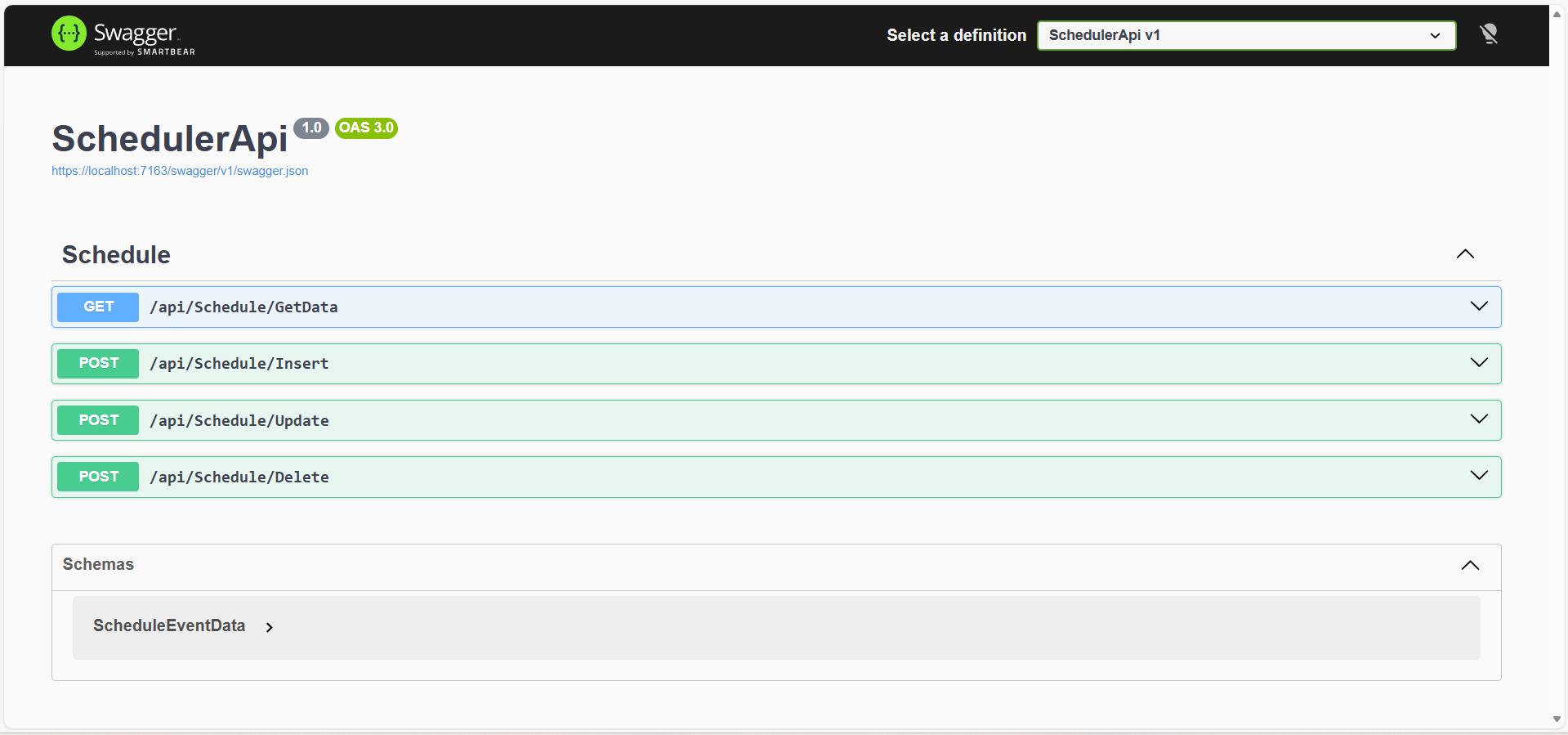
Image illustrating the DotNet Application
Syncfusion React Scheduler
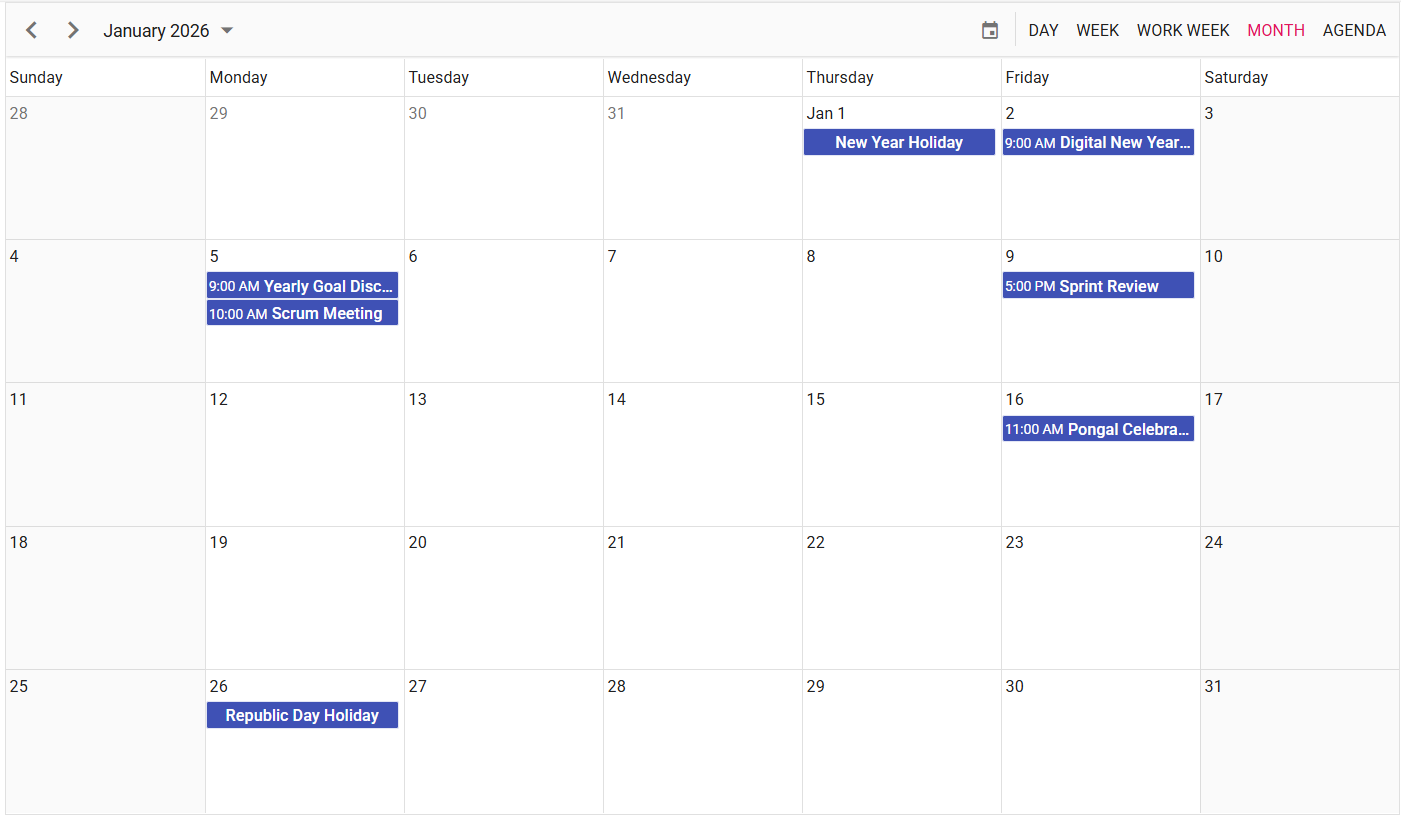
Image illustrating the Syncfusion React Scheduler
React Scheduler Events in Database

Image illustrating the Database Table
Please find the sample in this GitHub location