Formatting in .NET MAUI Time Picker
The Format property controls how the time is displayed. You can customize the time format using the Format property, which accepts a value from the PickerTimeFormat enumeration. The default format is HH_mm_ss.
The different types of formats are:
H_mm - Represents the hour minute in H_mm format.
H_mm_ss - Represents the hour minute second in H_mm_ss format.
h_mm_ss_tt - Represents the hour minute second meridiem in h_mm_ss_tt format.
h_mm_tt - Represents the hour minute meridiem in h_mm_tt format.
HH_mm - Represents the hour minute in HH_mm format.
HH_mm_ss - Represents the hour minute second in HH_mm_ss format.
HH_mm_ss_fff - Represents the hour minute second millisecond in HH_mm_ss_fff format.
hh_mm_ss_tt - Represents the hour minute second meridiem in hh_mm_ss_tt format.
hh_mm_ss_fff_tt - Represents the hour minute second millisecond meridiem in hh_mm_ss_fff_tt format.
hh_mm_tt - Represents the hour minute meridiem in hh_mm_tt format.
hh_tt - Represents the hour meridiem in hh_tt format.
ss_fff - Represents the second millisecond in ss_fff format.
mm_ss - Represents the minute second in mm_ss format.
mm_ss_fff - Represents the minute second millisecond in mm_ss_fff format.
Default - Represents the hour minute second meridiem in default culture based format.
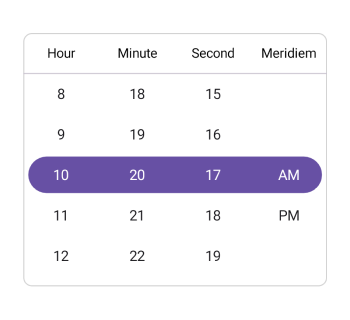
The following example demonstrates the Time Picker with the custom format PickerTimeFormat.hh_mm_ss_tt
<ContentPage xmlns="http://schemas.microsoft.com/dotnet/2021/maui"
             xmlns:x="http://schemas.microsoft.com/winfx/2009/xaml"
             xmlns:picker="clr-namespace:Syncfusion.Maui.Picker;assembly=Syncfusion.Maui.Picker">
    <picker:SfTimePicker x:Name="timePicker"
                         Format="hh_mm_ss_tt"/>
</ContentPage>
using Syncfusion.Maui.Picker;
. . .
SfTimePicker timePicker = new SfTimePicker()
{
Format = PickerTimeFormat.hh_mm_ss_tt
};
this.Content = timePicker;