Formatting in .NET MAUI Date Time Picker control
Format is a way to represent the date and time value in a different string format. The columns shown in the picker are controlled by the PickerMode property; DateFormat and TimeFormat apply only to their respective columns. The available values are defined by the PickerDateFormat and PickerTimeFormat enums in the Syncfusion.Maui.Picker namespace.
The XAML snippets below require
xmlns:picker="clr-namespace:Syncfusion.Maui.Picker;assembly=Syncfusion.Maui.Picker"in the parent element, and the C# snippets requireusing Syncfusion.Maui.Picker;.
Date format
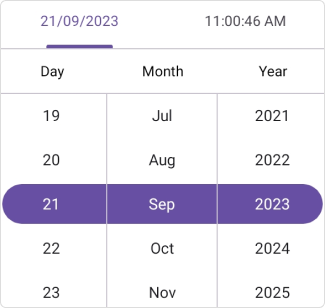
You can customize the date format of the date time picker by using the DateFormat property of type PickerDateFormat in SfDateTimePicker. The default format is yyyy_MM_dd. To render the date using the current culture’s format, set the property to Default.
The different types of formats are:
dd_MM - Represents the day month in dd/MM format.
dd_MM_yyyy - Represents the day month year in dd/MM/yyyy format.
dd_MMM_yyyy - Represents the day month year in dd/MMM/yyyy format.
M_d_yyyy - Represents the month day year in M/d/yyyy format.
MM_dd_yyyy - Represents the month day year in MM/dd/yyyy format.
MM_yyyy - Represents the month year in MM/yyyy format.
MMM_yyyy - Represents the month year in MMM/yyyy format.
yyyy_MM_dd - Represents the year month day in yyyy/MM/dd format.
MM_dd - Represents the month day in MM/dd format.
MMM_dd_yyyy - Represents the month day year in MMM/dd/yyyy format.
MMMM_dd_yyyy - Represents the month day year in MMMM/dd/yyyy format.
MMMM_yyyy - Represents the month year in MMMM/yyyy format.
yyyy_MM - Represents the year month in yyyy/MM format.
yyyy_MMM - Represents the year month in yyyy/MMM format.
yyyy_MMMM - Represents the year month in yyyy/MMMM format.
yyyy_MMM_dd - Represents the year month day in yyyy/MMM/dd format.
yyyy_MMMM_dd - Represents the year month day in yyyy/MMMM/dd format.
dd_MMM - Represents the day month in dd/MMM format.
dd_MMMM - Represents the day month in dd/MMMM format.
dd_MMMM_yyyy - Represents the day month year in dd/MMMM/yyyy format.
ddd_dd_MM_YYYY - Represents the weekday day month year in ddd/dd/MM/YYYY format.
Default - Represents the day month year in default culture based format.
<ContentPage
    . . .
    xmlns:picker="clr-namespace:Syncfusion.Maui.Picker;assembly=Syncfusion.Maui.Picker">
    <picker:SfDateTimePicker x:Name="picker"
                             DateFormat="dd_MMM_yyyy">
    </picker:SfDateTimePicker>
</ContentPage>
using Syncfusion.Maui.Picker;
. . .
public partial class MainPage : ContentPage
{
public MainPage()
{
InitializeComponent();
SfDateTimePicker dateTimePicker = new SfDateTimePicker();
datetimepicker.DateFormat = PickerDateFormat.dd_MMM_yyyy;
this.Content = dateTimePicker;
}
}
Time format
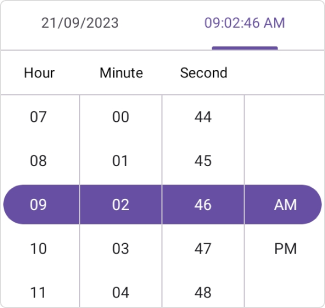
You can customize the time format of the date time picker by using the TimeFormat property of type PickerTimeFormat in SfDateTimePicker. The default format is HH_mm_ss. To render the time using the current culture’s format, set the property to Default.
The different types of formats are:
H_mm - Represents the hour minute in H_mm format.
H_mm_ss - Represents the hour minute second in H_mm_ss format.
HH_mm_ss_fff - Represents the hour minute second millisecond in HH_mm_ss_fff format.
h_mm_ss_tt - Represents the hour minute second meridiem in h_mm_ss_tt format.
hh_mm_ss_fff_tt - Represents the hour minute second millisecond meridiem in hh_mm_ss_fff_tt format.
h_mm_tt - Represents the hour minute meridiem in h_mm_tt format.
HH_mm - Represents the hour minute in HH_mm format.
HH_mm_ss - Represents the hour minute second in HH_mm_ss format.
hh_mm_ss_tt - Represents the hour minute second meridiem in hh_mm_ss_tt format.
hh_mm_tt - Represents the hour minute meridiem in hh_mm_tt format.
hh_tt - Represents the hour meridiem in hh_tt format.
ss_fff - Represents the second millisecond in ss_fff format.
mm_ss - Represents the minute second in mm_ss format.
mm_ss_fff - Represents the minute second millisecond in mm_ss_fff format.
Default - Represents the hour minute second meridiem in default culture based format.
<ContentPage
    . . .
    xmlns:picker="clr-namespace:Syncfusion.Maui.Picker;assembly=Syncfusion.Maui.Picker">
    <picker:SfDateTimePicker x:Name="picker"
                             TimeFormat="hh_mm_ss_tt">
    </picker:SfDateTimePicker>
</ContentPage>
using Syncfusion.Maui.Picker;
. . .
public partial class MainPage : ContentPage
{
public MainPage()
{
InitializeComponent();
SfDateTimePicker dateTimePicker = new SfDateTimePicker();
datetimepicker.TimeFormat = PickerTimeFormat.hh_mm_ss_tt;
this.Content = dateTimePicker;
}
}