Add a Custom Editor with Validation in Blazor Scheduler
By default, Blazor Scheduler provides field validation for built-in fields. If you want to validate a custom field, you can use a custom editor and apply validation through data annotations. Data annotations let you define rules for model classes or properties so that data can be validated and meaningful messages can be shown to end users.
Data annotations can be enabled by referencing the System.ComponentModel.DataAnnotations namespace, which maps the annotations to the corresponding appointment fields. In the following code example, Blazor Dialog is used to render the custom editor and save or update appointments by using public methods.
@using Newtonsoft.Json
@using Syncfusion.Blazor.Schedule
@using Syncfusion.Blazor.Calendars
@using Syncfusion.Blazor.DropDowns
@using Syncfusion.Blazor.Inputs
@using Syncfusion.Blazor.Popups
@using System.ComponentModel.DataAnnotations

<SfSchedule @ref="ScheduleRef" TValue="AppointmentData" Width="100%" Height="650px" SelectedDate="@(new DateTime(2020, 3, 11))">
    <ScheduleEvents TValue="AppointmentData" OnPopupOpen="PopupOpen"></ScheduleEvents>
    <ScheduleGroup Resources="@Resources"></ScheduleGroup>
    <ScheduleResources>
        <ScheduleResource TValue="int[]" TItem="ResourceData" DataSource="@OwnersData" Field="OwnerId" Title="Owner" Name="Owners" TextField="OwnerText" IdField="Id" ColorField="OwnerColor" AllowMultiple="true"></ScheduleResource>
    </ScheduleResources>
    <ScheduleEventSettings DataSource="@DataSource"></ScheduleEventSettings>
    <ScheduleViews>
        <ScheduleView Option="View.Day"></ScheduleView>
        <ScheduleView Option="View.Week"></ScheduleView>
        <ScheduleView Option="View.WorkWeek"></ScheduleView>
        <ScheduleView Option="View.Month"></ScheduleView>
        <ScheduleView Option="View.Agenda"></ScheduleView>
    </ScheduleViews>
</SfSchedule>

<SfDialog @bind-Visible="@DialogVisibility" IsModal="true" Width="575px" ShowCloseIcon="true">
    <DialogTemplates>
        <Header> <div>Appointment Details</div> </Header>
        <Content>
            <EditForm Model="AppointmentValidation" OnValidSubmit="@OnValidSubmit">
                <DataAnnotationsValidator />
                <ValidationSummary />
                <table class="custom-event-editor" width="550px" cellpadding="5">
                    <tbody>
                        <tr>
                            <td class="e-textlabel">Customer</td>
                            <td colspan="4">
                                <SfTextBox @ref="SubjectObj" @bind-Value="@AppointmentValidation.Subject"></SfTextBox>
                                <ValidationMessage For="@(() => AppointmentValidation.Subject)" />
                            </td>
                        </tr>
                        <tr>
                            <td class="e-textlabel">From</td>
                            <td colspan="4">
                                <SfDateTimePicker TValue="DateTime?" ID="Start" @bind-Value="@AppointmentValidation.StartTime"></SfDateTimePicker>
                                <ValidationMessage For="@(() => AppointmentValidation.StartTime)" />
                            </td>
                        </tr>
                        <tr>
                            <td class="e-textlabel">To</td>
                            <td colspan="4">
                                <SfDateTimePicker TValue="DateTime?" ID="End" @bind-Value="@AppointmentValidation.EndTime"></SfDateTimePicker>
                                <ValidationMessage For="@(() => AppointmentValidation.EndTime)" />
                            </td>
                        </tr>
                        <tr>
                            <td class="e-textlabel">Appointment Type</td>
                            <td colspan="4">
                                <SfDropDownList TValue="int?" @bind-Value="@AppointmentValidation.AppointmentType" ID="OwnerId" DataSource="@AppointmentTypes" TItem="AppointmentType">
                                    <DropDownListFieldSettings Value="Id" Text="Text"></DropDownListFieldSettings>
                                </SfDropDownList>
                                <ValidationMessage For="@(() => AppointmentValidation.AppointmentType)" />
                            </td>
                        </tr>
                        <tr>
                            <td class="e-textlabel">Owner Detail</td>
                            <td colspan="4">
                                <SfDropDownList TValue="int" @bind-Value="@AppointmentValidation.OwnerId" ID="IdOwnersData" DataSource="@OwnersData" TItem="ResourceData">
                                    <DropDownListFieldSettings Value="Id" Text="OwnerText"></DropDownListFieldSettings>
                                </SfDropDownList>
                                <ValidationMessage For="@(() => AppointmentValidation.OwnerId)" />
                            </td>
                        </tr>
                        <tr>
                            <td class="e-textlabel">Notes</td>
                            <td colspan="4">
                                <SfTextBox @ref="NotesObj" @bind-Value="@AppointmentValidation.Description"></SfTextBox>
                                <ValidationMessage For="@(() => AppointmentValidation.Description)" />
                            </td>
                        </tr>
                    </tbody>
                </table>
                <button type="submit" class="e-btn">Save</button>
            </EditForm>
        </Content>
    </DialogTemplates>
</SfDialog>

@code{
    SfTextBox SubjectObj;
    SfTextBox NotesObj;
    private string Action;
    Boolean DialogVisibility = false;
    private int Id;
    SfSchedule<AppointmentData> ScheduleRef;

    private string[] Resources { get; set; } = { "Owners" };
    List<AppointmentData> DataSource = new List<AppointmentData>
    {
        new AppointmentData { Id = 1, Subject = "Meeting", StartTime = new DateTime(2020, 1, 31, 9, 30, 0) , EndTime = new DateTime(2020, 1, 31, 11, 0, 0), OwnerId = 1 }
    };
    private List<ResourceData> OwnersData { get; set; } = new List<ResourceData>
    {
        new ResourceData{ OwnerText = "Nancy", Id = 1, OwnerColor = "#ffaa00" },
        new ResourceData{ OwnerText = "Steven", Id = 2, OwnerColor = "#f8a398" },
        new ResourceData{ OwnerText = "Michael", Id = 3, OwnerColor = "#7499e1" }
    };
    List<AppointmentType> AppointmentTypes = new List<AppointmentType>() {
        new AppointmentType{ Id= 0, Text= "Not started" },
        new AppointmentType{ Id= 1, Text= "In progress" },
        new AppointmentType{ Id= 2, Text= "Completed" }
    };

    public AppointmentData AppointmentValidation = new AppointmentData();

    private async void OnValidSubmit() // triggers on Save button click
    {
        DialogVisibility = false;
        AppointmentData EventData = new AppointmentData();
        EventData.Subject = AppointmentValidation.Subject;
        EventData.EndTime = (DateTime)AppointmentValidation.EndTime;
        EventData.StartTime = (DateTime)AppointmentValidation.StartTime;
        EventData.Description = AppointmentValidation.Description;
        EventData.OwnerId = AppointmentValidation.OwnerId;
        EventData.AppointmentType = AppointmentValidation.AppointmentType;
        EventData.Id = Id;
        if (Action == "CellClick")
        {
            await ScheduleRef.AddEventAsync(EventData); // to add a new appointment
        }
        else
        {
            await ScheduleRef.SaveEventAsync(EventData); // to save the existing appointment
        }
    }

    private void PopupOpen(PopupOpenEventArgs<AppointmentData> args)
    {
        if (args.Type == PopupType.Editor)
        {
            args.Cancel = true; // to prevent the default editor window
            this.Action = args.Data.Id == 0 ? "CellClick" : "AppointmentClick"; // to check whether the window opens for a cell or an appointment
            if (Action == "CellClick")
            {
                AppointmentValidation.StartTime = args.Data.StartTime;
                AppointmentValidation.EndTime = args.Data.EndTime;
                AppointmentValidation.Description = args.Data.Description;
                AppointmentValidation.OwnerId = args.Data.OwnerId;
                Random random = new Random();
                Id = random.Next(2, 1000);
            }
            else
            {
                Id = args.Data.Id;
                AppointmentValidation.StartTime = args.Data.StartTime;
                AppointmentValidation.EndTime = args.Data.EndTime;
                AppointmentValidation.AppointmentType = args.Data.AppointmentType;
                AppointmentValidation.OwnerId = args.Data.OwnerId;
            }
            AppointmentValidation.Description = args.Data.Description == null ? "" : args.Data.Description;
            AppointmentValidation.Subject = args.Data.Subject == null ? "Add title" : args.Data.Subject;
            DialogVisibility = true;
        }
        if (args.Type == PopupType.QuickInfo)
        {
            args.Cancel = true;
        }
    }

    class GroupData
    {
        public int OwnerId { get; set; }
    }

    public class ResourceData
    {
        public int Id { get; set; }
        public string OwnerText { get; set; }
        public string OwnerColor { get; set; }
    }

    public class AppointmentType
    {
        public int Id { get; set; }
        public string Text { get; set; }
    }

    public class AppointmentData
    {
        public int Id { get; set; }
        [Required]
        [StringLength(16, ErrorMessage = "Identifier too long (16 character limit).")]
        public string Subject { get; set; }
        [Required]
        public int? AppointmentType { get; set; }
        [Required]
        public DateTime? StartTime { get; set; }
        [Required]
        public DateTime? EndTime { get; set; }
        [Required]
        public int OwnerId { get; set; }
        public string Location { get; set; }
        public string EventType { get; set; }
        public string Description { get; set; }
        public bool IsAllDay { get; set; }
    }
}
<style>
    .custom-event-editor td {
        padding: 7px;
        padding-right: 16px;
    }
</style>
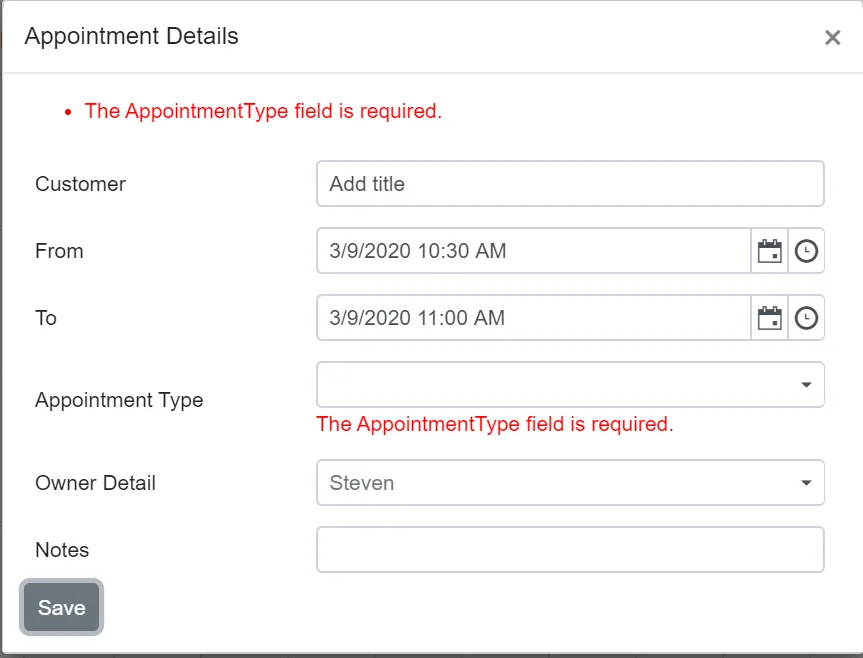
Validation is applied when the Save button is clicked with empty fields, as shown in the following image.