Data Binding in ASP.NET Core Scheduler
The Scheduler uses dataManager, which supports both RESTful JSON data service binding and local JavaScript object array binding. The dataSource property can be assigned either to a dataManager instance or to a JavaScript object array collection. It supports two kinds of data binding:
- Local data
- Remote data
Binding local data
To bind local JSON data to the Scheduler, assign a JavaScript object array to the dataSource option within the Scheduler eventSettings property. The local data source can also be provided as a dataManager instance.
@using Syncfusion.EJ2.Schedule

<ejs-schedule id="schedule" width="100%" height="550" selectedDate="new DateTime(2018, 2, 15)">
    <e-schedule-eventsettings dataSource="@ViewBag.datasource"></e-schedule-eventsettings>
</ejs-schedule>
public ActionResult Index()
{
ViewBag.datasource = GetScheduleData();
return View();
}
public List<AppointmentData> GetScheduleData()
{
List<AppointmentData> appData = new List<AppointmentData>();
appData.Add(new AppointmentData
{ Id = 1, Subject = "Blue Moon Eclipse", StartTime = new DateTime(2018, 2, 12, 9, 30, 0), EndTime = new DateTime(2018, 2, 12, 11, 0, 0) });
appData.Add(new AppointmentData
{ Id = 2, Subject = "Milky Way as Melting pot", StartTime = new DateTime(2018, 2, 14, 9, 30, 0), EndTime = new DateTime(2018, 2, 14, 11, 0, 0) });
return appData;
}
public class AppointmentData
{
public int Id { get; set; }
public string Subject { get; set; }
public DateTime StartTime { get; set; }
public DateTime EndTime { get; set; }
}By default,
dataManagerusesJsonAdaptorfor local data binding.
You can also bind different field names to the default event fields and include additional
custom fieldsin the event object collection, as described here.
Binding remote data
Any kind of remote data service can be bound to the Scheduler. To do so, create a dataManager instance, provide the service URL to the Url option, and assign it to the dataSource property within e-schedule-eventsettings.
Using ODataV4Adaptor
ODataV4 is a standardized protocol for creating and consuming data. Refer to the following code example to retrieve data from an ODataV4 service using the dataManager. To connect with ODataV4 service endpoints, use ODataV4Adaptor within dataManager.
@using Syncfusion.EJ2
@using Syncfusion.EJ2.Schedule

@{
    var dataManager = new DataManager() {
        Url = "https://services.syncfusion.com/aspnet/production/api/Schedule",
        Adaptor = "ODataV4Adaptor",
        CrossDomain = true
    };
}

<ejs-schedule id="schedule" width="100%" height="550" selectedDate="new DateTime(2020, 9, 20)" readonly="true">
    <e-schedule-eventsettings dataSource="dataManager" >
    </e-schedule-eventsettings>
</ejs-schedule>
public ActionResult Index()
{
return View();
}Filter events using the in-built query
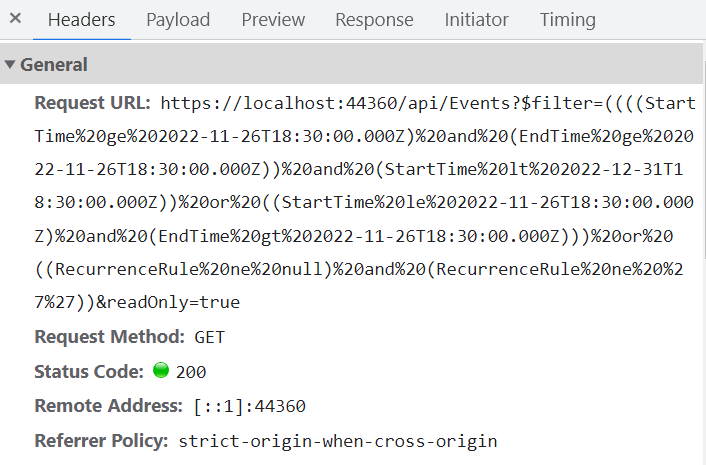
To enable server-side filtering based on predetermined conditions, set the includeFiltersInQuery API to true. This allows the filter query to be constructed using the start date, end date, and recurrence rule, which in turn filters the request accordingly.
This method improves the component’s performance by reducing the amount of data transferred to the client side. As a result, the component becomes more efficient and responsive. However, be aware that longer query strings may cause issues with the maximum URL length or server query string limits.
@using Syncfusion.EJ2
@using Syncfusion.EJ2.Schedule
@{
var dataManager = new DataManager() {
Url = "https://services.odata.org/V4/Northwind/Northwind.svc/Orders/",
Adaptor = "ODataV4Adaptor",
CrossDomain = true
};
}
<ejs-schedule id="schedule" height="650" readonly="true" selectedDate="new DateTime(1996, 7, 9)" currentView="Month">
<e-schedule-eventsettings dataSource="dataManager" query="new ej.data.Query()" includeFiltersInQuery="true">
<e-eventsettings-fields id="Id">
<e-field-subject name="ShipName"></e-field-subject>
<e-field-location name="ShipCountry"></e-field-location>
<e-field-description name="ShipAddress"></e-field-description>
<e-field-starttime name="OrderDate"></e-field-starttime>
<e-field-endtime name="RequiredDate"></e-field-endtime>
<e-field-recurrencerule name="ShipRegion"></e-field-recurrencerule>
</e-eventsettings-fields>
</e-schedule-eventsettings>
</ejs-schedule>public ActionResult Index()
{
return View();
}
public class AppointmentData
{
public int Id { get; set; }
public string ShipName { get; set; }
public DateTime OrderDate { get; set; }
public DateTime RequiredDate { get; set; }
public string ShipCountry { get; set; }
public string ShipAddress { get; set; }
public string ShipRegion { get; set; }
}The following image represents how the parameters are passed using ODataV4 filter.
Using custom adaptor
You can create your own custom adaptor by extending the available built-in adaptors. The following example demonstrates custom adaptor usage and how to add a custom field EventID to appointments by overriding the built-in response processing with the processResponse method of ODataV4Adaptor.
@using Syncfusion.EJ2.Schedule
<ejs-schedule id="schedule" width="100%" height="550" selectedDate="new DateTime(2020, 9, 20)" readonly="true" created="onCreated">
</ejs-schedule>
<script type="text/javascript">
function onCreated() {
class CustomAdaptor extends ej.data.ODataV4Adaptor {
processResponse() {
var i = 0;
// calling base class processResponse function
var original = super.processResponse.apply(this, arguments);
// adding employee id
original.forEach(function (item) {
item['EmpID'] = ++i
});
return original;
}
}
var dataManager = new ej.data.DataManager({
url: 'https://services.syncfusion.com/aspnet/production/api/Schedule',
adaptor: new CustomAdaptor
});
var schObj = document.querySelector('.e-schedule').ej2_instances[0];
schObj.eventSettings.dataSource = dataManager;
}
</script>public ActionResult Index()
{
return View();
}Loading data via AJAX post
You can bind event data through an external AJAX request and assign it to the Scheduler dataSource property. In the following code example, we retrieve data from the server with an AJAX request and assign the returned data to the Scheduler dataSource property within the Ajax onSuccess event.
@using Syncfusion.EJ2.Schedule
<input type="button" value="Click me to load Event" onclick="GetData()" /><br><br>
<ejs-schedule id="schedule" width="100%" height="550" selectedDate="new DateTime(2018, 2, 15)" readonly="true">
</ejs-schedule>
<script type="text/javascript">
function GetData() {
var ajax = new ej.base.Ajax('/Home/GetData', 'Post', false);
ajax.send().then(
function (value) {
var scheduleObj = document.querySelector('.e-schedule').ej2_instances[0];
scheduleObj.eventSettings.dataSource = JSON.parse(value);
scheduleObj.dataBind();
},
function (reason) {
console.log(reason);
});
}
</script>public ActionResult Index()
{
return View();
}The controller method definition for
GetDatacan be referred to here.
Passing additional parameters to the server
To send an additional custom parameter to the server-side post, use the addParams method of query. Then assign this query object with the additional parameters to the Scheduler query property.
@using Syncfusion.EJ2
@using Syncfusion.EJ2.Schedule
@{
var dataManager = new DataManager() {
Url = "https://services.syncfusion.com/aspnet/production/odata/",
Adaptor = "ODataV4Adaptor",
CrossDomain = true
};
}
<ejs-schedule id="schedule" width="100%" height="550" selectedDate="new DateTime(2017, 6, 11)" readonly="true">
<e-schedule-eventsettings dataSource="dataManager" query= "new ej.data.Query().from('Events').addParams('readOnly', 'true')">
</e-schedule-eventsettings>
</ejs-schedule>public ActionResult Index()
{
return View();
}The parameters added using the
queryproperty are sent with the data request to the server during every Scheduler action.
Handling failure actions
During Scheduler interaction with the server, server-side exceptions may occur. You can capture those error messages or exception details on the client side using the Scheduler actionFailure event.
@using Syncfusion.EJ2
@{
var dataManager = new DataManager() {
Url = "http://some.com/invalidUrl",
Adaptor = "UrlAdaptor",
CrossDomain = true
};
}
<ejs-schedule id="schedule" width="100%" height="550" selectedDate="new DateTime(2017, 6, 11)" actionFailure="onActionFailure">
<e-schedule-eventsettings dataSource="dataManager">
</e-schedule-eventsettings>
</ejs-schedule>
<script type="text/javascript">
function onActionFailure(args) {
var scheduleObj = document.getElementById('schedule').ej2_instances[0];
var span = document.createElement('span');
scheduleObj.element.parentNode.insertBefore(span, scheduleObj.element);
span.style.color = '#FF0000';
span.innerHTML = 'Server exception: 404 Not found';
}
</script>public ActionResult Index()
{
return View();
}The argument passed to the actionFailure event contains the error details returned by the server.
Scheduler CRUD actions
The CRUD (Create, Read, Update, and Delete) actions can be performed easily on Scheduler appointments using the various adaptors available within the dataManager. Most commonly, UrlAdaptor is used for performing CRUD actions on Scheduler appointments.
@using Syncfusion.EJ2
@{
var dataManager = new DataManager() {
Url = "Home/GetData",
Adaptor = "UrlAdaptor",
CrudUrl = "Home/UpdateData",
CrossDomain = true
};
}
<ejs-schedule id="schedule" width="100%" height="550" selectedDate="new DateTime(2017, 6, 5)">
<e-schedule-eventsettings dataSource="dataManager">
</e-schedule-eventsettings>
</ejs-schedule>The server-side controller code to handle the CRUD operations are as follows.
using System;
using System.Collections.Generic;
using System.Linq;
using System.Web;
using System.Web.Mvc;
using ScheduleSample.Models;
namespace ScheduleSample.Controllers
{
public class HomeController : Controller
{
ScheduleDataDataContext db = new ScheduleDataDataContext();
public ActionResult Index()
{
    return View();
}
public ActionResult LoadData() // Gets the start and end dates and filters the data before returning it to the Scheduler
{
var data = db.ScheduleEventDatas.ToList();
return Json(data);
}
[HttpPost]
public ActionResult UpdateData([FromBody] EditParams param)
{
if (param.action == "insert" || (param.action == "batch" && param.added != null)) // This block of code executes while inserting appointments
{
var value = (param.action == "insert") ? param.value : param.added[0];
int intMax = db.ScheduleEventDatas.ToList().Count > 0 ? db.ScheduleEventDatas.ToList().Max(p => p.Id) : 1;
DateTime startTime = Convert.ToDateTime(value.StartTime);
DateTime endTime = Convert.ToDateTime(value.EndTime);
ScheduleEventData appointment = new ScheduleEventData()
{
Id = intMax + 1,
StartTime = startTime,
EndTime = endTime,
Subject = value.Subject,
IsAllDay = value.IsAllDay,
StartTimezone = value.StartTimezone,
EndTimezone = value.EndTimezone,
RecurrenceRule = value.RecurrenceRule,
RecurrenceID = value.RecurrenceID,
RecurrenceException = value.RecurrenceException
};
db.ScheduleEventDatas.InsertOnSubmit(appointment);
db.SubmitChanges();
}
if (param.action == "update" || (param.action == "batch" && param.changed != null)) // This block of code executes while updating the appointment
{
var value = (param.action == "update") ? param.value : param.changed[0];
var filterData = db.ScheduleEventDatas.Where(c => c.Id == Convert.ToInt32(value.Id));
if (filterData.Count() > 0)
{
DateTime startTime = Convert.ToDateTime(value.StartTime);
DateTime endTime = Convert.ToDateTime(value.EndTime);
ScheduleEventData appointment = db.ScheduleEventDatas.Single(A => A.Id == Convert.ToInt32(value.Id));
appointment.StartTime = startTime;
appointment.EndTime = endTime;
appointment.StartTimezone = value.StartTimezone;
appointment.EndTimezone = value.EndTimezone;
appointment.Subject = value.Subject;
appointment.IsAllDay = value.IsAllDay;
appointment.RecurrenceRule = value.RecurrenceRule;
appointment.RecurrenceID = value.RecurrenceID;
appointment.RecurrenceException = value.RecurrenceException;
}
db.SubmitChanges();
}
if (param.action == "remove" || (param.action == "batch" && param.deleted != null)) // This block of code executes while removing the appointment
{
if (param.action == "remove")
{
int key = Convert.ToInt32(param.key);
ScheduleEventData appointment = db.ScheduleEventDatas.Where(c => c.Id == key).FirstOrDefault();
if (appointment != null) db.ScheduleEventDatas.DeleteOnSubmit(appointment);
}
else
{
foreach (var apps in param.deleted)
{
ScheduleEventData appointment = db.ScheduleEventDatas.Where(c => c.Id == apps.Id).FirstOrDefault();
if (appointment != null) db.ScheduleEventDatas.DeleteOnSubmit(appointment);
}
}
db.SubmitChanges();
}
var data = db.ScheduleEventDatas.ToList();
return Json(data);
}
public class EditParams
{
public string key { get; set; }
public string action { get; set; }
public List<ScheduleEventData> added { get; set; }
public List<ScheduleEventData> changed { get; set; }
public List<ScheduleEventData> deleted { get; set; }
public ScheduleEventData value { get; set; }
}
}
}You can find the working sample here.
Configuring Scheduler with Google API service
We assign the custom Google Calendar URL to the DataManager and then assign it to the Scheduler dataSource. Since the event data retrieved from Google Calendar is in its own object format, it must be resolved manually within the Scheduler dataBinding event. Within this event, the event fields need to be mapped properly and then assigned to the result.
@using Syncfusion.EJ2

@{
    var calendarId = "[email protected]";
    var publicKey = "AIzaSyD76zjMDsL_jkenM5AAnNsORypS1Icuqxg";
    var dataManager = new DataManager() { Url = "https://www.googleapis.com/calendar/v3/calendars/" + calendarId + "/events?key=" + publicKey, Adaptor = "WebApiAdaptor", CrossDomain = true };
}

<ejs-schedule id="schedule" width="100%" height="650px" selectedDate="new DateTime(2018, 11, 14)" readonly="true" dataBinding="onDataBinding">
    <e-schedule-eventsettings dataSource="dataManager">
    </e-schedule-eventsettings>
</ejs-schedule>

<script type="text/javascript">
    function onDataBinding(e) {
        var items = e.result.items;
        var scheduleData = [];
        if (items.length > 0) {
            for (var i = 0; i < items.length; i++) {
                var event = items[i];
                var when = event.start.dateTime;
                var start = event.start.dateTime;
                var end = event.end.dateTime;
                if (!when) {
                    when = event.start.date;
                    start = event.start.date;
                    end = event.end.date;
                }
                scheduleData.push({
                    Id: event.id,
                    Subject: event.summary,
                    StartTime: new Date(start),
                    EndTime: new Date(end),
                    IsAllDay: !event.start.dateTime
                });
            }
        }
        e.result = scheduleData;
    }
</script>
public ActionResult Index()
{
return View();
}You can refer to our ASP.NET Core Scheduler feature tour page for more details. You can also explore our ASP.NET Core Scheduler example to learn how to present and manipulate data.