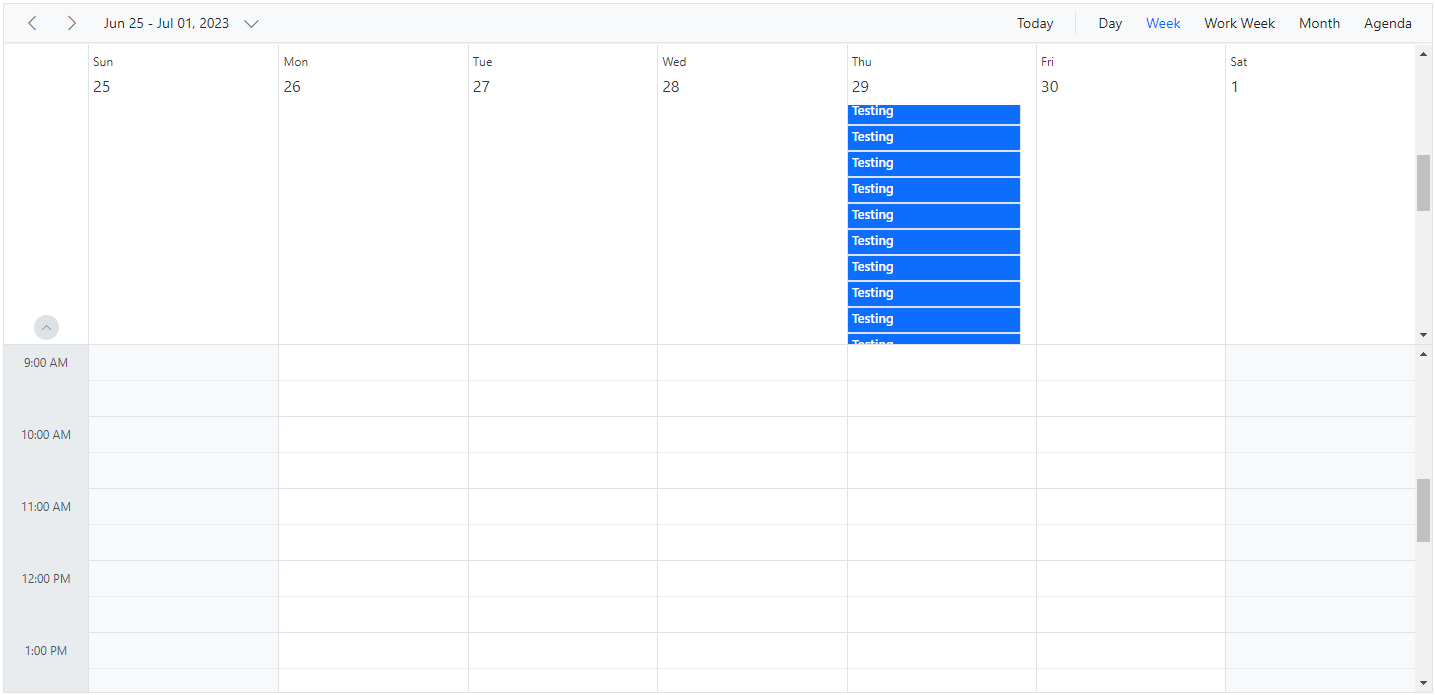
Enable Scroll Option on All-Day Section in Angular Scheduler
When a large number of appointments overflow the all-day row, enable a dedicated scrollbar by setting the enableAllDayScroll property to true. The default value is false. When enabled, the all-day row displays a scrollbar if its content exceeds the maximum height.
Note: This property is not applicable when Scheduler height is set to
auto.
import { NgModule } from '@angular/core'
import { BrowserModule } from '@angular/platform-browser'
import { ScheduleModule } from '@syncfusion/ej2-angular-schedule'
import { ButtonModule } from '@syncfusion/ej2-angular-buttons'
import { DayService, WeekService, WorkWeekService, MonthService, AgendaService, MonthAgendaService} from '@syncfusion/ej2-angular-schedule'


import { Component } from '@angular/core';
import { EventSettingsModel } from '@syncfusion/ej2-angular-schedule';
import { generateObject } from './datasource';

@Component({
imports: [

        ScheduleModule,
        ButtonModule
    ],

providers: [DayService,
                WeekService,
                WorkWeekService,
                MonthService,
                AgendaService,
                MonthAgendaService],
standalone: true,
    selector: 'app-root',
    // specifies the template string for the Schedule component
    template: `<ejs-schedule width='100%' height='550px' [selectedDate]="selectedDate"
  [eventSettings]="eventSettings" [enableAllDayScroll]="enableAllDayScroll"></ejs-schedule>`
})
export class AppComponent {
    public selectedDate: Date = new Date(2021, 3, 28);
    public eventSettings: EventSettingsModel = {
        dataSource: generateObject(),
    };
    public enableAllDayScroll?: true;
}
import { bootstrapApplication } from '@angular/platform-browser';
import { AppComponent } from './app.component';
bootstrapApplication(AppComponent).catch((err) => console.error(err));